
Merge multiple images into one PDF
Upload multiple images or ZIP archives containing images and convert them to a single PDF file. Perfect for creating photo albums, combining scanned documents, or organizing visual content.
Lees meer over de conversie mogelijkheden
Van eenvoudige conversies tot complexe automatisering met workflows, PDFengine biedt professionele hulpmiddelen voor elke PDF-taak.
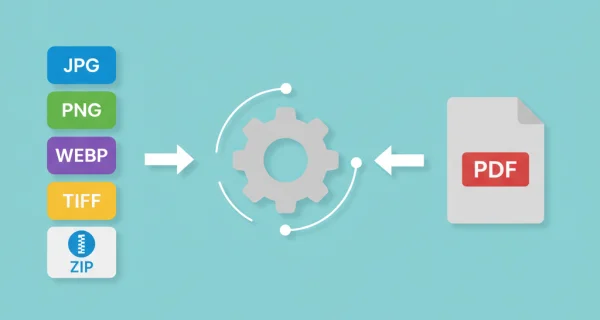
Multiple image formats supported
Supports JPG, PNG, WEBP, TIFF, and HEIC formats. Upload individual images or ZIP archives containing multiple image files.
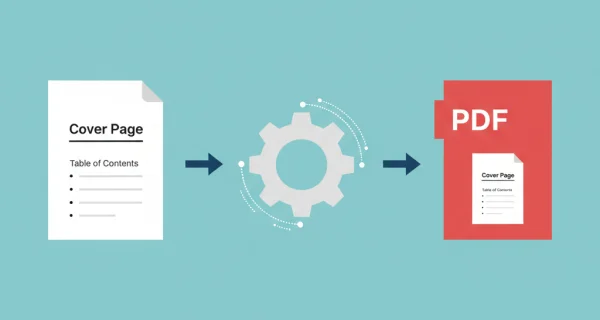
Enhanced administration and archiving with cover pages
Give your merged PDF a professional start with a custom cover page. Add a logo, title, summary, or table of contents as the first page of any document, and apply it in seconds.

Greater efficiency with PDFengine workflows
Take document management to the next level by combining and sequencing PDF conversion, optimalization, and/or organization tools. With fully customizable workflows, complicated PDF tasks cost just seconds to complete.
Waarom PDFengine?
Razendsnel converteren
Onze geavanceerde conversie-engine verwerkt uw bestanden in seconden, niet minuten. Uploaden, converteren en downloaden - alles binnen enkele momenten.
Focus op de business
Archiveer en converteer e-mail, AutoCAD, Visio en Office-bestanden in één gestroomlijnde workflow. Ideaal voor bedrijven met terugkerende documentprocessen.
Perfecte kwaliteit
Onze intelligente algoritmes behouden opmaak, lettertypen, afbeeldingen en lay-outs. Kwaliteitsverlies is verleden tijd.
Hoe het werkt
Eenvoudig en snel uw documenten verwerken in drie stappen
Upload images
Select your image files (JPG, PNG, WEBP, TIFF, HEIC) or upload ZIP archives containing multiple images.
Arrange order and settings
Drag and drop to reorder your images. Choose page size, orientation, and quality settings.
Download merged PDF
Get your merged PDF file with all images combined in the order you specified.
Veelgestelde vragen
Which image formats are supported?
We support JPG, PNG, WEBP, TIFF, and HEIC image formats. You can also upload ZIP archives containing these image types.
How many images can I combine?
You can upload up to 50 individual images or ZIP archives with a total size limit of 500MB.
Can I change the order of images?
Yes, you can drag and drop images to reorder them before conversion. The order determines how they appear in the final PDF.
Will image quality be preserved?
Yes, images are embedded in the PDF without compression, maintaining their original quality and resolution.
What does the setting "Page Size" do?
This determines the PDF page dimensions. "Fit to Image" creates pages matching each image size (recommended for mixed sizes). Standard sizes like A4 or Letter create uniform pages with margins around smaller images.
What does the setting "Page Orientation" do?
Controls page direction. "Auto" chooses portrait/landscape per image. "Portrait" (vertical) or "Landscape" (horizontal) forces all pages to one orientation. Auto works best for mixed image types.
What does the setting "Margin Size" do?
Adds white space around images on each page. Default is 0 px. You can add margins both horizontally and vertically, by indicating through pixels. Useful when you want consistent spacing or need room for hole-punching printed documents.
Verliezen documenten kwaliteit bij conversie?
Onze intelligente software minimaliseert kwaliteitsverlies bij het converteren van documenten. Zo kunnen documenten een groot aantal keren geconverteerd worden zonder dat u zich zorgen hoeft te maken over kwaliteitsverlies.
Hoe veilig zijn mijn documenten die ik upload?
We beschermen je bestanden met sterke beveiligingsmaatregelen die voldoen aan industriestandaarden. Alle uploads worden tijdens het verzenden beveiligd met HTTPS (TLS 1.2+), en het conversieresultaat wordt versleuteld opgeslagen met een unieke sleutel per bestand. Je documenten worden uitsluitend gebruikt om de gevraagde conversie uit te voeren en nooit handmatig bekeken.
Je bronbestanden worden verwijderd zodra de conversie klaar is; lukt een conversie niet, dan verdwijnen ze uiterlijk zes uur na de upload. Het conversieresultaat blijft standaard veertien dagen beschikbaar, of korter als je dat instelt. We monitoren onze systemen continu, volgen veilige programmeer patterns en hosten alle data binnen de EU op AVG-conforme infrastructuur.
Wordt de lay-out of indeling van mijn document gewijzigd als ik het converteer?
Nee; onze intelligente PDF software herkent document lay-outs en zet ze nauwkeurig om in een nieuw bestandsformaat. Is uw lay-out of formaat niet nauwkeurig omgezet? Overweeg dan OCR te gebruiken of andere instellingen aan te passen om het correct te converteren.
Kan ik een document converteren naar PDF en het vervolgens weer converteren naar het oorspronkelijke formaat?
Ja! Er zijn geen grenzen aan het converteren van documenten, en documenten kunnen veilig en gemakkelijk heen en weer worden geconverteerd. Conversie kan handig zijn om een PDF-document in Word te bewerken en het later terug te converteren naar een georganiseerd PDF-formaat.
Hoe kan ik PDF-documenten samenvoegen?
Om PDF-documenten samen te voegen, gaat u gewoon naar onze converter, kiest u het bestandsformaat dat u wilt samenvoegen en sleept u de bestanden die u wilt samenvoegen. Vervolgens hebt u de mogelijkheid om enkele instellingen te bewerken, op samenvoegen te drukken, en u bent klaar! U kunt uw samengevoegde bestand meteen downloaden.
Kan ik mijn PDF-documenten aanpassen tijdens het converteren?
Ja, PDFengine biedt verschillende manieren om uw (PDF-)documenten aan te passen. Denk bijvoorbeeld aan het toevoegen van een voorblad, het toepassen van OCR of het gebruik van PDF/A als outputdocument.
Ready to merge your images?
Combine multiple images into a single PDF document that can be shared, printed, or archived easily.
Other Conversions
Convert between PDF, Word, Excel, PowerPoint, and image formats. Our converter preserves formatting and quality.
Afbeelding naar PDF (converteren)
Converteer individuele afbeeldingen naar aparte PDF-bestanden
Word naar PDF
Converteer Word-documenten (.docx) naar PDF-formaat
PowerPoint naar PDF
Converteer PowerPoint-presentaties naar PDF-formaat
PDF naar afbeeldingen
Converteer PDF-pagina's naar afbeeldingsbestanden
PDF comprimeren
Verklein de bestandsgrootte van PDF's met behoud van kwaliteit
Converteren naar PDF/A
Converteer PDF naar archiefformaat PDF/A voor langdurige bewaring