
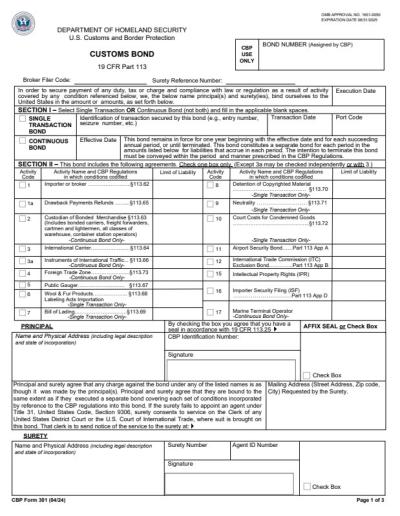
CBP Form 301 — Customs Bond, filled in online.
Official CBP customs bond form used to document surety and bonded obligations.
Type in the panel and watch each answer land on the page. Filling in and signing is free; downloading needs a free account, which includes 5 downloads a month.
Or fill it another way:
- Category
- Contracts
- Fillable fields
- 114
- Pages
- 5
- Paper size
- US Letter, 8.5 × 11 in
Five ways to fill this form.
-
Fill it in here
Type in the panel and watch it land on the form. Sign it, then download.
Free to fill and sign Start filling -
Many at once, from a spreadsheet
One row per person, one finished PDF for each.
Paid plan · you can walk through it Start with a spreadsheet -
Send it to someone to fill in
Email a link. They fill it in without an account and you get the answers back.
Paid plan · you can walk through it Send a request -
From your own software
Fill it over the API. One request returns the finished PDF.
Paid plan -
Let an AI assistant do it
Connect ChatGPT or Claude once, then describe what goes on the form.
With a free account
What is this form?
CBP Form 301 is the official customs bond document used to establish surety-backed obligations in customs matters. It records the principal, surety, bond type, bond amount, port information, execution dates, and other details needed when CBP requires a valid bond for import, warehouse, drawback, or related trade activity.
PDFengine keeps the official layout intact while mapping the real AcroForm fields from the government PDF. That makes this template useful for structured review, internal approvals, and repeatable filing workflows, especially when several people need to check the same data before the final version is sent. Instead of typing into a flat scan, you can work in the actual fillable form, save a readable copy, and keep the completed PDF in the same evidence folder as the related case, employment, benefits, or customs records.
That workflow matters because these forms rarely stand alone. A court application sits next to statements and incident logs, a customs filing sits next to invoices and transport records, and an HR leave document sits next to employer notices and provider certifications. Using the original government PDF from the start reduces version confusion, makes later comparison easier, and helps everyone involved review the same structure the agency or employer expects to receive.
Who needs to fill this out?
- Importers, warehouse operators, and trade parties that need a customs bond
- Sureties and customs brokers assembling official bond paperwork for CBP
- Compliance teams reviewing bond type, amount, principal identity, and port coverage
- Businesses that need a readable version of the signed bond for internal records
Where and how to submit
Provide Form 301 to CBP in the bond filing process, usually through the broker, surety, or trade system used for the underlying customs activity. Keep the completed PDF with powers of attorney, bond riders, underwriting records, and the related entry or warehouse documents, because the bond often has to be matched later to specific obligations.
Before relying on the finished file, compare it against the latest official instructions because filing channels, supporting evidence rules, and acceptable document versions can change. A saved PDF is most useful when it sits next to the emails, notices, invoices, ID copies, statements, or internal notes that explain why each answer was entered the way it was.
If another person will review the document before submission, send the PDF together with the key backup documents instead of forwarding the form in isolation. That makes it easier to spot date mismatches, missing references, unchecked boxes, and inconsistent names before the official copy reaches the court, agency, employer, broker, or customs officer.
How to fill it out
- Step 1 — Open the identifying section: Start with fields such as SuretyReferenceNumber and CBPIdentificationNumber so the file is tied to the right case, voyage, employer, claimant, or importer before anything else is added.
- Step 2 — Confirm the role and status details: Use the next core fields, including Nameaddress, to state the correct status, leave reason, order type, declaration basis, or identity category expected on the official form.
- Step 3 — Add the main operational information: Complete the practical details around SuretyNumber so the agency or employer can understand what is being requested, declared, certified, or registered.
- Step 4 — Enter dates, references, or linked parties: Use fields such as Single to tie the form back to the right dates, relationships, supporting references, or transaction details found in the rest of the file.
- Step 5 — Finish the submission-specific details: Complete Continuous and any related fields so the final PDF reflects the exact filing path, declaration route, or administrative follow-up expected for this document.
- Step 6 — Review against source records: Before signing or sending, compare the finished PDF against source records, notices, IDs, invoices, schedules, or correspondence so names, dates, amounts, and checkboxes stay consistent across the packet.
Frequently asked questions
What is this form mainly used for?
CBP Form 301 is the official customs bond document used to establish surety-backed obligations in customs matters. It records the principal, surety, bond type, bond amount, port information, execution dates, and other details needed when CBP requires a valid bond for import, warehouse, drawback, or related trade activity.
Who usually completes it?
Usually the person, business, employer, adviser, or agent directly responsible for the filing or for preparing the official record.
Do I submit it to the agency or give it to someone else?
Provide Form 301 to CBP in the bond filing process, usually through the broker, surety, or trade system used for the underlying customs activity. Keep the completed PDF with powers of attorney, bond riders, underwriting records, and the related entry or warehouse documents, because the bond often has to be matched later to specific obligations.
What documents should I keep with it?
Keep the final PDF with the source records that support the answers on the form, such as IDs, invoices, court papers, benefit notices, medical notes, or customs records.
Should I reuse an older version of the form?
Only if the official instructions still allow that version. When in doubt, compare your saved draft against the latest government PDF before filing.
Can I create CBP Form 301 — Customs Bond in bulk?
Yes. PDFengine supports bulk generation of CBP Form 301 — Customs Bond via Excel or CSV upload — upload a spreadsheet with one row per form and PDFengine generates all PDFs at once. You can also automate bulk creation programmatically via the PDFengine API.
Ready to fill it in?
Fill in this formMore forms in this category
-
 REG 135 Bill of SaleREG 135 Bill of Sale is the official fillable form from California Department of Motor Veh...
-
 Addendum For Sale Of Other Property By BuyerAddendum For Sale Of Other Property By Buyer — official fillable PDF form
-
 Au Nsw Residential Tenancy AgreementAu Nsw Residential Tenancy Agreement — official fillable PDF form
-
 Contract to Buy and Sell Real Estate (Land)Contract to Buy and Sell Real Estate (Land) — official fillable PDF form