
Form I-9, filled in online.
Employment Eligibility Verification
Type in the panel and watch each answer land on the page. Filling in and signing is free; downloading needs a free account, which includes 5 downloads a month.
Or fill it another way:
- Category
- HR & personnel
- Fillable fields
- 130
- Pages
- 4
- Paper size
- US Letter, 8.5 × 11 in
Five ways to fill this form.
-
Fill it in here
Type in the panel and watch it land on the form. Sign it, then download.
Free to fill and sign Start filling -
Many at once, from a spreadsheet
One row per person, one finished PDF for each.
Paid plan · you can walk through it Start with a spreadsheet -
Send it to someone to fill in
Email a link. They fill it in without an account and you get the answers back.
Paid plan · you can walk through it Send a request -
From your own software
Fill it over the API. One request returns the finished PDF.
Paid plan -
Let an AI assistant do it
Connect ChatGPT or Claude once, then describe what goes on the form.
With a free account
Key facts
| Property | Details |
|---|---|
| Form number | Form I-9 |
| Official name | Employment Eligibility Verification |
| Issuing agency | U.S. Citizenship and Immigration Services (USCIS), Department of Homeland Security |
| Current revision | 01/20/25 edition date listed by USCIS |
| Number of pages | 4 pages total: Sections 1 and 2, Lists of Acceptable Documents, Supplement A, and Supplement B |
| Filing frequency | Completed for each new hire; Supplement B only when reverification or qualifying rehire applies |
| Submission method | Retained by employer; produced only upon authorized government inspection |
| Related instructions | Instructions for Form I-9 (01/20/25) and the USCIS Handbook for Employers, M-274 |
What is this form?
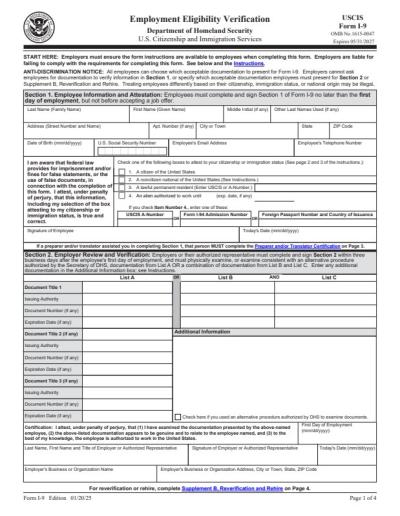
Form I-9, Employment Eligibility Verification, is the U.S. work-authorization verification form issued by U.S. Citizenship and Immigration Services (USCIS), a component of the Department of Homeland Security. Employers use Form I-9 to verify both identity and authorization to work for each person hired for employment in the United States. The current edition listed by USCIS is 01/20/25. The form is not an income tax return and it is not filed with the IRS; it is an employment-records compliance form that must be completed, retained, and produced if a government agency inspects the employer's records.
The form package is structured in distinct parts. Page 1 contains Section 1, Employee Information and Attestation, and Section 2, Employer Review and Verification. Page 2 contains the Lists of Acceptable Documents. Page 3 contains Supplement A, Preparer and/or Translator Certification for Section 1.
Page 4 contains Supplement B, Reverification and Rehire (formerly Section 3). The current version also includes a checkbox in Section 2 for employers that used the DHS-authorized alternative procedure for remote document examination instead of physical inspection.
In practice, Form I-9 documents the hiring event, not payroll withholding. The employee attests to citizenship or immigration status in Section 1, and the employer records either one List A document or one List B document plus one List C document in Section 2. If work authorization later expires, or if the employer chooses to document a qualifying rehire, Supplement B is used to record the update.
Who needs to fill this out?
- All U.S. employers must complete Form I-9 for each individual they hire for employment in the United States after Nov. 6, 1986, whether the worker is a U.S. citizen or a noncitizen authorized to work.
- Employees must complete and sign Section 1 no later than the first day of employment for pay, and must present acceptable identity and work-authorization documents to the employer.
- Authorized representatives may complete Section 2 on the employer's behalf, but the employer remains liable for errors, omissions, and unlawful document practices.
- Employers using reverification or rehire procedures must complete Supplement B when an employee's employment authorization requires reverification or when the employer chooses to document a qualifying rehire.
- Preparers or translators must complete Supplement A if they assisted the employee with Section 1.
- Do not complete Form I-9 for independent contractors you do not employ, individuals providing labor through a contract service provider, employees hired on or before Nov. 6, 1986 who have been continuously employed, or casual domestic workers in a private home on a sporadic, irregular, or intermittent basis.
Where and how to submit
Form I-9 is usually not submitted to USCIS, ICE, the IRS, or the Social Security Administration. The employer keeps the completed form and any retained supplements in its own records. If Homeland Security Investigations serves a Notice of Inspection, the employer generally has at least three business days to produce the requested Forms I-9, along with related supporting records such as payroll or employee lists. Forms may also be requested by authorized officials from the Department of Homeland Security, Department of Labor, or Department of Justice.
There is no routine mailing address or e-filing portal for standard Form I-9 retention. The filing deadline is operational instead of annual: the employee completes Section 1 by the first day of paid work, and the employer completes Section 2 within three business days after work begins. If the employee is hired for fewer than three business days, Section 2 must be completed no later than the first day of employment. Employers must retain each Form I-9 for three years after the date of hire, or one year after employment ends, whichever is later.
How to fill it out
- Step 1 — Section 1, Employee Information and Attestation: Enter the employee's Last Name (Family Name), First Name (Given Name), Middle Initial, Other Last Names Used, Address, Apt. Number, City or Town, State, ZIP Code, Date of Birth, and U.S. Social Security number if required for E-Verify. The employee may also enter email address and telephone number as optional fields. Section 1 must be completed no later than the first day of employment for wages or other remuneration.
- Step 2 — Section 1 citizenship or immigration status boxes: Check exactly one status box: 1. A citizen of the United States, 2. A noncitizen national of the United States, 3. A lawful permanent resident, or 4. A noncitizen authorized to work. If box 3 or 4 applies, enter the required USCIS Number/A-Number, Form I-94 Admission Number, foreign passport number, and country of issuance as applicable, plus the employment authorization expiration date if required.
- Step 3 — Supplement A, Preparer and/or Translator Certification: If the employee used a preparer or translator, that person must complete Supplement A using the employee's Last Name, First Name, and Middle Initial from Section 1, then enter the preparer's or translator's name, address, signature, and date. If no one helped, leave Supplement A out of the retained packet.
- Step 4 — Section 2, Employer Review and Verification: Within three business days after the employee's first day of employment, review the employee's original, acceptable, unexpired documents in the employee's physical presence unless you are properly using the DHS-authorized remote alternative. Record the Document Title, Issuing Authority, Document Number, and Expiration Date in either the List A column or the List B and List C columns. Use the Additional Information box for required notes such as automatic EAD extensions, receipt follow-up information, or certain F-1/J-1 details.
- Step 5 — Section 2 certification block: Enter the employee's first day of employment (mm/dd/yyyy), then complete the employer certification block with the employer or authorized representative's signature, today's date, title, last name, first name, business or organization name, and physical business address. If you remotely examined documents under the authorized alternative procedure, check the box provided in Section 2.
- Step 6 — Supplement B, Reverification and Rehire: Use Supplement B when an employee's employment authorization requires reverification, when certain employment authorization documents expire and reverification is required, or when the employer chooses to document a rehire. Enter the employee's name from Section 1, the new document title, number, and expiration date if any, then sign, date, and complete the employer information fields.
Important deadlines & penalties
- Section 1 deadline: the employee must complete and sign Section 1 no later than the first day of employment for pay.
- Section 2 deadline: the employer or authorized representative must examine documents and complete Section 2 within three business days after the employee's first day of employment. If the hire lasts fewer than three business days, Section 2 is due on the first day of employment.
- Retention deadline: keep each Form I-9 for three years after the date of hire or one year after employment ends, whichever is later.
- Inspection response deadline: after a Notice of Inspection from ICE/HSI, employers generally receive at least three business days to produce Forms I-9.
- Correction window: when ICE identifies technical or procedural failures during an inspection, employers generally receive at least 10 business days to correct them before they become substantive violations.
- Current penalty levels effective Jan. 2, 2025: Form I-9 paperwork violations can trigger civil penalties of $288 to $2,861 per violation. Knowingly hiring or continuing to employ unauthorized workers can trigger penalties of $716 to $5,724 for a first offense, $5,724 to $14,308 for a second offense, and $8,586 to $28,619 for a third or subsequent offense, per unauthorized worker.
- Extension rules: there is no general extension to complete Form I-9. In limited situations, an acceptable receipt or an automatic extension of employment authorization can temporarily satisfy documentation rules, but the employer still must complete Section 2 on time and follow up when replacement evidence is due.
Common mistakes to avoid
- Leaving a Section 1 status box blank or checking more than one box: the employee's attestation is incomplete, which can make the entire form deficient during an audit.
- Failing to complete Section 2 within three business days: late employer certification is a substantive violation and may support paperwork penalties even if the employee was authorized to work.
- Recording List A and List B/List C together: Section 2 requires either one List A document or one List B plus one List C document, not both systems at the same time.
- Accepting a restricted Social Security card as List C: cards marked VALID FOR WORK ONLY WITH DHS AUTHORIZATION, NOT VALID FOR EMPLOYMENT, or VALID FOR WORK ONLY WITH INS AUTHORIZATION are not acceptable List C documents by themselves.
- Requesting a specific document, such as a green card or Social Security card: this can create unlawful documentary practice or discrimination exposure under the INA anti-discrimination rules.
- Using the Spanish version outside Puerto Rico as the completed form: employers outside Puerto Rico may use it only as a translation aid; the completed retained form must be the English version.
- Forgetting Supplement A or Supplement B when required: missing preparer/translator certifications or missing reverification records can turn an otherwise complete hiring file into a compliance problem.
Expert tips
- Give the employee the Lists of Acceptable Documents and the instructions up front: USCIS says employees must have access to the instructions, either by hard copy or hyperlink, which reduces rushed Section 1 errors.
- Use the Additional Information box deliberately: note receipt replacement data, automatic EAD extensions, E-Verify case details used in your process, or F-1/J-1 supporting information where USCIS guidance calls for it.
- Do not use a P.O. box in the employer address block: Section 2 requires the employer's physical street address.
- If you use an authorized representative for remote hires, train them carefully: USCIS and ICE make clear the employer remains responsible for mistakes made by the representative.
- Only check the remote-examination checkbox when you qualify: the DHS-authorized alternative procedure is tied to specific conditions, including E-Verify participation and the required review steps.
- Track reverification dates separately: Supplement B is required for expiring employment authorization in many cases, but do not reverify U.S. citizens or lawful permanent residents who presented an unexpired Form I-551.
- Use official correction guidance: USCIS Handbook for Employers (M-274) and I-9 Central explain how to correct missing or inaccurate entries without obscuring the original record, which is safer than overwriting fields informally.
Related forms & next steps
- Form I-765 — application used to request employment authorization from USCIS. Official USCIS page
- Form I-20 — Certificate of Eligibility for Nonimmigrant Student Status, often relevant for F-1 student employment documentation. Official SEVP/ICE information
- Form DS-2019 — Certificate of Eligibility for Exchange Visitor (J-1) Status, used in some employment authorization scenarios. Official U.S. Department of State J-1 page
- Form I-983 — Training Plan for STEM OPT Students, required in STEM OPT employment situations. Official PDF
- Form W-4 — Employee's Withholding Certificate for federal income tax withholding, commonly completed alongside new-hire onboarding. Official IRS page
- Form SS-5 — Application for a Social Security Card, relevant when a worker needs an SSN for payroll or E-Verify processing. Official SSA PDF
Frequently asked questions
Do I send Form I-9 to USCIS or the IRS?
No. Employers do not routinely file Form I-9 with USCIS, ICE, or the IRS. The employer keeps the completed form and produces it only if an authorized government agency requests it during an inspection.
How long do employers have to keep Form I-9?
The retention rule is three years after the date of hire or one year after employment ends, whichever is later. Employers should calculate and track the destruction date for each employee separately.
Can an employer accept expired documents for Form I-9?
Generally no. Section 2 requires original, acceptable, unexpired documentation unless a specific receipt rule or automatic extension rule applies under USCIS guidance.
Do remote employees still need Form I-9 completed within three business days?
Yes. The timing rule does not change for remote workers. Employers either use an authorized representative to examine documents in person or, if they qualify, follow the DHS-authorized alternative procedure for remote document examination.
Does an employer reverify U.S. citizens or lawful permanent residents?
Not solely because time has passed. Reverification is tied to expiring employment authorization in situations where the rules require it. Employers should not reverify U.S. citizens and generally should not reverify lawful permanent residents who presented an unexpired Form I-551.
What happens if Form I-9 is missing or completed late?
ICE may treat missing forms, missing signatures, late Section 2 completion, or uncorrected technical failures as violations. Depending on the facts, penalties can range from paperwork fines to higher sanctions for knowingly employing unauthorized workers.
Can I create Form I-9, Employment Eligibility Verification in bulk?
Yes. PDFengine supports bulk generation of Form I-9, Employment Eligibility Verification via Excel or CSV upload — upload a spreadsheet with one row per entry and PDFengine generates all PDFs at once. You can also automate bulk creation programmatically via the PDFengine API.
Ready to fill it in?
Fill in this formOfficial sources
- USCIS Form I-9 page — official form page, edition dates, retention rules, and form package structure.
- Instructions for Form I-9 — official USCIS instructions for Section 1, Section 2, Supplement A, and Supplement B.
- Handbook for Employers, M-274 — detailed USCIS guidance on acceptable documents, corrections, receipts, reverification, and special cases.
- USCIS I-9 penalties page — official overview of employer responsibilities, prohibited practices, and enforcement consequences.
- ICE Form I-9 inspection fact sheet — official inspection process, notice periods, correction windows, and enforcement notices.
More forms in this category
-
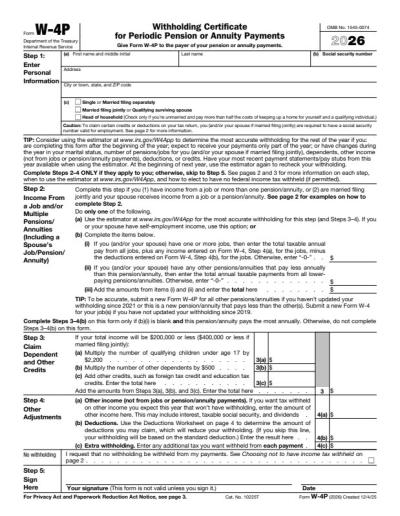 Form W-4PWithholding Certificate for Periodic Pension or Annuity Payments
-
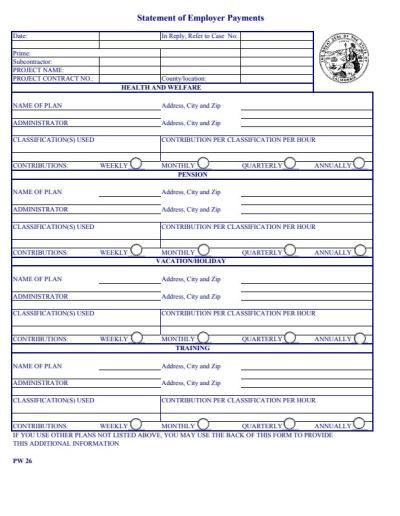 Contractor Fringe Benefit Statement (California DIR)Contractor Fringe Benefit Statement (California DIR) — official fillable PDF form
-
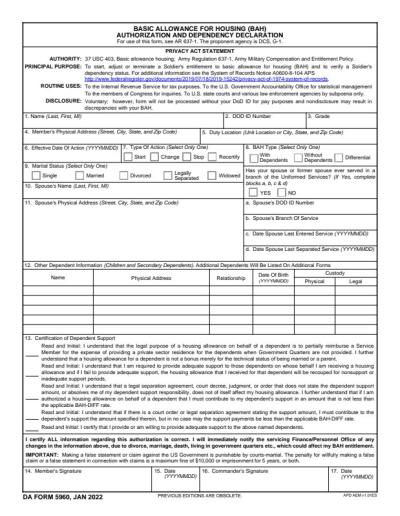 DA Form 5960 Basic Allowance for Housing Authorization and Dependency DeclarationDA Form 5960 Basic Allowance for Housing Authorization and Dependency Declaration is an of...
-
 DA Form 7598 Vehicle Load CardDA Form 7598 Vehicle Load Card is an official fillable form issued by U.S. Department of t...