
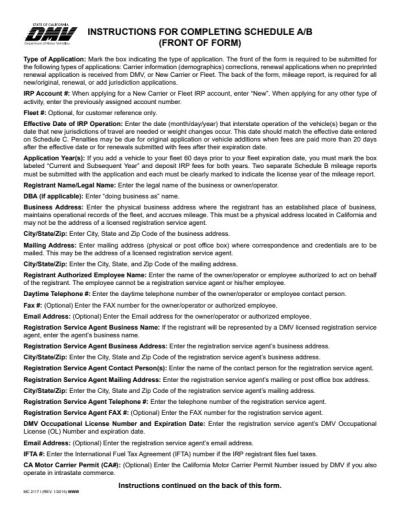
Mc 2117 I Instructions For Completing Schedule A B, filled in online.
Mc 2117 I Instructions For Completing Schedule A B — official fillable PDF form
Type in the panel and watch each answer land on the page. Filling in and signing is free; downloading needs a free account, which includes 5 downloads a month.
Or fill it another way:
- Category
- General
- Fillable fields
- 218
- Pages
- 4
- Paper size
- US Letter, 8.5 × 11 in
Five ways to fill this form.
-
Fill it in here
Type in the panel and watch it land on the form. Sign it, then download.
Free to fill and sign Start filling -
Many at once, from a spreadsheet
One row per person, one finished PDF for each.
Paid plan · you can walk through it Start with a spreadsheet -
Send it to someone to fill in
Email a link. They fill it in without an account and you get the answers back.
Paid plan · you can walk through it Send a request -
From your own software
Fill it over the API. One request returns the finished PDF.
Paid plan -
Let an AI assistant do it
Connect ChatGPT or Claude once, then describe what goes on the form.
With a free account
What is this form?
California form MC 2117 I is the instruction and application package used to complete Schedule A/B for an International Registration Plan account. Motor carriers use the schedule to identify the registrant, specify the application year, report business and mailing addresses, and list the vehicles that should be added, renewed, transferred, corrected, or removed from an apportioned fleet. The package supports registration that allocates fees among participating jurisdictions according to fleet operations.
The schedule is not a substitute for the carrier's source records. Prepare it from the legal business registration, IRP account documents, vehicle titles or ownership records, lease agreements, purchase documents, unit records, declared gross weights, safety information, and any credentials being replaced. A fleet can contain many units, so consistency matters: the registrant name, account number, fleet number, unit number, VIN, vehicle type, dates, and ownership details must agree with the supporting evidence.
PDFengine helps enter data into the official fillable PDF and creates a file for review. It does not determine whether a vehicle qualifies for apportioned registration, calculate jurisdictional fees, validate operating authority, or submit the application. Use the current California Department of Motor Vehicles or Motor Carrier Services instructions because required attachments, fees, signatures, and accepted delivery methods can change.
Who needs to fill this out?
- California-based motor carriers applying for, renewing, or changing vehicles in an International Registration Plan fleet.
- Fleet administrators reporting newly acquired, transferred, replaced, corrected, or deleted commercial vehicles.
- Authorized employees or registration services preparing Schedule A/B for a registrant with an existing IRP account.
- Carriers updating ownership, equipment, weight, safety, lease, or contact details that affect apportioned credentials.
Where and how to submit
Submit the completed MC 2117 I Schedule A/B and all required ownership, lease, weight, insurance, tax, or credential documents through the California IRP channel specified in the current application instructions. Depending on the transaction, that may be an approved online service, mail address, or Motor Carrier Services office. Do not send the PDF to PDFengine. Pay assessed fees through the official California payment method and wait for acceptance before operating on new or changed credentials. Retain the signed schedule, attachments, payment confirmation, correspondence, and issued cab cards with the fleet's compliance records.
How to fill it out
- Step 1 — IRP Account # and APPLICATION YEAR(S): Enter the account number exactly as assigned and identify the applicable registration year. Select CURRENT YEAR ONLY or CURRENT AND SUBSEQUENT YEAR only when that choice matches the transaction and official instructions.
- Step 2 — REGISTRANT NAME/LEGAL NAME: Use the complete legal name registered for the IRP account. Enter the BUSINESS ADDRESS, which must be a California physical location when the form requires one, followed by the CITY/STATE/ZIP CODE. Add the MAILING ADDRESS and its city, state, and ZIP when mail should go elsewhere.
- Step 3 — Contact and authorization: Complete REGISTRANT AUTHORIZED EMPLOYEE NAME, DAYTIME TELEPHONE #, E-MAIL ADDRESS, and FAX # where applicable. The named employee should be authorized to answer questions and receive notices about the submission.
- Step 4 — Fleet and vehicle identification: For each unit, copy the fleet, unit, VIN, make, model year, vehicle type, fuel type, and ownership information from the source records. A VIN must be transcribed character by character; do not substitute the license plate number or shorten leading characters.
- Step 5 — Weight and operating details: Enter the unladen, combined, or declared gross weight values requested for the vehicle and jurisdictions. Use the same units shown on the form and reconcile unusual values with title, manufacturer, and operating records before submission.
- Step 6 — Transaction and supporting facts: Mark the applicable add, transfer, correction, replacement, or deletion choice and supply acquisition, purchase, lease, title, or credential information required for that transaction. Answer each Yes or No field independently and attach evidence referenced by the instructions.
- Step 7 — Signature, Title, and Date: Review every vehicle row against the supporting documents, confirm that continuation pages carry the same account and fleet identifiers, then have the registrant or authorized representative provide the Signature, Title, and Date. Keep a complete signed copy.
Frequently asked questions
Is MC 2117 I itself the apportioned registration credential?
No. It supplies application information for Schedule A/B; California must review the submission, assess fees, and issue or update the applicable IRP credentials.
What records should I use for the VIN and vehicle details?
Use the title, manufacturer's record, purchase or lease documents, and current fleet record. Compare the VIN character by character because a single error can delay processing or associate the wrong vehicle.
Can I list more vehicles than fit on the first schedule?
Use the official continuation pages or additional Schedule A/B pages permitted by the instructions. Repeat the account, fleet, and application-year identifiers so every page can be matched.
Who may sign the application?
The registrant or a properly authorized representative should sign and state their title. Registration services and employees should retain evidence of authority when California requires it.
Does completing this form calculate my IRP fees?
No. Fees depend on the transaction, jurisdictions, vehicle weights, distance reporting, and official assessment. The receiving agency calculates or confirms the amount after reviewing the application.
What if I discover an error after submission?
Contact the California IRP office through the official channel and follow its correction process. Do not simply create a second conflicting application without identifying it as a correction.
Can I create California MC 2117 I Schedule A/B forms in bulk?
Yes. PDFengine supports bulk generation of MC 2117 I Schedule A/B via Excel or CSV upload — upload a spreadsheet with one row per form and PDFengine generates all PDFs at once. You can also automate bulk creation programmatically via the PDFengine API.
Ready to fill it in?
Fill in this formMore forms in this category
-
 REG 1000 Application for Clean Air Vehicle DecalsREG 1000 Application for Clean Air Vehicle Decals is the official fillable form from Calif...
-
 REG 227 Application for Duplicate or Paperless TitleREG 227 Application for Duplicate or Paperless Title is the official fillable form from Ca...
-
 REG 256 Statement of FactsREG 256 Statement of Facts is the official fillable form from California Department of Mot...
-
 REG 256A Miscellaneous CertificationsREG 256A Miscellaneous Certifications is the official fillable form from California Depart...