
Email Archiving and Email to PDF/A Conversion: How and Why It Matters
Jip Oomen
PDFengine Team
In today’s digital workplace, emails are so much more than just messages. They contain contracts, offers, invoices, project details, and crucial business records. Archiving them properly is essential for compliance, efficiency, and long-term accessibility.
But what’s the best way to store them? In this article, we explain why email archiving is important, how to do it effectively, and why converting emails to PDF or PDF/A is a smart choice; especially with PDFen’s simple and secure email-to-PDF tools.
I. Why Email Archiving?
Email archiving more than just keeping old messages. Email archiving is about protecting your organization’s information and ensuring legal, operational, and strategic continuity. Here are the key reasons why it matters:
1. Regulatory compliance
Many industries, such as healthcare, legal and financial sectors, are legally bound to store emails for a certain time period. Proper archiving can guarantee tamper-proof records, ensuring your organization fulfils all legal obligations, avoiding any fines or legal issues.
2. Privacy & protection
Emails regularly contain sensitive information like intellectual property, confidential information, or personal data. By storing emails in secure and limited-access archives, organizations ensure this information is kept private and safe.
3. Business continuity and disaster recovery
Archiving ensures external (encrypted) backups of your emails. If cyber-attacks, system failures, or natural disasters affect the organization these backups allow instant recovery and continued access to critical communications.
4. Legal preparedness
Courts and regulators increasingly request email evidence in litigation. A robust archiving system allows organizations to smoothly retrieve complete email records, avoiding complications during litigation.
5. Knowledge retention
Email threads often contain valuable insights, decisions, and context. Archiving ensures that this institutional knowledge is preserved even when employees leave or systems are replaced.
6. Infrastructure efficiency
Old emails take up significant space in active mailboxes. Archiving reduces storage load on email servers, improving performance and lowering long-term costs.
II. When and How to Archive Emails
For most organizations, email archiving should be a continuous process, not a one-time activity. It’s best to archive:
Periodically (e.g., every quarter or year)
After major projects or transactions
When employees leave or roles change
As part of backup and compliance policies
Emails can be exported directly from any major mail provider such as Outlook, Gmail, or Apple Mail into .eml, .msg, or .zip formats. These file formats preserve content, attachments and other details, and can be easily converted into PDF for archiving purposes.
III. Why Use PDF for Archiving?
PDF is the gold standard for long-term digital archiving. Here’s why it’s ideal for storing your emails:
Universality: PDFs open on nearly every device, platform, and operating system; no special software required.
Consistent layout: All email elements (headers, body, attachments) are preserved in a clear and readable layout.
Accessibility: PDFs are easy to save locally or in the cloud and don’t take up much storage space.
Ease of use: PDFs can store multiple email threats, including attachments, into a single, organized PDF file that’s easy to view, share, or download.
Safety and longevity: When saved as PDF/A, the archival version of PDF, your files remain readable and intact for decades, even when software and systems evolve.
IV. How Do You Export, Convert, and Archive your Emails with PDFen?
At PDFen, converting your emails to PDF (or PDF/A) is simple, automated, and highly reliable.
Step 1: Converting a few emails or an entire inbox?
Before starting, consider: would I like to export and convert emails individually, or export an entire inbox or email folder?
Would you like to export, convert and archive just a selection of emails? Go to step 2!
Are you looking to convert an entire email folder or inbox? Check out this blog!
Step 2: Download/export your emails
You have a few options to download your emails, depending on your email provider:
For downloading individual emails, clicking on the 3 'dots' on the top right often works to download an individual email.
You must often log into your account center and find an option named 'export emails' to download a large selection of emails; find the instructions for Gmail here.
With some email providers automatic backup or exporting of emails can also be installed.
Remember to export emails in .eml, .msg, or .zip format.
Step 3: Upload Your Files
You can upload:
.eml files (from Gmail, Outlook, Apple Mail, and others)
.msg files (from Microsoft Outlook)
or a .zip file containing multiple emails
When you upload a ZIP file, PDFen automatically extracts and processes only the email files inside. Non-email files, such as existing PDFs or Word documents, are skipped. Hence, no sorting necessary. Example:
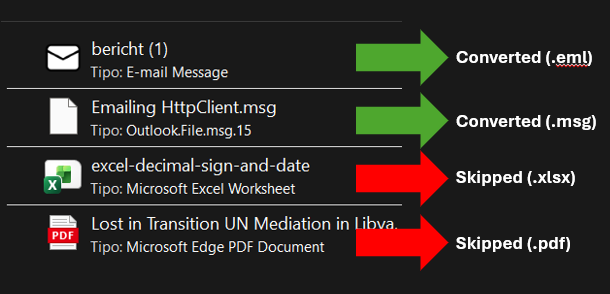 Example: when uploading multiple documents in a ZIP file, PDFen will automatically convert all email documents (.eml, .msg and .zip), while skipping all other file formats.
Step 4: Customize Your Settings
PDFen also lets you tailor the output to professional standards:
Timezone & date format: Choose from 17 display formats and global timezones (e.g., Europe/Amsterdam, America/New York).
Decimal symbol: Select either a comma or point as decimal separator in Excel attachments.
Hence, with PDFen you allow hands-off bulk conversion of email details, content, and attachments, converting them into organized PDF or ZIP output ready for archiving.
Step 5: Automatic processing & conversion
Each email is processed and converted into a well-structured PDF including:
Email headers (sender, recipient, subject, date)
The full email body with original formatting
All attachments, which are also converted to PDF if needed:
PDFs are added directly
Images (JPG, PNG, GIF) are converted
Office files (Word, Excel, PowerPoint) are converted
Text files are converted as well
(Currently, embedded emails -an .eml or .msg attached inside another email- are not supported and are skipped.)
Step 6: Download the Result
Each email becomes a separate PDF file. When you upload multiple emails, PDFen returns a ZIP archive containing all your converted PDFs with their original names intact.
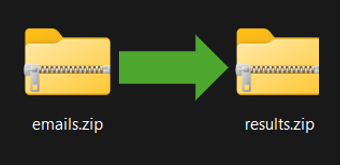 Example output when uploading a zip file.
Step 7: Archiving the result
Having downloaded your emails in PDF format, you should think of where to save the PDF documents. Consider:
Document Management System (DMS), like M-Files, OpenText, or SharePoint. Best for structured, searchable storage with access controls and version management
Electronic Archiving Systems (EAS), like Preservicaor ELO Digital Office. Best for documents that are highly sensitive or need to meet strict archiving regulation
Secure Cloud Storage, like Microsoft 365 Compliance Center or Google Workspace Vault. Best for: Organizations looking for scalable, off-site, and redundant storage.
Local storage (with backup), like on secure local servers or hard drives. Best for: low-budget, low-scale archiving needs.
V. PDF/A: For Long-Term Archiving
When it comes to permanent email preservation, PDF/A is the safest choice. PDF/A is an ISO-standardized version of the PDF format designed for long-term, self-contained storage; meaning the file contains all fonts, color profiles, and metadata needed to remain accessible in the future, regardless of software updates.
At PDFen, you can:
Choose from six PDF/A types during email conversion, ensuring you find the perfect PDF/A fit for your arching needs.
Or first convert your emails to PDF, and then later transform them to PDF/A.
Whether you’re archiving for compliance, backup, or historical recordkeeping, PDF/A ensures your email archives stay secure and readable for decades.
VI. Start Archiving Your Emails Today
Email archiving doesn’t have to be complicated. With PDFen, you can:
Upload your .eml, .msg, or .zip files
Convert them to high-quality PDF or PDF/A
Keep your records compliant, secure, and easy to access
👉 Convert your emails to PDF now
Related Articles
Compressing and repairing: How to optimize your PDFs
Professionalize your PDFs by using 5 essential PDF optimization tools. Learn when and how to repair,...

Can ChatGPT, Claude or Gemini Convert Email to PDF? What AI Can (and Can't) Do
No AI assistant can natively convert .eml or .msg to PDF. But Claude + MCP bridges the gap — here's...