
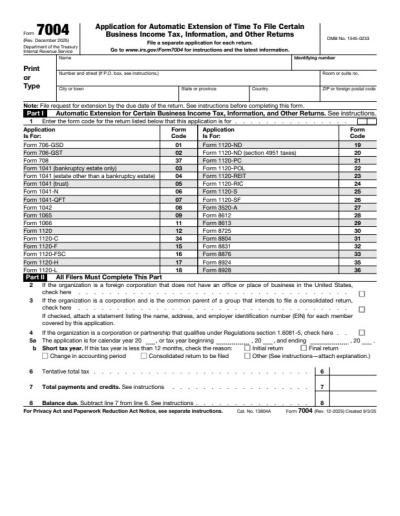
Form 7004, filled in online.
Application for Automatic Extension of Time (Business)
Type in the panel and watch each answer land on the page. Filling in and signing is free; downloading needs a free account, which includes 5 downloads a month.
Or fill it another way:
- Category
- Business
- Fillable fields
- 26
- Pages
- 1
- Paper size
- US Letter, 8.5 × 11 in
Five ways to fill this form.
-
Fill it in here
Type in the panel and watch it land on the form. Sign it, then download.
Free to fill and sign Start filling -
Many at once, from a spreadsheet
One row per person, one finished PDF for each.
Paid plan · you can walk through it Start with a spreadsheet -
Send it to someone to fill in
Email a link. They fill it in without an account and you get the answers back.
Paid plan · you can walk through it Send a request -
From your own software
Fill it over the API. One request returns the finished PDF.
Paid plan -
Let an AI assistant do it
Connect ChatGPT or Claude once, then describe what goes on the form.
With a free account
Key facts
| Item | Details |
|---|---|
| Form number | Form 7004 |
| Official name | Application for Automatic Extension of Time To File Certain Business Income Tax, Information, and Other Returns |
| Issuing agency | Internal Revenue Service, Department of the Treasury |
| Current revision date | Rev. December 2025 |
| Number of pages | 1 page |
| Filing frequency | As needed, one separate filing for each return being extended |
| Maximum extension | Generally 6 months, with special exceptions in the instructions |
| Related instructions document | Instructions for Form 7004 (Rev. December 2025) |
What is this form?
Form 7004, officially titled Application for Automatic Extension of Time To File Certain Business Income Tax, Information, and Other Returns, is the IRS form businesses and certain other entities use to request more time to file a listed federal return. It does not change the underlying return itself; it extends the filing deadline for the specific return identified in Part I, line 1 by form code. The current IRS form is Rev. December 2025, and the IRS instructions say a properly completed filing generally grants the maximum automatic extension allowed for that return.
The form is only one page, but it covers many return types, including Forms 1065, 1120, 1120-S, 1041, 1042, 1066, 8804, 3520-A, 8928, and several others listed in Part I. Part I is where the filer identifies the return by entering the two-digit form code on line 1. Part II collects the filer’s status and tax-year details, including special boxes on lines 2 through 4, tax-year dates on line 5a, short-year reasons on line 5b, and the payment estimate on lines 6 through 8.
Form 7004 is often described as a “business tax extension,” but it does not extend the time to pay tax. The instructions specifically require the filer to make a proper estimate of tax and pay any balance due by the original due date. That is why line 6 asks for Tentative total tax, line 7 asks for Total payments and credits, and line 8 computes the Balance due. If those amounts are wrong or the payment is late, the extension to file may still be valid, but penalties and interest can still apply.
Who needs to fill this out?
- Businesses and entities filing one of the returns listed in Part I, line 1 may file Form 7004 if they need extra time to file that return. Common examples include calendar-year partnerships filing Form 1065, C corporations filing Form 1120, S corporations filing Form 1120-S, estates and trusts filing Form 1041, REMICs filing Form 1066, and withholding or foreign-related filers such as Forms 1042, 1120-F, 3520-A, and 8804.
- Consolidated corporate groups may file it through the common parent or agent. If line 3 is checked, the filer must attach a member list with the name, address, and EIN for each covered member.
- Foreign corporations with no office or place of business in the United States may file Form 7004 and check line 2. The instructions say they must file by the due date of the return, generally the 15th day of the 6th month after the close of the tax year.
- Certain foreign and domestic corporations and certain partnerships that already qualify for the automatic extension under Regulations section 1.6081-5 generally do not need Form 7004 for that first automatic extension. Those filers use line 4 only if they need the additional extension described in the instructions.
- Separate returns require separate extension requests. The IRS does not allow blanket requests. A filer with multiple entities or multiple return types must submit a separate Form 7004 for each return.
- Filers that should not use this form include trusts required to file Form 1041-A, which use Form 8868 instead, and any filer trying to extend a return type not listed in Part I.
- Who does not need to file also includes taxpayers who will file the original return on time and entities already covered by a regulatory automatic extension that does not require Form 7004.
Where and how to submit
Form 7004 is filed with the IRS, not with an employer, shareholder, partner, or beneficiary. The IRS allows electronic filing through the Modernized e-File (MeF) platform for most return types covered by the form. The IRS e-file page says Form 7004 cannot be e-filed for Forms 706-GS(D), 8612, 8613, 8725, 8831, and 8876. For tax year 2025, the instructions also require a paper Form 7004 for Forms 708, 8924, and 8928.
Electronic filing is usually the cleanest option because it gives an acknowledgement record and can be paired with electronic payment.
If filing on paper, the exact IRS address depends on the return code and sometimes the filer’s location or asset size. The official Where To File table includes these addresses: Department of the Treasury, Internal Revenue Service, Kansas City, MO 64999-0019; Department of the Treasury, Internal Revenue Service, Ogden, UT 84201-0045; Internal Revenue Service, P.O. Box 409101, Ogden, UT 84409; and Department of the Treasury, Internal Revenue Service, Ogden, UT 84409-0045. Form 7004 must generally be submitted by the original due date of the underlying return, such as March 15 for many calendar-year partnerships and S corporations or April 15 for many calendar-year corporations and fiduciary returns. It is sent only to the IRS service center or e-file system, never to the entity receiving the main return information.
How to fill it out
- Step 1 — Heading and identification: Enter the filer’s Name, Identifying number, and full mailing address at the top of the form. Use the same name control and EIN or SSN already on file with the IRS. The instructions warn that if the name or identifying number does not match the IRS database, the extension may not be valid.
- Step 2 — Part I, line 1 form code: In the two boxes on line 1, enter the exact two-digit form code for the return being extended. For example, 09 is Form 1065, 12 is Form 1120, 25 is Form 1120-S, 04 is Form 1041 for an estate other than a bankruptcy estate, and 31 is Form 8804. File a separate Form 7004 for each return code.
- Step 3 — Part II, lines 2 through 4 special-status boxes: Check line 2 only if the filer is a foreign corporation that does not have an office or place of business in the United States. Check line 3 only if the filer is the common parent of a consolidated group, and attach the required statement listing each member’s name, address, and EIN. Check line 4 only if the corporation or partnership qualifies under Regulations section 1.6081-5 and is asking for the additional extension described in the instructions.
- Step 4 — Part II, line 5a and line 5b tax year: On line 5a, mark whether the application is for a calendar year or enter the tax year beginning and ending dates. If it is a short tax year, use line 5b to check the reason: Initial return, Final return, Change in accounting period, Consolidated return to be filed, or Other. If “Other” applies, attach the explanation required by the instructions.
- Step 5 — Part II, lines 6 and 7 tax estimate: Enter on line 6 the Tentative total tax the entity expects to owe for the tax year, including any nonrefundable credits. If the amount is zero, the instructions say to enter -0-. On line 7, enter Total payments and credits, including deposits, withholding, estimated tax payments, and refundable credits allowed for the specific return.
- Step 6 — Part II, line 8 payment due: Subtract line 7 from line 6 and enter the result on line 8, Balance due. If tax is due, pay it by the original due date even if the form is being filed for an extension. Most entities pay electronically through EFTPS; electronic filers may also be able to use Electronic Funds Withdrawal.
- Step 7 — Submit the form correctly: E-file Form 7004 through the IRS Modernized e-File (MeF) system when available, or mail it to the IRS address that matches the return type and location. No signature is required. Keep the e-file acknowledgement or mailing proof because the IRS usually does not send an approval notice unless the request is disallowed.
Important deadlines & penalties
- General deadline: File Form 7004 on or before the due date of the return being extended. The form itself says, “File request for extension by the due date of the return.”
- Common calendar-year examples: Form 1065 and Form 1120-S extensions are commonly due by March 15. Form 1120, most Form 1041 returns, and several other calendar-year business returns are commonly due by April 15. The exact deadline still depends on the underlying return’s instructions.
- Foreign corporation rule: A foreign corporation with no U.S. office or place of business checking line 2 must generally file by the 15th day of the 6th month following the close of the tax year.
- Extension length: The extension is generally 6 months. Estates and trusts filing Form 1041 usually receive 5 1/2 months. C corporations with tax years ending June 30 and beginning before January 1, 2026, may receive 7 months; the instructions say tax years beginning in 2026 return to a 6-month period.
- Late-payment penalty: Form 7004 does not extend the time to pay tax. The instructions state the penalty is generally 0.5% of unpaid tax for each month or part of a month, up to 25%, plus interest from the original due date until paid.
- Late-filing penalty on the underlying return: For many corporation returns, the IRS states the penalty is generally 5% of the unpaid tax for each month or part of a month the return is late, up to 25%, unless reasonable cause applies. For partnerships and REMICs filing Forms 1065 or 1066, the 2025 IRS instructions for Form 1065 state a penalty of $255 for each month or part of a month, for up to 12 months, multiplied by the number of partners, if the return is late or incomplete.
- Additional extension situations: Filers qualifying under Regulations section 1.6081-5 may use line 4 to request the additional extension described in the instructions. That extra period is 3 months for partnerships and S corporations and 4 months for C corporations and Form 1120-POL filers.
Common mistakes to avoid
- Using the wrong form code on line 1: Entering the wrong two-digit code can apply the extension to the wrong return type or cause the request to be rejected. A common example is confusing 09 for Form 1065 with 25 for Form 1120-S.
- Name and EIN mismatch in the heading: The instructions warn that if the filer’s Name and Identifying number do not match IRS records, the extension may not be valid. That can leave the return exposed to late-filing penalties even if the form was submitted on time.
- Checking line 3 without attaching the consolidated group statement: A common parent filing for a consolidated return must attach the member list with each member’s name, address, and EIN. Omitting it can interfere with the consolidated filing election and trigger IRS follow-up.
- Checking line 4 when the filer does not actually qualify under Regulations section 1.6081-5: Line 4 is not a general extension box. Using it incorrectly can create a false expectation of extra time and lead to a late-filed return.
- Leaving line 5a or line 5b inconsistent with the actual tax year: Short-year filers often forget to complete the tax year beginning and ending dates or fail to mark the correct short-year reason. That can delay processing or produce a rejected e-file.
- Understating line 6 or failing to pay line 8 by the original due date: Form 7004 extends filing time, not payment time. A low Tentative total tax estimate or an unpaid Balance due can lead to failure-to-pay penalties and interest even when the extension itself is accepted.
- Filing one Form 7004 for multiple returns: The instructions expressly prohibit blanket requests. Each return needs its own extension filing, so using one form for multiple entities or return types can leave some returns unextended.
Expert tips
- Match the prior-year IRS name control: Enter the filer’s name exactly as it appeared on the last filed return. That reduces name-control and EIN mismatch problems at the top of the form.
- Use line 6 as a real estimate, not a placeholder: The IRS says the extension is granted only if you make a proper estimate of the tax. If the expected tax is zero, enter -0- instead of leaving the line blank.
- Remember that Form 7004 does not update your address: The instructions say a new address on Form 7004 will not update IRS records. Use Form 8822 or Form 8822-B for an address change.
- Keep payment and filing proof together: Save the MeF acknowledgement, certified-mail receipt, and proof of the line 8 payment. Those records matter if the IRS later claims the extension was missing or late.
- Know the paper-only exceptions: For tax year 2025, extensions for Forms 708, 8924, and 8928 must be filed on paper, and the IRS e-file page also lists several forms that cannot be e-filed through Form 7004 at all.
- Use EFTPS or EFW when possible: Paying electronically reduces mail delays and gives an immediate record that the balance due on line 8 was addressed by the original due date.
- Read the related instructions before checking line 2 or line 4: Those boxes apply only to specific foreign-corporation and regulatory-extension situations. They are the lines most likely to be checked incorrectly by filers using generic extension software.
Related forms & next steps
- Form 1120 — U.S. Corporation Income Tax Return; many C corporations use Form 7004 to extend its filing deadline.
- Form 1120-S — U.S. Income Tax Return for an S Corporation; commonly extended with Form 7004.
- Form 1065 — U.S. Return of Partnership Income; partnerships often file Form 7004 by March 15.
- Form 1041 — U.S. Income Tax Return for Estates and Trusts; certain estates and trusts receive a 5 1/2-month extension through Form 7004.
- Form 8868 — Application for Extension of Time To File an Exempt Organization Return or Excise Taxes Related to Employee Benefit Plans; also used instead of Form 7004 for Form 1041-A.
- Form 1128 — Application to Adopt, Change, or Retain a Tax Year; relevant when line 5b involves a change in accounting period.
- Form 1138 — Extension of Time for Payment of Taxes by a Corporation Expecting a Net Operating Loss Carryback; the instructions mention it when reducing deposits related to line 8.
- Instructions for Form 7004 — Official line-by-line rules, extension periods, e-file limitations, and paper filing addresses.
Frequently asked questions
What does Form 7004 actually extend?
It extends the time to file the listed return, not the time to pay tax. Any unpaid amount shown on line 8 should generally be paid by the original due date of the underlying return.
How long is the extension on Form 7004?
Usually 6 months, but not always. The IRS instructions give special periods for some Form 1041 filers, certain June 30 corporate year-ends, and filers qualifying under Regulations section 1.6081-5.
Do I need a separate Form 7004 for each return?
Yes. The IRS does not allow blanket requests. If you are extending more than one entity or more than one return type, file a separate Form 7004 for each one.
Can I e-file Form 7004?
Yes, for most returns. The IRS e-file page says Form 7004 is filed through Modernized e-File (MeF), but some return types are excluded from e-filing, and for tax year 2025 the IRS requires paper filing for Forms 708, 8924, and 8928.
What happens if I file Form 7004 on time but pay late?
The extension to file may still be valid, but the IRS can still charge interest and a late-payment penalty, generally 0.5% per month of the unpaid tax, because Form 7004 does not extend the payment deadline.
Do I need to sign Form 7004?
No. The current IRS instructions state that no signature is required on Form 7004.
Can I create Form 7004, Application for Automatic Extension of Time To File Certain Business Income Tax, Information, and Other Returns in bulk?
Yes. PDFengine supports bulk generation of Form 7004, Application for Automatic Extension of Time To File Certain Business Income Tax, Information, and Other Returns via Excel or CSV upload — upload a spreadsheet with one row per entry and PDFengine generates all PDFs at once. You can also automate bulk creation programmatically via the PDFengine API.
Ready to fill it in?
Fill in this formOfficial sources
- About Form 7004 — IRS overview page for the form and its current purpose.
- Form 7004 PDF — Official one-page IRS form showing Part I, Part II, and lines 1 through 8.
- Instructions for Form 7004 — Official filing rules, extension periods, payment rules, line instructions, and mailing addresses.
- IRS e-filing Form 7004 page — Official MeF guidance and e-file limitations for Form 7004.
- Where to file Form 7004 — Official IRS address table for paper-filed Form 7004 submissions.
More forms in this category
-
 VA Form 26-1880 — Request for a Certificate of EligibilityOfficial VA home loan form used to request a Certificate of Eligibility.
-
 VA Form 21-0966 — Intent to File a Claim for Compensation, Pension, or Survivors BenefitsOfficial VA form used to preserve a potential effective date before filing a full claim.
-
 Form 1065U.S. Return of Partnership Income
-
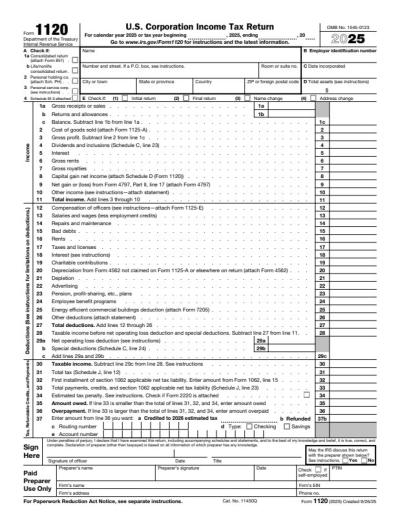 Form 1120U.S. Corporation Income Tax Return