
Form 8300, filled in online.
Report of Cash Payments Over $10,000
Type in the panel and watch each answer land on the page. Filling in and signing is free; downloading needs a free account, which includes 5 downloads a month.
Or fill it another way:
- Category
- Business
- Fillable fields
- 138
- Pages
- 2
- Paper size
- US Letter, 8.5 × 11 in
Five ways to fill this form.
-
Fill it in here
Type in the panel and watch it land on the form. Sign it, then download.
Free to fill and sign Start filling -
Many at once, from a spreadsheet
One row per person, one finished PDF for each.
Paid plan · you can walk through it Start with a spreadsheet -
Send it to someone to fill in
Email a link. They fill it in without an account and you get the answers back.
Paid plan · you can walk through it Send a request -
From your own software
Fill it over the API. One request returns the finished PDF.
Paid plan -
Let an AI assistant do it
Connect ChatGPT or Claude once, then describe what goes on the form.
With a free account
Key facts
| Form number | Form 8300 |
|---|---|
| Official name | Report of Cash Payments Over $10,000 Received in a Trade or Business |
| Issuing agency | Internal Revenue Service and Financial Crimes Enforcement Network (FinCEN) |
| Current revision date | Rev. December 2023 instructions; current form listed by IRS as Form 8300 |
| Number of pages | 2 pages |
| Filing frequency | As needed when reportable cash receipts exceed $10,000 or when a suspicious transaction is voluntarily reported |
| Submission methods | FinCEN BSA E-Filing System or paper mail to IRS Detroit address if paper filing is allowed |
| Related instructions document | Instructions for Form 8300 (Rev. December 2023) |
What is this form?
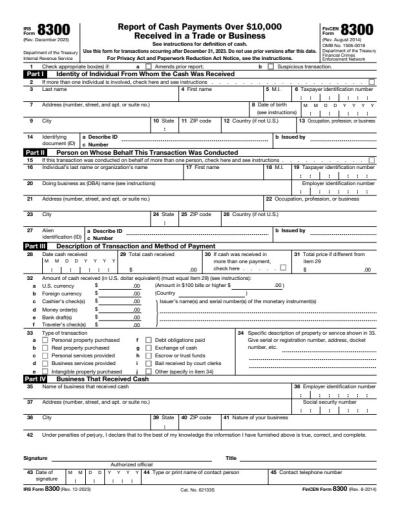
Form 8300, officially Report of Cash Payments Over $10,000 Received in a Trade or Business, is the joint IRS/FinCEN information return used when a trade or business receives more than $10,000 in cash in one transaction or in two or more related transactions. The form is not a tax calculation worksheet. It is a reporting document that identifies who paid the cash, who the payment was for, when the cash was received, what type of cash or monetary instruments were used, and what goods or services were involved. The current IRS instructions are revised December 2023, and the form is commonly referred to simply as Form 8300.
The form is organized into four main reporting parts on page 1. Part I identifies the individual from whom the cash was received, including lines 3 through 14c for name, TIN, address, date of birth, occupation, and identifying document details. Part II identifies the person on whose behalf the transaction was conducted, if different, using lines 16 through 27c. Part III reports the transaction itself, including the date cash was received on line 28, total cash received on line 29, payment method details on lines 32a through 32f, and transaction type checkboxes on line 33. Part IV identifies the business that received the cash on lines 35 through 41, followed by the signature and contact fields.
Page 2 is used to continue Part I or Part II when more than one individual or more than one person is involved, and it also includes a comments area for clarifying unusual facts. That comments area is important for late filings, related-party transactions, customer TIN refusals in e-filed reports, or suspicious transaction explanations when box 1b is checked. Form 8300 is filed with the federal government, but a separate annual written statement must usually also be provided to each named person.
Who needs to fill this out?
- Must file: Any person engaged in a trade or business that receives more than $10,000 in cash in one transaction or in two or more related transactions. For this purpose, a person can be an individual, sole proprietorship, partnership, corporation, LLC, association, trust, or estate.
- Must file for installment or related payments: If the first payment does not exceed $10,000, but later cash payments on the same transaction or related transactions push the total over $10,000, Form 8300 is required by the 15th day after the payment that causes the threshold to be exceeded.
- Must file for certain monetary instruments: Cash can include cashier's checks, money orders, bank drafts, and traveler's checks with a face value of $10,000 or less in designated reporting transactions or when the business knows the customer is trying to avoid reporting.
- Must file in special situations: Court clerks receiving more than $10,000 in cash as bail for specified criminal offenses, and casinos for nongaming activities such as restaurants, retail shops, or nightclubs.
- May file voluntarily: A business may voluntarily file Form 8300 for a suspicious transaction of $10,000 or less by checking line 1b, even though the dollar threshold was not met.
- Does not need to file: People receiving cash outside the ordinary course of a trade or business, such as a private person selling a personal car; financial institutions that instead report the transaction on FinCEN Currency Transaction Report (FinCEN Report 112); casinos reporting gaming activity under CTR rules; and transactions occurring entirely outside the United States.
- Does not need to treat as cash: Personal checks, wire transfers, ACH transfers, and cashier's checks or money orders with a face value over $10,000 generally are not cash for Form 8300 purposes.
Where and how to submit
Form 8300 is filed with the federal government, not given back to the payer as the primary filing. Businesses that are required to e-file information returns, or that choose to e-file, submit Form 8300 through the FinCEN Bank Secrecy Act E-Filing System. Beginning January 1, 2024, electronic filing is mandatory if the business is required to file at least 10 information returns of any type other than Form 8300 during the calendar year, such as Forms W-2 or 1099 series returns. Businesses under that threshold may still e-file voluntarily.
If the business is not required to e-file and does not elect to do so, paper Forms 8300 are mailed to: Internal Revenue Service, The Rosa Parks Federal Building, P.O. Box 32621, Detroit, MI 48232. The form must generally be filed within 15 days after the cash is received, or within 15 days after the payment that causes related payments to exceed $10,000. Separate from filing with IRS/FinCEN, the business must usually provide a written statement to each person named on a required Form 8300 by January 31 of the following year. Do not send that annual statement for a voluntary suspicious transaction filing under the $10,000 threshold.
How to fill it out
- Step 1 — Top of form and Part I: At the top of page 1, check line 1a only if you are amending a prior report and check line 1b if this is a suspicious transaction report. If more than one person gave the cash, check line 2. Then complete Part I, lines 3 through 14c, with the payer's full legal name, line 6 taxpayer identification number, line 7 street address, line 8 date of birth, lines 9 through 13 city/state/ZIP/country/occupation, and lines 14a through 14c identifying document details.
- Step 2 — Part II person on whose behalf the transaction was conducted: If the cash payer was acting for someone else, complete lines 16 through 27c for that person or organization. Enter the legal name on line 16, first name on line 17 if applicable, TIN on line 19, DBA name on line 20 if relevant, address on line 21, occupation or business on line 22, and identification fields on lines 27a through 27c. If more than one person was represented, check line 15 and continue on page 2.
- Step 3 — Part III transaction totals: Enter the date cash was received on line 28 and the total cash received on line 29. If the report covers more than one payment, check line 30. If the total transaction price differs from the cash amount reported on line 29, enter the full price on line 31. This is common when a buyer paid part in cash and part by wire transfer or other non-cash method.
- Step 4 — Part III method of payment: Break the payment down by type on lines 32a through 32f. Line 32a is U.S. currency. Line 32b is foreign currency, including the country and amount. Lines 32c through 32f are for cashier's checks, money orders, bank drafts, and traveler's checks, with the issuer name and serial number fields completed for each instrument used.
- Step 5 — Part III transaction type and description: Check the correct boxes on line 33 to show what the payment was for, such as personal property, real property, personal services, business services, debt obligations, escrow or trust funds, bail, or other. Then describe the property or service on line 34 as specifically as possible, for example vehicle year/make/model, legal services retainer, or real estate address.
- Step 6 — Part IV business information: Complete lines 35 through 41 for the business that received the cash. Enter the business name on line 35, EIN on line 36, address on line 37, city/state/ZIP on lines 38 through 40, and nature of business on line 41. If the filer is part of a consolidated group, Part IV should identify the member corporation that received the cash, while the common parent's name and EIN go in the comments section.
- Step 7 — Signature, contact, and comments: Sign the form in the signature area, enter the date on line 43, print the contact person's name on line 44, and enter the contact telephone number on line 45. Use the page 2 comments lines to explain late filings, suspicious activity, related-party transactions, or a customer TIN refusal. If filing late by paper, write LATE at the top of page 1; if filing late electronically, include LATE in the comments section.
Important deadlines & penalties
- Primary filing deadline: File Form 8300 by the 15th day after the date the cash is received. If the 15th day falls on a Saturday, Sunday, or legal holiday, the due date moves to the next business day.
- Multiple payments: If the initial payment is $10,000 or less, file by the 15th day after the later payment that causes aggregate cash received for the transaction or related transactions to exceed $10,000.
- Annual customer statement: Provide the required written statement to each person named on a required Form 8300 by January 31 of the year following the calendar year in which the cash was received.
- Record retention: Keep a copy of each filed Form 8300, supporting documentation, and the customer statement for 5 years from the date filed.
- Late filing penalties: For returns due in calendar year 2024, the IRS reference guide states the penalty for negligent failure to timely file, include all required information, or include correct information is $310 per return, up to $3,783,000 per year. If corrected within 30 days, the penalty can drop to $60 per return, up to $630,500.
- Failure to furnish the annual statement: The penalty for negligent failure to provide a timely, complete, and correct statement to each named person is $310 per statement, with the same reduced $60 amount if corrected within 30 days, subject to the annual limits in the IRS guidance.
- Intentional disregard: The IRS reference guide states intentional disregard of the filing requirement can trigger the greater of $31,520 or the amount of cash received in the transaction, up to $126,000 per failure, with no calendar-year maximum. Intentional disregard of the customer statement requirement is $570 per failure or, if greater, 10% of the aggregate amount required to be reported correctly.
- Extensions and exceptions: There is no routine due-date extension for filing Form 8300. A filer needing relief from mandatory e-filing must request a waiver on Form 8508. Religious exemptions apply automatically if the required filing technology conflicts with the filer's religious beliefs, but the paper form is still due on time.
Common mistakes to avoid
- Leaving line 6 or line 19 blank without explanation: Missing TINs are one of the most common problems. If a customer refuses to provide the TIN, the filer needs to follow the IRS instructions and document the refusal correctly; otherwise the form can be treated as incomplete and trigger penalties.
- Reporting only the last payment on line 29: Line 29 is the total cash received being reported, not just the final payment that crossed the threshold. Underreporting line 29 distorts the filing and can lead to incorrect customer statements.
- Ignoring line 30 when there were multiple payments: If the report covers more than one payment, line 30 should be checked. Leaving it unchecked makes installment or related-transaction reporting look like a single lump-sum receipt.
- Using the wrong payment category on lines 32a through 32f: Businesses often list wire transfers or personal checks as cash, or forget to list cashier's checks and money orders under the correct lines. That can cause overreporting or underreporting because Form 8300 has a narrower definition of cash than many filers expect.
- Checking the wrong line 33 box or writing a vague line 34 description: A generic description like services or goods is weak. The IRS expects a specific description of the property or service, such as the vehicle details, legal retainer, artwork, or escrow purpose.
- Completing Part IV with parent-company data instead of the entity that received the cash: For consolidated groups, lines 35 through 41 must identify the member corporation that actually received the cash. The common parent belongs in the comments section, not as the receiving business.
- Failing to mark late or suspicious filings correctly: A late e-filed form should include LATE in the comments section, and a suspicious transaction should be flagged with box 1b. Missing those indicators can create examination issues and make the filing inconsistent with the facts.
Expert tips
- Use line 34 like an auditor will read it: Instead of writing car, enter the year, make, model, VIN, or stock number. Instead of services, describe the service type and matter. Specific line 34 descriptions make later substantiation much easier.
- Reconcile line 29 against lines 32a through 32f before filing: The total cash received should match the detailed payment breakdown. That simple cross-check catches many data-entry errors before the form goes out.
- Watch the 24-hour and connected-transaction rules: Even if payments are on different invoices or different days, they may still be related transactions. If the same payer is making connected payments, track them centrally instead of by employee memory.
- Use the page 2 comments section proactively: Add explanations for related-party transactions, unusual ownership structures, consolidated groups, or late-filing facts. The instructions specifically expect comments in those situations.
- Know when monetary instruments count as cash: Lines 32c through 32f are not just backup fields. Cashier's checks, money orders, bank drafts, and traveler's checks with face values of $10,000 or less can count as cash in designated reporting transactions or structuring situations.
- Prepare the January 31 customer statement at the same time you file: Capture the contact name, phone number, aggregate cash amount, and named parties immediately. Businesses often remember the IRS filing but forget the separate statement requirement.
- Keep Publication 1544 and the instructions nearby: Publication 1544 is especially useful for edge cases involving related transactions, foreign persons, and payment methods, while the instructions help with exact line treatment and e-filing exceptions.
Related forms & next steps
- Instructions for Form 8300 — Official line-by-line instructions, filing rules, e-filing mandate details, and statement requirements.
- Form 8508 — Application for a Waiver from Electronic Filing of Information Returns when mandatory e-filing would cause undue hardship.
- Publication 1544 — IRS publication explaining cash-reporting rules, related transactions, and exceptions for businesses.
- Form 1099-MISC — One example of an information return counted toward the 10-return threshold that can trigger mandatory Form 8300 e-filing.
- Form W-2 — Another information return counted toward the electronic filing threshold that determines whether Form 8300 must be e-filed.
- FinCEN Report 112 (Currency Transaction Report) — Used by financial institutions for certain currency transactions and relevant because some receipts are reported there instead of on Form 8300.
Frequently asked questions
What is Form 8300 used for?
Form 8300 is used to report that a trade or business received more than $10,000 in cash in one transaction or in related transactions. It helps IRS and FinCEN track potentially reportable large cash activity and is not a tax payment voucher or deduction form.
Do I file Form 8300 if I receive $10,000 exactly?
No. The filing threshold is more than $10,000 in cash. However, if additional related cash payments later push the total above $10,000, the form becomes required and is due within 15 days after that later payment.
Does a cashier's check count as cash on Form 8300?
Sometimes. A cashier's check, money order, bank draft, or traveler's check with a face value of $10,000 or less can count as cash in a designated reporting transaction or when the business knows the customer is trying to avoid Form 8300 reporting. A cashier's check over $10,000 generally does not count as cash for this form.
Do I have to send a copy of Form 8300 to the customer?
No. You generally must send a separate written statement by January 31 to each person named on a required Form 8300, but the IRS says sending a copy of the actual form is not advisable because it contains sensitive identifying information. If the filing was voluntary for a suspicious transaction under $10,000, no customer statement is required.
What happens if I miss the 15-day deadline?
You should still file the form as soon as possible and identify it as late. For paper filings, write LATE at the top of page 1. For electronic filings, include LATE in the comments section. Late filing can trigger civil penalties, and intentional disregard can trigger much higher penalties.
Can I e-file Form 8300?
Yes. Form 8300 can be filed through the FinCEN BSA E-Filing System, and e-filing is mandatory for businesses that must electronically file at least 10 information returns of other types during the calendar year. Even if you are below that threshold, you can still e-file voluntarily.
Can I create Form 8300 in bulk?
Yes. PDFengine supports bulk generation of Form 8300 via Excel or CSV upload — upload a spreadsheet with one row per entry and PDFengine generates all PDFs at once. You can also automate bulk creation programmatically via the PDFengine API.
Ready to fill it in?
Fill in this formOfficial sources
- IRS: About Form 8300 — Official IRS overview, current revision links, and related products.
- IRS: Instructions for Form 8300 — Official filing instructions, due dates, exceptions, and e-filing mandate details.
- IRS: Form 8300 and reporting cash payments of over $10,000 — IRS guidance on who files, where to file, annual statements, waivers, and recordkeeping.
- IRS Form 8300 reference guide — IRS reference guide with examples, related transaction rules, and penalty explanations.
- FinCEN BSA E-Filing System — Official electronic filing portal for Form 8300 submissions.
More forms in this category
-
 VA Form 26-1880 — Request for a Certificate of EligibilityOfficial VA home loan form used to request a Certificate of Eligibility.
-
 VA Form 21-0966 — Intent to File a Claim for Compensation, Pension, or Survivors BenefitsOfficial VA form used to preserve a potential effective date before filing a full claim.
-
 Form 1065U.S. Return of Partnership Income
-
 Form 1120U.S. Corporation Income Tax Return