
Form 8832, filled in online.
Entity Classification Election
Type in the panel and watch each answer land on the page. Filling in and signing is free; downloading needs a free account, which includes 5 downloads a month.
Or fill it another way:
- Category
- Business
- Fillable fields
- 70
- Pages
- 8
- Paper size
- US Letter, 8.5 × 11 in
Five ways to fill this form.
-
Fill it in here
Type in the panel and watch it land on the form. Sign it, then download.
Free to fill and sign Start filling -
Many at once, from a spreadsheet
One row per person, one finished PDF for each.
Paid plan · you can walk through it Start with a spreadsheet -
Send it to someone to fill in
Email a link. They fill it in without an account and you get the answers back.
Paid plan · you can walk through it Send a request -
From your own software
Fill it over the API. One request returns the finished PDF.
Paid plan -
Let an AI assistant do it
Connect ChatGPT or Claude once, then describe what goes on the form.
With a free account
Key facts
| Item | Details |
|---|---|
| Form number | Form 8832 |
| Official name | Entity Classification Election |
| Issuing agency | Internal Revenue Service, Department of the Treasury |
| Current revision date | Rev. December 2013 |
| Number of pages | 8 pages in the official IRS PDF, including instructions |
| Filing frequency | As needed, not annual |
| Main filing sections | Part I on pages 1-2 and Part II on page 3 |
| Related instructions document | Official IRS Form 8832 instructions included with the form PDF |
What is this form?
Form 8832, officially titled Entity Classification Election, is the IRS "check-the-box" form that an eligible business entity uses to choose how it will be treated for federal tax purposes. Instead of accepting the default IRS classification, the entity can elect to be treated as a corporation, a partnership, or, if it has a single owner, an entity disregarded as separate from its owner. The official IRS form currently in circulation is Form 8832 (Rev. December 2013), with later IRS website updates for mailing addresses.
The form itself is structured around Part I on pages 1 and 2 and, when needed, Part II — Late Election Relief on page 3. Part I covers the election type on line 1, the 60-month limitation questions on lines 2a and 2b, owner information on line 4, parent-corporation information on line 5, the specific entity type election on line 6, and the requested effective date on line 8. Part II is used only when the filer is requesting late-election relief under Revenue Procedure 2009-41.
Who needs to fill this out?
- Domestic eligible entities file Form 8832 when they want a tax classification different from the default IRS rule. A domestic entity with two or more owners defaults to a partnership; a domestic entity with one owner defaults to a disregarded entity.
- Domestic entities changing classification also file Form 8832, even if the current classification came from a default rule rather than a prior election.
- Foreign eligible entities file when they want a classification different from the foreign default rules, including electing partnership, corporate, or disregarded-entity treatment depending on owner count and limited-liability status.
- Entities seeking late relief may file if the intended election failed solely because Form 8832 was not timely filed and the request is made within 3 years and 75 days of the requested effective date, subject to the Rev. Proc. 2009-41 conditions.
- Who does not file: a new entity that wants its default classification, an entity tax-exempt under section 501(a), a REIT under section 856, or an entity electing S corporation status. S corporation elections are made on Form 2553, not Form 8832.
- No income threshold applies. Filing depends on entity type and classification choice, not on revenue, profit, payroll, or asset levels.
Where and how to submit
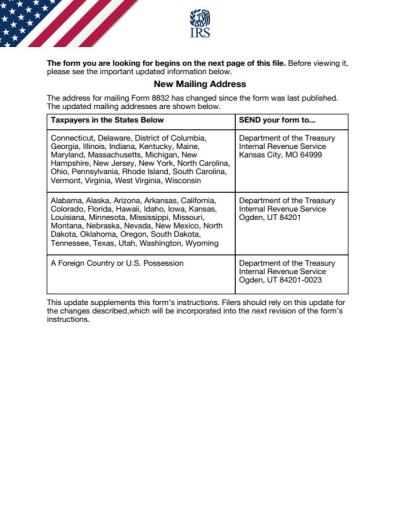
Form 8832 is filed with the Internal Revenue Service. Under the IRS mailing update, entities in Connecticut, Delaware, District of Columbia, Georgia, Illinois, Indiana, Kentucky, Maine, Maryland, Massachusetts, Michigan, New Hampshire, New Jersey, New York, North Carolina, Ohio, Pennsylvania, Rhode Island, South Carolina, Vermont, Virginia, West Virginia, and Wisconsin mail the form to Department of the Treasury, Internal Revenue Service, Kansas City, MO 64999. Entities in Alabama, Alaska, Arizona, Arkansas, California, Colorado, Florida, Hawaii, Idaho, Iowa, Kansas, Louisiana, Minnesota, Mississippi, Missouri, Montana, Nebraska, Nevada, New Mexico, North Dakota, Oklahoma, Oregon, South Dakota, Tennessee, Texas, Utah, Washington, and Wyoming mail it to Department of the Treasury, Internal Revenue Service, Ogden, UT 84201. Filers in a foreign country or U.S. possession use Department of the Treasury, Internal Revenue Service, Ogden, UT 84201-0023.
A copy of Form 8832 must also be attached to the entity's federal tax or information return for the tax year of the election. If the entity itself does not file a return for that year, a copy must be attached to the returns of the relevant direct or indirect owners. The IRS filing page does not provide a stand-alone online submission portal for Form 8832, so the election is generally filed by paper mail.
How to fill it out
- Step 1 — Entity identification: Enter the Name of eligible entity making election, the entity's Employer identification number, and the mailing address. Check Address change if applicable. If you are requesting relief, also check the box for Revenue Procedure 2009-41 or Revenue Procedure 2010-32.
- Step 2 — Part I, lines 1 through 3: Check line 1a for an initial classification by a newly formed entity, or line 1b for a change in current classification. If line 1b applies, answer line 2a and, if necessary, line 2b to test the 60-month limitation. Then answer line 3 to show whether the entity has more than one owner.
- Step 3 — Owner or parent details: If the entity has one owner, complete line 4a Name of owner and line 4b Identifying number of owner. If the owner is itself disregarded, the instructions say to identify the first owner in the chain that is not disregarded. If the entity is in an affiliated consolidated group, complete line 5a and line 5b for the parent corporation.
- Step 4 — Type of entity, lines 6 and 7: Check exactly one box on line 6: 6a domestic corporation, 6b domestic partnership, 6c domestic single-owner disregarded entity, 6d foreign corporation, 6e foreign partnership, or 6f foreign single-owner disregarded entity. If organized in a foreign jurisdiction, enter the country on line 7.
- Step 5 — Effective date and contact person: Enter the requested effective date on line 8. The election generally cannot be effective more than 75 days before filing or later than 12 months after filing. Then complete line 9 with the contact person's name and title and line 10 with that person's telephone number.
- Step 6 — Signatures and late relief: Complete the Consent Statement and Signature(s) section with the required owners or authorized signers, dates, and titles. If you are requesting late-election relief, complete Part II, line 11 with the explanation of why the election was late and obtain the additional signatures required from the authorized representative and affected persons.
Important deadlines & penalties
- No annual calendar deadline: Form 8832 is event-driven, not a yearly return.
- Effective-date rule: the election on line 8 generally cannot be effective more than 75 days before the form is filed and cannot be effective later than 12 months after filing.
- If line 8 is left blank: the IRS instructions say the election generally takes effect on the filing date.
- Late election relief deadline: under Rev. Proc. 2009-41, the request generally must be made within 3 years and 75 days of the requested effective date.
- No extension form: there is no separate IRS extension request that extends the Form 8832 timing window. Missing the timing rule means looking to late-election relief instead.
- Penalty and consequence issues: the instructions do not set a stand-alone percentage late-filing penalty like an income tax return. The main consequence is that the election may fail for the intended date, and the instructions also warn that penalties may apply for missing required attachments, inconsistent owner returns, or TIN failures under sections 6721 through 6724.
Common mistakes to avoid
- Filing when no election is needed: a newly formed entity that wants its default classification should not file Form 8832. Filing unnecessarily can create avoidable complexity.
- Overlooking the 60-month rule on lines 2a and 2b: a filer may request a new classification change that is blocked because a prior election became effective within the last 60 months.
- Using the wrong EIN: the heading asks for the electing entity's own Employer identification number. The IRS says the election will not be accepted if the entity does not provide an EIN.
- Putting the wrong owner on line 4: in tiered disregarded-entity structures, the instructions require the first owner that is not disregarded, not always the direct legal owner.
- Checking the wrong line 6 box: mixing up domestic and foreign boxes, or partnership and disregarded boxes, produces the wrong federal tax classification.
- Using an invalid date on line 8: if the requested effective date falls outside the 75-day and 12-month limits, the IRS instructions say the election defaults instead of following the requested date.
- Missing signatures: incomplete signatures in the consent section or Part II can derail the election or the late-relief request.
Expert tips
- Get the EIN first: the instructions say the entity must have received an EIN by the time Form 8832 is filed. Do not write "Applied For".
- Choose line 8 carefully: if you want a specific tax effective date, write it and verify it fits within the allowed timing window.
- Keep proof of filing: the instructions list acceptable proof such as certified or registered mail receipts, an IRS received stamp, or an IRS acceptance letter.
- Watch for the 60-day response window: the instructions say the entity should generally receive acceptance or nonacceptance within 60 days after filing.
- Do not forget the return attachment: mailing Form 8832 to the IRS is not the only step; a copy also belongs with the entity's return or, in some cases, owner returns.
- Use Form 2553 for S elections: one of the most common classification mistakes is trying to use Form 8832 for an S corporation election.
Related forms & next steps
- Form SS-4 — Application for Employer Identification Number, used when the entity needs its own EIN before filing Form 8832.
- Form 2553 — Election by a Small Business Corporation, used for S corporation status.
- Form 1065 — U.S. Return of Partnership Income, generally relevant if the entity is classified as a partnership.
- Form 1120 — U.S. Corporation Income Tax Return, generally relevant if the entity elects corporate treatment.
- Schedule C (Form 1040) — Often relevant when a single-member entity is disregarded and its activity is reported by the owner.
- Late election relief — IRS guidance on fixing missed election filings in qualifying cases.
Frequently asked questions
What is Form 8832 used for?
It is used by an eligible entity to elect how it will be classified for federal tax purposes instead of accepting the default IRS classification.
Do LLCs file Form 8832?
Many do, but only when they want a classification different from the default rule. A domestic multi-member LLC usually defaults to partnership treatment, and a domestic single-member LLC usually defaults to disregarded-entity treatment.
Do I need Form 8832 for an S corporation election?
No, not usually. The IRS says S corporation elections are made on Form 2553.
Can Form 8832 be filed online?
The official IRS filing page lists mailing addresses and does not provide a stand-alone online filing portal for Form 8832, so the election is generally submitted by mail.
What happens if I miss the filing window?
The intended effective date may fail. Some entities can still request relief under Revenue Procedure 2009-41 if the conditions are met and the filing is within 3 years and 75 days of the requested effective date.
How long does the IRS take to respond?
The instructions say the entity should generally receive an IRS acceptance or nonacceptance notice within 60 days after filing.
Can I create Form 8832, Entity Classification Election in bulk?
Yes. PDFengine supports bulk generation of Form 8832, Entity Classification Election via Excel or CSV upload — upload a spreadsheet with one row per entry and PDFengine generates all PDFs at once. You can also automate bulk creation programmatically via the PDFengine API.
Ready to fill it in?
Fill in this formOfficial sources
- About Form 8832, Entity Classification Election — IRS overview of the form and its purpose.
- Form 8832 PDF — Official IRS form and instructions with line-by-line guidance.
- Where to file your taxes for Form 8832 — Current IRS mailing addresses for the form.
- Late election relief — IRS relief guidance for missed election filings.
- IRS FAQ on entity elections and Form 2553 — Official IRS explanation of the relationship between entity classification and S corporation elections.
More forms in this category
-
 VA Form 26-1880 — Request for a Certificate of EligibilityOfficial VA home loan form used to request a Certificate of Eligibility.
-
 VA Form 21-0966 — Intent to File a Claim for Compensation, Pension, or Survivors BenefitsOfficial VA form used to preserve a potential effective date before filing a full claim.
-
 Form 1065U.S. Return of Partnership Income
-
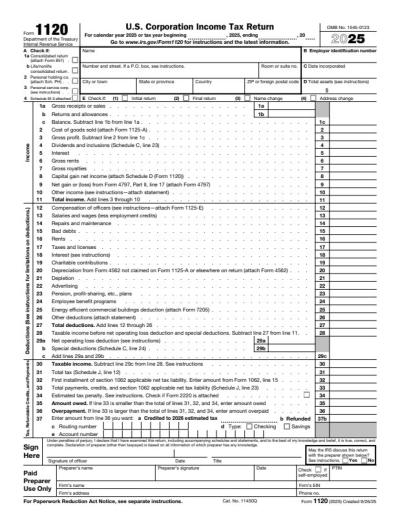 Form 1120U.S. Corporation Income Tax Return