
Form 8821, filled in online.
Tax Information Authorization
Type in the panel and watch each answer land on the page. Filling in and signing is free; downloading needs a free account, which includes 5 downloads a month.
Or fill it another way:
- Category
- Government
- Fillable fields
- 45
- Pages
- 1
- Paper size
- US Letter, 8.5 × 11 in
Five ways to fill this form.
-
Fill it in here
Type in the panel and watch it land on the form. Sign it, then download.
Free to fill and sign Start filling -
Many at once, from a spreadsheet
One row per person, one finished PDF for each.
Paid plan · you can walk through it Start with a spreadsheet -
Send it to someone to fill in
Email a link. They fill it in without an account and you get the answers back.
Paid plan · you can walk through it Send a request -
From your own software
Fill it over the API. One request returns the finished PDF.
Paid plan -
Let an AI assistant do it
Connect ChatGPT or Claude once, then describe what goes on the form.
With a free account
Key facts
| Item | Details |
|---|---|
| Form number | Form 8821 |
| Official name | Tax Information Authorization |
| Issuing agency | Internal Revenue Service, Department of the Treasury |
| Current revision date | Rev. January 2021 form; official instructions revised September 2021 |
| Number of pages | 1 page |
| Filing frequency | As needed; no annual filing cycle |
| Main purpose | Authorize a designee to inspect and/or receive listed IRS tax information |
| Related instructions document | Instructions for Form 8821 (Rev. 09-2021) |
What is this form?
Form 8821, officially titled Tax Information Authorization, is the IRS authorization form that lets a taxpayer name one or more designees to inspect and/or receive confidential federal tax information for the exact tax matters and periods listed on the form. It covers access to information only. It does not let the designee represent the taxpayer before the IRS, argue a position, sign agreements, or act in the taxpayer's place. For representation authority, the IRS requires Form 2848 instead.
The IRS page for this form currently points to the Rev. January 2021 version, and the official instructions are revised September 2021.
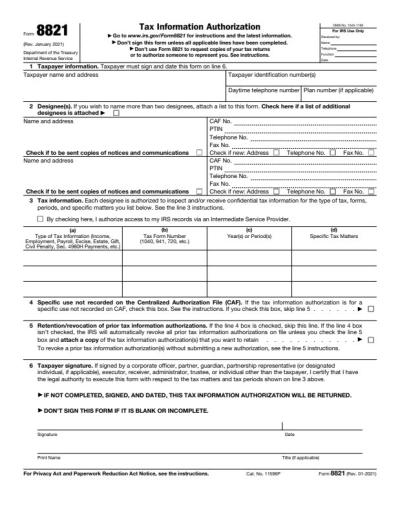
This is a 1-page IRS form with six main line items. Line 1 identifies the taxpayer. Line 2 identifies up to two designees, with a checkbox to attach additional designees and separate boxes for notices, address changes, phone changes, and fax changes. Line 3 is the core authorization table, where the taxpayer lists the type of tax information, tax form number, year(s) or period(s), and any specific tax matters. Line 4 is for a specific use that is not recorded on the Centralized Authorization File (CAF), line 5 controls retention or revocation of prior tax information authorizations, and line 6 contains the taxpayer's signature, date, printed name, and title if applicable.
Form 8821 is commonly used when a taxpayer wants an accountant, enrolled agent, payroll provider, lender, or other third party to obtain IRS information such as transcript data, balance due details, lien information, notices, or return-related penalty information for listed tax forms. The form may also be used to revoke an earlier Form 8821. The IRS instructions warn that a designee may never endorse a refund check or receive a refund by direct deposit under this authorization.
Who needs to fill this out?
- Individuals who want another person or business to inspect or receive their IRS information for listed tax matters and periods may file Form 8821. There is no income threshold for using this form.
- Businesses and entities may file it, including corporations, partnerships, associations, trusts, estates, employee plans, exempt organizations, and certain tax-advantaged bond issuers, if they want a third party to access IRS information.
- Taxpayers dealing with a lender, school, investigator, payroll provider, or tax professional may use it when the third party needs transcript or account information but does not need representation authority.
- Taxpayers who want to revoke or replace a prior tax information authorization may use Form 8821, especially through line 5 or by submitting a marked revocation.
- Joint filers should note: one spouse's Form 8821 authorizes access only for that spouse. The other spouse, or former spouse, must submit a separate Form 8821.
- People who should not use this form include anyone who needs a representative to speak or act before the IRS, sign waivers or consents, or advocate a tax position. Those taxpayers generally need Form 2848.
- People who only need their own transcript or a copy of a return often do not need Form 8821. The IRS directs them to transcript tools, Form 4506-T, or Form 4506 instead.
Where and how to submit
Form 8821 is submitted to the Internal Revenue Service, not to an employer, bank, payroll company, or state agency. If line 4 is checked for a specific use not recorded on CAF, the IRS instructions say to mail or fax the form to the IRS office handling that matter. If line 4 is not checked, the form may be submitted online, by fax, or by mail. Online submission is available at IRS.gov/Submit8821, and the instructions say forms with an electronic signature image may only be submitted online.
The IRS where-to-file chart lists three CAF destinations. Taxpayers in AL, AR, CT, DE, DC, FL, GA, IL, IN, KY, LA, ME, MD, MA, MI, MS, NH, NJ, NY, NC, OH, PA, RI, SC, TN, VT, VA, or WV mail to Internal Revenue Service, 5333 Getwell Road, Stop 8423, Memphis, TN 38118 or fax 855-214-7519. Taxpayers in AK, AZ, CA, CO, HI, ID, IA, KS, MN, MO, MT, NE, NV, NM, ND, OK, OR, SD, TX, UT, WA, WI, or WY mail to Internal Revenue Service, 1973 Rulon White Blvd., MS 6737, Ogden, UT 84201 or fax 855-214-7522. APO/FPO, Puerto Rico, Guam, U.S. Virgin Islands, foreign addresses, and other taxpayers outside the United States use Internal Revenue Service, International CAF Team, 2970 Market Street, MS 4-H14.123, Philadelphia, PA 19104, fax 855-772-3156, or 304-707-9785 from outside the United States.
How to fill it out
- Step 1 — Line 1, Taxpayer information: Enter the taxpayer's full legal name, address, taxpayer identification number(s), daytime telephone number, and plan number if applicable. Use the taxpayer's information here, not the designee's. For a trust, estate, employee plan, or exempt organization, enter the identifying name and EIN or SSN exactly as described in the IRS instructions.
- Step 2 — Line 2, Designee(s): Enter each designee's name and address, CAF No., PTIN, Telephone No., and Fax No.. If the designee has no CAF number yet, enter NONE. Check the box if a list of additional designees is attached. If you want a designee to receive copies of IRS notices and communications for the listed matters, check the box under that designee. Use the Check if new boxes for updated address, telephone, or fax information.
- Step 3 — Line 3, Tax information: Complete each row of the table using the actual fields shown on the form: (a) Type of Tax Information, (b) Tax Form Number, (c) Year(s) or Period(s), and (d) Specific Tax Matters. Be precise. The IRS says not to use broad phrases such as All years, All periods, or All taxes; a form with a general reference will be returned. For future periods, list the tax form number, the future year or period, and the matter description.
- Step 4 — Line 3 checkbox, Intermediate Service Provider access: Check the line 3 box only if you want the designee to be able to access IRS records through an Intermediate Service Provider. If you leave it unchecked, the designee can still obtain information directly from the IRS when otherwise authorized, but not through that indirect access method.
- Step 5 — Line 4 and line 5, Specific use and prior authorizations: If the authorization is for a specific use not recorded on CAF, check line 4 and skip line 5. If line 4 is not checked, review line 5 carefully because the IRS will automatically revoke prior Forms 8821 on file unless you check the line 5 box and attach copies of the authorizations you want to retain. If you are revoking without submitting a new authorization, the instructions say to write REVOKE across the top of the earlier authorization and sign and date under the original signature.
- Step 6 — Line 6, Taxpayer signature: Sign and date the form on line 6, then enter the Print Name and Title (if applicable). If the signer is a corporate officer, partner, executor, trustee, guardian, receiver, administrator, or other authorized person, that person must have legal authority to sign for the taxpayer. For mailed or faxed submissions, the IRS requires a handwritten signature; digital, electronic, or typed-font signatures are not valid by mail or fax.
- Step 7 — Submit the form correctly: If the form has an electronic signature image or other e-signature method, submit it online at IRS.gov/Submit8821. Otherwise, submit by mail or fax to the correct CAF office from the IRS where-to-file chart, or to the IRS office handling the matter if line 4 is checked. Keep a copy of the signed form and any attached retained authorizations for your records.
Important deadlines & penalties
- No annual due date: Form 8821 is generally filed as needed. It is not an annual tax return and does not have a fixed filing date like April 15.
- 120-day rule for non-IRS matters: If the form is used to authorize disclosure for a purpose other than addressing or resolving a tax matter with the IRS, such as income verification for a lender, the IRS must receive Form 8821 within 120 days of the taxpayer's signature date.
- No 120-day limit for IRS tax-matter assistance: The instructions say the 120-day rule does not apply when the authorization is for assistance with a tax matter with the IRS.
- No automatic extension form: There is no separate IRS extension process for Form 8821. If a 120-day submission window applies, the practical fix is usually to sign and submit a new form.
- No stand-alone late-filing penalty stated by the IRS: The IRS instructions do not assign a separate dollar penalty or percentage for filing Form 8821 after a deadline. The usual consequence is that the IRS will not honor stale, incomplete, unsigned, or invalid authorizations, which can delay transcripts, notices, lender requests, or case handling.
- Unauthorized use or redisclosure risk: The instructions state that section 6103(c) limits disclosure and use of information received under Form 8821 and subjects recipients to penalties and private-right-of-action consequences for unauthorized access, other use, or redisclosure.
Common mistakes to avoid
- Using a broad description on line 3: Entries such as All years, All periods, or All taxes are not allowed. The IRS instructions say a general reference will cause the authorization to be returned.
- Putting the wrong person in line 1: Some filers enter the designee's information in the Taxpayer information area. That misidentifies the taxpayer and can prevent the IRS from honoring the form.
- Forgetting that spouses need separate forms: On a joint return, one spouse's Form 8821 does not automatically cover the other spouse. If only one spouse signs, the designee may be blocked from getting the other spouse's information.
- Leaving line 5 unchecked without understanding the effect: If line 4 is not checked, a newly filed Form 8821 generally revokes prior tax information authorizations on file unless the taxpayer checks line 5 and attaches copies of the prior authorizations to retain. Missing this can accidentally wipe out earlier authorizations.
- Checking line 4 for a normal CAF authorization: Line 4 is only for a specific use not recorded on CAF. Using it incorrectly can send the form to the wrong IRS workflow and prevent the authorization from being recorded on CAF.
- Using an invalid signature method on line 6: For mail or fax filing, the IRS says digital, electronic, or typed-font signatures are not valid. A faxed or mailed form with the wrong signature style may be rejected or ignored.
- Omitting CAF numbers, PTINs, or updated contact boxes on line 2: Missing or inconsistent designee details make it harder for the IRS to match the designee to existing CAF records, which can slow processing or create notice-delivery errors.
Expert tips
- Mirror the taxpayer name exactly: Match the legal name and TIN in line 1 to IRS records. Small mismatches create avoidable processing delays.
- Use precise line 3 entries: Instead of a vague request, list the exact tax type, form number, and period, such as Income / 1040 / 2023 / transcript and balance due. The IRS instructions explicitly allow targeted entries in column (d) such as lien information, balance due amount, or a specific schedule.
- Enter NONE for a new designee with no CAF number: The instructions say to write NONE in line 2 if a designee has not yet been assigned a CAF number. Leaving it blank is less clear.
- Use line 3's Intermediate Service Provider checkbox intentionally: Check it only if you want the designee to retrieve records through a third-party intermediate provider. Many filers miss that this checkbox expands how data may be accessed.
- Do not rely on Form 8821 to change addresses: The instructions state that the address on Form 8821 does not change the taxpayer's last known IRS address. Use Form 8822 or Form 8822-B when an address change is the real goal.
- Keep copies of retained authorizations: If you check line 5, attach copies of the authorizations you want to keep and save the same copies in your records. This is the cleanest way to avoid accidental revocation.
- Use the right alternative form: If you need a transcript, consider the IRS transcript tools or Form 4506-T. If you need representation authority, use Form 2848. Using the wrong form is one of the fastest ways to lose time.
Related forms & next steps
- Form 2848 — Power of Attorney and Declaration of Representative; used when someone needs to represent the taxpayer before the IRS.
- Form 4506-T — Request for Transcript of Tax Return; used when a transcript is needed without granting ongoing authorization.
- Form 4506 — Request for Copy of Tax Return; used to request a photocopy of a filed return.
- Form 56 — Notice Concerning Fiduciary Relationship; identifies a fiduciary such as a trustee or executor to the IRS.
- Form 8822 — Change of Address; used to update an individual home mailing address with the IRS.
- Form 8822-B — Change of Address or Responsible Party — Business; used to update a business address or responsible party.
- Instructions for Form 8821 — Official IRS line-by-line instructions, where-to-file chart, and revocation rules.
Frequently asked questions
What does Form 8821 actually authorize?
It authorizes the named designee to inspect and/or receive confidential IRS tax information for the specific tax forms, years or periods, and matters listed on line 3. It does not authorize representation before the IRS.
What is the difference between Form 8821 and Form 2848?
Form 8821 is for information access only. Form 2848 is for representation authority, including speaking to the IRS on the taxpayer's behalf and handling certain matters as a representative.
Does Form 8821 expire after 120 days?
Not in every case. The IRS says the 120-day receipt rule applies when the form is used for a purpose other than resolving a tax matter with the IRS, such as lender verification. That rule does not apply to authorizations used for IRS tax-matter assistance.
Can one Form 8821 cover both spouses on a joint return?
No. The instructions say the designee listed on one spouse's Form 8821 is authorized only for that spouse. The other spouse or former spouse must file a separate Form 8821.
Can I fax or mail a Form 8821 with a typed signature?
No. The instructions say mailed or faxed Forms 8821 must have a handwritten signature. Electronic signature images and similar methods are only valid when the form is submitted online through the IRS online submission process.
How do I revoke an old Form 8821?
You can file a new Form 8821 and use line 5 rules, or revoke an existing authorization by writing REVOKE across the top of the earlier authorization and adding a current signature and date under the original signature. If you do not have a copy, the IRS instructions allow a signed written revocation notice with the required identifying details.
Can I create Form 8821, Tax Information Authorization in bulk?
Yes. PDFengine supports bulk generation of Form 8821, Tax Information Authorization via Excel or CSV upload — upload a spreadsheet with one row per entry and PDFengine generates all PDFs at once. You can also automate bulk creation programmatically via the PDFengine API.
Ready to fill it in?
Fill in this formOfficial sources
- About Form 8821, Tax Information Authorization — IRS overview of the form's purpose and current revision page.
- Form 8821 PDF — Official IRS one-page form showing lines 1 through 6 and the authorization table.
- Instructions for Form 8821 PDF — Official filing instructions, where-to-file chart, revocation rules, and signature requirements.
- Submit Forms 2848 and 8821 online — IRS page describing online submission and remote-signature authentication requirements.
- About Form 2848 — IRS reference for representation authority when Form 8821 is not enough.
More forms in this category
-
 CBP Form 6059B — Customs DeclarationOfficial U.S. Customs and Border Protection arrival declaration form for travelers enterin...
-
 CBP Form 7501 — Entry SummaryOfficial U.S. Customs and Border Protection form used to summarize imported merchandise en...
-
 CBP Form 3461 — Entry/Immediate DeliveryOfficial U.S. Customs and Border Protection form for entry and immediate delivery of impor...
-
 CBP Form 3299 — Declaration for Free Entry of Unaccompanied ArticlesOfficial U.S. Customs and Border Protection form for claiming free entry of unaccompanied...