
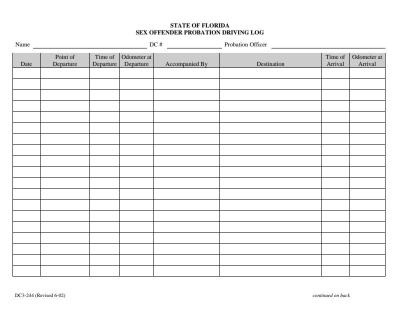
Dc3 244 Sex Offender Driving Log, filled in online.
Dc3 244 Sex Offender Driving Log — official fillable PDF form
Type in the panel and watch each answer land on the page. Filling in and signing is free; downloading needs a free account, which includes 5 downloads a month.
Or fill it another way:
- Category
- Legal
- Fillable fields
- 323
- Pages
- 2
- Paper size
- 792 × 612 pt
Five ways to fill this form.
-
Fill it in here
Type in the panel and watch it land on the form. Sign it, then download.
Free to fill and sign Start filling -
Many at once, from a spreadsheet
One row per person, one finished PDF for each.
Paid plan · you can walk through it Start with a spreadsheet -
Send it to someone to fill in
Email a link. They fill it in without an account and you get the answers back.
Paid plan · you can walk through it Send a request -
From your own software
Fill it over the API. One request returns the finished PDF.
Paid plan -
Let an AI assistant do it
Connect ChatGPT or Claude once, then describe what goes on the form.
With a free account
What is this form?
The DC3-244 Sex Offender Probation Driving Log is a structured trip record used in Florida supervision contexts. Each row captures a date, point of departure, departure time, destination, arrival time, odometer reading at departure, odometer reading at arrival, and any person who accompanied the driver. Repeating those entries creates a chronological account that a supervising officer can compare with approved travel, appointments, work schedules, vehicle mileage, and supervision conditions.
The log does not grant permission to travel and does not change any probation, community-control, registration, curfew, route, passenger, internet, residence, or contact restriction. A person subject to the form must follow the exact instructions given by the Florida Department of Corrections and the supervising officer. If an unexpected event changes an approved trip, record what actually happened and use the required notification process instead of rewriting the log to match the original plan.
PDFengine helps type the entries into the official fillable PDF and download a copy. It does not monitor a vehicle, validate mileage, approve destinations, send the log to an officer, or provide legal advice. Entries may be reviewed in an enforcement setting, so they should be contemporaneous, complete, legible, and supported by truthful source information.
Who needs to fill this out?
- A person under Florida Department of Corrections supervision who has been directed to maintain form DC3-244.
- A supervised person whose conditions require documentation of vehicle movements, destinations, times, mileage, or companions.
- An authorized officer or program staff member reviewing travel records for compliance and follow-up.
- A permitted helper entering information for the supervised person, provided the supervised person verifies every entry and remains responsible for it.
Where and how to submit
Provide the completed DC3-244 log to the assigned supervising officer by the deadline and channel stated in the supervision instructions, which may involve an office visit, scheduled report, approved electronic process, or another method. Do not assume that creating or saving the PDF counts as delivery. Keep a copy of the exact version submitted and any receipt or message confirming delivery. If the page runs out of rows, use the continuation method authorized by the officer. Questions about permitted travel, missing entries, vehicle changes, or late submission should be raised with the supervising officer promptly rather than answered by altering past entries.
How to fill it out
- Step 1 — Date: Start a new row for each distinct trip or movement as instructed. Enter the calendar date on which the vehicle leaves the point of departure. Do not combine several days or unrelated trips in one row.
- Step 2 — Point of Departure: Record the actual starting location with enough detail for the supervising officer to identify it, such as an approved residence, workplace, treatment provider, or named address. Use the officer’s required format.
- Step 3 — Time of Departure: Enter the time the vehicle actually departs. Use a consistent 12-hour format with a.m./p.m. or 24-hour format and do not substitute the planned time when departure was delayed.
- Step 4 — Destination: Identify the actual destination and purpose when the instructions require it. If one outing has multiple stops, give each stop its own row unless the supervising officer has expressly approved a different method.
- Step 5 — Time of Arrival: Record the actual arrival time at the destination. If a detour, emergency, vehicle problem, or other event materially changes the route or time, follow the notification rule and document the event accurately.
- Step 6 — Odometer at Departure and Arrival: Copy the vehicle’s full displayed mileage before departure and immediately after arrival. The arrival reading should not be lower than the departure reading; investigate a typo, trip-meter value, vehicle change, or rollover rather than forcing a number.
- Step 7 — Accompanied By: List every companion using the identifying detail required by supervision instructions. If no one accompanied you, use the approved notation instead of leaving an ambiguous blank. Review rows in chronological order and sign, initial, or certify the log wherever directed.
Frequently asked questions
Does completing DC3-244 give me permission to travel?
No. It records travel; authorization comes from the applicable supervision conditions and instructions from the supervising officer.
When should I enter a trip?
Follow the officer’s directions. As a recordkeeping practice, enter departure information at departure and arrival information promptly after arrival.
How do I record several stops?
Use separate chronological rows unless your supervising officer has approved another format, so every departure, destination, and mileage change remains clear.
What if I forgot an odometer reading?
Do not invent mileage. Follow the correction and notification process given by the officer and clearly identify any later-added explanation.
Should I list family members as companions?
List every companion when the form or supervision instructions require it, regardless of relationship, using the requested identifying detail.
Can I erase an incorrect entry?
Use the approved correction method that preserves what changed and when. Concealing or backdating a correction can undermine the log’s reliability.
Does PDFengine send the log to the Department of Corrections?
No. PDFengine generates the PDF; you must submit it through the channel and by the deadline your officer specifies.
Can I create DC3-244 Driving Logs in bulk?
Yes. PDFengine can generate logs from Excel or CSV, with one row per generated form, and supports automation through the PDFengine API. Each log still requires individual verification and submission.
Ready to fill it in?
Fill in this formMore forms in this category
-
 VA Form 21-22a — Appointment of Individual as Claimant's RepresentativeOfficial VA form used to appoint an individual representative such as an attorney, agent,...
-
 CH-120 Response to Request for Civil Harassment Restraining OrdersCH-120 Response to Request for Civil Harassment Restraining Orders is the official fillabl...
-
 CP10.5 Prejudgment Claim of Right to PossessionCP10.5 Prejudgment Claim of Right to Possession is the official fillable form from Judicia...
-
 FL-341(C) Children's Holiday Schedule AttachmentFL-341(C) Children's Holiday Schedule Attachment is the official fillable form from Judici...