
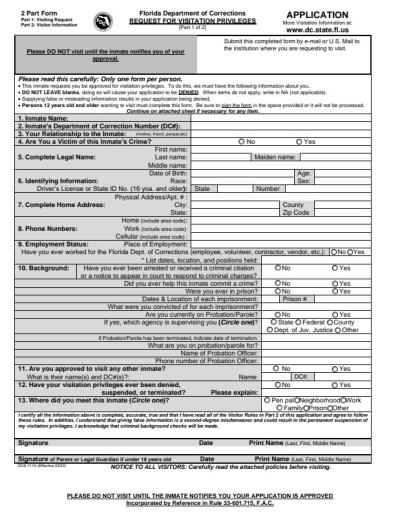
Fl Dc6 111A Form, filled in online.
Fl Dc6 111A Form — official fillable PDF form
Type in the panel and watch each answer land on the page. Filling in and signing is free; downloading needs a free account, which includes 5 downloads a month.
Or fill it another way:
- Category
- Legal
- Fillable fields
- 128
- Pages
- 2
- Paper size
- US Letter, 8.5 × 11 in
Five ways to fill this form.
-
Fill it in here
Type in the panel and watch it land on the form. Sign it, then download.
Free to fill and sign Start filling -
Many at once, from a spreadsheet
One row per person, one finished PDF for each.
Paid plan · you can walk through it Start with a spreadsheet -
Send it to someone to fill in
Email a link. They fill it in without an account and you get the answers back.
Paid plan · you can walk through it Send a request -
From your own software
Fill it over the API. One request returns the finished PDF.
Paid plan -
Let an AI assistant do it
Connect ChatGPT or Claude once, then describe what goes on the form.
With a free account
What is this form?
Florida Form DC6-111A is a visitor application used by the Florida Department of Corrections to collect information from a person seeking approval to visit an inmate. It identifies the inmate and proposed visitor, records their relationship, asks whether the applicant was a victim of the inmate’s crime, and gathers legal name, date of birth, identification, address, telephone, employment, criminal-justice background, prior visitation history, and how the applicant met the inmate.
The form supports a background and eligibility review; completing it does not guarantee approval, reserve a visit, or override institution rules. The Department may compare the responses with identification, correctional records, supervision information, and other authorized sources. Omissions or inconsistent answers can delay or affect the decision. Use the current institution instructions because required identification, minor-consent documents, mailing addresses, processing times, and visitation procedures can change.
PDFengine helps type the application into the fillable PDF and download it for review. It does not submit the application, conduct the background check, approve a visitor, schedule a visit, or provide a decision. The form contains sensitive personal and criminal-history information, so store and transmit it only through the official channel and avoid ordinary public links or unprotected email.
Who needs to fill this out?
- An adult applying to be placed on a Florida Department of Corrections inmate’s approved visiting list.
- A family member, friend, spouse, clergy member, or other person whose relationship and identity must be reviewed.
- A parent or legal guardian completing required information or consent for a minor applicant.
- A former inmate, person under supervision, crime victim, or applicant with earlier visitation action who must disclose the relevant history.
- An applicant who has received this form or official directions from the inmate, institution, or Department.
Where and how to submit
Send or deliver the signed application to the address and unit specified in the current Florida Department of Corrections or institution instructions. Do not send it to PDFengine, and do not assume the inmate can submit it for you unless the official process says so. Include copies of identification or minor-consent documents only when instructed. Keep a secure copy and allow the stated processing period before asking about status. Approval is separate from scheduling: after approval, follow the institution’s current reservation, dress, identification, property, arrival, search, conduct, and cancellation rules for every visit.
How to fill it out
- Step 1 — Inmate Name, DC#, and Relationship: Enter the inmate’s complete name, Department of Correction Number, and your relationship to the inmate. Verify the DC number from an official source because similar names can identify different people.
- Step 2 — Victim question: Answer Yes or No to “Are You a Victim of this Inmate’s Crime?” truthfully. Follow any additional review or contact instructions that apply; do not leave the item blank because it feels sensitive.
- Step 3 — Complete Legal Name and identity: Provide First name, Last name, Maiden name, Middle name, Date of Birth, Age, Race, Sex, and Driver’s License or State ID State and Number as requested. Match valid identification and include prior names rather than substituting an informal name.
- Step 4 — Home address and phone numbers: Complete Physical Address/Apt. #, City, County, State, ZIP Code, and Home, Work, and Cellular phone numbers. Use your actual residence and current contacts; follow the instructions if a particular phone type does not apply.
- Step 5 — Employment Status: Enter Place of Employment and the requested dates, locations, and positions held. If unemployed, retired, a student, or otherwise not employed, use the notation permitted by the form instead of inventing an employer.
- Step 6 — Background and supervision: Disclose each imprisonment with Dates & Location, Prison #, and conviction information. Identify Federal, Department of Juvenile Justice, or Other supervision, any termination date, the reason for probation or parole, and the supervising officer’s name and phone when applicable.
- Step 7 — Other visits, history, meeting, and signatures: List any other inmate you are approved to visit with Name and DC#, explain denied, suspended, or terminated privileges, and select where you met this inmate. Review the certification, then enter Date and Print Name; obtain the parent or legal guardian signature, date, and printed name when required.
Frequently asked questions
Does submitting DC6-111A guarantee visitation approval?
No. The Department reviews eligibility and background information and may approve, deny, defer, or request more information.
Where can I find the inmate’s DC number?
Use an official Florida Department of Corrections source or information provided through the institution, and verify the name before entering it.
Must I disclose an old conviction or imprisonment?
Answer the form exactly as written and provide the requested history. If scope is unclear, seek instructions from the Department rather than omitting it.
Can a minor apply to visit?
Minors may be subject to additional eligibility, guardian-consent, identification, and accompaniment rules. Complete the guardian fields and required documents.
What if my visitation privileges were denied before?
Answer the prior-action question truthfully and provide the requested explanation. A prior decision does not authorize an incomplete response.
How long does approval take?
Processing time varies by institution and review circumstances. Use the current official estimate and avoid scheduling travel until approval is confirmed.
Does PDFengine send or track my application?
No. PDFengine creates the PDF only; you are responsible for secure submission and status inquiries through official channels.
Can I create DC6-111A applications in bulk?
Yes. PDFengine supports bulk generation through Excel or CSV upload and the PDFengine API. Each applicant must review, certify, sign, and submit their own accurate application.
Ready to fill it in?
Fill in this formMore forms in this category
-
 VA Form 21-22a — Appointment of Individual as Claimant's RepresentativeOfficial VA form used to appoint an individual representative such as an attorney, agent,...
-
 CH-120 Response to Request for Civil Harassment Restraining OrdersCH-120 Response to Request for Civil Harassment Restraining Orders is the official fillabl...
-
 CP10.5 Prejudgment Claim of Right to PossessionCP10.5 Prejudgment Claim of Right to Possession is the official fillable form from Judicia...
-
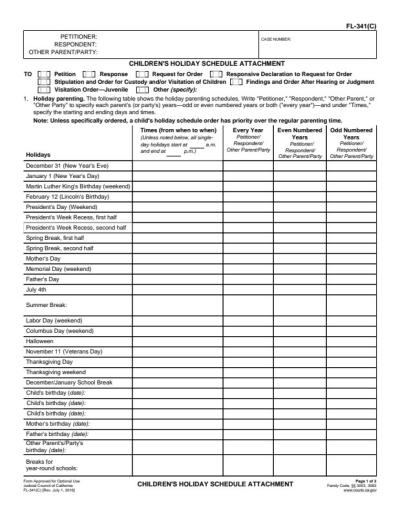 FL-341(C) Children's Holiday Schedule AttachmentFL-341(C) Children's Holiday Schedule Attachment is the official fillable form from Judici...