
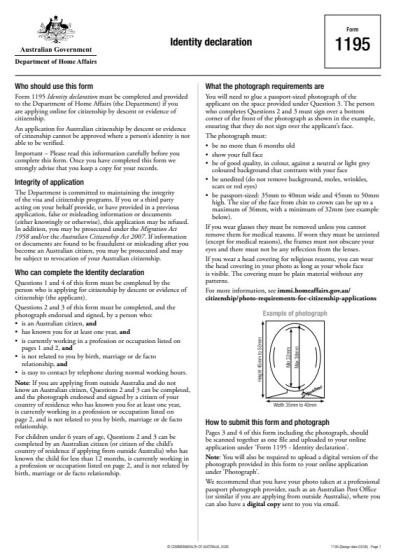
Form 1195, filled in online.
Form 1195 — official fillable PDF form
Type in the panel and watch each answer land on the page. Filling in and signing is free; downloading needs a free account, which includes 5 downloads a month.
Or fill it another way:
- Category
- Legal
- Fillable fields
- 46
- Pages
- 4
- Paper size
- A4, 210 × 297 mm
Five ways to fill this form.
-
Fill it in here
Type in the panel and watch it land on the form. Sign it, then download.
Free to fill and sign Start filling -
Many at once, from a spreadsheet
One row per person, one finished PDF for each.
Paid plan · you can walk through it Start with a spreadsheet -
Send it to someone to fill in
Email a link. They fill it in without an account and you get the answers back.
Paid plan · you can walk through it Send a request -
From your own software
Fill it over the API. One request returns the finished PDF.
Paid plan -
Let an AI assistant do it
Connect ChatGPT or Claude once, then describe what goes on the form.
With a free account
What is this form?
Form 1195 Identity Declaration is an official form issued or administered by the Australian Department of Home Affairs. It is used to support an eligible citizenship application by recording the applicant details and an identity declaration from a qualified person. The original PDF preserves the field order, identifiers, calculations, declarations and signature areas expected by the receiving authority.
Prepare it from current source records rather than memory. Names, tax or account numbers, addresses, dates, amounts and status selections must agree with the related return, application, statement and supporting evidence. A mismatch can delay processing, produce an incorrect amount or lead to a correction request. Check the form revision and official instructions for the filing year before starting.
PDFengine maps the existing AcroForm fields so you can produce a readable working copy. It does not determine eligibility, calculate legal or tax consequences, verify evidence, sign for a person or entity, or submit the form. The responsible filer and any authorised adviser must review the completed PDF and approve the final filing.
Who needs to fill this out?
- Australian citizenship applicants, children included in applications, identity declarants and authorised representatives who must complete or review this official form.
- Authorised employees or representatives entering information from verified records.
- Professional advisers checking that the form agrees with the related filing and evidence.
- Recipients who need a consistent PDF copy for filing, delivery or retention.
Where and how to submit
Include the signed identity declaration and compliant photograph with the related citizenship application through the Department of Home Affairs channel. Confirm the destination, due date, filing method, payment rule, signature standard and attachment list on the official Australian Department of Home Affairs website before delivery. Keep the completed PDF, the records used to prepare it, copies of attachments and proof of filing or delivery. If the authority requests a correction, update the source information and send the replacement through the channel it specifies rather than creating an unexplained duplicate submission.
Before delivery, compare the generated PDF with the blank official form and with the source records side by side. Check page count, field alignment, repeated identifiers, negative amounts, decimal places, dates, checkboxes and continuation pages. Confirm that no text was clipped and that confidential information appears only where required. Ask a second reviewer to check high-impact figures or legal declarations when possible. Record the form revision, preparation date and reviewer so the exact version can be reconstructed later. Do not email sensitive forms unless the recipient and transmission method are authorised.
How to fill it out
- Step 1 — Family name of the applicant: Enter this value exactly as it appears in the governing record. Preserve legal names, number sequences, leading zeroes, punctuation and the date or tax-year format printed on the form.
- Step 2 — Given names of the applicant: Use the source document that supports this entry and confirm that it belongs to the same person, entity, account, vehicle or filing period. Do not substitute an estimate unless the official instructions permit one.
- Step 3 — Applicant's date of birth: Complete every related field as a group. If the item does not apply, follow the form instruction for a blank, zero, checkbox or explanatory attachment rather than adding placeholder text.
- Step 4 — Family name of the person who is making the identity declaration: Reconcile this answer with repeated values on later pages and with the return, application, schedule or statement that accompanies the form. Resolve differences before creating the final PDF.
- Step 5 — Given names of the person who is making the identity declaration: Select only the option that accurately describes the transaction or status on the relevant date. Avoid conflicting checkboxes and keep the evidence used to support the selection.
- Step 6 — Dec str: Review calculations, identifiers and supporting documents connected with this field. Use the current official instructions for thresholds, definitions, rounding and required attachments.
- Step 7 — Applicant's current residential street address: Perform a final page-by-page check, then complete every required signature, date, declaration or preparer area outside the fillable fields. A generated PDF is not filed automatically.
Frequently asked questions
Is Form 1195 Identity Declaration the complete filing?
Not always. It may need an accompanying return, application, schedule, payment, statement or supporting documents; use the current official checklist.
Can I use a form from an earlier year?
Use the revision required for the filing period. Definitions, addresses, thresholds and electronic filing rules can change between versions.
Does PDFengine submit the form?
No. PDFengine creates the filled PDF for review and download; the responsible person must sign and deliver it through an accepted official channel.
What should I do when a field does not apply?
Follow the form instructions. Depending on the field, the correct treatment may be blank, zero, a checkbox, “N/A,” or a separate explanation.
Should I keep a copy?
Yes. Retain the final form, source records, attachments and proof of delivery for the period required by the authority and your recordkeeping rules.
Can I create Form 1195 Identity Declaration in bulk?
Yes. PDFengine supports bulk generation via Excel or CSV upload — add one row per form and PDFengine generates all PDFs at once. You can also automate bulk creation through the PDFengine API.
Ready to fill it in?
Fill in this formMore forms in this category
-
 VA Form 21-22a — Appointment of Individual as Claimant's RepresentativeOfficial VA form used to appoint an individual representative such as an attorney, agent,...
-
 CH-120 Response to Request for Civil Harassment Restraining OrdersCH-120 Response to Request for Civil Harassment Restraining Orders is the official fillabl...
-
 CP10.5 Prejudgment Claim of Right to PossessionCP10.5 Prejudgment Claim of Right to Possession is the official fillable form from Judicia...
-
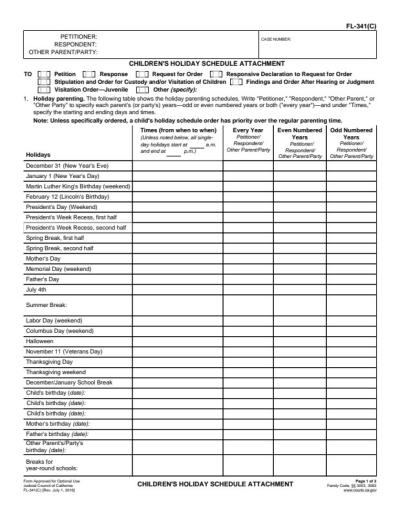 FL-341(C) Children's Holiday Schedule AttachmentFL-341(C) Children's Holiday Schedule Attachment is the official fillable form from Judici...