
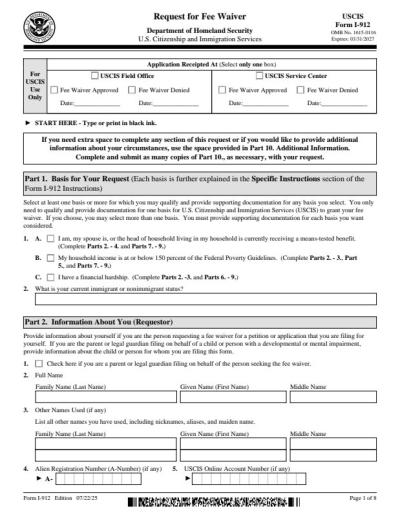
Form I-912 Request for Fee Waiver, filled in online.
Form I-912 Request for Fee Waiver — official fillable PDF form
Type in the panel and watch each answer land on the page. Filling in and signing is free; downloading needs a free account, which includes 5 downloads a month.
Or fill it another way:
- Category
- Legal
- Fillable fields
- 192
- Pages
- 8
- Paper size
- US Letter, 8.5 × 11 in
Five ways to fill this form.
-
Fill it in here
Type in the panel and watch it land on the form. Sign it, then download.
Free to fill and sign Start filling -
Many at once, from a spreadsheet
One row per person, one finished PDF for each.
Paid plan · you can walk through it Start with a spreadsheet -
Send it to someone to fill in
Email a link. They fill it in without an account and you get the answers back.
Paid plan · you can walk through it Send a request -
From your own software
Fill it over the API. One request returns the finished PDF.
Paid plan -
Let an AI assistant do it
Connect ChatGPT or Claude once, then describe what goes on the form.
With a free account
What is this form?
Form I-912 Request for Fee Waiver is an official fillable form issued or used by U.S. Citizenship and Immigration Services (USCIS). It is used to request a waiver of eligible USCIS filing fees based on a means-tested benefit, household income at or below the stated guideline, or financial hardship. The official PDF matters because the receiving organisation expects its prescribed questions, declarations, identifiers, and signature areas in the original order.
Prepare the form from current records, notices, statements, and identity documents rather than memory. A mismatch in a name, date, account or case number, address, amount, status, or selected option can delay processing, produce a request for evidence, or cause the submission to be rejected. Read the latest agency instructions as well as the form itself, since eligibility rules, fees, filing addresses, and deadlines can change without changing every visible field.
PDFengine maps the existing AcroForm fields into an online workflow and generates the completed official PDF. It does not decide eligibility, calculate every legal obligation, verify evidence, provide legal or tax advice, sign for the filer, or transmit the filing automatically. The applicant, taxpayer, party, owner, director, representative, or other authorised signer remains responsible for the truth and completeness of the final document.
Who needs to fill this out?
- People or organisations specifically instructed by U.S. Citizenship and Immigration Services (USCIS) to provide the information covered by Form I-912.
- Applicants, respondents, taxpayers, owners, businesses, or representatives who meet the official conditions for this procedure and need an official PDF record.
- Professionals helping an authorised signer prepare a draft from source documents, while leaving all declarations and signatures to the proper person.
- Filers correcting an earlier incomplete or inaccurate submission after the receiving office has explained what must be replaced or supplemented.
Do not use the form merely because its title sounds similar to your situation. Confirm the edition, jurisdiction, filing period, underlying case or account, and signer authority before entering sensitive information.
Where and how to submit
Place the signed I-912 and evidence with each eligible paper application or petition and send the complete packet to the USCIS filing location for the underlying request. Before delivery, confirm the current destination, deadline, filing fee, signature method, attachment list, and whether online filing, original ink, notarisation, witness certification, or personal service is required. The agency’s current website and the notice connected with the matter take priority over general guidance.
A PDF downloaded from PDFengine remains a preparation copy until every required person has reviewed and signed it and the authorised recipient has accepted it. Keep the final PDF, the source records used to complete it, copies of all attachments, and proof of submission. Record any case, confirmation, tracking, tax, loan, vehicle, or account number. If a correction is requested, update the source information and submit the replacement through the channel specified by the receiving office rather than sending competing versions.
How to fill it out
- Step 1 — Application Receipted At: Enter this information exactly as it appears in the authoritative record. Preserve full legal names, identifying numbers, punctuation, leading zeroes, and the printed date format; do not substitute a nickname or an approximate value.
- Step 2 — My household income is at or below 150 percent of the Federal Poverty Guidelines.: Complete the related choice or detail using the current facts for this filing. Read every nearby instruction before selecting a box, because apparently similar options can have different legal or financial effects.
- Step 3 — I have a financial hardship.: Use a reliable source document and compare the entry with any value repeated elsewhere in the form. If the item does not apply, follow the official instruction for blanks rather than inserting guessed data or placeholder text.
- Step 4 — What is your current immigrant or nonimmigrant status?: Review this part as a complete section. Check calculations, dates, names, addresses, case or account references, and supporting records so that the receiving agency can match the form to the correct person and transaction.
- Step 5 — Family Name (Last Name): Explain the requested facts clearly and attach continuation pages only when the official instructions allow them. Identify each attachment with the form number, filer name, and relevant item so pages cannot be separated from the filing.
- Step 6 — Given Name (First Name): Read the declaration, privacy notice, and authorisation connected with this field before approving it. PDFengine prepares the PDF but does not create a signature, oath, notarisation, witness certification, or agency approval.
- Step 7 — Middle Name: Perform a final page-by-page review, confirm that all required attachments are present, then save a clean copy for signing and submission. Keep an identical copy and proof of delivery for the filer’s records.
Frequently asked questions
Does PDFengine submit Form I-912 for me?
No. PDFengine creates the filled official PDF; the filer must sign and deliver it through a channel accepted by U.S. Citizenship and Immigration Services (USCIS).
How do I know whether this is the current edition?
Compare the revision date, form number, and official instructions with the current version published by the issuing agency before filing.
Can I leave a field blank when it does not apply?
Follow the form-specific instruction. Some agencies want a blank, while others require “N/A”, zero, an explanation, or a selected checkbox.
Can PDFengine give legal, immigration, tax, or benefits advice?
No. PDFengine helps prepare the PDF but does not determine eligibility, strategy, deadlines, evidence sufficiency, or the legal effect of an answer.
What should I review before signing?
Check every page, repeated identifier, selected option, amount, date, attachment reference, declaration, and signature block against the supporting records.
Should I keep a copy after filing?
Yes. Keep the exact signed version, all attachments, and proof showing when and how the receiving organisation obtained it.
Can I create Form I-912 in bulk?
Yes. PDFengine supports bulk generation of Form I-912 via Excel or CSV upload — use one row per form and PDFengine generates all PDFs at once. You can also automate bulk creation programmatically via the PDFengine API.
Ready to fill it in?
Fill in this formMore forms in this category
-
 VA Form 21-22a — Appointment of Individual as Claimant's RepresentativeOfficial VA form used to appoint an individual representative such as an attorney, agent,...
-
 CH-120 Response to Request for Civil Harassment Restraining OrdersCH-120 Response to Request for Civil Harassment Restraining Orders is the official fillabl...
-
 CP10.5 Prejudgment Claim of Right to PossessionCP10.5 Prejudgment Claim of Right to Possession is the official fillable form from Judicia...
-
 FL-341(C) Children's Holiday Schedule AttachmentFL-341(C) Children's Holiday Schedule Attachment is the official fillable form from Judici...