
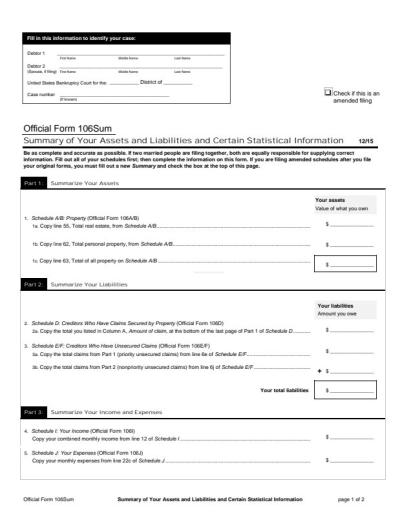
Bankruptcy Form B106Sum — Summary of Assets and Liabilities, filled in online.
Official U.S. Courts bankruptcy form summarizing an individual debtor’s assets, liabilities, and statistical information.
Type in the panel and watch each answer land on the page. Filling in and signing is free; downloading needs a free account, which includes 5 downloads a month.
Or fill it another way:
- Category
- Legal
- Fillable fields
- 28
- Pages
- 2
- Paper size
- US Letter, 8.5 × 11 in
Five ways to fill this form.
-
Fill it in here
Type in the panel and watch it land on the form. Sign it, then download.
Free to fill and sign Start filling -
Many at once, from a spreadsheet
One row per person, one finished PDF for each.
Paid plan · you can walk through it Start with a spreadsheet -
Send it to someone to fill in
Email a link. They fill it in without an account and you get the answers back.
Paid plan · you can walk through it Send a request -
From your own software
Fill it over the API. One request returns the finished PDF.
Paid plan -
Let an AI assistant do it
Connect ChatGPT or Claude once, then describe what goes on the form.
With a free account
What is this form?
Bankruptcy Form B106Sum is the official U.S. Courts summary sheet that pulls together the main totals from an individual debtor’s schedules. It gives the bankruptcy court, trustee, and other reviewers a high-level snapshot of assets, liabilities, property categories, and statistical details without forcing them to recalculate every number from the underlying schedule set. The form matters because it only makes sense when the totals match the debtor’s full bankruptcy package. A fillable PDF is useful for review because the debtor or adviser can check the same official layout that will sit alongside the schedules, statement of financial affairs, and means-test forms in the filing set.
On PDFengine, the official layout stays intact while the AcroForm fields are mapped into a structured fillable template. That is useful for forms like Bankruptcy Form B106Sum because the people reviewing them usually care about the original wording, checkbox structure, and court or agency layout. Instead of typing into a flat scan, you can save a draft, review it with another person, and return to the same version later without recreating the document from scratch.
Accuracy matters more than filler on legal and court-linked forms. Users should copy names, dates, account references, court numbers, estate details, or financial figures from the source records that support the filing. A clean PDF workflow reduces transcription mistakes and makes it easier to compare the completed form with the complaint, petition, will, schedules, or correspondence that sits beside it.
That matters especially when the same form is reviewed by more than one person. A lawyer, trustee, executor, court clerk, or family member may all look at the same draft at different moments, so having one consistent fillable PDF helps prevent conflicting versions and avoids small errors becoming procedural delays later.
Who needs to fill this out?
- Individual debtors filing for bankruptcy in the United States
- Bankruptcy attorneys and petition preparers assembling the full schedule package
- Reviewers who need one official page summarizing asset and liability totals
- Anyone validating that schedule totals flow correctly into the court summary form
Where and how to submit
Form B106Sum is filed with the bankruptcy petition package and should be reviewed together with Schedules A/B through J, any statement of financial affairs, and the remaining debtor forms. Its figures are summary figures, so the completed PDF should not be treated as standalone data divorced from the schedules that support it.
Keep a copy with the entire bankruptcy filing set, including schedules, creditor matrix, and supporting financial records. If an amendment is needed later, the summary can be compared against the amended schedules to make sure all totals still reconcile.
In practice, the value of completing Bankruptcy Form B106Sum online is control. You can pause, compare the answers with evidence, let another person review the draft, and keep a copy of exactly what was intended for filing or service. That becomes useful when the court, agency, trustee, solicitor, executor, or opposing party later asks what was entered and why.
How to fill it out
- Step 1 — Confirm the case and parties: Start with Debtor 1 and make sure the PDF belongs to the right case, estate, debtor, family dispute, or applicant before you continue.
- Step 2 — Enter the main identity details: Complete fields such as Debtor 2 exactly as they appear in the supporting records so names, court references, and addresses stay consistent.
- Step 3 — Add the central factual details: Use Bankruptcy District Information and Case number to capture the main facts, amounts, dates, or classifications the form is designed to report.
- Step 4 — Review the status or selection fields: Check entries like Check if this is an carefully so boxes, categories, and procedural choices match the underlying situation.
- Step 5 — Finish any narrative or supporting detail: If the form includes an explanation field such as 1a, use it to add the specific context a reviewer would need rather than leaving the official PDF ambiguous.
- Step 6 — Cross-check before filing: Compare the finished PDF with the complaint, petition, schedules, will, tax records, or supporting papers and confirm that names, dates, totals, and attachments are internally consistent.
Frequently asked questions
What does Form B106Sum summarize?
It summarizes key asset, liability, and statistical totals from the debtor’s bankruptcy schedules.
Can I complete this form before the schedules?
Usually no. The summary is most reliable after the supporting schedules have been prepared.
Why do the totals matter so much?
Because trustees and courts use the form as a quick cross-check of the overall filing.
Is Form B106Sum a standalone bankruptcy filing?
No. It is part of the larger bankruptcy petition package.
Should amended schedules trigger a review of this form?
Yes. Any change in the underlying totals can affect the summary.
Can I create Bankruptcy Form B106Sum — Summary of Assets and Liabilities in bulk?
Yes. PDFengine supports bulk generation of Bankruptcy Form B106Sum — Summary of Assets and Liabilities via Excel or CSV upload — upload a spreadsheet with one row per form and PDFengine generates all PDFs at once. You can also automate bulk creation programmatically via the PDFengine API.
Ready to fill it in?
Fill in this formMore forms in this category
-
 VA Form 21-22a — Appointment of Individual as Claimant's RepresentativeOfficial VA form used to appoint an individual representative such as an attorney, agent,...
-
 CH-120 Response to Request for Civil Harassment Restraining OrdersCH-120 Response to Request for Civil Harassment Restraining Orders is the official fillabl...
-
 CP10.5 Prejudgment Claim of Right to PossessionCP10.5 Prejudgment Claim of Right to Possession is the official fillable form from Judicia...
-
 FL-341(C) Children's Holiday Schedule AttachmentFL-341(C) Children's Holiday Schedule Attachment is the official fillable form from Judici...