
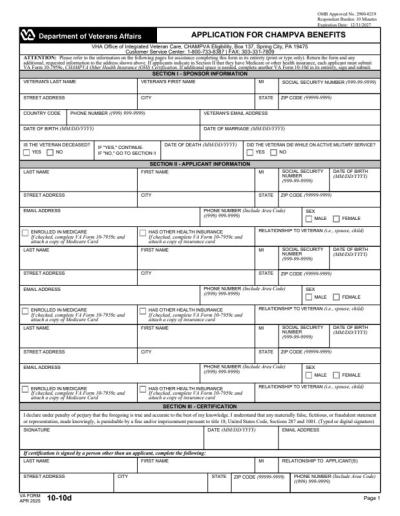
VA Form 10-10D — Application for CHAMPVA Benefits, filled in online.
Official VA form used to apply for CHAMPVA health benefits.
Type in the panel and watch each answer land on the page. Filling in and signing is free; downloading needs a free account, which includes 5 downloads a month.
Or fill it another way:
- Category
- Healthcare
- Fillable fields
- 74
- Pages
- 3
- Paper size
- US Letter, 8.5 × 11 in
Five ways to fill this form.
-
Fill it in here
Type in the panel and watch it land on the form. Sign it, then download.
Free to fill and sign Start filling -
Many at once, from a spreadsheet
One row per person, one finished PDF for each.
Paid plan · you can walk through it Start with a spreadsheet -
Send it to someone to fill in
Email a link. They fill it in without an account and you get the answers back.
Paid plan · you can walk through it Send a request -
From your own software
Fill it over the API. One request returns the finished PDF.
Paid plan -
Let an AI assistant do it
Connect ChatGPT or Claude once, then describe what goes on the form.
With a free account
What is this form?
VA Form 10-10D is the application used to request CHAMPVA health benefits for eligible spouses, surviving spouses, and children connected to certain veterans. The form helps the VA identify the veteran sponsor, the applicant, any dependents included in the request, and the coordination details needed to determine whether CHAMPVA coverage can begin. Because health-coverage applications often depend on exact names, Social Security numbers, dates of birth, addresses, Medicare status, and other insurance information, a careful and legible filing matters.
Because these government forms are often reused in claims, travel files, broker packets, or compliance reviews, it helps to keep the wording on the PDF aligned with the official source documents from the first draft onward. Using the original layout also makes later review easier for agencies, representatives, customs officers, lenders, or family members who expect the standard federal form and not a rewritten private template.
PDFengine preserves the official CHAMPVA PDF and maps the real fillable fields so families can complete the original government form digitally. That is valuable on Form 10-10D because the application can involve household data, veteran relationship details, contact fields, other-health-insurance answers, and signatures across more than one page. A clean typed version is easier to review before you attach supporting eligibility documents and send the package to the VA Health Administration Center.
Who needs to fill this out?
- Spouses or surviving spouses applying for CHAMPVA based on a veteran's qualifying status
- Children or family members included in a CHAMPVA household application
- Caregivers helping a family assemble health-benefit enrollment paperwork
- Applicants who need to coordinate CHAMPVA with Medicare or other health insurance coverage
Where and how to submit
Send the completed Form 10-10D to the VA Health Administration Center together with the supporting proof listed in the CHAMPVA instructions, such as relationship and eligibility documents. The application is usually mailed or otherwise delivered as a package rather than sent by itself, because the VA needs the form plus evidence to open or confirm coverage. Keep a full copy for your records, especially if the household also has Medicare, employer coverage, or another health plan that may need to be coordinated later. Keep any submission receipts, tracking confirmations, broker transmittals, or portal screenshots with the finished PDF, because many follow-up questions are really about proving what was sent, when it was sent, and which supporting documents traveled with it. If the agency later updates the form version, compare your saved copy against the new instructions before reusing earlier data. It is also smart to keep the completed PDF in the same folder as the source records you relied on, so a later correction can be made from evidence instead of memory.
How to fill it out
- Step 1 — VETERANSLASTNAME and VETERANSFIRSTNAME: Start with the identifying fields exactly as they appear in the official record for the person or shipment involved. Small mismatches here can cause the rest of the filing to be attached to the wrong case, traveler, or commercial entry.
- Step 2 — VETERANMIDDLEINITIAL: Add the main contact, location, or trip field next and compare it against the supporting documents you will submit with the form so the address, port, route, or claimant details stay consistent across the whole packet.
- Step 3 — Core details: Enter the veteran sponsor and applicant identity information carefully so CHAMPVA can match the application to the correct eligibility record. Use fields such as VETERANSSN and STREETADDRESS to complete the main substance of the form before moving to the declarations.
- Step 4 — Supporting declarations: Use the household and other-insurance sections to explain who is applying and how CHAMPVA should coordinate with existing coverage. If a field does not apply, follow the official instructions rather than guessing, because agencies often reject forms that contain inconsistent answers.
- Step 5 — VETERANDATEOFBIRTH, DATEOFMARRIAGE, DATEOFDEATH: Review the certification, then complete the signature and date areas only after the other entries have been checked against passports, military records, invoices, inventories, or the other source documents tied to this filing.
- Step 6 — Final review before submission: Confirm that names, dates, reference numbers, and declaration answers match the rest of your paperwork. Save a copy of the finished PDF so you can show exactly what was submitted if the agency, broker, representative, or traveler needs it later.
Frequently asked questions
Who can apply with Form 10-10D?
Eligible spouses, surviving spouses, and children connected to qualifying veterans generally use this application.
Does the form itself prove eligibility?
No. The form starts the request, but the VA also needs supporting documents that prove the relationship and qualifying status.
Why does CHAMPVA ask about other insurance?
Because CHAMPVA may need to coordinate benefits with Medicare or another health plan.
Can one application include more than one family member?
Yes. Household applications often include multiple dependents when the instructions allow it.
Should I keep a full copy of the package?
Yes. Medical-benefit files often require follow-up, and a complete copy makes later updates easier.
Should I review the latest official instructions before filing?
Yes. The fillable PDF helps with accuracy, but filing rules, mailing addresses, and evidence requirements can change. A final check against the current agency instructions reduces avoidable rejections.
Can I create VA Form 10-10D — Application for CHAMPVA Benefits in bulk?
Yes. PDFengine supports bulk generation of VA Form 10-10D — Application for CHAMPVA Benefits via Excel or CSV upload — upload a spreadsheet with one row per form and PDFengine generates all PDFs at once. You can also automate bulk creation programmatically via the PDFengine API.
Ready to fill it in?
Fill in this formMore forms in this category
-
 Annual Physical Exam Verification FormAnnual Physical Exam Verification Form — official fillable PDF form
-
 Certified hemodialysis technician cht renewal applicationCertified hemodialysis technician cht renewal application — official fillable PDF form
-
 Covid 19 Test Results Form TemplateCovid 19 Test Results Form Template — official fillable PDF form
-
 Dl 546 Health Questionnaire California DmvDl 546 Health Questionnaire California Dmv — official fillable PDF form