
Form 1040-V, filled in online.
Form 1040-V — official IRS fillable PDF form
Type in the panel and watch each answer land on the page. Filling in and signing is free; downloading needs a free account, which includes 5 downloads a month.
Or fill it another way:
- Category
- Tax
- Fillable fields
- 15
- Pages
- 2
- Paper size
- US Letter, 8.5 × 11 in
Five ways to fill this form.
-
Fill it in here
Type in the panel and watch it land on the form. Sign it, then download.
Free to fill and sign Start filling -
Many at once, from a spreadsheet
One row per person, one finished PDF for each.
Paid plan · you can walk through it Start with a spreadsheet -
Send it to someone to fill in
Email a link. They fill it in without an account and you get the answers back.
Paid plan · you can walk through it Send a request -
From your own software
Fill it over the API. One request returns the finished PDF.
Paid plan -
Let an AI assistant do it
Connect ChatGPT or Claude once, then describe what goes on the form.
With a free account
Key facts
| Form number | Form 1040-V |
|---|---|
| Official name | Payment Voucher for Individuals |
| Issuing agency | Internal Revenue Service, Department of the Treasury |
| Current revision date | 2025 edition, created 12/22/25 |
| Number of pages | 2 pages |
| Filing frequency | As needed when mailing a balance-due payment with Form 1040, Form 1040-SR, or Form 1040-NR |
| Related instructions document | Instructions for Form 1040 and Form 1040-SR, plus the printed instructions on Form 1040-V |
What is this form?
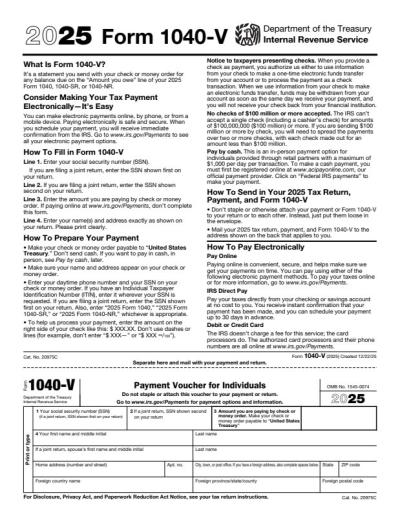
Form 1040-V is the IRS Payment Voucher for Individuals. Taxpayers use it when mailing a check or money order for the balance due shown on Form 1040, Form 1040-SR, or Form 1040-NR. It is not a tax return, does not compute tax, and does not replace the underlying return. Its purpose is to help the Internal Revenue Service apply a paper payment to the correct taxpayer account and tax year.
The current official version is Form 1040-V (2025). The IRS PDF states that it was Created 12/22/25 and carries OMB No. 1545-0074. The form contains a short instruction section and a detachable voucher. The numbered parts are limited but important: line 1 is for the SSN shown first on the return, line 2 is for the second SSN on a joint return, line 3 is for the amount being paid by check or money order, and line 4 covers the taxpayer's name and address exactly as shown on the return.
The voucher also includes separate fields for Home address, Apt. no., City, town, or post office, State, ZIP code, and foreign address details. Page 2 contains payment addresses and instructions on how to mail the voucher. The IRS expressly says that if you pay online through irs.gov/Payments, you should not complete Form 1040-V.
Who needs to fill this out?
- Individuals filing Form 1040, Form 1040-SR, or Form 1040-NR who owe tax and plan to mail a paper payment by check or money order may use Form 1040-V.
- Taxpayers with a balance due on the return's Amount you owe line should include Form 1040-V when sending a paper payment so the IRS can post the payment correctly.
- Joint filers mailing one payment with a joint return may use the form and should place the SSN shown first on the return on line 1 and the second SSN on line 2.
- Taxpayers with foreign, APO, or FPO addresses, dual-status returns, or filings involving Form 2555 or Form 4563 may use Form 1040-V if they are mailing a balance-due payment with a Form 1040-series return.
- Do not use Form 1040-V if you are paying electronically through IRS Direct Pay, EFTPS, card payment, electronic funds withdrawal, tax software, or your IRS online account.
- Do not use Form 1040-V if you do not owe tax, if your return shows a refund, or if withholding, refundable credits, and estimated payments already cover the full liability.
- Do not use Form 1040-V for estimated tax payments, payroll tax deposits, business entity returns, or installment agreement requests. Those situations use other IRS forms or payment systems.
Where and how to submit
Form 1040-V is submitted to the Internal Revenue Service, not to an employer, a bank, or a state tax agency. The exact address depends on where the taxpayer lives. The 2025 IRS form lists Internal Revenue Service, P.O. Box 1214, Charlotte, NC 28201-1214 for taxpayers in Alabama, Florida, Georgia, Louisiana, Mississippi, North Carolina, South Carolina, Tennessee, and Texas. It lists Internal Revenue Service, P.O. Box 931000, Louisville, KY 40293-1000 for taxpayers in Alaska, Arizona, Arkansas, California, Colorado, Connecticut, Delaware, District of Columbia, Hawaii, Idaho, Illinois, Indiana, Iowa, Kansas, Kentucky, Maine, Maryland, Massachusetts, Michigan, Minnesota, Missouri, Montana, Nebraska, Nevada, New Hampshire, New Jersey, New Mexico, New York, North Dakota, Ohio, Oklahoma, Oregon, Pennsylvania, Rhode Island, South Dakota, Utah, Vermont, Virginia, Washington, West Virginia, Wisconsin, and Wyoming.
For many taxpayers in a foreign country, American Samoa, Puerto Rico, APO or FPO locations, dual-status situations, or filings involving Form 2555 or Form 4563, the listed payment address is Internal Revenue Service, P.O. Box 1303, Charlotte, NC 28201-1303. The IRS also says that if you are mailing a payment with Form 1040-V, use regular mail, because private delivery services may delay processing. If you pay electronically through IRS Direct Pay, EFTPS, a card processor, tax software, or electronic funds withdrawal, you generally do not send Form 1040-V at all. The voucher should be mailed by the same deadline as the related Form 1040-series payment.
How to fill it out
- Step 1 — Line 1, Your social security number (SSN): Enter the SSN shown first on the related Form 1040, Form 1040-SR, or Form 1040-NR. On a joint return, this must be the SSN listed first on the return.
- Step 2 — Line 2, If a joint return, SSN shown second on your return: If filing jointly, enter the second SSN exactly as it appears on the return. Leave this line blank if the return is not joint.
- Step 3 — Line 3, Amount you are paying by check or money order: Enter the exact amount enclosed with the voucher. The amount on line 3 should match the amount written on the check or money order. If you are paying online at irs.gov/Payments, the IRS says not to complete Form 1040-V.
- Step 4 — Line 4, Name fields: Enter Your first name and middle initial and Last name. If filing jointly, also enter the spouse's first name and middle initial and last name in the joint-return fields. Use the same name order and spelling shown on the tax return.
- Step 5 — Address section: Complete Home address (number and street), Apt. no., City, town, or post office, State, and ZIP code. If you have a foreign address, also complete Foreign country name, Foreign province/state/county, and Foreign postal code.
- Step 6 — Prepare the payment: Make the check or money order payable to United States Treasury. The IRS instructs taxpayers to ensure their name and address appear on the payment and to add their daytime phone number, SSN, and the return type and year, such as 2025 Form 1040, 2025 Form 1040-SR, or 2025 Form 1040-NR. Do not send cash.
- Step 7 — Detach and mail: Separate the voucher and mail it with the payment and return. Do not staple or otherwise attach the voucher to the payment or return. Put the items loose in the envelope and mail them to the page 2 payment address that applies to your location.
Important deadlines & penalties
- For most calendar-year taxpayers, the payment mailed with Form 1040-V is generally due on April 15 following the end of the tax year. For a 2025 return, that is generally April 15, 2026, unless the IRS announces a holiday or disaster-related extension.
- Form 1040-V does not have a separate standalone filing cycle. Its deadline follows the due date for the balance due on Form 1040, Form 1040-SR, or Form 1040-NR.
- If you request an automatic extension on Form 4868, the filing deadline is generally extended to October 15, 2026 for a 2025 calendar-year return. However, an extension to file is not an extension to pay, so tax is still generally due by April 15, 2026.
- The IRS failure-to-pay penalty is generally 0.5% of the unpaid tax for each month or part of a month the balance remains unpaid, up to a maximum of 25%.
- If you filed on time and have an approved payment plan, the IRS states that the failure-to-pay penalty may be reduced to 0.25% per month during the approved installment agreement period.
- If you do not pay within 10 days after the IRS sends a notice of intent to levy, the failure-to-pay penalty can increase to 1% per month or part of a month.
- Interest accrues on unpaid tax and on certain penalties until the account is paid in full. Weekends, legal holidays, and federally declared disaster relief can change the practical due date.
Common mistakes to avoid
- Entering the wrong taxpayer identifier on line 1 or line 2. If the SSN or ITIN does not match the return, the IRS may delay posting or apply the payment to the wrong account.
- Completing Form 1040-V when the payment was already made electronically. The IRS says not to complete the voucher if you pay online, and sending it anyway can create duplicate-processing confusion.
- Entering one amount on line 3 but writing a different amount on the check or money order. A mismatch can delay processing and may leave an unpaid balance that triggers notices, penalty accrual, or both.
- Using names in the line 4 fields that do not match the return. Differences in spelling, order, or joint-return sequence can interfere with IRS payment matching.
- Leaving the address section incomplete, especially Home address, City, town, or post office, State, or ZIP code. Missing information can make it harder for the IRS to resolve payment issues.
- Stapling the voucher to the payment or return. The IRS expressly says not to staple or otherwise attach Form 1040-V to your payment or return, and doing so can slow manual processing.
- Mailing the voucher to the wrong page 2 address. Because addresses vary by state and filing situation, using the wrong lockbox can delay crediting the payment and increase the risk of late-payment notices.
Expert tips
- If you cannot pay the full balance, still send what you can with line 3 completed. A prompt partial payment can reduce how much failure-to-pay penalty and interest continue to grow.
- On a joint return, make sure the SSN on line 1 is the SSN shown first on the return. That is the identifier the IRS uses as the primary taxpayer for the voucher.
- Copy the names and address exactly from the tax return into the line 4 and address fields. Consistency reduces the chance of payment posting errors.
- Write the tax year and return type on the check or money order, such as 2025 Form 1040. This helps if the payment and voucher are separated during processing.
- The IRS specifically says to use regular mail with Form 1040-V. Many taxpayers assume a private courier is faster, but the IRS warns that private delivery can delay payment processing for this voucher.
- If you are eligible to pay electronically, compare that option first. IRS Direct Pay and electronic funds withdrawal provide confirmation and reduce the risk of mailing delays and line 3 mismatches.
- Helpful IRS references include the Instructions for Form 1040 and Form 1040-SR, the Where to File page, and the IRS Failure to Pay Penalty guidance when deciding whether to pay in full, make a partial payment, or request a payment plan.
Related forms & next steps
- Form 1040 — U.S. Individual Income Tax Return; the main return for which Form 1040-V is used when mailing a balance-due payment.
- Form 1040-SR — U.S. Tax Return for Seniors; senior taxpayers owing tax by check or money order may use Form 1040-V.
- Form 1040-NR — U.S. Nonresident Alien Income Tax Return; nonresident taxpayers mailing a balance-due payment may use Form 1040-V.
- Form 4868 — Application for Automatic Extension of Time to File U.S. Individual Income Tax Return; it extends the filing deadline but generally not the payment deadline.
- Form 9465 — Installment Agreement Request; used when a taxpayer cannot pay the full balance immediately.
- Form 1040-ES — Estimated Tax for Individuals; used for estimated tax payments rather than a balance due with an annual return.
- Instructions for Form 1040 and Form 1040-SR — the main IRS instruction set covering filing, payment methods, and balance-due rules relevant to Form 1040-V.
Frequently asked questions
What is Form 1040-V used for?
Form 1040-V is used to send a paper check or money order with a balance-due Form 1040, Form 1040-SR, or Form 1040-NR. It helps the IRS post the payment to the correct taxpayer account and tax year.
Do I need Form 1040-V if I pay online?
No. The IRS instructions say not to complete Form 1040-V if you pay through IRS electronic payment methods. The voucher is for mailed paper payments.
Can I use Form 1040-V for a joint return?
Yes. The voucher includes line 1 for the SSN shown first on the return and line 2 for the second SSN on a joint return, along with separate name fields for both taxpayers.
Can I use Form 1040-V for estimated taxes?
No. Estimated tax payments generally use Form 1040-ES. Form 1040-V is for a balance due with an annual Form 1040-series return.
What happens if I mail Form 1040-V late?
If the payment is late, the IRS may charge a failure-to-pay penalty and interest. The general failure-to-pay penalty is 0.5% per month or part of a month, up to 25%, unless a different reduced or increased rate applies.
Should I staple Form 1040-V to my check or return?
No. The IRS instructions specifically say not to staple or attach the voucher to the payment or return. The items should be placed loose in the envelope.
Can I create Form 1040-V, Payment Voucher for Individuals in bulk?
Yes. PDFengine supports bulk generation of Form 1040-V, Payment Voucher for Individuals via Excel or CSV upload — upload a spreadsheet with one row per entry and PDFengine generates all PDFs at once. You can also automate bulk creation programmatically via the PDFengine API.
Ready to fill it in?
Fill in this formOfficial sources
- About Form 1040-V — official IRS overview of the payment voucher and when to use it.
- Current Form 1040-V PDF — official IRS form showing the current revision, numbered fields, and printed instructions.
- Where to file Form 1040 addresses — official IRS mailing addresses for taxpayers sending payments with Form 1040-V.
- Failure to Pay Penalty — official IRS explanation of late-payment penalty rates, reduced rates, and interest.
- About Form 4868 — official IRS explanation that an extension to file does not extend the time to pay.



