
Form 1099-Q, filled in online.
Form 1099-Q — official IRS fillable PDF form
Type in the panel and watch each answer land on the page. Filling in and signing is free; downloading needs a free account, which includes 5 downloads a month.
Or fill it another way:
- Category
- Tax
- Fillable fields
- 38
- Pages
- 3
- Paper size
- US Letter, 8.5 × 11 in
Five ways to fill this form.
-
Fill it in here
Type in the panel and watch it land on the form. Sign it, then download.
Free to fill and sign Start filling -
Many at once, from a spreadsheet
One row per person, one finished PDF for each.
Paid plan · you can walk through it Start with a spreadsheet -
Send it to someone to fill in
Email a link. They fill it in without an account and you get the answers back.
Paid plan · you can walk through it Send a request -
From your own software
Fill it over the API. One request returns the finished PDF.
Paid plan -
Let an AI assistant do it
Connect ChatGPT or Claude once, then describe what goes on the form.
With a free account
Key facts
| Form number | Form 1099-Q |
|---|---|
| Official name | Payments From Qualified Education Programs (Under Sections 529 and 530) |
| Issuing agency | Internal Revenue Service (IRS), U.S. Department of the Treasury |
| Current revision date | Rev. April 2025 |
| Number of pages | 2 pages |
| Filing frequency | Annual, only when a reportable distribution occurs |
| Who files | QTP operators and Coverdell ESA trustees making reportable distributions |
| Related instructions document | Instructions for Form 1099-Q (Rev. April 2025) |
What is this form?
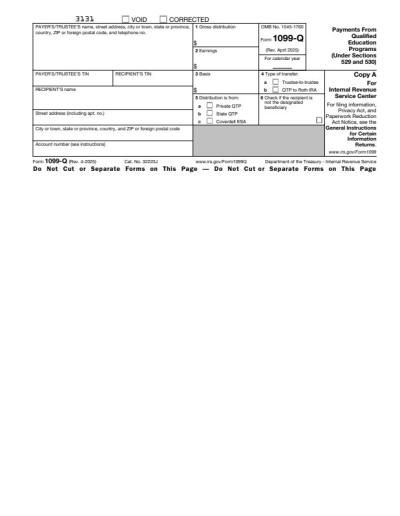
Form 1099-Q, Payments From Qualified Education Programs (Under Sections 529 and 530), is the IRS information return used to report distributions from qualified tuition programs (QTPs, commonly called 529 plans) and Coverdell education savings accounts (ESAs). The payer or trustee files Form 1099-Q to show the IRS and the recipient how much was distributed during the calendar year and, when determinable, how much of that amount represents earnings and basis. The current IRS revision is Rev. April 2025.
The form is organized around payer and recipient identity fields and a small set of reporting boxes. Box 1 reports the gross distribution, box 2 reports earnings, and box 3 reports basis. Boxes 4a and 4b identify the type of transfer, including trustee-to-trustee transfers and direct QTP-to-Roth IRA transfers. Boxes 5a through 5c identify whether the distribution came from a private QTP, state QTP, or Coverdell ESA, and box 6 shows whether the recipient is not the designated beneficiary. On the recipient copy, box 7 may be used for fair market value or certain distribution codes in special Coverdell ESA situations.
Form 1099-Q does not itself determine whether the distribution is taxable. Instead, it supplies the reporting data used with section 529, section 530, and IRS Publication 970 to determine whether any earnings are taxable or whether the transaction is a non-taxable transfer. That makes accurate reporting of the recipient, the source account type, and the box 1 through box 6 classifications especially important.
Who needs to fill this out?
- Qualified tuition program operators must file Form 1099-Q if they are an officer, employee, or designee having control of a program established by a state or eligible educational institution and they made a distribution from that QTP during the year.
- Trustees of Coverdell ESAs must file Form 1099-Q for distributions from Coverdell education savings accounts, including regular distributions, refunds, disability or death payments, and withdrawals of excess contributions plus earnings.
- Filers must furnish a recipient statement to the person treated as the recipient under the IRS rules. For a QTP, the recipient may be the designated beneficiary, the account owner, or an eligible educational institution depending on who actually received the distribution.
- Nominees or middlemen that receive a Form 1099-Q for amounts that actually belong to another person may need to issue a nominee Form 1099-Q and file it with Form 1096 under the general information return rules.
- Do not file Form 1099-Q solely because the designated beneficiary changed on a QTP account if the new beneficiary is a qualifying family member. For a Coverdell ESA, the replacement beneficiary generally must be a qualifying family member and under age 30, unless the beneficiary has special needs.
- Do not file merely because an account exists or has a year-end balance. The filing trigger is a reportable distribution. The specific IRS instructions do not set a minimum dollar threshold for filing Form 1099-Q.
Where and how to submit
Form 1099-Q is filed with the IRS, and a separate statement must also be furnished to the recipient. If you paper file, send Copy A with Form 1096 to the IRS address for your filing location. The IRS currently lists these Form 1096 paper-filing addresses: Internal Revenue Service, Austin Submission Processing Center, P.O. Box 149213, Austin, TX 78714; Department of the Treasury, Internal Revenue Service Center, P.O. Box 219256, Kansas City, MO 64121-9256; and Department of the Treasury, Internal Revenue Service Center, Ogden, UT 84201. The correct address depends on the filer's principal business, office, agency, or legal residence.
Electronic filing is available through the IRS Information Returns Intake System (IRIS) and other approved information return channels. For returns due in calendar year 2024 and later, filers with 10 or more information returns in the aggregate generally must e-file unless the IRS grants a waiver. Standard timing is January 31 to furnish the recipient statement, February 28 to file paper returns with the IRS, and March 31 to file electronically with the IRS.
How to fill it out
- Step 1 — Header and correction boxes: Enter the reporting year in the For calendar year field. Check VOID only when voiding an incorrect form before IRS processing, and check CORRECTED when correcting a previously filed Form 1099-Q.
- Step 2 — Payer/trustee and recipient information: Complete the payer or trustee name, address, telephone number, and PAYER'S/TRUSTEE'S TIN. Then enter the RECIPIENT'S TIN, recipient name, street address, and city, state, and ZIP or foreign postal code. For a QTP, confirm whether the proper recipient is the designated beneficiary, the account owner, or a school. For a Coverdell ESA, enter the designated beneficiary as the recipient.
- Step 3 — Account number and boxes 1 through 3: Enter the Account number if you have multiple accounts for the same recipient or want a tracking reference. Report the total amount paid in box 1 Gross distribution, the earnings portion in box 2 Earnings, and the basis portion in box 3 Basis. When basis is determinable, box 3 should equal box 1 minus box 2.
- Step 4 — Boxes 4a and 4b transfer classification: Check box 4a if the payment was a trustee-to-trustee transfer, including certain direct transfers between QTPs, from a QTP to an ABLE account, or from a Coverdell ESA directly to another Coverdell ESA or QTP. Check box 4b if the payment was made directly from a QTP to a Roth IRA maintained for the benefit of the QTP beneficiary.
- Step 5 — Boxes 5a through 5c source of distribution: Check only one source category. Use box 5a for a private QTP, box 5b for a state QTP, or box 5c for a Coverdell ESA. This classification affects how the recipient interprets the distribution.
- Step 6 — Box 6 and box 7 special reporting: Check box 6 if the recipient is not the designated beneficiary. On the recipient copy, use box 7 when required by the instructions, such as reporting year-end FMV for certain Coverdell ESA cases or adding a distribution code for excess contributions, disability, death, or prohibited transactions.
- Step 7 — Furnish and file: Give Copy B or an approved substitute statement to the recipient by the recipient deadline. File Copy A with the IRS together with Form 1096 if filing on paper, or transmit electronically through IRIS or another approved e-file channel if electronic filing applies.
Important deadlines & penalties
- Recipient statement deadline: Furnish Form 1099-Q to the recipient by January 31 of the year following the distribution year.
- IRS paper filing deadline: File Copy A with Form 1096 by February 28. IRS guidance notes that February 28 remains February 28 even in leap years, unless a weekend or legal holiday rule shifts the deadline.
- IRS electronic filing deadline: If you file electronically, the due date is March 31.
- Electronic filing threshold: If you have 10 or more information returns in the aggregate, you generally must e-file unless the IRS approves a waiver, usually requested on Form 8508.
- Extension to file with the IRS: Request additional time by filing Form 8809, Application for Extension of Time to File Information Returns, on or before the original filing deadline.
- Extension to furnish recipient statements: Under the general information return rules, you may request additional time to furnish statements to recipients before the payee statement due date.
- Late-filing penalties: For returns due in 2025, the IRS penalty is $60 per return or payee statement if corrected within 30 days after the due date, $130 if corrected more than 30 days late but by August 1, $330 if filed after August 1 or not filed, and $660 for intentional disregard. Separate penalties can apply for the IRS filing and the recipient statement.
Common mistakes to avoid
- Using the wrong recipient name and TIN. For QTP distributions, the recipient is not always the designated beneficiary. If the payment went to the account owner, a school, or a direct Roth IRA transfer for the beneficiary, listing the wrong recipient can trigger mismatch notices and require a corrected filing.
- Entering zero in box 2 or box 3 for certain Coverdell ESA cases. If earnings and basis are not being reported for a Coverdell ESA distribution, the instructions say to leave box 2 and box 3 blank and report FMV in box 7. Entering zero can misstate the form.
- Failing the box 1, box 2, and box 3 math check. When basis is determinable, box 3 Basis should equal box 1 Gross distribution minus box 2 Earnings. If it does not, the recipient may report income incorrectly and the filer may need to amend the form.
- Not checking box 4a or 4b for a transfer. Missing the proper transfer checkbox can make a non-taxable transfer appear to be a regular taxable-looking distribution, increasing confusion and correction risk.
- Checking the wrong box 5 category. Marking box 5a, 5b, or 5c incorrectly can cause the recipient to apply the wrong rules for a private QTP, state QTP, or Coverdell ESA.
- Leaving box 6 blank when the recipient is not the designated beneficiary. If the account owner or another non-beneficiary recipient received the payment, failing to check box 6 makes the statement incomplete and may lead to questions or a correction request.
- Paper filing without Form 1096. Copy A must be transmitted with Form 1096 when filed on paper. Omitting the transmittal or using non-scannable copies can delay processing and increase penalty exposure.
Expert tips
- Decide who the recipient is before completing the form. On QTP distributions, the recipient controls the recipient name, TIN, and whether box 6 should be checked. This is one of the most common error points.
- Use Publication 970 with the form instructions. Publication 970 helps recipients understand how box 1, box 2, and box 3 relate to qualified education expenses and potential taxability.
- Keep a worksheet for box 2 earnings. The instructions refer to earnings-ratio rules in IRS notices and proposed regulations. Maintaining support for your box 2 Earnings figure makes later corrections easier.
- Do not truncate the payer's TIN on the IRS copy. IRS rules allow certain truncation of a recipient's TIN on payee statements, but not on documents filed with the IRS, and not for the payer's or trustee's TIN.
- Use the account number field even when optional. The IRS encourages an Account number on all Forms 1099-Q. It helps distinguish multiple accounts for one recipient and simplifies corrected filings.
- Separate Coverdell events when needed. If a Coverdell ESA distribution includes a returned contribution plus earnings and another distribution from the same account, the instructions say separate Forms 1099-Q may be required.
- Check your aggregate filing count early. Even if you issue only a few Forms 1099-Q, you may still be required to e-file because the 10-return threshold is based on total information returns, not this form alone.
Related forms & next steps
- Form 1096 — annual summary and transmittal used when paper-filing Form 1099-Q with the IRS.
- Instructions for Form 1099-Q — official IRS instructions for recipient selection, transfers, and boxes 1 through 7.
- Publication 970 — education tax guidance explaining how Form 1099-Q distributions are analyzed for tax purposes.
- Form 5498-ESA — reports Coverdell ESA contributions and related account information.
- Form 1099-QA — reports distributions from ABLE accounts under a separate reporting regime.
- Form 8508 — request for waiver from the electronic filing requirement for information returns.
- Form 8809 — request for an extension of time to file information returns with the IRS.
Frequently asked questions
What is Form 1099-Q used for?
Form 1099-Q reports distributions from qualified tuition programs and Coverdell ESAs. It shows the IRS and the recipient the total distribution and, when reported, the earnings and basis portions.
Who receives Form 1099-Q?
The recipient depends on who actually received the distribution under the IRS rules. For a QTP, that may be the designated beneficiary, the account owner, or the school. For a Coverdell ESA, the designated beneficiary is generally the recipient.
Is every Form 1099-Q distribution taxable?
No. Form 1099-Q is an information return, not a tax calculation. Taxability depends on qualified education expenses, coordination with other education benefits, and the rules described in Publication 970.
When is Form 1099-Q due?
The standard deadlines are January 31 to furnish the recipient statement, February 28 to paper-file with the IRS, and March 31 to file electronically with the IRS.
How do I report a trustee-to-trustee transfer on Form 1099-Q?
Use box 4a for a trustee-to-trustee transfer covered by the instructions. If the transfer was made directly from a QTP to a Roth IRA maintained for the beneficiary, use box 4b.
What happens if I file Form 1099-Q late or incorrectly?
The IRS can assess separate penalties for late or incorrect IRS filings and for late or incorrect payee statements. For returns due in 2025, the penalty can be $60, $130, or $330 per item depending on how late the correction is made, and $660 per item for intentional disregard.
Can I create Form 1099-Q, Payments From Qualified Education Programs (Under Sections 529 and 530) in bulk?
Yes. PDFengine supports bulk generation of Form 1099-Q, Payments From Qualified Education Programs (Under Sections 529 and 530) via Excel or CSV upload — upload a spreadsheet with one row per entry and PDFengine generates all PDFs at once. You can also automate bulk creation programmatically via the PDFengine API.
Ready to fill it in?
Fill in this formOfficial sources
- About Form 1099-Q — IRS overview of the form and who files it.
- Instructions for Form 1099-Q — official IRS instructions for boxes, recipients, transfers, and special reporting.
- General Instructions for Certain Information Returns — due dates, Form 1096 rules, e-filing rules, and payee statement requirements.
- Where to file Form 1096 — official IRS mailing addresses for paper information return transmittals.
- Information return penalties — IRS penalty amounts for late or incorrect information returns and payee statements.



