
Form 2106, filled in online.
Employee Business Expenses
Type in the panel and watch each answer land on the page. Filling in and signing is free; downloading needs a free account, which includes 5 downloads a month.
Or fill it another way:
- Category
- Tax
- Fillable fields
- 87
- Pages
- 2
- Paper size
- US Letter, 8.5 × 11 in
Five ways to fill this form.
-
Fill it in here
Type in the panel and watch it land on the form. Sign it, then download.
Free to fill and sign Start filling -
Many at once, from a spreadsheet
One row per person, one finished PDF for each.
Paid plan · you can walk through it Start with a spreadsheet -
Send it to someone to fill in
Email a link. They fill it in without an account and you get the answers back.
Paid plan · you can walk through it Send a request -
From your own software
Fill it over the API. One request returns the finished PDF.
Paid plan -
Let an AI assistant do it
Connect ChatGPT or Claude once, then describe what goes on the form.
With a free account
Key facts
| Item | Details |
|---|---|
| Form number | Form 2106 |
| Official name | Employee Business Expenses |
| Issuing agency | Internal Revenue Service, Department of the Treasury |
| Current revision date | 2025 revision; form PDF says Created 3/27/25 |
| Number of pages | 2 pages |
| Filing frequency | Annual, only when attached to an applicable individual return |
| Main return it attaches to | Form 1040, Form 1040-SR, or Form 1040-NR |
| Related instructions document | 2025 Instructions for Form 2106 |
What is this form?
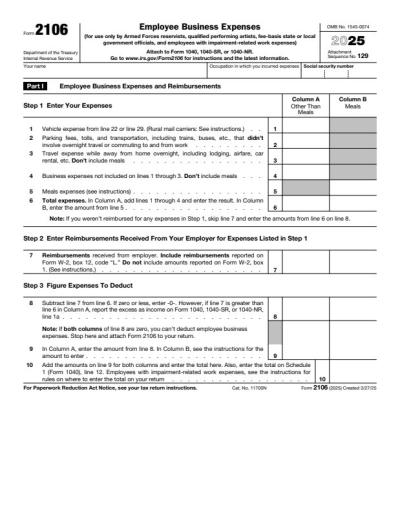
Form 2106, officially titled Employee Business Expenses, is the IRS attachment used by a limited group of employees to calculate deductible unreimbursed job expenses and certain employer reimbursements. For the 2025 form shown here, it attaches to Form 1040, Form 1040-SR, or Form 1040-NR. The current form is the 2025 revision, and the IRS PDF states Created 3/27/25. It is not a general-purpose employee deduction form for every W-2 worker; after the suspension of miscellaneous itemized deductions, it is mainly used by Armed Forces reservists, qualified performing artists, fee-basis state or local government officials, and employees with impairment-related work expenses.
Page 1 contains Part I—Employee Business Expenses and Reimbursements. In Step 1, lines 1 through 6 total vehicle, travel, parking, other business, and meal costs. Step 2, line 7, reports employer reimbursements, including amounts shown in Form W-2, box 12, code L. Step 3, lines 8 through 10, determines the deductible amount and tells eligible filers where to carry it on the return.
Page 2 is Part II—Vehicle Expenses. Section A, lines 11 through 21, documents business-use mileage and substantiation. Filers then choose either Section B—Standard Mileage Rate at line 22 or Section C—Actual Expenses at lines 23 through 29. If they use actual expenses for an owned vehicle, Section D—Depreciation of Vehicles, lines 30 through 38, calculates the depreciation amount that flows back to line 28 and then line 29.
Who needs to fill this out?
- Armed Forces reservists who travel more than 100 miles away from home in connection with reserve service may file Form 2106 to compute the deductible part of those travel expenses.
- Qualified performing artists may file if they performed services as an employee for at least two employers during the year, received $200 or more from at least two of those employers, had allowable performing-arts expenses of more than 10% of gross income from the performing arts, and had adjusted gross income of $16,000 or less before deducting those expenses.
- Fee-basis state or local government officials may file for employee business expenses paid or incurred in performing that fee-basis public job.
- Employees with impairment-related work expenses may file to calculate allowable attendant-care or workplace-related expenses that enable them to work.
- Employees claiming deductible vehicle expenses in one of the categories above use Part II when they have business vehicle costs, including mileage or actual vehicle expenses.
- Employees who generally do not need or cannot use this form include most ordinary W-2 employees with unreimbursed employee expenses, because those deductions are generally suspended for federal tax purposes through current law.
- Rural mail carriers with qualified reimbursements generally should not use Form 2106 for the qualified reimbursement amount; the 2025 instructions say the employer should not include that reimbursement in income.
- People with only line 4-type expenses generally should not complete Form 2106 unless they are a qualified performing artist, fee-basis official, or an employee claiming impairment-related work expenses.
Where and how to submit
Form 2106 is not mailed by itself. The form says to attach it to Form 1040, Form 1040-SR, or Form 1040-NR. Most filers submit it electronically as part of their federal income tax return through IRS Free File, Direct File where available, commercial software, or an authorized e-file provider. You do not give Form 2106 to your employer.
If an employer reimbursement was reported incorrectly, the instructions say to ask the employer for a corrected Form W-2, but the completed Form 2106 itself goes only with the federal return.
For paper filing, there is no separate national mailing address just for Form 2106. The completed form is enclosed with the taxpayer's Form 1040-series return and mailed to the IRS address listed for that taxpayer's state and payment status in the current Form 1040/1040-SR instructions or the IRS paper-return address table. For a 2025 return, the normal filing deadline is April 15, 2026. If the taxpayer files Form 4868 on time, the filing deadline is generally extended to October 15, 2026, although tax due still must be paid by the original due date.
How to fill it out
- Step 1 — Heading and occupation: Enter Your name, your Social security number, and your Occupation in which you incurred expenses at the top of page 1. The identifying information must match the Form 1040, 1040-SR, or 1040-NR to which Form 2106 is attached.
- Step 2 — Step 1, lines 1 through 6: In Column A, enter vehicle expense from line 22 or line 29 on line 1, parking fees, tolls, and local transportation on line 2, overnight travel on line 3, and other business expenses on line 4. Enter allowable Meals expenses on line 5, Column B. On line 6, total Column A lines 1 through 4 and place the meal total in Column B.
- Step 3 — Step 2 and Step 3, lines 7 through 10: On line 7, enter reimbursements received from your employer for the Step 1 expenses, including amounts reported on Form W-2, box 12, code L, but not amounts in Form W-2, box 1. On line 8, subtract line 7 from line 6; if Column A line 7 is greater than line 6, the excess is reported as income on Form 1040, 1040-SR, or 1040-NR, line 1a. Complete line 9 using the instructions for the deductible meal portion, then add both columns on line 10 and carry the total to Schedule 1 (Form 1040), line 12, unless the impairment-related work-expense rules direct you elsewhere.
- Step 4 — Part II, Section A, lines 11 through 21: If you are claiming vehicle expenses, complete Section A for each vehicle. Enter the date the vehicle was placed in service on line 11, total miles driven during 2025 on line 12, business miles on line 13, and compute the Percent of business use on line 14. Then enter average daily roundtrip commuting distance on line 15, commuting miles on line 16, other miles on line 17, and answer the substantiation questions on lines 18 through 21.
- Step 5 — Part II, Section B or Section C: If you qualify to use the standard mileage rate, complete line 22 by multiplying line 13 by 70¢ (0.70) and enter that amount on line 1. If you use the actual expense method instead, complete lines 23 through 29: gasoline, oil, repairs, and insurance on line 23; rentals on line 24a; any inclusion amount on line 24b; the net rental amount on line 24c; any value of employer-provided vehicle on line 25; totals on line 26; business-use percentage on line 27; depreciation on line 28; and the total vehicle expense on line 29, which also goes to line 1.
- Step 6 — Part II, Section D, lines 30 through 38: Complete Section D only if you owned the vehicle and are using Section C. Enter cost or other basis on line 30, any section 179 deduction and special allowance on line 31, the business-use-adjusted basis on line 32, and the depreciation method and percentage on line 33. Compute line 34, total line 35, enter the applicable depreciation limit on line 36, multiply for line 37, and enter on line 38 the smaller of line 35 or line 37. That line 38 amount is also entered on line 28 above. If you used more than two vehicles, attach a second page 2.
Important deadlines & penalties
- Annual due date: For the 2025 tax year, attach Form 2106 to the individual return due April 15, 2026, unless a weekend, holiday, or IRS relief announcement changes the deadline.
- Automatic extension: File Form 4868 by April 15, 2026 to request an automatic extension of time to file the return package, which generally moves the filing deadline to October 15, 2026.
- Late-filing penalty: The IRS states the failure-to-file penalty for individuals is generally 5% of the unpaid tax for each month or part of a month the return is late, up to 25%. If the return is more than 60 days late and was required to be filed in 2026, the minimum penalty is generally $525 or 100% of the unpaid tax, whichever is less.
- Late-payment penalty: If tax is not paid by the original due date, the failure-to-pay penalty is generally 0.5% of the unpaid tax per month, up to 25%. If both late-filing and late-payment penalties apply in the same month, the late-filing penalty is reduced by the late-payment amount.
- Special timing rules: U.S. citizens or residents living abroad usually receive an automatic 2-month filing extension to June 15, 2026, though interest generally still runs from April 15. Federally declared disaster relief may also postpone the filing deadline for the entire return, including Form 2106.
- No separate Form 2106 deadline: Because the form is an attachment, its deadline always follows the due date of the taxpayer's Form 1040, 1040-SR, or 1040-NR return.
Common mistakes to avoid
- Using Form 2106 as a general unreimbursed employee expense form: Most W-2 employees can no longer deduct those expenses. Filing it without fitting one of the allowed categories can lead to a disallowed deduction and an IRS adjustment notice.
- Putting Form W-2, box 1 wages on line 7: Line 7 specifically excludes amounts reported in box 1. Overstating reimbursements can erase a valid deduction or produce the wrong result on line 8.
- Forgetting that excess reimbursements in Column A can become income: If line 7 is greater than line 6 in Column A, the excess must be reported on Form 1040, 1040-SR, or 1040-NR, line 1a. Missing that rule can underreport income.
- Claiming commuting miles as business miles: The instructions for lines 13, 15, and 16 make clear that ordinary commuting is not deductible. Inflating business miles on line 13 overstates the business-use percentage on line 14 and can distort every later vehicle calculation.
- Completing both Section B and Section C for the same vehicle: The filer should use either the standard mileage rate at line 22 or the actual expense method at lines 23 through 29 for a vehicle, not both. Double counting can overstate line 1.
- Using the standard mileage rate when not allowed: The 2025 instructions say the standard mileage rate is allowed only if the first-year and lease-period rules are met, and it cannot be used for five or more vehicles used simultaneously. Using it anyway can invalidate the deduction.
- Skipping Section A substantiation questions: If you claim vehicle expense on line 1 but leave lines 11 through 21 incomplete or unsupported, the IRS may deny the vehicle deduction for lack of contemporaneous evidence.
Expert tips
- Confirm eligibility before you start: If you are not an Armed Forces reservist, qualified performing artist, fee-basis official, or employee with impairment-related work expenses, Form 2106 often will not produce a federal deduction.
- Use the reimbursement allocation worksheet when meals were reimbursed together with other costs: The line 7 instructions include a worksheet so you can split reimbursements properly between Column A and Column B.
- Keep written mileage evidence for lines 12 through 21: The form explicitly asks on lines 20 and 21 whether you have evidence and whether it is written. A mileage log is much stronger than a reconstructed estimate.
- Remember the 2025 mileage rate: For the standard method, line 22 uses 70 cents per business mile. That amount changes by year, so do not copy a prior-year rate.
- Check whether meals are only 50% deductible before filling line 9: The instructions say business meals are generally limited, so the amount carried from line 8, Column B to line 9 is not always the full cost.
- Review Publication 463 and Publication 946 together: Publication 463 is the main reference for travel, meal, gift, and car-expense substantiation, while Publication 946 helps with depreciation that feeds Section D.
- If you used more than two vehicles, add a second page 2 early: The instructions require another Form 2106, page 2 for additional vehicles, and the extra line 22 amounts must be included in the total on line 1.
Related forms & next steps
- Form 1040 — Main individual income tax return to which Form 2106 is attached.
- Form 1040-SR — Senior version of the individual return that can also include Form 2106.
- Form 1040-NR — U.S. nonresident income tax return referenced on Form 2106 as an attachment destination.
- Schedule 1 (Form 1040) — Additional Income and Adjustments to Income; most eligible Form 2106 deductions flow to line 12.
- Schedule A (Form 1040) — Itemized deductions schedule used for impairment-related work expenses under the Form 2106 instructions.
- Form 4562 — Used to figure depreciation and section 179 amounts that may feed line 4 or Section D.
- Form 4868 — Requests the automatic extension of time to file the return package that includes Form 2106.
- 2025 Instructions for Form 2106 — Official line-by-line instructions, eligibility rules, and vehicle-expense limitations.
Frequently asked questions
Who can still use Form 2106?
Only specific categories of employees generally benefit from Form 2106: Armed Forces reservists, qualified performing artists, fee-basis state or local government officials, and employees with impairment-related work expenses.
Can ordinary W-2 employees deduct unreimbursed work expenses on Form 2106?
Usually no. For most employees, miscellaneous itemized deductions subject to the 2% floor are suspended, so Form 2106 does not create a federal deduction unless the filer falls into one of the special categories allowed in the instructions.
Does Form 2106 go to my employer or to the IRS?
It goes to the IRS as an attachment to Form 1040, 1040-SR, or 1040-NR. You do not submit the form to your employer, although you may need a corrected Form W-2 if reimbursements were reported incorrectly.
Can I use the standard mileage rate on Form 2106?
Yes, but only if you meet the IRS rules for that vehicle. For 2025, line 22 uses 70 cents per business mile. The standard mileage rate cannot be used in every situation, especially if the first-year or lease-period rules are not satisfied.
What records do I need for Form 2106 vehicle expenses?
You should keep mileage logs, receipts, reimbursement statements, and other written proof showing the amount, time, place, and business purpose of each expense. The form specifically asks on lines 20 and 21 whether you have evidence and whether it is written.
What if my employer reimbursed me but included the amount in Form W-2 box 1?
The line 7 instructions say not to include amounts reported in Form W-2, box 1 as reimbursements on that line. If the amount was reported incorrectly, ask the employer for a corrected Form W-2 before finalizing the deduction.
Can I create Form Employee Business Expenses in bulk?
Yes. PDFengine supports bulk generation of Form Employee Business Expenses via Excel or CSV upload — upload a spreadsheet with one row per entry and PDFengine generates all PDFs at once. You can also automate bulk creation programmatically via the PDFengine API.
Ready to fill it in?
Fill in this formOfficial sources
- About Form 2106, Employee Business Expenses — IRS overview page for the form and related resources.
- 2025 Form 2106 PDF — Official IRS form showing the 2025 revision, line numbers, and attachment instructions.
- 2025 Instructions for Form 2106 — Official eligibility rules, reimbursement guidance, mileage-rate rules, and line-by-line instructions.
- IRS Failure to File Penalty — Official penalty rates, minimum late-filing penalty amounts, and coordination with failure-to-pay penalties.
- About Form 4868 — IRS page for the automatic extension of time to file an individual return.



