
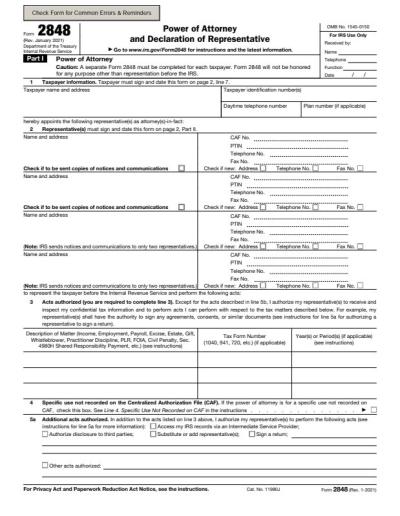
Form 2848, filled in online.
Power of Attorney and Declaration of Representative
Type in the panel and watch each answer land on the page. Filling in and signing is free; downloading needs a free account, which includes 5 downloads a month.
Or fill it another way:
- Category
- Tax
- Fillable fields
- 91
- Pages
- 2
- Paper size
- US Letter, 8.5 × 11 in
Five ways to fill this form.
-
Fill it in here
Type in the panel and watch it land on the form. Sign it, then download.
Free to fill and sign Start filling -
Many at once, from a spreadsheet
One row per person, one finished PDF for each.
Paid plan · you can walk through it Start with a spreadsheet -
Send it to someone to fill in
Email a link. They fill it in without an account and you get the answers back.
Paid plan · you can walk through it Send a request -
From your own software
Fill it over the API. One request returns the finished PDF.
Paid plan -
Let an AI assistant do it
Connect ChatGPT or Claude once, then describe what goes on the form.
With a free account
Key facts
| Form number | Form 2848 |
|---|---|
| Official name | Power of Attorney and Declaration of Representative |
| Issuing agency | Internal Revenue Service, Department of the Treasury |
| Current revision date | Rev. January 2021 form; instructions revised September 2021 |
| Number of pages | 2 pages |
| Filing frequency | As needed; filed when representation authority is required |
| Who signs | Taxpayer or authorized signer on line 7, plus each representative in Part II |
| Related instructions document | Instructions for Form 2848 (09/2021) |
What is this form?
Form 2848 is the IRS's official Power of Attorney and Declaration of Representative. It lets a taxpayer authorize an eligible individual—such as an attorney, certified public accountant, enrolled agent, enrolled actuary, enrolled retirement plan agent, certain unenrolled return preparers, or another person listed in Part II—to represent the taxpayer before the Internal Revenue Service. In Part I, the taxpayer identifies the taxpayer on line 1, lists representatives on line 2, and defines the exact tax matters covered on line 3. The form also allows the named representative to inspect and receive confidential tax information for those listed matters, unless line 5b limits the authority.
This version of Form 2848 is Rev. January 2021, and the IRS instructions are revised September 2021. The two-page form covers line 4 for a specific use not recorded on the Centralized Authorization File (CAF), line 5a for additional acts authorized, line 5b for specific acts not authorized, line 6 for retention or revocation of prior powers of attorney, and line 7 for the taxpayer declaration and signature. Page 2 also contains Part II, Declaration of Representative, where each representative enters a designation letter, licensing jurisdiction, and any required license or enrollment number before signing and dating.
Form 2848 is commonly used for audits, collections, transcript access, appeals, payroll tax issues, estate and gift tax matters, and other identified federal tax matters. If you only want someone to inspect or receive tax information without representing you, the IRS directs taxpayers to Form 8821 instead.
Who needs to fill this out?
- Individuals who want an eligible representative to act before the IRS for identified matters such as Form 1040 income tax, payroll tax, penalty, collection, or examination issues.
- Businesses and entities including corporations, partnerships, exempt organizations, trusts, estates, employee plans, and bond issuers that need to authorize a named individual to represent them before the IRS.
- Partnerships subject to the BBA centralized partnership audit regime when the partnership representative wants to appoint an eligible person as power of attorney for a partnership matter.
- Taxpayers in a joint-return situation where representation is needed: each spouse must file a separate Form 2848 even if both spouses appoint the same representative for the same year.
- Taxpayers using a specific-use authorization that is not recorded on the CAF may still use Form 2848 by checking line 4 and sending it to the office handling that matter.
- Who does not need to file: taxpayers who only want an individual or organization to inspect or receive confidential tax information without representation should generally use Form 8821 instead of Form 2848, and fiduciaries generally use Form 56 to notify the IRS of the fiduciary relationship itself.
Where and how to submit
If line 4 is not checked, Form 2848 can generally be submitted online, by fax, or by mail. The IRS instructions say taxpayers and representatives may submit online through IRS.gov/Submit2848, and electronically signed Forms 2848 may be submitted only online. The IRS also points practitioners to the all-digital Tax Pro Account, where many requests are recorded immediately to the CAF.
The IRS Where To File chart lists 5333 Getwell Road, Stop 8423, Memphis, TN 38118 with fax 855-214-7519 for many eastern and southern states; 1973 Rulon White Blvd., MS 6737, Ogden, UT 84201 with fax 855-214-7522 for many western and midwestern states; and 2970 Market Street, MS: 4-H14.123., Philadelphia, PA 19104 with fax 855-772-3156 or 304-707-9785 from outside the United States for foreign and territorial filings. If line 4 is checked, send the form to the IRS office handling that specific matter. There is no employer filing copy; this form goes to the IRS.
How to fill it out
- Step 1 — Line 1, Taxpayer information: Enter the taxpayer's name and address, taxpayer identification number(s), daytime telephone number, and plan number if applicable. Use the correct TIN for the taxpayer type: SSN or ITIN for an individual, EIN for a business, and both individual and business numbers where the instructions require them.
- Step 2 — Line 2, Representative(s): For each representative, enter the full name and mailing address, then complete the CAF No., PTIN, Telephone No., and Fax No. fields. If no CAF number has been assigned, the instructions say to enter None. Check the notice-copy box only for representatives who should receive IRS notices and communications.
- Step 3 — Line 3, Acts authorized: Complete all three columns for each matter: Description of Matter, Tax Form Number, and Year(s) or Period(s). Be exact—for example, Income / 1040 / 2023 or Employment / 941 / quarter ending 06/30/2025. The IRS instructions state that line 3 is required.
- Step 4 — Line 4 and line 5a, special scope and added powers: Check line 4 only if the authorization is for a specific use not recorded on the CAF. On line 5a, check only the powers you actually want to grant, such as Authorize disclosure to third parties, Substitute or add representative(s), Sign a return, or Access my IRS records via an Intermediate Service Provider.
- Step 5 — Line 5b and line 6, limits and prior authorizations: On line 5b, list any specific acts not authorized. On line 6, decide whether this filing should revoke earlier powers of attorney for the same matters and periods. If you check the box to keep a prior power of attorney in effect, attach a copy of that prior power of attorney.
- Step 6 — Line 7, Taxpayer declaration and signature: The taxpayer, or a person with legal authority to sign for the taxpayer, must sign and date page 2, line 7. Complete the Print name, Title (if applicable), and Print name of taxpayer from line 1 if other than individual fields where relevant.
- Step 7 — Part II, Declaration of Representative: Each representative must complete Part II in the same order listed on line 2. Enter the Designation letter, Licensing jurisdiction, and any required bar, license, certification, registration, or enrollment number, then sign and date.
Important deadlines & penalties
- No annual due date: Form 2848 is filed when representation authority is needed, not on a fixed calendar deadline.
- File before the representative acts: submit it before the representative calls the IRS, appears in an examination, requests records, or signs any document that requires power-of-attorney authority.
- Electronic signatures: if the taxpayer uses an electronic signature image or digitized signature, the instructions say the form must be submitted online at IRS.gov/Submit2848 rather than by mail or fax.
- Specific-use filings on line 4: when line 4 is checked, send the form promptly to the IRS office handling that matter instead of the regular CAF unit.
- Penalty consequences: the IRS instructions do not impose a standalone dollar penalty for filing Form 2848 late. The practical consequence is that the IRS can refuse to discuss the matter with the representative, or return the form if line 7 or Part II is incomplete, while underlying tax penalties and interest on the actual tax matter may continue to accrue.
- No extension form: there is no separate extension request for Form 2848 itself. If a prior power of attorney should stay in effect, line 6 requires checking the retention box and attaching a copy of the prior power of attorney.
Common mistakes to avoid
- Leaving line 3 incomplete by failing to fill in the Description of Matter, Tax Form Number, or Year(s) or Period(s) columns. The IRS explicitly requires line 3, and vague entries can delay processing or lead to rejection.
- Using one form for both spouses on a joint return. The instructions require each spouse to file a separate Form 2848. If only one spouse signs, the other spouse is not represented.
- Failing to complete page 2, line 7. The form states that if the taxpayer declaration and signature section is not completed, signed, and dated, the IRS will return the power of attorney.
- Failing to complete Part II for every representative. If a representative does not enter the designation letter, sign, and date the declaration, or if representatives do not sign in the same order listed on line 2, the IRS says it will return the form.
- Checking too many notice-copy boxes on line 2. The IRS sends notices and communications to only two representatives for the same matters, so overchecking does not expand the limit.
- Checking line 6 to keep an earlier power of attorney but not attaching a copy. The form says you must attach a copy of any power of attorney you want to remain in effect.
- Assuming the address on line 1 updates IRS records. The instructions say address information on Form 2848 does not change the taxpayer's last known address.
Expert tips
- Match the representative's name exactly on every filing. The instructions tell representatives to use the identical full name on all submissions and correspondence, which helps the IRS match the authorization to the correct CAF record.
- If no CAF number exists, write "None" rather than leaving the field blank. The IRS will assign a CAF number directly to the representative.
- Be narrow and specific on line 3. Break matters out by type and period—for example, Income / Form 1040 / 2022 and 2023 or Employment / Form 941 / quarter ending 06/30/2025.
- Use line 5a carefully. The power to sign a return is limited and should be granted only when the facts and IRS rules support it.
- Use line 5b to carve out authority you do not want to grant. That section is useful when a representative may communicate with the IRS but should not have the full default scope of authority.
- For electronically signed forms, do not mail a duplicate. The instructions say electronic signatures must be submitted online.
Related forms & next steps
- Form 8821 — Tax Information Authorization; used when you want someone to inspect or receive tax information without representation authority.
- Form 56 — Notice Concerning Fiduciary Relationship; used to notify the IRS that a fiduciary is acting for a taxpayer.
- Form 8822 — Change of Address; used by individuals to update their last known address with the IRS.
- Form 8822-B — Change of Address or Responsible Party—Business; used by businesses to update address or responsible-party information.
- Instructions for Form 2848 — official filing and line-by-line instructions.
Frequently asked questions
What is Form 2848 used for?
Form 2848 authorizes an eligible individual to represent a taxpayer before the IRS for the specific tax matters and years or periods listed on line 3. It also authorizes that person to inspect and receive confidential tax information for those matters.
Do both spouses need to sign Form 2848 for a joint return?
Yes. The IRS instructions say each spouse must file a separate Form 2848, even if both spouses want to appoint the same representative for the same joint-return year.
Can I authorize more than one representative on Form 2848?
Yes. Form 2848 allows multiple representatives. However, only two representatives can be designated to receive copies of IRS notices and communications for the same matters.
Can Form 2848 be filed online?
Yes. The IRS allows online submission through IRS.gov/Submit2848, and the instructions say forms with an electronic signature image or digitized handwritten signature may be submitted only online.
What happens if line 3 is too vague or Part II is not signed?
The IRS may reject or return the form. Line 3 must identify the matter, tax form number, and year or period, and each representative must complete, sign, and date Part II in the proper order.
Does Form 2848 change my address with the IRS?
No. The instructions specifically say that address information on Form 2848 does not change the taxpayer's last known address. To update an address, the IRS generally directs individuals to Form 8822 and businesses to Form 8822-B.
Can I create Form 2848 in bulk?
Yes. PDFengine supports bulk generation of Form 2848 via Excel or CSV upload — upload a spreadsheet with one row per entry and PDFengine generates all PDFs at once. You can also automate bulk creation programmatically via the PDFengine API.
Ready to fill it in?
Fill in this formOfficial sources
- About Form 2848, Power of Attorney and Declaration of Representative — official IRS overview of the form and its purpose.
- Instructions for Form 2848 — official IRS instructions covering line-by-line rules, filing methods, and Where To File addresses and fax numbers.
- Form 2848 PDF — official IRS form showing the current fields, warnings, and declarations.
- Submit Forms 2848 and 8821 Online — IRS guidance on online submission and digital processing options.



