
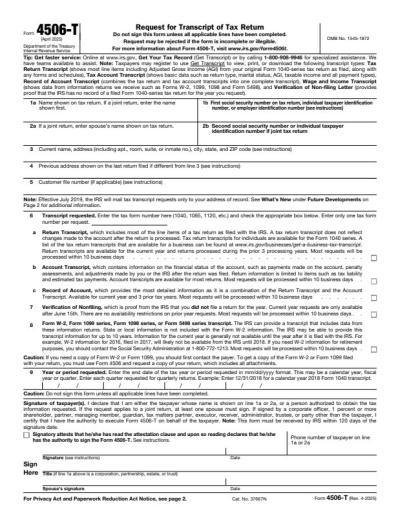
Form 4506-T, filled in online.
Request for Transcript of Tax Return
Type in the panel and watch each answer land on the page. Filling in and signing is free; downloading needs a free account, which includes 5 downloads a month.
Or fill it another way:
- Category
- Tax
- Fillable fields
- 24
- Pages
- 2
- Paper size
- US Letter, 8.5 × 11 in
Five ways to fill this form.
-
Fill it in here
Type in the panel and watch it land on the form. Sign it, then download.
Free to fill and sign Start filling -
Many at once, from a spreadsheet
One row per person, one finished PDF for each.
Paid plan · you can walk through it Start with a spreadsheet -
Send it to someone to fill in
Email a link. They fill it in without an account and you get the answers back.
Paid plan · you can walk through it Send a request -
From your own software
Fill it over the API. One request returns the finished PDF.
Paid plan -
Let an AI assistant do it
Connect ChatGPT or Claude once, then describe what goes on the form.
With a free account
Key facts
| Form number | Form 4506-T |
|---|---|
| Official name | Request for Transcript of Tax Return |
| Issuing agency | Internal Revenue Service, Department of the Treasury |
| Current revision date | April 2025 (Rev. 4-2025) |
| Number of pages | 2 pages, including instructions |
| Filing frequency | As needed |
| Primary purpose | Request IRS transcript information rather than a photocopy of the full return |
| Related instructions document | Instructions printed on page 2 of Form 4506-T and the IRS Form 4506-T page |
What is this form?
Form 4506-T, officially titled Request for Transcript of Tax Return, is the IRS authorization form used to request transcript data from a previously filed tax account. It does not request a photocopy of the full return. Instead, it lets a taxpayer ask for a Return Transcript, Account Transcript, Record of Account, Wage and Income Transcript, or Verification of Nonfiling. The current IRS form is Form 4506-T (Rev. 4-2025), and the form itself states that most requests are processed within 10 business days.
The form is structured around a few key parts. Lines 1a through 4 identify the taxpayer and the address information that must match IRS records. Line 5 is the optional Customer file number, which prints on the transcript and helps a lender, attorney, or taxpayer match the transcript to an internal file without exposing a full taxpayer identification number. Line 6 asks for the tax form number, while boxes 6a, 6b, and 6c and lines 7 and 8 determine which transcript product the IRS should issue.
Line 9 identifies the tax year, fiscal year, or quarter requested.
In practice, Form 4506-T is commonly used in lending, tax controversy, estate administration, business due diligence, and income verification. It is also the form the IRS tells taxpayers to use when they have a fiscal tax year and need a return transcript. The form is only a request mechanism: it does not amend a return, replace a missing filing, or update an address by itself.
Who needs to fill this out?
- Individuals who need an IRS transcript of a Form 1040-series return, Wage and Income Transcript data, or a Verification of Nonfiling letter for a mortgage, student aid, tax preparation, litigation, or audit support.
- Businesses and other entities that need transcripts relating to returns such as Form 1065, Form 1120, or other business filings, using line 1b for the EIN and line 6 for the tax form number.
- Taxpayers with a fiscal year beginning in one calendar year and ending in the next year, because the IRS instructions specifically direct those taxpayers to use Form 4506-T to request a return transcript.
- Joint filers requesting transcript information from a jointly filed return; line 2a and line 2b are used for the spouse's name and identifying number, and at least one spouse must sign.
- Authorized representatives, corporate officers, partners, trustees, executors, guardians, managing members, or others with legal authority to obtain the tax information, including representatives with authority specifically delegated on Form 2848, line 5.
- People who do not need this form if they can use IRS Get Transcript online or by phone for the same transcript type instead of mailing or faxing a paper request.
- People who should use a different form if they need an actual copy of a filed return with attachments rather than a transcript; in that case the IRS directs them to Form 4506, not Form 4506-T.
Where and how to submit
Form 4506-T is submitted to the IRS, not to an employer, lender, or payroll department. The IRS allows the form to be sent by mail or fax to the RAIVS Team location assigned to the state where the taxpayer lived, or where the business was located, when the return was filed. The current IRS where-to-file page lists these main destinations: Austin, TX 73301 for certain individual transcript requests, Kansas City, MO 64999 for certain individual and business transcript requests, and Ogden, UT 84409 for certain individual and business transcript requests, with state-specific fax numbers that correspond to each location. Because the IRS notes that online address tables may be updated after the form is printed, taxpayers should verify the current chart before sending the request.
There is no general annual due date for Form 4506-T because it is filed as needed. However, timing rules matter. The IRS must receive the signed form within 120 days of the signature date, and current-year Verification of Nonfiling requests on line 7 are available only after June 15. If you do not need to mail or fax a paper form, the IRS also directs taxpayers to faster self-service options through Get Transcript at IRS.gov or by calling 1-800-908-9946.
How to fill it out
- Step 1 — Taxpayer identification (lines 1a, 1b, 2a, and 2b): Enter the name shown on the tax return on line 1a. If the request relates to a joint return, enter the spouse's name on line 2a. On line 1b, enter the first SSN or ITIN shown on the return, or the EIN if the request relates to a business return. If joint, enter the second SSN or ITIN on line 2b.
- Step 2 — Current and prior address (lines 3 and 4): On line 3, enter the current name and address, including apartment, suite, P.O. box, or inmate number if applicable. On line 4, enter the previous address shown on the last return filed if it is different from line 3. The IRS instructions say to file Form 8822 or Form 8822-B if your address has changed and IRS records have not been updated.
- Step 3 — Customer file tracking (line 5): If you want a reference number printed on the transcript, enter up to 10 numeric characters in the Customer file number field on line 5. Do not use an SSN. The instructions warn that if you use an SSN, name, or a combination of both, the IRS will replace it with a generic entry of 9999999999 on the transcript.
- Step 4 — Identify the return and transcript type (line 6 and boxes 6a, 6b, 6c): On line 6, enter only one tax form number per request, such as 1040, 1065, or 1120. Then check 6a for a Return Transcript, 6b for an Account Transcript, or 6c for a Record of Account. Use the definitions printed on the form to match the request to the correct transcript product.
- Step 5 — Special transcript requests (lines 7 and 8): Check line 7 if you need a Verification of Nonfiling; the form states that current-year requests are available only after June 15. Use line 8 if you need transcript data from information returns such as Form W-2, the 1099 series, the 1098 series, or the 5498 series. The IRS notes that current-year Wage and Income information is generally not available until the year after filing.
- Step 6 — Tax period requested (line 9): Enter the end date for each tax year or period requested in mm/dd/yyyy format on line 9. For calendar-year Form 1040 requests, use dates like 12/31/2024. For quarterly returns, enter each quarter separately. If you need more than four years or periods, attach another Form 4506-T.
- Step 7 — Signature area and attestation checkbox: Before signing, complete all applicable lines. Then check the attestation box in the signature area, sign, date, add a title if line 1a is a corporation, partnership, estate, or trust, and provide the taxpayer phone number. The IRS states the form must be received within 120 days of the signature date or it will be rejected.
Important deadlines & penalties
- No annual filing deadline: Form 4506-T is not an annual tax return. You file it only when you need transcript information.
- 120-day signature rule: The IRS states that the signed form must be received within 120 days of the signature date. If it arrives after that window, the request will be rejected.
- Current-year nonfiling requests: A Verification of Nonfiling request on line 7 is available for the current year only after June 15.
- Processing timeframe: The form states that most transcript requests are processed within 10 business days, but mailing and fax handling can add time.
- No separate late-filing penalty listed for Form 4506-T itself: The IRS does not impose a stated dollar-based late-filing penalty for sending this request form after a certain date, because it is optional. The practical consequence of a late, stale, unsigned, or incomplete request is rejection and delay.
- Fraud risk: The Privacy Act notice on the form warns that providing false or fraudulent information may subject the requester to penalties under tax law, even though the form itself does not list a fixed dollar amount on its face.
- No extension form: There is no extension procedure for Form 4506-T. If the 120-day signature window expires, you must sign and submit a new form.
Common mistakes to avoid
- Entering the wrong taxpayer name on line 1a or 2a: The IRS matches the request to the name shown on the original return. If the name does not match IRS records, the transcript request may be rejected or delayed.
- Using the wrong identifying number on line 1b or 2b: For business transcript requests, line 1b should contain the EIN; for individual requests it should contain the first SSN or ITIN shown on the return. A mismatch can cause a no-record response or rejection.
- Leaving line 4 blank when the last filed return used a different address: If the address on the last return differs from the current address on line 3, omitting line 4 can prevent the IRS from locating the account accurately.
- Putting more than one tax form number on line 6: The instructions say to enter only one tax form number per request. Mixing forms such as 1040 and 1099 on the same line can result in rejection or incomplete fulfillment.
- Requesting the wrong product by checking the wrong box: A taxpayer who needs post-filing adjustments may check 6a Return Transcript when 6b Account Transcript or 6c Record of Account would be more useful. That can mean ordering a second transcript and losing time in underwriting or dispute resolution.
- Using an SSN in the Customer file number field on line 5: The IRS specifically says not to do this. If you enter an SSN, name, or both, the IRS will substitute 9999999999, defeating the tracking purpose of the field.
- Forgetting the signature-area attestation box, signature, or date: The IRS says the form will not be processed if the required checkbox is unchecked, and the request will also fail if the form is unsigned, undated, or received more than 120 days after signing.
Expert tips
- Use Record of Account when uncertain: The IRS instructions say to request the Record of Account if you are unsure which transcript type you need, because it combines return and account data.
- Match line 9 to the return type: For a calendar-year Form 1040, enter an end date such as 12/31/2024. For quarterly returns, list each quarter separately instead of entering only the tax year.
- Keep line 5 purely numeric and generic: Use a neutral 10-digit internal file number rather than a client name or SSN so the transcript prints a useful identifier without exposing protected data.
- Check the current IRS address chart before sending: The IRS says the website may contain newer where-to-file information than the printed form. Always verify the latest chart before mailing or faxing.
- Update your address first if needed: If IRS records still show an old address, file Form 8822 or Form 8822-B before relying on Form 4506-T, especially because transcript mailings go to the taxpayer's address of record.
- Use Get Transcript for speed when eligible: If you do not need a mailed or faxed paper request, the IRS points taxpayers to Get Transcript online or the transcript phone line for faster access.
- Attach authority documents for entity or representative requests: Corporate, estate, trust, partnership, and power-of-attorney requests often fail because supporting authority is missing. If a representative signs, attach the Form 2848 showing the delegated authority.
Related forms & next steps
- Form 4506 — request a full copy of a previously filed tax return, including attachments.
- Form 4506-C — IVES Request for Transcript of Tax Return, generally used by Income Verification Express Service participants.
- Form 2848 — Power of Attorney and Declaration of Representative; needed when a representative is specifically authorized to sign Form 4506-T.
- Form 8822 — Change of Address for individuals when the address on line 3 differs from IRS records.
- Form 8822-B — Change of Address or Responsible Party — Business for business address updates.
- Form 4506-T page — official IRS overview page for transcript requests and updates.
Frequently asked questions
What is Form 4506-T used for?
Form 4506-T is used to request transcript information from the IRS. Depending on the box checked, it can request a Return Transcript, Account Transcript, Record of Account, Wage and Income Transcript, or Verification of Nonfiling.
Is Form 4506-T the same as Form 4506?
No. Form 4506-T requests transcript data. Form 4506 requests an actual copy of a filed tax return with attachments. If you need the full return package, use Form 4506 instead.
How long is a signed Form 4506-T valid?
The IRS states that it must receive the signed form within 120 days of the signature date. After that, the request becomes stale and you must sign a new one.
Can I request a current-year Verification of Nonfiling right away?
No. The form says current-year requests for Verification of Nonfiling on line 7 are available only after June 15. Prior-year requests do not have that restriction.
Can I submit Form 4506-T electronically?
The IRS pushes taxpayers toward Get Transcript online and its transcript phone service for faster access, but the paper Form 4506-T itself is generally submitted by mail or fax to the RAIVS Team address listed for the taxpayer's state.
What is the most common reason Form 4506-T gets rejected?
Common rejection points are an unchecked signature-area attestation box, a missing signature or date, mismatched name or taxpayer identification data on lines 1a through 2b, and forms received more than 120 days after signing.
Can I create Form 4506-T in bulk?
Yes. PDFengine supports bulk generation of Form 4506-T via Excel or CSV upload — upload a spreadsheet with one row per entry and PDFengine generates all PDFs at once. You can also automate bulk creation programmatically via the PDFengine API.
Ready to fill it in?
Fill in this formOfficial sources
- IRS Form 4506-T (Rev. 4-2025) — official IRS form with line-by-line field labels, transcript types, signature rules, and mailing instructions.
- About Form 4506-T — official IRS overview of what transcript products can be requested with Form 4506-T.
- Where to file addresses for Form 4506-T — current IRS mailing and fax destinations for RAIVS transcript requests.
- Get Transcript — official IRS self-service transcript retrieval option referenced by Form 4506-T.
- IRS Form 2848 — official IRS power of attorney form relevant when a representative signs or requests transcript information.



