
Form 5695, filled in online.
Form 5695 — official IRS fillable PDF form
Type in the panel and watch each answer land on the page. Filling in and signing is free; downloading needs a free account, which includes 5 downloads a month.
Or fill it another way:
- Category
- Tax
- Fillable fields
- 167
- Pages
- 4
- Paper size
- US Letter, 8.5 × 11 in
Five ways to fill this form.
-
Fill it in here
Type in the panel and watch it land on the form. Sign it, then download.
Free to fill and sign Start filling -
Many at once, from a spreadsheet
One row per person, one finished PDF for each.
Paid plan · you can walk through it Start with a spreadsheet -
Send it to someone to fill in
Email a link. They fill it in without an account and you get the answers back.
Paid plan · you can walk through it Send a request -
From your own software
Fill it over the API. One request returns the finished PDF.
Paid plan -
Let an AI assistant do it
Connect ChatGPT or Claude once, then describe what goes on the form.
With a free account
Key facts
| Form number | Form 5695 |
|---|---|
| Official name | Residential Energy Credits |
| Issuing agency | Internal Revenue Service, U.S. Department of the Treasury |
| Current revision date | 2025 form year |
| Number of pages | 4 pages |
| Filing frequency | Annual, only when claiming the credit or reporting a carryforward |
| Related instructions document | Instructions for Form 5695 |
| Attached to | Form 1040, Form 1040-SR, or Form 1040-NR |
What is this form?
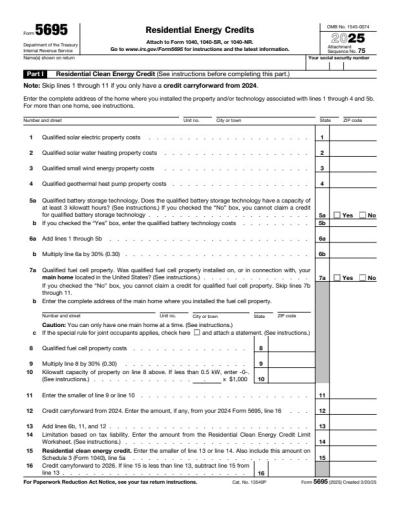
Form 5695, officially titled Residential Energy Credits, is the IRS form individual taxpayers use to calculate and claim federal home-energy tax credits on an annual income tax return. The version reflected by this template is the 2025 Form 5695. It is attached to Form 1040, Form 1040-SR, or Form 1040-NR and is used to compute the exact nonrefundable credit that later flows to Schedule 3. Form 5695 is not a rebate application and is not filed by itself; it is a tax calculation form that supports a federal return.
Part I—Residential Clean Energy Credit covers qualified solar electric property costs on line 1, solar water heating property costs on line 2, small wind energy property costs on line 3, geothermal heat pump property costs on line 4, battery storage technology on lines 5a and 5b, and qualified fuel cell property on lines 7 through 11. It also includes the prior-year carryforward on line 12, the tax-liability limitation on line 14, the allowed residential clean energy credit on line 15, and the carryforward to 2026 on line 16.
Part II—Energy Efficient Home Improvement Credit is divided into Section A—Qualified Energy Efficiency Improvements and Section B—Residential Energy Property Expenditures. It covers insulation, exterior doors, exterior windows, skylights, central air conditioners, water heaters, furnaces, boilers, panelboards, home energy audits, heat pumps, heat pump water heaters, biomass stoves, and biomass boilers. The form requires cost entries, eligibility checkboxes, address fields, and Qualified Manufacturer Identification Number entries for specific items, making it the IRS's line-by-line worksheet for turning qualifying home-improvement costs into the exact credit allowed for the tax year.
Who needs to fill this out?
- Individual taxpayers filing Form 1040, 1040-SR, or 1040-NR must file Form 5695 if they want to claim a residential energy credit for a home in the United States.
- File Part I if you paid qualified 2025 costs for solar electric property, solar water heating property, small wind energy property, geothermal heat pump property, qualified battery storage technology, or qualified fuel cell property.
- File Part II if you paid qualified 2025 costs for insulation, exterior doors, exterior windows, skylights, central air conditioners, natural gas, propane, or oil water heaters, furnaces, hot water boilers, heat pumps, heat pump water heaters, biomass stoves, biomass boilers, panelboards, branch circuits, feeders, or home energy audits.
- Taxpayers with a residential clean energy credit carryforward from 2024 must file Form 5695 to enter that amount on line 12, even if they had no new Part I spending in 2025.
- Joint occupants who are not married filing jointly may each need their own Form 5695 if they shared costs and must allocate the credit under the special rules referenced on line 7c and line 32a.
- Condominium or cooperative owners may need Form 5695 when claiming a fractional share of qualifying costs and checking line 32b.
- There is no income threshold written into Form 5695 itself; eligibility depends on taxpayer type, property type, home location, whether the home is a main home when required, and whether the item meets the applicable efficiency or certification rules.
- Do not file Form 5695 if you are not claiming either residential energy credit, do not have a carryforward, or your costs were for property that fails the IRS placed-in-service, main-home, efficiency, or certification requirements.
- Do not use Form 5695 for corporations, partnerships, employers, or payroll reporting. It belongs on an individual federal income tax return, not on business entity returns or information returns.
Where and how to submit
Form 5695 is filed with your federal income tax return; it is not submitted to an employer, contractor, manufacturer, utility company, or state agency. The official form states that it is attached to Form 1040, Form 1040-SR, or Form 1040-NR. Most taxpayers file it electronically through IRS e-file, IRS Free File, or commercial tax software that supports Form 5695.
If you file on paper, mail the entire return package to the IRS Form 1040 filing address that applies to your state, residency status, and whether you are enclosing a payment. The IRS publishes those addresses on its official Form 1040 "Where to file" pages. Because the mailing address varies, Form 5695 does not have one universal paper-filing address of its own. For the 2025 tax year, the normal filing deadline for the return that includes Form 5695 is April 15, 2026, unless the IRS announces a later due date because of a weekend, holiday, disaster relief, or similar filing relief.
How to fill it out
- Step 1 — Taxpayer information: Enter Name(s) shown on return and Your social security number at the top of page 1. If continuation pages are used, make sure the identifying information matches the federal return exactly.
- Step 2 — Part I, Residential Clean Energy Credit: Enter the property address in the address fields at the top of Part I, then complete line 1 for qualified solar electric property costs, line 2 for qualified solar water heating property costs, line 3 for qualified small wind energy property costs, line 4 for qualified geothermal heat pump property costs, and lines 5a and 5b for qualified battery storage technology. Add those amounts on line 6a and multiply by 30% on line 6b.
- Step 3 — Part I, fuel cell and carryforward entries: If qualified fuel cell property applies, answer the line 7a Yes/No boxes, enter the property address on line 7b, check line 7c if the special rule for joint occupants applies, enter costs on line 8, compute 30% on line 9, calculate the kilowatt-capacity limit on line 10, and enter the smaller amount on line 11. Then enter any 2024 carryforward on line 12, total the credit on line 13, apply the limitation on line 14, enter the allowed credit on line 15, and compute the carryforward to 2026 on line 16.
- Step 4 — Part II, Section A—Qualified Energy Efficiency Improvements: Complete the eligibility questions on lines 17a through 17e. Enter insulation material or system costs on line 18a and the 30% computation on line 18b. For exterior doors, enter the cost of the most expensive door on line 19a, the Qualified Manufacturer Identification Number on line 19b, the 30% amount on line 19c, additional door details on line 19d, other qualifying door costs on line 19e, and complete the subtotal through line 19h. For windows and skylights, use lines 20a through 20d, including the required Qualified Manufacturer Identification Number fields.
- Step 5 — Part II, Section B—Residential Energy Property Expenditures: Answer the questions on lines 21a through 21c, including whether the property was originally placed in service by you and the address of each relevant home. Then enter costs and identification information for central air conditioners on lines 22a through 22d, water heaters on lines 23a through 23d, furnaces or hot water boilers on lines 24a through 24d, panelboards and enabling property on lines 25a through 25e, and home energy audits on lines 26a through 26c.
- Step 6 — Part II, annual limits and special property: Add the amounts listed on line 27, then enter the smaller of line 27 or $1,200 on line 28. Complete lines 29a through 29h for electric or natural gas heat pumps, heat pump water heaters, biomass stoves, and biomass boilers, keeping the separate $2,000 limit in mind. Add those amounts through line 29i, complete the Part II total on line 30, enter the limitation worksheet result on line 31, and put the allowed credit on line 32.
- Step 7 — Final reporting and attachment: Check line 32a if the special rule for joint occupants applies and line 32b if you are claiming a condominium or cooperative fractional share. Then transfer the final credit to Schedule 3 (Form 1040), line 5b as directed by the form and attach Form 5695 to your federal return.
Important deadlines & penalties
- 2025 return deadline: File Form 5695 with your federal return by April 15, 2026, unless the IRS announces a later due date for your location.
- Extension deadline: To request more time to file the return, submit Form 4868 by April 15, 2026. A valid extension generally moves the filing deadline to October 15, 2026.
- Late-filing penalty: There is no separate penalty schedule just for Form 5695, but if your overall individual return is late and tax is due, the general failure-to-file penalty is usually 5% of the unpaid tax for each month or part of a month, up to 25%.
- Late-payment penalty: If tax is not paid by the original due date, the general failure-to-pay penalty is usually 0.5% of the unpaid tax for each month or part of a month, up to 25%, plus interest.
- Amended return timing: If you forgot to claim the credit, you generally correct it by filing Form 1040-X within the normal time limits for amended refund claims.
- Special deadline changes: Federally declared disasters, combat zone relief, and IRS administrative postponements can change the filing deadline. When that happens, Form 5695 follows the same postponed deadline as the related Form 1040 filing.
Common mistakes to avoid
- Including nonqualifying installation labor in Section A: For insulation, doors, windows, and skylights, the IRS instructions say not to include onsite preparation, assembly, or original installation costs in the amounts entered on lines 18a, 19a, 19d, 19e, 20a, or 20b. If those costs are included, the credit on lines 18b, 19c, 19g, or 20d can be overstated and reduced by the IRS.
- Leaving the Qualified Manufacturer Identification Number blank: The form requires manufacturer identification information on lines such as 19b, 19d, 20a, 22a, 23a, 24a, 25d, 29a, 29c, and 29e for specified property. Missing or invalid entries can delay processing or lead to disallowance of the item.
- Claiming main-home-only property for the wrong residence: Mistakes in the eligibility boxes on lines 17a through 17e or lines 21a and 21b can cause a denied credit when the property was not installed in or connected to a qualifying main home.
- Ignoring the qualified fuel cell limitation: Some filers calculate 30% on line 9 and stop there. The form also requires the capacity-based limit on line 10 and the smaller-of rule on line 11. Skipping those entries can overstate the Part I credit.
- Claiming battery storage that does not meet the minimum threshold: Qualified battery storage technology on line 5b must have a capacity of at least 3 kilowatt hours. Entering a smaller system can invalidate the claimed amount.
- Skipping the tax-liability limitation lines: The amount on line 14 limits Part I, and the worksheet result entered on line 31 limits Part II. If you carry the gross credit forward without those limits, the return may claim more credit than the law allows.
- Failing to reduce costs for subsidies or nonbusiness use: If a nontaxable utility subsidy reduced your out-of-pocket cost, or the property had partial business use, the amount entered on the form may need to be reduced before calculating the credit. Ignoring that adjustment can produce an IRS correction.
Expert tips
- Break every invoice into product cost, labor, rebates, and identifiers before starting: That makes it easier to place the correct numbers on lines 18 through 29 and avoid including nonqualifying labor where the instructions disallow it.
- Use the placed-in-service date, not just the contract date: Form 5695 generally follows when installation is completed or original use begins. This matters for year-end projects and for deciding whether a cost belongs on the 2025 form.
- Keep the carryforward worksheet with your return copy: If you enter a prior amount on line 12 or generate a carryforward on line 16, save the form and supporting worksheet so you can substantiate the number on the next year's return.
- Copy the Qualified Manufacturer Identification Number exactly: Do not shorten, estimate, or reformat the QMID on lines 19, 20, 22, 23, 24, 25, and 29. Use the manufacturer's official documentation.
- Watch the separate annual caps carefully: Part II has multiple limits, including a $1,200 annual cap for many items, a $600 combined cap for windows and skylights, a $250 per door and $500 total cap for doors, a $150 cap for home energy audits, and a separate $2,000 cap for certain heat pumps and biomass equipment.
- Prepare an allocation statement for joint occupants: If you check line 7c or line 32a, keep a short worksheet showing what each occupant paid, the total paid by all occupants, and how your allocable fraction was calculated.
- Use both the official IRS instructions and Department of Energy guidance: The IRS instructions explain how to compute the credit, while Department of Energy guidance is useful for confirming whether a home energy audit or specific equipment category fits the intended federal standard.
Related forms & next steps
- Form 1040 — U.S. individual income tax return to which Form 5695 is attached.
- Schedule 3 (Form 1040) — Used to report nonrefundable credits, including the amount transferred from Form 5695.
- Form 1040-SR — Individual return for seniors that can include Form 5695.
- Form 1040-NR — Nonresident alien return referenced on Form 5695 as an attachment option.
- Form 1040-X — Amended individual return used if you need to claim a missed Form 5695 credit later.
- Form 4868 — Automatic extension request for more time to file the return that includes Form 5695.
- Instructions for Form 5695 — Official line-by-line instructions, definitions, and credit limitations for this form.
Frequently asked questions
What is Form 5695 used for?
Form 5695 is used to calculate and claim federal residential energy credits on an individual tax return. It covers both the Residential Clean Energy Credit in Part I and the Energy Efficient Home Improvement Credit in Part II.
Do I need Form 5695 for solar panels?
Yes. If you want to claim the federal residential clean energy credit for qualified solar electric property, you generally calculate that credit in Part I of Form 5695 and attach the form to your federal return.
Can I claim Form 5695 for a second home?
Some Part I property can qualify for a home that is not your main home, but many Part II items and qualified fuel cell property are subject to stricter main-home rules. You have to follow the rule that applies to the exact line item being claimed.
Why is my Form 5695 credit less than 30% of what I spent?
Because the form applies multiple caps and limits. Examples include the fuel cell limitation on lines 10 and 11, the Part II annual cap on line 28, the separate $2,000 limitation for certain heat pumps and biomass equipment, and the tax-liability limitations on lines 14 and 31.
Do I have to attach receipts to Form 5695?
Generally no, receipts are not attached to the filed return, but you should keep invoices, proof of payment, manufacturer identification information, and any supporting certification or audit records in case the IRS asks for them later.
Can I fix Form 5695 if I forgot to claim the credit?
Usually yes. The normal correction is to file Form 1040-X for the affected year and attach a completed Form 5695 showing the missed credit, subject to the standard deadlines for amended refund claims.
Can I create Form 5695, Residential Energy Credits in bulk?
Yes. PDFengine supports bulk generation of Form 5695, Residential Energy Credits via Excel or CSV upload — upload a spreadsheet with one row per entry and PDFengine generates all PDFs at once. You can also automate bulk creation programmatically via the PDFengine API.
Ready to fill it in?
Fill in this formOfficial sources
- IRS — About Form 5695 — official overview of Form 5695, including related forms and updates.
- IRS — Instructions for Form 5695 — official line-by-line instructions, definitions, limitations, and filing rules.
- IRS — Form 5695 PDF — official current form showing the exact lines, boxes, and field names.
- IRS — Where to file Form 1040 — official filing address lookup used when Form 5695 is attached to an individual return.
- U.S. Department of Energy — 25C Energy Efficient Home Improvement Credit — government guidance on qualifying improvement categories and home energy audit standards relevant to Part II.



