
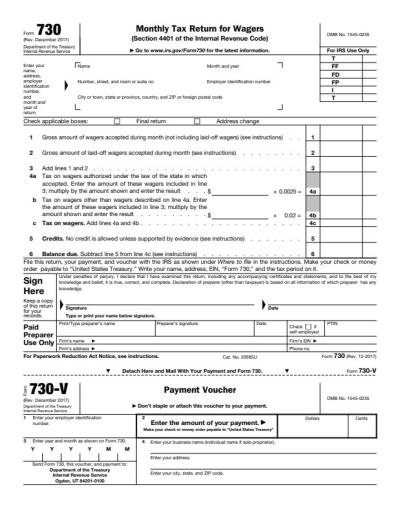
Form 730, filled in online.
Form 730 — official IRS fillable PDF form
Type in the panel and watch each answer land on the page. Filling in and signing is free; downloading needs a free account, which includes 5 downloads a month.
Or fill it another way:
- Category
- Tax
- Fillable fields
- 45
- Pages
- 4
- Paper size
- US Letter, 8.5 × 11 in
Five ways to fill this form.
-
Fill it in here
Type in the panel and watch it land on the form. Sign it, then download.
Free to fill and sign Start filling -
Many at once, from a spreadsheet
One row per person, one finished PDF for each.
Paid plan · you can walk through it Start with a spreadsheet -
Send it to someone to fill in
Email a link. They fill it in without an account and you get the answers back.
Paid plan · you can walk through it Send a request -
From your own software
Fill it over the API. One request returns the finished PDF.
Paid plan -
Let an AI assistant do it
Connect ChatGPT or Claude once, then describe what goes on the form.
With a free account
What is this form?
Form 730 is the IRS monthly return used to report and pay the federal excise tax on wagers. It focuses on a specific monthly activity base, so accuracy depends on matching the reported amounts to wagering records, gross receipts, and any related federal compliance files. On PDFengine, the template is presented as a fillable PDF so the user can complete the official layout online and download a clean finished file. The field schema behind this template maps the real AcroForm fields, which makes it practical for structured data entry, repeatable office workflows, and later review.
Because this is an official IRS form, accuracy matters more than marketing language. Users should treat it as a filing-ready worksheet: enter names, identification numbers, dates, amounts, and checkboxes exactly as they appear in source records. A reliable PDF workflow is especially useful when multiple people need to review the same filing package or when a taxpayer, executor, employer, or adviser needs to keep a precise copy for audit or recordkeeping purposes.
Who needs to fill this out?
- Businesses or persons who accept taxable wagers subject to federal excise tax
- Sports books, wagering operators, or advisers handling U.S. wagering tax compliance
- Finance teams that must calculate the monthly tax on gross wagers
- Filers who need a clean monthly IRS record of wagering-tax liability and payments
- Anyone who wants to complete the official Form 730 layout without editing the original government PDF by hand
Where and how to submit
Form 730 is filed with the IRS on a monthly basis, generally by the last day of the month following the month in which the taxable wagers were accepted. The finished return should be kept with wagering ledgers, tax workpapers, and payment records because the filing often needs to reconcile to other regulatory or financial reports. If the business works with advisers, the final PDF is best stored in the same monthly compliance package as the supporting calculations.
For Dutch and German users dealing with U.S. tax paperwork, the main practical point is that Form 730 remains a U.S. federal tax document even when you prepare it from abroad. That means you should follow IRS filing instructions, preserve English names exactly as issued in source documents, and keep a copy of the final PDF together with any schedules, statements, payroll reports, probate records, or correspondence linked to the filing.
Before entering data, assemble the source records that control the filing: the current IRS instructions, the related federal return, statements from payers or custodians, prior-year carryforwards, and any schedules that feed the calculation. Mark which figures are copied, which are calculated, and which require a judgment or election. This simple preparation step prevents a number from being entered twice or carried to the wrong line and gives a reviewer a clear audit trail.
Review the completed form in two passes. In the first pass, check identity data, tax year, addresses, identification numbers, status boxes, and signatures. In the second, recalculate totals and compare every material amount with the source schedule. A mathematically correct total can still be wrong when it belongs to another person, activity, period, or return. Resolve differences before creating the final PDF rather than explaining them after filing.
How to fill it out
- Step 1 — Review the filing context: Start with Month and year and confirm you are working on the right tax year, transaction, or reporting event before entering numbers.
- Step 2 — Enter identifying details: Complete fields such as Employer identification number and any related taxpayer, recipient, business, estate, employer, or child information exactly as shown in the underlying records.
- Step 3 — Add the core reportable amounts: Use entries like Line 1: Gross amount of wagers accepted during month (not including laid-off wagers) (dollars) and Line 2: Gross amount of laid-off wagers accepted during month (dollars) to capture the main amounts the IRS expects on Form 730. Match those figures to source documents instead of estimating.
- Step 4 — Finish supporting selections: Review checkbox or supporting fields such as Final return checkbox so the form reflects status, exceptions, filing years, or special circumstances correctly.
- Step 5 — Complete the remaining calculations or narrative: If the PDF includes a text area or explanation field such as Line 4c: Tax on wagers. Add lines 4a and 4b (dollars), use it to clarify corrections, reporting assumptions, or transaction details when needed.
- Step 6 — Validate before filing: Compare the finished PDF with the related return, statement, payroll file, probate packet, or support documents and make sure names, amounts, dates, and attachments are consistent before submission.
Frequently asked questions
What does Form 730 report?
It reports the federal excise tax on taxable wagers for a specific month.
Is Form 730 filed yearly or quarterly?
No. It is generally a monthly return.
Why is the monthly cutoff important?
Because wagers must be reported in the correct month, not rolled into a later period.
Should wagering records match the form?
Yes. The return should tie back to the underlying wagering and accounting records.
Do payment records need to be kept?
Yes. Proof of payment should stay with the monthly filing package.
Can I create Form 730 in bulk?
Yes. PDFengine supports bulk generation of Form 730 via Excel or CSV upload — upload a spreadsheet with one row per form and PDFengine generates all PDFs at once. You can also automate bulk creation programmatically via the PDFengine API.
Ready to fill it in?
Fill in this form


