
Alabama Tax Form 40a, filled in online.
Alabama Tax Form 40a — official fillable PDF form
Type in the panel and watch each answer land on the page. Filling in and signing is free; downloading needs a free account, which includes 5 downloads a month.
Or fill it another way:
- Category
- Tax
- Fillable fields
- 322
- Pages
- 4
- Paper size
- US Letter, 8.5 × 11 in
Five ways to fill this form.
-
Fill it in here
Type in the panel and watch it land on the form. Sign it, then download.
Free to fill and sign Start filling -
Many at once, from a spreadsheet
One row per person, one finished PDF for each.
Paid plan · you can walk through it Start with a spreadsheet -
Send it to someone to fill in
Email a link. They fill it in without an account and you get the answers back.
Paid plan · you can walk through it Send a request -
From your own software
Fill it over the API. One request returns the finished PDF.
Paid plan -
Let an AI assistant do it
Connect ChatGPT or Claude once, then describe what goes on the form.
With a free account
What is this form?
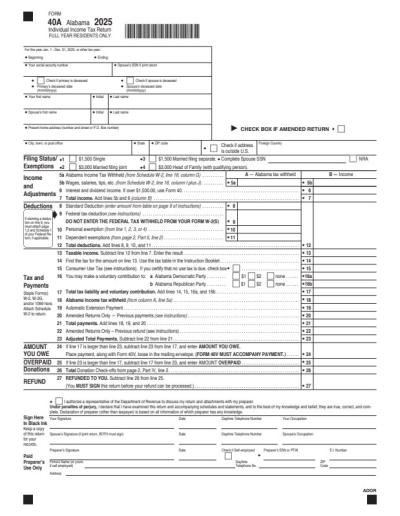
Alabama Tax Form 40A is a shorter Alabama individual income tax return issued by the Alabama Department of Revenue. It is intended for filing situations that fit the eligibility rules of the shorter form while still capturing names, address details, filing status, income, withholding, and final tax due or refund.
The field schema shows the form still follows the same practical order as a larger return: personal details first, then calculations, then signatures. Representative fields such as First name and middle initial, Last name, and Address make it clear you should gather identity data, address information, and amendment details before moving through the tax lines.
Use this template if you qualify for the short return and want a fillable PDF that matches the official layout exactly. It is especially useful when you need a clean typed copy for mailing, internal review, or a client sign-off process.
Before you submit the final PDF, compare every typed entry against the official instructions, supporting schedules, and source records. Small mismatches in names, identification numbers, dates, totals, or checkbox selections are one of the most common reasons official forms need to be corrected later. Using a fillable PDF helps readability, but careful review is still what makes the filing usable.
It is also smart to keep the source documents used for each line close to the finished PDF. If a preparer, employer, buyer, seller, or state agency asks how a figure or identifier was entered, you can quickly trace each box back to the form, title, tax worksheet, or record it came from.
When a form belongs to an older tax year or to a state-specific process, always confirm that you are using the correct version before submission. Government agencies may reject a perfectly completed PDF if it was prepared on the wrong revision, missing a required attachment, or sent to the wrong filing address.
If another person needs to review the form before filing, send them the typed PDF together with the source records you used. That makes it easier to spot missing signatures, inconsistent totals, and data-entry mistakes before the document reaches the agency or counterparty.
Who needs to fill this out?
- Alabama taxpayers whose filing situation fits the short-return rules for Form 40A
- Married couples or individuals who want to type the official form instead of handwriting it
- Users preparing a corrected or amended short-form return where clean presentation matters
- Tax assistants collecting taxpayer information before a final compliance review
Where and how to submit
Submit the finished form to the Alabama Department of Revenue using the filing instructions printed with that year’s Form 40A package. Include signatures, attachments, and payment if required, and keep a PDF copy for your records before sending it.
How to fill it out
- Step 1 — Adobe® Reader XI or higher will allow you to save the form data and complete the form.: Start by copying the information exactly as it appears on your official documents or tax records.
- Step 2 — First name and middle initial: Use the matching line or box from your supporting paperwork so the PDF stays consistent with the filing record.
- Step 3 — Last name: If the field applies only in a special case, leave it blank unless the instructions tell you to complete it.
- Step 4 — Spouse's first name and middle initial: Review spelling, numbers, and line mapping before moving to the next section.
- Step 5 — Spouse's last name: For calculated amounts, enter the final figure from your worksheet or state instructions rather than estimating inside the PDF.
- Step 6 — Amended return: Finish by checking related signature, date, and submission requirements before you print or file the form.
Frequently asked questions
Who can use Form 40A?
Only taxpayers whose facts meet the Alabama eligibility rules for the short return. If your return is more complex, you may need a different Alabama form.
Can I amend Form 40A?
Yes, if the state allows an amended short-form filing and the PDF includes the needed checkbox. Follow the official amendment instructions.
Do I need my spouse’s details?
If you are filing jointly, yes. The template includes separate spouse name fields and related tax lines where needed.
Why does the PDF mention Adobe Reader?
Some government forms are built for Adobe features. PDFengine keeps the fillable fields accessible online, but you should still review the final PDF carefully before submission.
Should I print or e-file this form?
Use the official filing method allowed for that tax year. Some users print and mail the return, while others transfer the same data into a separate e-file workflow.
Can I create Alabama Form 40A in bulk?
Yes. PDFengine supports bulk generation of Alabama Form 40A via Excel or CSV upload — upload a spreadsheet with one row per form and PDFengine generates all PDFs at once. You can also automate bulk creation programmatically via the PDFengine API.
Ready to fill it in?
Fill in this form


