
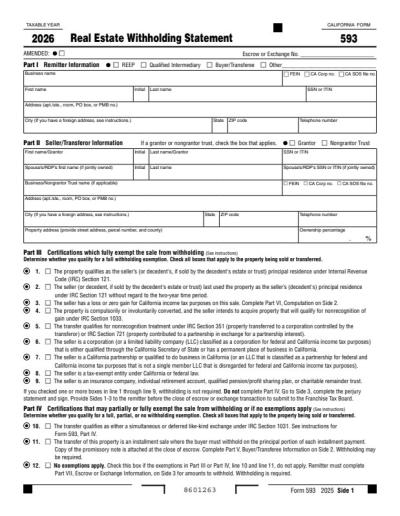
California Form 593 Real Estate Withholding Statement, filled in online.
California Form 593 Real Estate Withholding Statement — official fillable PDF form
Type in the panel and watch each answer land on the page. Filling in and signing is free; downloading needs a free account, which includes 5 downloads a month.
Or fill it another way:
- Category
- Tax
- Fillable fields
- 146
- Pages
- 3
- Paper size
- US Letter, 8.5 × 11 in
Five ways to fill this form.
-
Fill it in here
Type in the panel and watch it land on the form. Sign it, then download.
Free to fill and sign Start filling -
Many at once, from a spreadsheet
One row per person, one finished PDF for each.
Paid plan · you can walk through it Start with a spreadsheet -
Send it to someone to fill in
Email a link. They fill it in without an account and you get the answers back.
Paid plan · you can walk through it Send a request -
From your own software
Fill it over the API. One request returns the finished PDF.
Paid plan -
Let an AI assistant do it
Connect ChatGPT or Claude once, then describe what goes on the form.
With a free account
What is this form?
California Form 593 Real Estate Withholding Statement is an official form issued by the California Franchise Tax Board (FTB) to report and remit real estate withholding connected with a California property transfer, installment payment, or like-kind exchange. The statement identifies the remitter, seller or transferor, buyer, property, sales price, withholding calculation, and payment timing. It gives the seller credit for tax withheld and enables the FTB to match the payment. Form 593 does not replace the purchase agreement, escrow statement, or the seller’s income tax return.
\nUse the official instructions for the relevant filing year alongside this fillable version. PDFengine helps you enter data into the original PDF and download a completed copy, but it does not decide eligibility, calculate facts that are not supplied, or submit the form for you. Before signing, compare every identifier, date, amount, checkbox, and attachment against source records. A technically complete PDF can still be rejected when information is inconsistent, a required schedule is missing, or an outdated revision is used.
Who needs to fill this out?
This template is most relevant to people and organizations in the following situations:
\n- Escrow companies and qualified intermediaries remitting California real estate withholding. Review the official eligibility and filing rules before relying on this form.
- Buyers acting as remitters when no escrow holder performs the duty. Review the official eligibility and filing rules before relying on this form.
- Sellers or transferors documenting withholding credit. Review the official eligibility and filing rules before relying on this form.
- Parties reporting installment-sale or exchange-related withholding. Review the official eligibility and filing rules before relying on this form.
If your facts fall outside these examples, consult the issuing agency’s current instructions or a qualified adviser. Do not enter placeholder identifiers or estimates merely to make every field appear complete; leave fields blank only when the instructions permit it and use the required notation when a line calls for zero, none, or not applicable.
Where and how to submit
Provide copies to the seller or transferor and submit the required copy and payment to the FTB according to the current Form 593 due-date table. Electronic remitters should follow FTB payment and upload procedures. Deadlines can depend on the closing, installment receipt, or exchange date, so retain escrow records and proof of remittance. PDFengine does not transmit this form to the issuing agency. Download the final PDF, check that all entries remain visible, and use only the agency’s accepted filing channel. Protect the file in storage and transit because tax, identity, financial, or personnel information may be sensitive. Record the submission date, delivery or confirmation number, amount paid when applicable, and the exact version sent so you can answer a later notice or prepare a correction.
How to fill it out
Gather identification records, the related return or transaction documents, and the current agency instructions before starting. Then complete the PDF in this order:
\n- \n
- Step 1 — Escrow or Exchange No.: Select this option only when it accurately describes the filing or transaction, and review nearby alternatives so that conflicting choices are not marked. This label comes directly from the official PDF, so match it to the same line in the agency instructions.
- Step 2 — Buyer/Transferee: Select this option only when it accurately describes the filing or transaction, and review nearby alternatives so that conflicting choices are not marked. This label comes directly from the official PDF, so match it to the same line in the agency instructions.
- Step 3 — Business name: Enter the complete legal name used in the related agency record or source document; use a trade name only when the label or instructions specifically request it. This label comes directly from the official PDF, so match it to the same line in the agency instructions.
- Step 4 — SSN or ITIN: Copy this identifier exactly from the official record, preserving every digit and any required leading zero; then compare it a second time before continuing. This label comes directly from the official PDF, so match it to the same line in the agency instructions.
- Step 5 — Address (apt./ste., room, PO box, or PMB no.): Enter the requested address component exactly as used for official correspondence, including unit, state, postal code, and foreign-address details when applicable. This label comes directly from the official PDF, so match it to the same line in the agency instructions.
- Step 6 — Spouse's/RDP's first name (if jointly owned): Enter the complete legal name used in the related agency record or source document; use a trade name only when the label or instructions specifically request it. This label comes directly from the official PDF, so match it to the same line in the agency instructions.
After completing these steps, inspect the entire PDF page by page. Calculated totals should reconcile to source schedules, checkbox answers should not conflict, and names and identifiers should remain consistent across all pages. Sign and date only after that review, and add any schedules, statements, payment, or evidence required by the official instructions.
Frequently asked questions
Who is responsible for California real estate withholding?
\nThe buyer is generally the withholding agent, although an escrow holder or qualified intermediary commonly performs the reporting and remittance. Always verify the current instructions when dates, thresholds, addresses, or agency procedures could have changed.
\nIs withholding the seller’s final California tax?
\nNo. It is a prepayment credited on the seller’s California return; the final gain and tax are calculated separately. Always verify the current instructions when dates, thresholds, addresses, or agency procedures could have changed.
\nCan a seller qualify for an exemption or reduced amount?
\nCertain exemptions and alternative calculations may apply when properly certified using the required FTB documentation. Always verify the current instructions when dates, thresholds, addresses, or agency procedures could have changed.
\nHow does a joint ownership transfer get reported?
\nEnter each transferor’s identifying and ownership information as instructed and allocate withholding correctly among them. Always verify the current instructions when dates, thresholds, addresses, or agency procedures could have changed.
\nWhat if Form 593 was filed with an error?
\nUse the FTB correction procedure promptly so the payment and seller credit are matched to the correct account. Always verify the current instructions when dates, thresholds, addresses, or agency procedures could have changed.
\nCan I create California Form 593 Real Estate Withholding Statement in bulk?
\nYes. PDFengine supports bulk generation of California Form 593 Real Estate Withholding Statement via Excel or CSV upload: use one row per form and map each spreadsheet column to the corresponding PDF field. PDFengine then generates the completed PDFs together. You can also automate bulk creation programmatically through the PDFengine API. Bulk generation speeds up data entry but does not replace record-by-record validation, signatures, attachments, or submission through the issuing agency’s approved channel.
Ready to fill it in?
Fill in this form


