
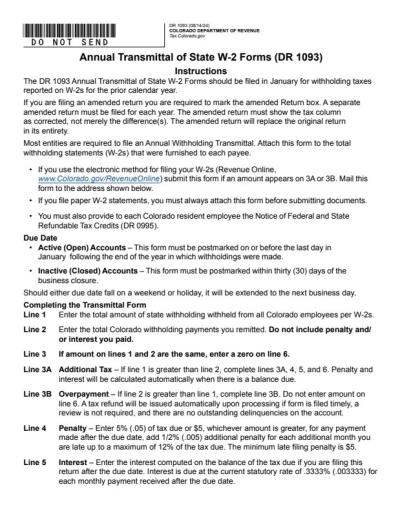
Colorado DR 1093 — Annual Transmittal of State W-2 Forms, filled in online.
Colorado DR 1093 — Annual Transmittal of State W-2 Forms — official fillable PDF form
Type in the panel and watch each answer land on the page. Filling in and signing is free; downloading needs a free account, which includes 5 downloads a month.
Or fill it another way:
- Category
- Tax
- Fillable fields
- 41
- Pages
- 4
- Paper size
- US Letter, 8.5 × 11 in
Five ways to fill this form.
-
Fill it in here
Type in the panel and watch it land on the form. Sign it, then download.
Free to fill and sign Start filling -
Many at once, from a spreadsheet
One row per person, one finished PDF for each.
Paid plan · you can walk through it Start with a spreadsheet -
Send it to someone to fill in
Email a link. They fill it in without an account and you get the answers back.
Paid plan · you can walk through it Send a request -
From your own software
Fill it over the API. One request returns the finished PDF.
Paid plan -
Let an AI assistant do it
Connect ChatGPT or Claude once, then describe what goes on the form.
With a free account
What is this form?
Colorado DR 1093, Annual Transmittal of State W-2 Forms, is the Colorado Department of Revenue reconciliation return used to report the total Colorado income tax shown on the W-2 statements submitted for a filing period. It compares the withholding reported on those employee statements with the tax already remitted to the state, then identifies a balance due or an overpayment. The form also records the employer or filer account details, the number of W-2s included, and whether the return amends an earlier filing.
DR 1093 is a summary return, not a substitute for the individual W-2 records. Complete it from the same payroll reports and W-2 totals used for the state wage-statement submission. PDFengine lets you enter the values into the official fillable PDF, review the completed document, and download a copy for filing and recordkeeping.
Who needs to fill this out?
- Colorado employers that withheld Colorado income tax from employee wages and must reconcile their annual W-2 information.
- Payroll departments, bookkeepers, accountants, and payroll service providers preparing a client's Colorado year-end withholding return.
- Businesses correcting a previously submitted DR 1093 by filing an amended return.
- Employers that need to report a difference between Colorado tax shown on W-2s and amounts already remitted during the filing period.
Use the filing instructions that apply to the relevant tax year and account. A business with no Colorado withholding activity may have different close-account or zero-return requirements. If payroll records do not agree with Revenue Online payment history, reconcile the difference before submitting the form rather than changing W-2 totals merely to make the return balance.
Where and how to submit
Submit DR 1093 and the related wage statements using the method required by the Colorado Department of Revenue for the relevant filing year, commonly through Revenue Online or an approved electronic wage-reporting channel. If paper filing is permitted for your situation, use the current official instructions for the correct mailing address and payment handling; addresses and electronic-filing thresholds can change. File by the due date printed in the applicable instructions, retain the submitted DR 1093, W-2 totals, payment confirmations, and proof of delivery with the employer's payroll records.
How to fill it out
- Step 1 — Filing period and account identity: Enter the applicable year or period in Filing Period. Provide either the requested SSN 1 and SSN 2 details or the employer FEIN, plus the Colorado Account Number. Copy these identifiers from official payroll and Department of Revenue records.
- Step 2 — Filer name and mailing address: Complete Last Name or Business Name, First Name, Middle InitialRow1, Address, City, StateRow1, and ZIP. Use the legal name tied to the withholding account, not an informal trade name unless that is the registered account name.
- Step 3 — Period, due date, and attachments: Enter period from, period to, and Due Date MMDDYY. Add the total in Number of W2s Attached and a contact number in Phone Number. Select amended rtn only when correcting a return already filed, and select EFT when payment was made electronically.
- Step 4 — W-2 withholding total: Enter the aggregate Colorado income tax withheld from all included W-2s in 1. dollars and 1. cents. This amount should equal the sum of the Colorado withholding boxes on the wage statements, not total federal withholding or gross wages.
- Step 5 — Payments already remitted: Enter the withholding tax paid for the period in 2. dollars and 2. cents. Verify the figure against accepted payments in Revenue Online and include only payments applicable to this account and period.
- Step 6 — Difference, penalty, and interest: If line 1 exceeds line 2, enter the difference in 3a. dollars and 3a. cents. If line 2 exceeds line 1, use 3b. dollars and 3b. cents. Add any instructed amounts in 4. dollars/4. cents for penalty and 5. dollars/5. cents for interest; do not estimate these amounts without the applicable instructions.
- Step 7 — Final payment and date: Record any payment accompanying the return in 6 dollars and 6 cents, then complete Signature Date. Review identifiers, decimal placement, attachment count, and the arithmetic before downloading the PDF.
Frequently asked questions
Is DR 1093 the same as a Colorado W-2?
No. Each W-2 reports one employee's wages and withholding, while DR 1093 summarizes the Colorado withholding totals for the group of W-2s submitted.
What amount belongs on line 1?
Enter the combined Colorado income tax withheld as reported on all W-2s included with the return. Reconcile that total to the payroll register before filing.
What amount belongs on line 2?
Enter Colorado withholding payments already remitted for the stated period. Confirm the total against state account records rather than relying only on scheduled payroll debits.
When should I mark the amended-return box?
Mark it when the DR 1093 corrects a return already submitted, such as after corrected W-2s or a discovered payment discrepancy. Keep an explanation and supporting reconciliation in your records.
How do I report cents on this PDF?
The form provides separate dollar and cent fields for the financial lines. Enter whole dollars and two-digit cents in their corresponding fields and check that the combined amounts match your records.
Does PDFengine submit DR 1093 to Colorado?
PDFengine prepares the fillable PDF for download. You remain responsible for submitting it and any required W-2 information through the method accepted by the Colorado Department of Revenue.
Can I create Colorado DR 1093 in bulk?
Yes. PDFengine supports bulk generation of Colorado DR 1093 via Excel or CSV upload — upload a spreadsheet with one row per form and PDFengine generates all PDFs at once. You can also automate bulk creation programmatically via the PDFengine API.
Ready to fill it in?
Fill in this form


