
De 4 Form, filled in online.
De 4 Form — official fillable PDF form
Type in the panel and watch each answer land on the page. Filling in and signing is free; downloading needs a free account, which includes 5 downloads a month.
Or fill it another way:
- Category
- Tax
- Fillable fields
- 50
- Pages
- 4
- Paper size
- US Letter, 8.5 × 11 in
Five ways to fill this form.
-
Fill it in here
Type in the panel and watch it land on the form. Sign it, then download.
Free to fill and sign Start filling -
Many at once, from a spreadsheet
One row per person, one finished PDF for each.
Paid plan · you can walk through it Start with a spreadsheet -
Send it to someone to fill in
Email a link. They fill it in without an account and you get the answers back.
Paid plan · you can walk through it Send a request -
From your own software
Fill it over the API. One request returns the finished PDF.
Paid plan -
Let an AI assistant do it
Connect ChatGPT or Claude once, then describe what goes on the form.
With a free account
What is this form?
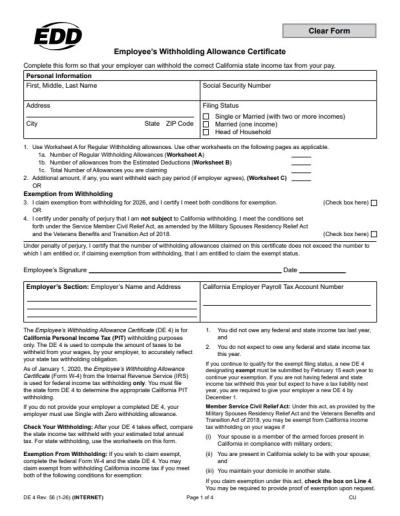
California Form DE 4, Employee’s Withholding Allowance Certificate, tells an employer how to calculate California personal income tax withholding from wages. The 2026 form records the employee’s identity, filing status, regular withholding allowances, estimated-deduction allowances, optional additional withholding, and any valid claim of exemption from California withholding. Worksheets A, B, and C help translate household circumstances, deductions, nonwage income, credits, and expected tax into the entries delivered to payroll.
DE 4 controls California withholding; it is separate from federal Form W-4. Completing it changes the amount prepaid through payroll but does not change the employee’s actual California tax liability. Too few allowances or extra withholding can increase each deduction and may produce a refund, while too many allowances can leave tax due and potentially create penalties. Use current 2026 figures and reconsider the certificate after marriage, divorce, a new dependent, a second job, a major income change, or an unexpectedly large balance or refund.
PDFengine helps complete and download the fillable form. It does not calculate a guaranteed tax result, transmit the certificate to payroll, verify an exemption, or provide tax advice. Employees with multiple incomes, substantial nonwage income, military-spouse status, or complex deductions may need the official Employment Development Department instructions or professional advice.
Who needs to fill this out?
- Employees beginning work for an employer that withholds California personal income tax.
- Current employees who need to change California allowances or request an additional amount per pay period.
- Employees whose California filing status, dependents, deductions, credits, or other income changed.
- Employees claiming the annual exemption from withholding who meet both conditions printed on the 2026 form.
- Qualifying service-member spouses claiming they are not subject to California withholding under the laws cited on the form.
Where and how to submit
Give the completed DE 4 to the employer’s payroll or human-resources department, not to the IRS. The employer uses it for California wage withholding, keeps it with payroll records, and completes the employer section. The employer may have to send certain certificates to the California Employment Development Department under current rules. Ask payroll when a revised certificate will take effect and inspect a later pay statement to confirm the change. Retain the signed form and worksheets used to support the entries. Submit a new DE 4 when circumstances change or when an annual exemption must be renewed.
How to fill it out
- Step 1 — Name, Social Security Number, and Address: Enter First, Middle, Last Name, Social Security Number, Address, City, State, and ZIP Code exactly as used in payroll and tax records. Resolve a name or SSN mismatch with the appropriate records rather than using a nickname.
- Step 2 — Filing Status: Select Single or Married (with two or more incomes), Married (one income), or Head of Household as applicable. The choice affects the withholding tables and may differ from how the federal W-4 presents its options.
- Step 3 — Worksheet A and line 1a: Calculate allowances for yourself, an eligible spouse, blindness, and dependents in Worksheet A. Add lines A through E on WKsheetA_F and enter that total as 1a, Number of Regular Withholding Allowances.
- Step 4 — Worksheet B and line 1b: If claiming estimated deductions, complete WKsheetB_1 through WKsheetB_11 using 2026 California itemized deductions, the printed threshold, adjustments, and nonwage income. Transfer the permitted result to 1b and add 1a plus 1b on line 1c.
- Step 5 — Worksheet C and additional withholding: When extra withholding may be needed, complete WKsheetC_1 through WKsheetC_15 with estimated wages, nonwage income, deductions, tax, exemptions, credits, withholding already expected, and remaining pay periods. Enter the chosen per-pay-period amount on line 2 if the employer agrees.
- Step 6 — Exemption choices: Check line 3 only if both 2026 exemption conditions are true. Check line 4 only if the cited service-member-spouse rules apply. Do not combine an exemption claim with allowances or extra withholding in a way the instructions prohibit.
- Step 7 — Signature and employer section: Review the certificate under the penalty-of-perjury statement, sign, and enter Date Employee Signed. Give it to payroll; the employer completes California Employer Payroll Tax Account Number and Employer’s Name and Address and retains the certificate as required.
Frequently asked questions
Is Form DE 4 the same as federal Form W-4?
No. DE 4 determines California withholding, while W-4 determines federal withholding. An employer may require both.
Do I send DE 4 to the California tax agency?
Employees normally give it to their employer. The employer handles retention and any agency submission required by current rules.
What does an allowance do?
An allowance generally reduces the wages subject to withholding calculations. It does not directly claim a deduction on the eventual tax return.
Can I ask for an extra dollar amount to be withheld?
Yes, line 2 provides for additional withholding per pay period if the employer agrees; Worksheet C can help estimate the amount.
Who can claim exemption from withholding for 2026?
Only an employee who satisfies both conditions printed for the 2026 exemption. Review them each year because an earlier certificate does not prove continuing eligibility.
What if I have two jobs or my spouse works?
Select the applicable filing-status option and calculate the combined income carefully. Multiple incomes often require fewer allowances or extra withholding.
Does PDFengine calculate my final California tax?
No. PDFengine prepares the PDF; actual liability depends on the tax return and complete year-end facts.
Can I create Form DE 4 certificates in bulk?
Yes. PDFengine supports bulk generation via Excel or CSV upload, with one row per employee, and automation through the PDFengine API. Each employee must review and sign their own certificate.
Ready to fill it in?
Fill in this form


