
Form 720 June 22, filled in online.
Form 720 June 22 — official fillable PDF form
Type in the panel and watch each answer land on the page. Filling in and signing is free; downloading needs a free account, which includes 5 downloads a month.
Or fill it another way:
- Category
- Tax
- Fillable fields
- 715
- Pages
- 8
- Paper size
- US Letter, 8.5 × 11 in
Five ways to fill this form.
-
Fill it in here
Type in the panel and watch it land on the form. Sign it, then download.
Free to fill and sign Start filling -
Many at once, from a spreadsheet
One row per person, one finished PDF for each.
Paid plan · you can walk through it Start with a spreadsheet -
Send it to someone to fill in
Email a link. They fill it in without an account and you get the answers back.
Paid plan · you can walk through it Send a request -
From your own software
Fill it over the API. One request returns the finished PDF.
Paid plan -
Let an AI assistant do it
Connect ChatGPT or Claude once, then describe what goes on the form.
With a free account
What is this form?
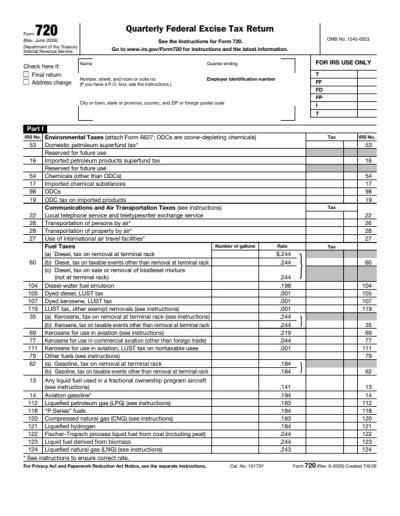
IRS Form 720, Quarterly Federal Excise Tax Return, reports a broad group of federal excise taxes imposed on particular products, services, activities, and policies. The June 2022 revision includes environmental taxes, communications and air transportation taxes, fuel taxes, manufacturers taxes, indoor tanning services, patient-centered outcomes research fees, and other listed liabilities. Part I generally covers taxes that may require semimonthly deposits, while Part II includes taxes handled under different payment rules. Schedule C calculates permitted claims and credits.
This revision remains useful only for periods for which the IRS accepts it; always compare the revision date and tax-period instructions before filing. Identify each applicable IRS number, gather taxable quantities or charges, calculate tax using the prescribed rate, and reconcile deposits before completing the return. Businesses should maintain source records for every line even when only one excise-tax category applies.
Excise-tax responsibility often depends on the transaction, product use, registration status, and who is treated as the manufacturer, importer, seller, or service provider. Do not infer liability from the form label alone. Map business activities to the current instructions and IRS numbers, then document exemptions and nontaxable sales with valid certificates. A line-by-line control schedule should show the taxable base, rate, calculated tax, deposit date, and return amount for each category.
Use an internal reviewer for rate changes and Schedule C claims, since these areas often create notices. Confirm that the quarter shown on the return agrees with every deposit and that amounts are not duplicated between Part I, Part II, or a claim schedule.
Who needs to fill this out?
- Businesses liable for one or more federal excise taxes listed on the applicable revision of Form 720.
- Communications providers, air transportation operators, fuel producers or sellers, chemical and petroleum businesses, manufacturers, and indoor tanning service providers.
- Health insurers and self-insured plan sponsors reporting the patient-centered outcomes research fee when applicable.
- Entities claiming allowable fuel or other excise-tax credits through Schedule C.
- Tax professionals and finance teams reconciling excise-tax deposits to quarterly liabilities.
Where and how to submit
Form 720 is generally filed quarterly, with returns due by the last day of the month following the quarter. If that date is a weekend or legal holiday, use the next business day. Tax deposits may be due much earlier and are normally made electronically through EFTPS. File electronically when required or use the IRS mailing address stated in the current instructions for the return and payment method. Keep tax-rate workpapers, deposit confirmations, certificates, invoices, quantity records, and a copy of the filed PDF.
How to fill it out
- Step 1 — Entity and quarter: Enter Name, Quarter ending, Number, street, and room or suite no., Employer identification number, and City or town, state or province, country, and ZIP or foreign postal code. Mark Final return or Address change only when applicable.
- Step 2 — Part I liabilities: Use the correct IRS number and enter tax for applicable categories, including Domestic petroleum superfund tax, Imported petroleum products superfund tax, Chemicals, Imported chemical substances, communications, air transportation, fuel, retail, or manufacturers taxes. Keep the taxable base and rate calculation for every populated line.
- Step 3 — Part II liabilities: Complete only the categories that apply and use the instructions for their measurement period and rate. Do not move a tax between parts merely because it was paid on a different date.
- Step 4 — Schedule A deposits: Report net tax liability by semimonthly period for deposit taxes. The schedule must reconcile with Part I liability after permitted adjustments and should match EFTPS deposit confirmations.
- Step 5 — Schedule C claims: Enter each claim using the correct claim type, fuel or product quantity, rate, registration number, and supporting certificate information. Verify eligibility and reduce or carry claims exactly as instructed.
- Step 6 — Balance and authorization: Total Parts I and II, subtract deposits and allowable claims, and calculate Balance due or Overpayment. Select the overpayment treatment, sign and date the return, and complete third-party designee or paid-preparer fields only when authorized.
Frequently asked questions
Do I file Form 720 when no listed excise tax applies?
Generally no, unless the IRS requires a final return or another special filing. Once a business stops all covered activity, follow the final-return procedure rather than continuing blank quarterly filings.
Can I use the June 2022 revision for a current quarter?
Only if the IRS instructions accept that revision for the period. Excise categories and rates change, so verify the revision before filing.
Are Form 720 payments always quarterly?
No. Many Part I taxes require semimonthly deposits even though the return is quarterly. A timely quarterly balance payment does not cure missed deposit requirements.
What records support Schedule C claims?
Keep invoices, certificates, fuel-use statements, registration details, quantity calculations, and proof that the claimant meets every statutory condition.
What if I discover an error after filing?
Use the applicable IRS adjustment or amended-return procedure for the tax and period. Do not silently offset an old error on a later return unless the instructions expressly permit it.
Can I create Form 720 in bulk?
Yes. PDFengine supports bulk generation of Form 720 via Excel or CSV upload — upload a spreadsheet with one row per return and PDFengine generates all PDFs at once. You can also automate bulk creation programmatically via the PDFengine API.
Ready to fill it in?
Fill in this form


