
Form 9465, filled in online.
Installment Agreement Request
Type in the panel and watch each answer land on the page. Filling in and signing is free; downloading needs a free account, which includes 5 downloads a month.
Or fill it another way:
- Category
- Tax
- Fillable fields
- 60
- Pages
- 2
- Paper size
- US Letter, 8.5 × 11 in
Five ways to fill this form.
-
Fill it in here
Type in the panel and watch it land on the form. Sign it, then download.
Free to fill and sign Start filling -
Many at once, from a spreadsheet
One row per person, one finished PDF for each.
Paid plan · you can walk through it Start with a spreadsheet -
Send it to someone to fill in
Email a link. They fill it in without an account and you get the answers back.
Paid plan · you can walk through it Send a request -
From your own software
Fill it over the API. One request returns the finished PDF.
Paid plan -
Let an AI assistant do it
Connect ChatGPT or Claude once, then describe what goes on the form.
With a free account
Key facts
| Item | Details |
|---|---|
| Form number | Form 9465 |
| Official name | Installment Agreement Request |
| Issuing agency | Internal Revenue Service, Department of the Treasury |
| Current revision date | Form revised September 2020; instructions revised July 2024 |
| Number of pages | 2 pages |
| Filing frequency | As needed when requesting an IRS monthly payment plan |
| Main filing threshold mentioned by IRS | Online application may be available if total balance is $50,000 or less |
| Related instructions document | Instructions for Form 9465 (Rev. July 2024) |
What is this form?
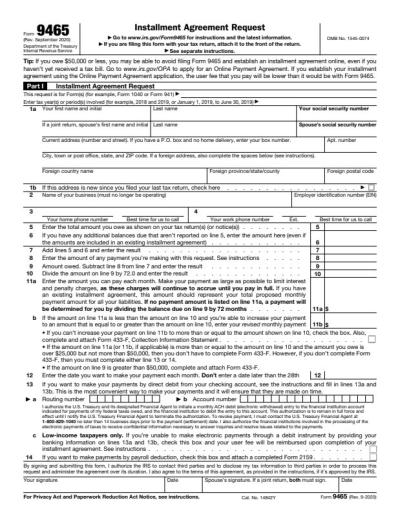
Form 9465, officially titled Installment Agreement Request, is the IRS form individuals use to ask for a monthly payment plan when they cannot pay their full federal tax balance at once. The form is used for balances shown on a tax return or on an IRS notice. The current official form available from the IRS is Form 9465 (Rev. September 2020), and the IRS instructions were revised in July 2024.
The form is split into two main sections. Part I is the actual request for an installment agreement: it asks for the tax form involved, tax years or periods, taxpayer identification details, balance information on lines 5 through 10, the proposed monthly payment on line 11a or 11b, the monthly due date on line 12, and optional payment method details on lines 13a, 13b, 13c, and 14. Part II is additional financial information required only in narrower cases, such as certain taxpayers who recently defaulted on another installment agreement and owe more than $25,000 but not more than $50,000.
In practical terms, Form 9465 does not reduce the tax itself. It asks the IRS to let you pay over time under section 6159. Interest and applicable late-payment penalties generally continue until the balance is fully paid, and the IRS may still require extra financial disclosure, such as Form 433-F, if the payment proposal is too low or the total balance is too high.
Who needs to fill this out?
- Individuals who owe income tax on Form 1040 or Form 1040-SR and cannot pay in full may use Form 9465.
- Individuals who are or may be responsible for a trust fund recovery penalty may use this form.
- Individuals who owe employment taxes for a sole proprietorship that is no longer operating, including liabilities from Forms 941, 943, or 940, may use Form 9465.
- Individuals who still owe an assessed individual shared responsibility payment from pre-2019 ACA months may also use it.
- Taxpayers seeking a guaranteed installment agreement may qualify if the tax owed is $10,000 or less, they were compliant for the prior 5 tax years, they agree to pay in full within 3 years, and they cannot pay when due.
- Taxpayers often do not need to file Form 9465 if they owe $50,000 or less and can apply online instead, usually for a lower user fee.
- Do not use Form 9465 if you can pay in full within 180 days, if your business is still operating and owes employment or unemployment taxes, if you are in bankruptcy, or if you have a pending or accepted offer in compromise.
Where and how to submit
If you are filing Form 9465 with a tax return, the IRS says to attach it to the front of the return and mail the package to the address shown in the tax return instructions. If you are submitting the request after the return was already filed or in response to an IRS notice, Form 9465 is mailed by itself to the correct Internal Revenue Service Center address based on where you live and whether the liability involves Form 1040 or 1040-SR with Schedule C, E, or F. For example, some taxpayers mail it to Department of the Treasury, Internal Revenue Service, 310 Lowell St., Stop 830, Andover, MA 01810; others use IRS centers in Doraville, GA, Kansas City, MO, Holtsville, NY, Memphis, TN, Ogden, UT, Philadelphia, PA, or Austin, TX for foreign addresses. The exact address depends on the IRS table in the official instructions.
The IRS also offers an Online Payment Agreement application at IRS.gov/OPA. If you owe $50,000 or less, you may be able to request the payment plan online instead of mailing Form 9465, and the user fee is generally lower. There is no single standalone annual deadline for Form 9465 itself; it is usually sent with the return by that return's due date, or as soon as possible after an IRS balance-due notice. For calendar-year individual returns, that usually means April 15, unless the due date is moved by a weekend, holiday, extension, or disaster relief.
How to fill it out
- Step 1 — Tax years and taxpayer identification: In Part I, enter the tax return type in the box that begins 'This request is for Form(s)', then enter the tax year(s) or period(s). Complete line 1a with your first name, last name, Social Security number, spouse information if joint, and current mailing address. Check line 1b if the address is new since your last return. If this request relates to a sole proprietorship that is no longer operating, enter the business name and EIN on line 2. Add phone numbers and best times to call on lines 3 and 4.
- Step 2 — Balance due section: Enter on line 5 the total amount you owe from the return(s) or notice(s). On line 6, enter any additional balances due not already shown on line 5, including balances already in an existing agreement if applicable. Add them on line 7. On line 8, enter any payment you are sending with the request. Subtract line 8 from line 7 and enter the result on line 9, Amount owed.
- Step 3 — Minimum comparison and monthly proposal: Divide the line 9 balance by 72.0 and enter that number on line 10. Then enter on line 11a the amount you can pay each month. If line 11a is less than line 10 but you can raise it, enter the higher proposal on line 11b. If you cannot raise the payment to at least line 10, check the box below line 11b and attach Form 433-F, Collection Information Statement. If line 9 is greater than $50,000, Form 433-F is required.
- Step 4 — Payment timing and payment method: Enter on line 12 the day of the month you want payments due; the form says not later than the 28th. If you want direct debit, complete line 13a, Routing number, and line 13b, Account number. Low-income taxpayers who cannot make electronic payments through direct debit may check line 13c for possible user-fee reimbursement. If you prefer payroll deduction, check line 14 and attach a completed, signed Form 2159.
- Step 5 — Signatures and authorization: Read the authorization language under the payment method section, then sign and date the form. If the request relates to a joint return, both spouses must sign. The IRS instructions specifically state that a direct debit request will not be approved unless both spouses sign when filing jointly.
- Step 6 — Part II additional information when required: Complete Part II only if all three conditions on page 2 apply: you defaulted on an installment agreement in the last 12 months, you owe more than $25,000 but not more than $50,000, and the amount on line 11a or 11b is less than line 10. Then answer line 15 county of residence, line 16a marital status and 16b shared household expenses, line 17 dependents, line 18 household members age 65 or older, lines 19 and 20 your pay frequency and net income per pay period, lines 21 and 22 spouse income details if required, lines 23 and 24 vehicles and monthly car payments, lines 25a through 25c health insurance questions, lines 26a through 26c court-ordered payments, and line 27 monthly child or dependent care costs.
Important deadlines & penalties
- When filed with a return: Attach Form 9465 to the front of the tax return and file it by the return's due date. For a calendar-year individual filing a 2025 Form 1040 or 1040-SR, that is generally April 15, 2026.
- Extension to file the return: If you file Form 4868 by April 15, 2026, the return filing deadline generally moves to October 15, 2026. That extension does not extend the time to pay tax. Interest and late-payment penalties still run from the original due date.
- When filed after a notice: If you already filed the return, send Form 9465 as soon as possible after receiving an IRS bill or notice. The instructions do not give a universal single date for notice-based requests; the notice due date controls when the IRS expects payment.
- Failure-to-pay penalty: The IRS generally charges 0.5% of unpaid tax per month or part of a month, up to 25%. If you filed on time as an individual and have an approved payment plan, the rate is generally reduced to 0.25% per month while the agreement is in effect.
- Failure-to-file penalty on the underlying return: If you do not file the tax return on time, the IRS generally charges 5% of the unpaid tax per month or part of a month, up to 25%. If the return is more than 60 days late and the due date is after December 31, 2025, the minimum penalty is generally $525 or 100% of the unpaid tax, whichever is less.
- User fees: As of July 1, 2024, the IRS lists setup fees of $107 for direct debit and $178 for non-direct-debit requests filed outside the online application; online agreements are lower, including $22 for direct debit and $69 for non-direct-debit, with reduced-fee rules for low-income taxpayers.
Common mistakes to avoid
- Leaving the tax form or tax periods blank: Missing entries in 'This request is for Form(s)' or the tax period line can delay processing or misapply the request.
- Understating line 5 or skipping line 6 balances: If line 7 and line 9 do not reflect the full debt, the monthly proposal may be rejected.
- Entering line 11a below line 10 without fixing it: If you do not raise the payment on line 11b or attach Form 433-F when required, the request is incomplete.
- Choosing a date after the 28th on line 12: The IRS can override an invalid payment date.
- Providing wrong banking data on lines 13a and 13b: A bad routing or account number can cause rejected debits and default risk.
- Checking line 14 without Form 2159: Payroll deduction requests are incomplete without the attached signed form.
- Skipping Part II when all three triggers apply: Omitting it can stall or deny the request.
Expert tips
- Pay something with the request if you can: Enter that amount on line 8 to reduce the balance on line 9.
- Use direct debit if you qualify: Completing lines 13a and 13b can help taxpayers owing more than $25,000 but not more than $50,000 stay within streamlined rules and avoid default.
- Compare line 11a to line 10 before mailing: If the proposed payment does not meet the 72-month benchmark, either raise it on line 11b or include Form 433-F.
- Low-income taxpayers should review line 13c and Form 13844: These can matter for reduced-fee or reimbursement treatment.
- Joint filers should check signatures carefully: If the liability is from a joint return and you request direct debit, both spouses should sign.
- Use the online route when allowed: If the total balance is $50,000 or less, the IRS says you may be able to set up the agreement online at IRS.gov/OPA.
- Keep future returns current: The agreement can default if you miss later filing or payment obligations.
Related forms & next steps
- Form 433-F — Collection Information Statement required in many non-streamlined or lower-payment situations.
- Form 2159 — Payroll Deduction Agreement used when line 14 is checked.
- Form 13844 — Application for Reduced User Fee for Installment Agreements.
- Form 1040 — U.S. Individual Income Tax Return; Form 9465 is often attached to it.
- Form 1040-SR — Senior version of the individual return that may also accompany Form 9465.
- Form 4868 — Automatic extension of time to file an individual return; does not extend time to pay.
- Instructions for Form 9465 — Official IRS guidance on eligibility, line instructions, user fees, and filing addresses.
Frequently asked questions
What is Form 9465 used for?
It requests an IRS monthly installment agreement when you cannot pay the full tax due.
Do I have to file Form 9465 if I owe less than $50,000?
Not always. Many taxpayers at or below $50,000 can apply online instead.
What monthly payment should I enter on Form 9465?
Enter the amount you can pay on line 11a, then compare it with line 10. If it is lower, the IRS may require line 11b or Form 433-F.
Can I choose my IRS payment date?
Yes. Use line 12, but do not choose a date later than the 28th.
Do I need to give bank information on Form 9465?
Only for direct debit. Complete line 13a and line 13b if you want automatic withdrawals.
What happens after I submit Form 9465?
The IRS usually responds within about 30 days, though some requests take longer.
Can I create Form 9465, Installment Agreement Request in bulk?
Yes. PDFengine supports bulk generation of Form 9465, Installment Agreement Request via Excel or CSV upload — upload a spreadsheet with one row per entry and PDFengine generates all PDFs at once. You can also automate bulk creation programmatically via the PDFengine API.
Ready to fill it in?
Fill in this formOfficial sources
- About Form 9465, Installment Agreement Request — IRS overview of the form and its purpose.
- Form 9465 PDF — Official IRS form showing the current fields, lines, and signature requirements.
- Instructions for Form 9465 — Official filing rules, addresses, user fees, and line-by-line instructions.
- Online Payment Agreement Application — IRS online alternative for eligible taxpayers requesting payment plans.
- Failure to Pay Penalty — Official IRS penalty rates that continue to matter even after requesting an installment agreement.



