
Form St 119 2, filled in online.
Form St 119 2 — official fillable PDF form
Type in the panel and watch each answer land on the page. Filling in and signing is free; downloading needs a free account, which includes 5 downloads a month.
Or fill it another way:
- Category
- Tax
- Fillable fields
- 62
- Pages
- 2
- Paper size
- US Letter, 8.5 × 11 in
Five ways to fill this form.
-
Fill it in here
Type in the panel and watch it land on the form. Sign it, then download.
Free to fill and sign Start filling -
Many at once, from a spreadsheet
One row per person, one finished PDF for each.
Paid plan · you can walk through it Start with a spreadsheet -
Send it to someone to fill in
Email a link. They fill it in without an account and you get the answers back.
Paid plan · you can walk through it Send a request -
From your own software
Fill it over the API. One request returns the finished PDF.
Paid plan -
Let an AI assistant do it
Connect ChatGPT or Claude once, then describe what goes on the form.
With a free account
What is this form?
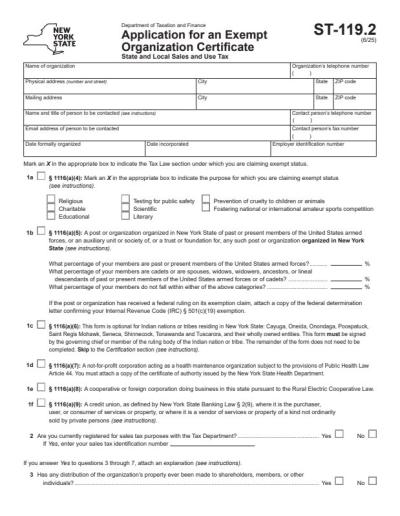
New York Form ST-119.2 Application for an Exempt Organization Certificate is an official form issued by the New York State Department of Taxation and Finance. It is used to apply for New York sales-tax exemption recognition for an eligible nonprofit or other qualifying organization. The fillable version preserves the original agency layout while letting you type into the document, review each entry, and create a clean PDF for the required signature and submission process.
Completing the PDF does not by itself file the form or confirm that the agency will accept it. Read the edition date and instructions printed on the document, use information from authoritative records, and attach every schedule or item the issuer requires. PDFengine helps prepare the document; it does not decide eligibility, calculate professional advice, or submit the form on your behalf.
Who needs to fill this out?
- Charitable organizations seeking New York sales-tax exemption. Use the current official instructions to confirm eligibility and gather the evidence that applies to the transaction or case.
- Religious or educational organizations applying for a certificate. Use the current official instructions to confirm eligibility and gather the evidence that applies to the transaction or case.
- Authorized officers supplying organization details. Use the current official instructions to confirm eligibility and gather the evidence that applies to the transaction or case.
- Tax advisers preparing an exemption application. Use the current official instructions to confirm eligibility and gather the evidence that applies to the transaction or case.
A representative may prepare the form when the governing rules allow it, but the named person or authorized signer remains responsible for the accuracy of the entries. If the facts are disputed, the deadline is close, or the filing could affect legal or tax rights, obtain advice from the relevant agency or a qualified professional before signing.
Where and how to submit
Mail the completed application and supporting organizing documents to the New York State Tax Department address in the current ST-119.2 instructions. Check the latest official instructions for the exact recipient, accepted delivery methods, fees, attachments, and deadline because these details can change independently of the PDF edition.
Keep a complete copy of the submitted form, attachments, proof of delivery, and any confirmation number. PDFengine generates the document but does not transmit it automatically. Sensitive personal, financial, medical, or case information should be shared only with the authorized recipient through an approved channel.
How to fill it out
- Step 1 — Name of organization: Complete the field named
name of organizationexactly as requested on the official form. Use the same spelling and identifiers as the supporting record, select only options that apply, and do not guess when the form requires a legal, tax, or case-specific answer. - Step 2 — Name and title of person to be contacted: Complete the field named
contact name/titleexactly as requested on the official form. Use the same spelling and identifiers as the supporting record, select only options that apply, and do not guess when the form requires a legal, tax, or case-specific answer. - Step 3 — Testing for public safety: Complete the field named
1a_2exactly as requested on the official form. Use the same spelling and identifiers as the supporting record, select only options that apply, and do not guess when the form requires a legal, tax, or case-specific answer. - Step 4 — 1c § 1116(a)(6): This form is optional for Indian nations or tribes residing in New York State: Cayuga, Oneida, Onondaga, Poospatuck, Saint Regis Mohawk, Seneca, Shinnecock, Tonawanda and Tuscarora, and their wholly owned entities. This form must be signed by the governing body or member of the ruling body of the Indian nation or tribe. The remainder of the form does not need to be completed. Skip to the Certification section (see instructions).: Complete the field named
Section 1116(a)(6)exactly as requested on the official form. Use the same spelling and identifiers as the supporting record, select only options that apply, and do not guess when the form requires a legal, tax, or case-specific answer. - Step 5 — 5 If you marked box 1a, has the organization ever attempted to influence legislation? Yes: Complete the field named
5exactly as requested on the official form. Use the same spelling and identifiers as the supporting record, select only options that apply, and do not guess when the form requires a legal, tax, or case-specific answer. - Step 6 — Email address of officer, trustee, governing chief, or member of the ruling body: Complete the field named
E-mail officer/trusteeexactly as requested on the official form. Use the same spelling and identifiers as the supporting record, select only options that apply, and do not guess when the form requires a legal, tax, or case-specific answer.
After completing these fields, review the remaining checkboxes, dates, totals, declarations, and signature blocks in page order. Compare names, account or case numbers, and monetary amounts with the supporting records. Save an unsigned working copy before adding a signature so corrections remain easy to make.
Frequently asked questions
Is New York Form ST-119.2 Application for an Exempt Organization Certificate the official form?
The template follows the official fillable PDF and retains its original field structure. Confirm the edition date and any revision notice against the issuer’s current website before relying on it.
Does completing the PDF submit it automatically?
No. PDFengine creates a completed PDF for you to review, sign, and deliver. Follow the issuer’s filing instructions and retain proof that the correct office received it.
Do all fields have to be completed?
Complete every field that applies and follow any direction to write “none,” “not applicable,” or zero. Do not add invented information merely to avoid a blank field.
Can I correct the form after downloading it?
Yes. Return to the saved data or refill the template, make the correction, and generate a new PDF. If the form was already filed, ask the receiving agency whether an amended or replacement filing is required.
Does PDFengine provide legal or tax advice?
No. PDFengine helps populate the official document. Questions about eligibility, calculations, deadlines, evidence, or the legal effect of an answer should go to the issuing agency or a qualified adviser.
Can I create New York Form ST-119.2 Application for an Exempt Organization Certificate in bulk?
Yes. PDFengine supports bulk generation of New York Form ST-119.2 Application for an Exempt Organization Certificate via Excel or CSV upload — upload a spreadsheet with one row per form and PDFengine generates all PDFs at once. You can also automate bulk creation programmatically via the PDFengine API.
Ready to fill it in?
Fill in this form


