
Form W 4S, filled in online.
Form W 4S — official fillable PDF form
Type in the panel and watch each answer land on the page. Filling in and signing is free; downloading needs a free account, which includes 5 downloads a month.
Or fill it another way:
- Category
- Tax
- Fillable fields
- 17
- Pages
- 2
- Paper size
- US Letter, 8.5 × 11 in
Five ways to fill this form.
-
Fill it in here
Type in the panel and watch it land on the form. Sign it, then download.
Free to fill and sign Start filling -
Many at once, from a spreadsheet
One row per person, one finished PDF for each.
Paid plan · you can walk through it Start with a spreadsheet -
Send it to someone to fill in
Email a link. They fill it in without an account and you get the answers back.
Paid plan · you can walk through it Send a request -
From your own software
Fill it over the API. One request returns the finished PDF.
Paid plan -
Let an AI assistant do it
Connect ChatGPT or Claude once, then describe what goes on the form.
With a free account
What is this form?
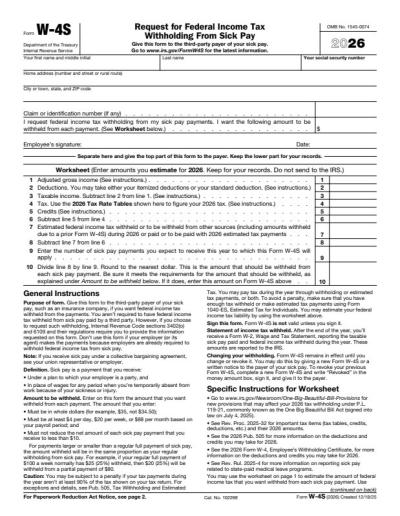
IRS Form W-4S, Request for Federal Income Tax Withholding From Sick Pay, lets an employee ask a third-party sick-pay payer to withhold a specified amount of federal income tax from eligible sick-pay payments. This fillable version preserves the official layout and field structure, so the completed file can be reviewed, saved, and shared as a standard PDF. PDFengine helps prepare the document, but it does not decide eligibility, calculate professional advice, or submit the form to the issuing authority.
The request is voluntary and is separate from regular wage withholding; the requested amount is limited by the payment and payroll taxes that must also be withheld. Before entering data, confirm that this is the correct edition for the relevant reporting period and read the official instructions. Keep the records used to prepare the form nearby, because names, identification numbers, dates, and monetary amounts should agree with the underlying documents.
Who needs to fill this out?
- Employees receiving sick pay from an insurance company or other third-party payer
- Benefit administrators and insurers processing voluntary federal withholding requests
- Tax advisers helping a recipient estimate an appropriate flat amount without submitting the form for the recipient
Preparers and authorized representatives may also use Form W-4S when they have the information and authority required to act for the filer. Anyone handling the completed PDF should protect personal and financial data, verify the recipient, and retain copies according to the applicable recordkeeping rules.
Where and how to submit
Send Form W-4S to the third-party payer of sick pay, such as the insurer or benefit administrator; do not send it to the IRS. The request generally takes effect according to the payer’s processing schedule and remains subject to the limits in the current instructions. PDFengine does not transmit the completed file automatically. Download the PDF, review it, and follow the current official instructions for electronic filing, mailing, or delivery. Use the address or portal that applies to the filer and reporting period rather than relying on an address printed on an older copy. Keep proof of timely filing or delivery and a final copy with the supporting records.
How to fill it out
- Step 1 — Your first name and middle initial: Enter the recipient’s first name, middle initial, last name, Social Security Number, and complete home address.
- Step 2 — Claim or identification number (if any): Provide the sick-pay claim or account number so the payer applies the election to the correct benefit.
- Step 3 — Amount to be withheld from sick pay payments: Enter the fixed dollar amount requested from each payment and make sure it meets the current minimum and does not exceed available pay after required taxes.
- Step 4 — Line 1: Adjusted gross income: Use the worksheet as needed to estimate adjusted gross income, deductions, taxable income, tax, and credits.
- Step 5 — Line 5: Credits: Complete the remaining worksheet lines to estimate tax still due and divide it across expected sick-pay payments when choosing the request amount.
- Step 6 — Signature, date, and review: Sign and date the request, verify the claim number and amount, and keep a copy before sending it to the third-party payer.
Use the labels exactly as they appear on the official form. Review repeated fields on every copy or page, and do not guess when a line depends on a worksheet or separate instruction. After completing the fields, compare the PDF with the source records and check that no required checkbox, attachment, signature, or date was overlooked.
Frequently asked questions
What information should I gather before completing Form W-4S?
Gather the sick-pay claim number, payment amount and frequency, expected duration, Social Security Number, address, other expected annual income, deductions, credits, and federal tax already withheld. Use those figures to select a sustainable fixed withholding amount.
Does PDFengine file Form W-4S for me?
No. PDFengine creates a fillable PDF that you can download and review. You remain responsible for signing, attaching supporting documents, and sending or filing Form W-4S through the method required by the responsible agency or recipient.
Can I correct Form W-4S after downloading it?
Yes, you can return to the form data, correct the relevant fields, and generate a new PDF before submission. If Form W-4S has already been filed or furnished, follow the official correction or amended-return procedure instead of silently replacing the original copy.
How should I protect sensitive data on Form W-4S?
Store the completed PDF in an access-controlled location and share it only through a trusted channel with the intended recipient. Identification numbers, addresses, payroll details, tax figures, and banking information should not be sent through an unsecured public link.
How long should I keep a copy of Form W-4S?
Keep the signed or filed copy together with the records used to prepare it for at least the period required by the responsible tax, payroll, or program authority. Longer retention may apply when a return is amended, a claim remains open, property basis is involved, or an audit or dispute is pending.
Can I create Form W-4S in bulk?
Yes. PDFengine supports bulk generation of Form W-4S via Excel or CSV upload — upload a spreadsheet with one row per form and PDFengine generates all PDFs at once. You can also automate bulk creation programmatically via the PDFengine API.
Ready to fill it in?
Fill in this form


