
Form 1095 A, filled in online.
Form 1095 A — official fillable PDF form
Type in the panel and watch each answer land on the page. Filling in and signing is free; downloading needs a free account, which includes 5 downloads a month.
Or fill it another way:
- Category
- Tax
- Fillable fields
- 81
- Pages
- 2
- Paper size
- US Letter, 8.5 × 11 in
Five ways to fill this form.
-
Fill it in here
Type in the panel and watch it land on the form. Sign it, then download.
Free to fill and sign Start filling -
Many at once, from a spreadsheet
One row per person, one finished PDF for each.
Paid plan · you can walk through it Start with a spreadsheet -
Send it to someone to fill in
Email a link. They fill it in without an account and you get the answers back.
Paid plan · you can walk through it Send a request -
From your own software
Fill it over the API. One request returns the finished PDF.
Paid plan -
Let an AI assistant do it
Connect ChatGPT or Claude once, then describe what goes on the form.
With a free account
What is this form?
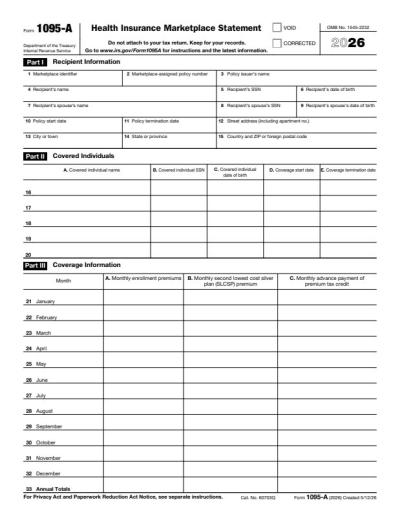
IRS Form 1095-A Health Insurance Marketplace Statement is a fillable document issued or used by a Health Insurance Marketplace for federal tax reporting to report enrollment in qualified Marketplace health coverage, identify covered household members, and state monthly premiums, benchmark-plan amounts, and advance premium tax credit payments. The completed PDF creates a consistent record, but it does not replace the official instructions, supporting documents, professional advice, or a separate filing that may be required.
Before starting, gather the notices, identity details, account or registration records, dates, calculations, and attachments referenced by the form. Work from primary records and keep names, identifiers, monetary amounts, and dates consistent across every related document. PDFengine lets you enter the information online and download the completed PDF; it does not submit the form or decide whether the filer qualifies.
Review the current official version before use. Agencies and private parties may revise addresses, deadlines, fees, evidentiary requirements, and signature rules without changing the familiar form name. A technically complete PDF can still be rejected when it is late, unsigned, unsupported, sent to the wrong recipient, or prepared for the wrong reporting period.
Who needs to fill this out?
- Health Insurance Marketplaces preparing coverage statements. Applicants should confirm that the form version and filing rules match their transaction or reporting period.
- Policy recipients reviewing information used for Form 8962. Applicants should confirm that the form version and filing rules match their transaction or reporting period.
- Tax professionals reconciling premium tax credits. Applicants should confirm that the form version and filing rules match their transaction or reporting period.
Where and how to submit
The Marketplace files Form 1095-A with the IRS and furnishes a copy to the recipient under the applicable deadlines and correction procedures. Recipients generally keep it with tax records and use it to complete Form 8962. Before delivery, confirm the recipient, deadline, submission method, required fee, signature format, and attachment list from current official instructions. Do not email sensitive personal, medical, financial, or identification data unless the recipient provides an approved secure method.
Save the final PDF with the filing or transaction date in its filename and keep the source records used to complete it. When delivery timing matters, preserve a portal receipt, certified-mail record, timestamp, or signed acknowledgement. If a correction is needed, prepare a clearly identified corrected version and follow the recipient’s replacement procedure rather than silently changing the retained copy.
How to fill it out
- Step 1 — VOID or CORRECTED checkbox: Select a status only when the statement is being voided or corrected; leave both clear for an original statement. Use the source record named by the form, review formatting and dates, and do not guess when information is unavailable.
- Step 2 — Marketplace identifier and policy number: Enter the Marketplace identifier, assigned policy number, and policy issuer exactly as maintained in enrollment records. Use the source record named by the form, review formatting and dates, and do not guess when information is unavailable.
- Step 3 — Recipient and spouse information: Provide names, Social Security numbers or dates of birth, and the recipient’s current address. Use the source record named by the form, review formatting and dates, and do not guess when information is unavailable.
- Step 4 — Covered individuals: List every covered person with the requested identifying number, date of birth, and coverage start and end dates. Use the source record named by the form, review formatting and dates, and do not guess when information is unavailable.
- Step 5 — Monthly enrollment premiums: Enter each month’s enrollment premium and second-lowest-cost silver-plan premium using the Marketplace calculation records. Use the source record named by the form, review formatting and dates, and do not guess when information is unavailable.
- Step 6 — Advance payment and annual totals: Record monthly advance premium tax credit payments, calculate annual totals, and review the statement before furnishing and filing. Use the source record named by the form, review formatting and dates, and do not guess when information is unavailable.
Frequently asked questions
Is IRS Form 1095-A Health Insurance Marketplace Statement filed automatically when I complete it in PDFengine?
No. PDFengine creates a downloadable PDF; you remain responsible for signing, attaching evidence, paying any fee, and delivering it through the method accepted by the recipient.
Which version of the form should I use?
Use the version required for the relevant tax year, transaction date, application period, or proceeding. Compare the revision date and instructions with the official source before submission.
Can I leave a field blank?
Leave a field blank only when the instructions make it optional or not applicable. If the recipient expects an explicit response, use the permitted notation and never invent information.
Do I need to sign the completed PDF?
Most forms that contain a certification or agreement require a signature and date. Check whether handwritten, approved electronic, representative, witness, or multiple-party signatures are required.
What supporting documents should I attach?
Attach only the records required for your circumstances, using the order and identification method in the official instructions. Keep originals unless the recipient specifically requires them.
How should I protect sensitive information on this form?
Use a trusted device, verify the recipient, choose a secure delivery channel, and restrict stored copies. Avoid ordinary email for unencrypted personal or financial information.
Can I create IRS Form 1095-A Health Insurance Marketplace Statement in bulk?
Yes. PDFengine supports bulk generation of IRS Form 1095-A Health Insurance Marketplace Statement via Excel or CSV upload — upload a spreadsheet with one row per form and PDFengine generates all PDFs at once. You can also automate bulk creation programmatically via the PDFengine API.
Ready to fill it in?
Fill in this form


