
Form 4626 — Alternative Minimum Tax (Corporations), filled in online.
Form 4626 — Alternative Minimum Tax (Corporations) — official fillable PDF form
Type in the panel and watch each answer land on the page. Filling in and signing is free; downloading needs a free account, which includes 5 downloads a month.
Or fill it another way:
- Category
- Tax
- Fillable fields
- 813
- Pages
- 8
- Paper size
- US Letter, 8.5 × 11 in
Five ways to fill this form.
-
Fill it in here
Type in the panel and watch it land on the form. Sign it, then download.
Free to fill and sign Start filling -
Many at once, from a spreadsheet
One row per person, one finished PDF for each.
Paid plan · you can walk through it Start with a spreadsheet -
Send it to someone to fill in
Email a link. They fill it in without an account and you get the answers back.
Paid plan · you can walk through it Send a request -
From your own software
Fill it over the API. One request returns the finished PDF.
Paid plan -
Let an AI assistant do it
Connect ChatGPT or Claude once, then describe what goes on the form.
With a free account
What is this form?
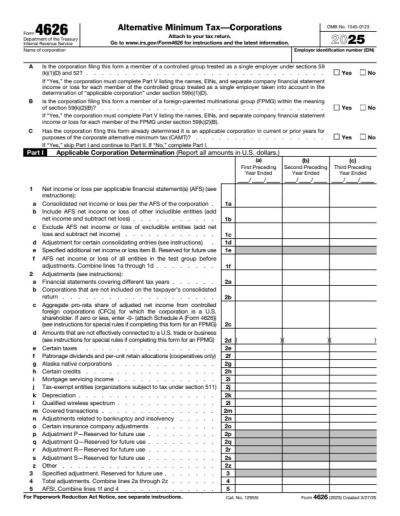
IRS Form 4626 is the official form used to determine whether a corporation is subject to the corporate alternative minimum tax and calculate adjusted financial statement income, applicable adjustments, credits, and tax. It is issued or administered by Internal Revenue Service, and its original layout keeps the identifiers, calculations, choices, certifications, and signature areas in the order expected by the receiving office.
Prepare the form from current source documents rather than memory. Compare names, identification numbers, account or case references, dates, addresses, and monetary figures with the official records that support them. If a question is unclear or a situation is unusual, consult the current agency instructions or a qualified adviser before signing; PDFengine helps populate the PDF but does not decide eligibility, calculate legal rights, verify evidence, or file the form for you.
Use the latest version required for the relevant filing period. Forms and mailing addresses can change, and a prior-year copy may contain obsolete lines or rates. Save an unaltered copy of the source records and review the generated PDF page by page so that truncated text, conflicting selections, blank required items, and transposed digits can be corrected before delivery.
Who needs to fill this out?
- Corporations that may meet the applicable-corporation tests
- Members of controlled groups or foreign-parented multinational groups
- Corporate tax departments and authorized preparers calculating CAMT
- Authorized preparers or representatives who have the records and permission needed to complete the form accurately
Where and how to submit
Attach Form 4626 to the corporation’s federal income-tax return for the relevant tax year and retain the applicable financial statements and adjustment workpapers. Confirm the current destination, deadline, payment method, signature rule, and attachment checklist on the official Internal Revenue Service website before sending anything. Do not assume that creating or downloading the PDF submits it.
Keep the completed form, source documents, calculations, attachments, and proof of timely delivery for the retention period that applies to the transaction. If the agency requests a correction, update the affected source data, regenerate the form, clearly identify the replacement when instructed, and avoid sending duplicate versions through different channels unless the agency asks you to do so.
How to fill it out
- Step 1 — Name of corporation (
topmostSubform[0].Page1[0].f1_01[0]): Enter this exactly as it appears in the controlling record. Preserve the full legal spelling, punctuation, leading zeroes, and printed date or number format; do not substitute a nickname or an internal shorthand. - Step 2 — Employer identification number (EIN) (
topmostSubform[0].Page1[0].f1_02[0]): Complete the related details from the same source document and compare repeated information across every page. A mismatch between identifying fields can prevent the receiving system from matching the form to the correct person, business, property, or account. - Step 3 — Is the corporation filing this form a member of a controlled group treated as a single employer under sections 59 (k)(1)(D) and 52? Yes (
topmostSubform[0].Page1[0].c1_1[0]): Select only the option that is true for this filing and the signing date. Read nearby instructions before choosing yes/no boxes, status codes, periods, or categories, and never mark mutually exclusive choices merely to avoid leaving a field blank. - Step 4 — Is the corporation filing this form a member of a foreign-parented multinational group (FPMG) within the meaning of section 59(k)(2)(B)? Yes (
topmostSubform[0].Page1[0].c1_2[0]): Transfer the requested figure or description from the applicable statement, ledger, notice, or supporting schedule. Keep the calculation behind the entry, including intermediate totals and rounding, so another reviewer can reproduce it. - Step 5 — First Preceding Year Ended Month (
topmostSubform[0].Page1[0].Table_Lines1-5[0].Header[0].ColA[0].f1_03[0]): Complete linked fields as a single section. Check that totals agree with the lines they summarize and that any attachment uses the same name and identifier as the main form. Use an explanation page only where the official instructions permit one. - Step 6 — Line 1a: Consolidated net income or loss per the AFS of the corporation (
topmostSubform[0].Page1[0].Table_Lines1-5[0].Line1a[0].f1_12[0]): Review the declaration and evidence requirements associated with this field. A generated PDF is a draft: add any required signature, date, witness, preparer information, certification, or attachment using the method accepted by the agency.
Frequently asked questions
Is IRS Form 4626 the official form?
PDFengine uses the official PDF layout and its fillable fields. Always confirm on the issuing agency’s website that the version and filing period are still accepted.
Does PDFengine submit the completed form?
No. PDFengine creates a filled PDF for your review and download; you remain responsible for signatures, attachments, fees, deadlines, and delivery through an accepted channel.
What records should I gather before starting?
Gather the notices, identity or account records, statements, schedules, calculations, and supporting evidence relevant to every entry. Use the agency checklist because the required evidence depends on the filer and transaction.
Can I leave a field blank if it does not apply?
Follow the official instructions for that line. Some fields may remain blank, while others require zero, “none,” “N/A,” an explanation, or a separate attachment.
Can I correct the PDF after generating it?
Yes, correct the underlying entries and generate a new final copy before signing or filing. If a version has already been submitted, use the agency’s amendment or correction procedure instead of silently sending another copy.
How should sensitive information be handled?
Share the final PDF only with authorized people and through approved channels. Store tax, identity, health, benefit, licensing, and banking information securely and delete unnecessary working copies.
Can I create IRS Form 4626 in bulk?
Yes. PDFengine supports bulk generation of IRS Form 4626 via Excel or CSV upload — upload a spreadsheet with one row per form and PDFengine generates all PDFs at once. You can also automate bulk creation programmatically via the PDFengine API.
Ready to fill it in?
Fill in this form


