
Minnesota Schedule M1M, filled in online.
Income Additions and Subtractions
Type in the panel and watch each answer land on the page. Filling in and signing is free; downloading needs a free account, which includes 5 downloads a month.
Or fill it another way:
- Category
- Tax
- Fillable fields
- 39
- Pages
- 7
- Paper size
- US Letter, 8.5 × 11 in
Five ways to fill this form.
-
Fill it in here
Type in the panel and watch it land on the form. Sign it, then download.
Free to fill and sign Start filling -
Many at once, from a spreadsheet
One row per person, one finished PDF for each.
Paid plan · you can walk through it Start with a spreadsheet -
Send it to someone to fill in
Email a link. They fill it in without an account and you get the answers back.
Paid plan · you can walk through it Send a request -
From your own software
Fill it over the API. One request returns the finished PDF.
Paid plan -
Let an AI assistant do it
Connect ChatGPT or Claude once, then describe what goes on the form.
With a free account
What is this form?
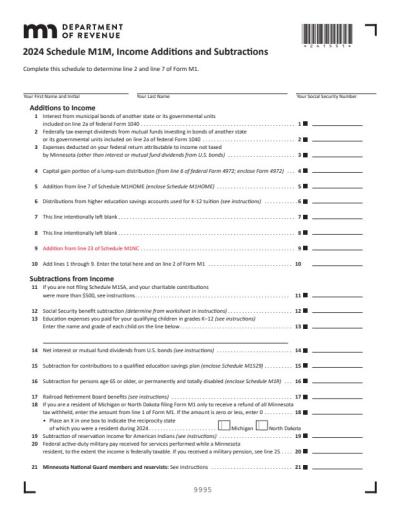
Minnesota Schedule M1M is the official government form used for income additions and subtractions. In practice, that means the document exists to capture structured information tied to Minnesota individual income adjustments, not just to serve as a casual worksheet. PDFengine keeps the original fillable layout intact so users can complete the official PDF online, download a clean copy, and keep the same field structure that appears on the source document.
That matters because forms like Minnesota Schedule M1M are usually checked against other records. Names, identification numbers, dates, line amounts, and box selections often have to match payroll files, title packets, tax returns, settlement records, or agency correspondence exactly. Using the mapped AcroForm fields makes review easier, reduces retyping mistakes, and gives you a cleaner final PDF for filing, sharing with a professional, or saving in your records.
For users on PDFengine, the practical benefit is consistency. Instead of typing over a scan or rebuilding the form from scratch, you can work directly in the official layout and then compare the finished PDF against the source package line by line. That makes the template useful both for first-pass preparation and for a second review by payroll staff, a tax preparer, a title clerk, an immigration adviser, or whoever else needs to verify the same file before it is sent onward.
Who needs to fill this out?
- Minnesota taxpayers reporting additions or subtractions on a state return
- Preparers reconciling federal income items with Minnesota-specific tax adjustments
- People entering adjustments for municipal bond interest, education accounts, or other state-specific items
- Anyone who wants a typed version of the schedule before filing
- Anyone who needs to complete the official Minnesota Schedule M1M layout online without manually editing a flat government scan
Where and how to submit
Attach Schedule M1M to the Minnesota individual income tax return when the taxpayer must report additions or subtractions that modify Minnesota taxable income. Keep federal forms, account statements, and any referenced Minnesota schedules because the amounts on M1M often come directly from outside forms or supporting calculations.
Even when you prepare the form digitally, the official filing rules still come from the issuing agency. That is why it is smart to keep the finished PDF together with the supporting documents used to complete it, especially when another party such as an employer, agency, closing office, accountant, or DMV clerk may need to review the same information later.
As a practical workflow, many users treat the PDF as the review copy that sits between raw source documents and the final submission step. That makes it easier to catch missing identifiers, mismatched amounts, incomplete addresses, or forgotten attachments before the form is printed, uploaded, mailed, or handed to the next reviewer.
How to fill it out
- Step 1 — Start with the identity and context fields: Begin with Your First Name and Initial and related header fields so you are working on the right person, property, tax year, or transaction before entering any amounts.
- Step 2 — Fill the core identification details: Complete fields such as Your Last Name and Your Social Security Number exactly as they appear in the supporting records. On official forms, small identity mismatches can cause avoidable rejections.
- Step 3 — Enter the primary reportable values: Use the fields labeled Line 1: Interest from municipal bonds of another state or its governmental units included on line 2a of federal Form 1040 and Line 2: Federally tax-exempt dividends from mutual funds investing in bonds of another state or its governmental units included on line 2a of federal Form 1040 for the main values or reportable facts that drive Minnesota Schedule M1M. Copy those numbers or statements from the source documents rather than estimating.
- Step 4 — Finish the supporting form data: Review additional fields such as Line 3: Expenses deducted on your federal return attributable to income not taxed by Minnesota (other than interest or mutual fund dividends from U.S. bonds) and Line 4: Capital gain portion of a lump-sum distribution (from line 6 of federal Form 4972; enclose Form 4972) so dates, addresses, status selections, or supporting calculations match the rest of the file.
- Step 5 — Review signatures, checkboxes, and attachments: Before finalizing the PDF, make sure every required signature block, checkbox, explanatory field, and attachment reference is completed in the same way the agency or filing party expects.
- Step 6 — Validate against the source package: Compare the completed PDF against the payroll file, title packet, closing statement, tax return, immigration file, or other source package so that names, numbers, and dates stay consistent end to end.
Frequently asked questions
What is Schedule M1M for?
It is used to report Minnesota additions and subtractions that adjust income for state tax purposes.
Why does the schedule reference federal forms?
Because many Minnesota additions and subtractions start with amounts already reported on federal returns or federal schedules.
Do I need supporting forms for the entries?
Yes. The line descriptions often point to federal forms or other Minnesota schedules that support the numbers entered.
Is Schedule M1M filed on its own?
No. It is generally part of the taxpayer's Minnesota return package.
Should the taxpayer name and Social Security number match the return exactly?
Yes. The schedule should line up perfectly with the identity information on the related Minnesota return.
Can I create Minnesota Schedule M1M in bulk?
Yes. PDFengine supports bulk generation of Minnesota Schedule M1M via Excel or CSV upload — upload a spreadsheet with one row per form and PDFengine generates all PDFs at once. You can also automate bulk creation programmatically via the PDFengine API.
Ready to fill it in?
Fill in this form


