
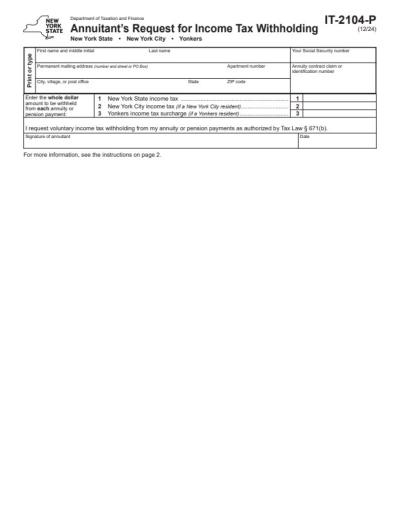
New York Form It 2104 P, filled in online.
New York Form It 2104 P — official fillable PDF form
Type in the panel and watch each answer land on the page. Filling in and signing is free; downloading needs a free account, which includes 5 downloads a month.
Or fill it another way:
- Category
- Tax
- Fillable fields
- 13
- Pages
- 2
- Paper size
- US Letter, 8.5 × 11 in
Five ways to fill this form.
-
Fill it in here
Type in the panel and watch it land on the form. Sign it, then download.
Free to fill and sign Start filling -
Many at once, from a spreadsheet
One row per person, one finished PDF for each.
Paid plan · you can walk through it Start with a spreadsheet -
Send it to someone to fill in
Email a link. They fill it in without an account and you get the answers back.
Paid plan · you can walk through it Send a request -
From your own software
Fill it over the API. One request returns the finished PDF.
Paid plan -
Let an AI assistant do it
Connect ChatGPT or Claude once, then describe what goes on the form.
With a free account
What is this form?
New York Form IT-2104-P Annuitant’s Request for Income Tax Withholding is issued by the New York State Department of Taxation and Finance to tell the payer of an annuity or pension the fixed amounts of New York State, New York City, and Yonkers income tax to withhold. It creates a consistent record that the receiving office, seller, employer, payer, or other reviewer can match to supporting documents and the correct person or account. Complete it from reliable source records, because PDFengine helps prepare the PDF but does not decide eligibility, tax treatment, legal effect, or whether a supporting document is acceptable.
Who needs to fill this out?
- \n
- New York residents receiving pension or annuity payments, especially when a complete and legible record is needed for review or retention. \n
- New York City residents requesting city withholding, especially when a complete and legible record is needed for review or retention. \n
- Yonkers residents subject to the Yonkers surcharge, especially when a complete and legible record is needed for review or retention. \n
- Annuitants changing a previous withholding request, especially when a complete and legible record is needed for review or retention. \n
Where and how to submit
Give Form IT-2104-P to the pension or annuity payer, not to the New York Tax Department. Submit it early enough for the payer’s payroll cycle and ask when the new withholding will begin. Keep a copy and compare the requested amounts with later payment statements and Form 1099-R reporting. Before submission, compare the completed PDF with the current official instructions, verify that every required signature or certification is present, and use a traceable delivery or electronic confirmation when the filing is time-sensitive.
How to fill it out
- \n
- Step 1 — First name and middle initial, Last name, and SSN: Enter the annuitant’s legal name and Social Security number exactly as maintained by the payer. Use the spelling, dates, identifiers, and amounts shown on the underlying records. Review the entry before moving on, and leave a field blank only when the official instructions say it is not applicable. \n
- Step 2 — Permanent mailing address: Complete the street or PO Box, apartment, city, state, and ZIP fields with the address used for tax correspondence. Use the spelling, dates, identifiers, and amounts shown on the underlying records. Review the entry before moving on, and leave a field blank only when the official instructions say it is not applicable. \n
- Step 3 — Annuity contract claim or identification number: Copy the payer’s contract, claim, or account identifier so the request is applied to the correct payment stream. Use the spelling, dates, identifiers, and amounts shown on the underlying records. Review the entry before moving on, and leave a field blank only when the official instructions say it is not applicable. \n
- Step 4 — New York State income tax: Enter the fixed state amount you want withheld from each payment, after reviewing the form instructions and your expected liability. Use the spelling, dates, identifiers, and amounts shown on the underlying records. Review the entry before moving on, and leave a field blank only when the official instructions say it is not applicable. \n
- Step 5 — New York City and Yonkers amounts: Enter city or Yonkers withholding only when those taxes apply to your residence and payment. Use the spelling, dates, identifiers, and amounts shown on the underlying records. Review the entry before moving on, and leave a field blank only when the official instructions say it is not applicable. \n
- Step 6 — Date and signature: Date the request and sign the printed form before giving it to the payer; an unsigned request may not be implemented. Use the spelling, dates, identifiers, and amounts shown on the underlying records. Review the entry before moving on, and leave a field blank only when the official instructions say it is not applicable. \n
Frequently asked questions
What should I gather before completing New York Form IT-2104-P Annuitant’s Request for Income Tax Withholding?
\nGather the source records named by the form, the relevant identification or account numbers, current addresses, dates, amounts, and any instructions received with the form. Using the original records reduces transcription errors and makes the final review faster.
\nCan I leave a field blank?
\nLeave a field blank only when it truly does not apply and the official instructions do not require zero, “none,” or a separate explanation. Required identifiers, period information, certifications, and signature fields should never be skipped merely because they are inconvenient to obtain.
\nDoes filling the PDF online submit the form automatically?
\nNo. PDFengine creates a completed PDF for download, but you must still sign it when required and deliver, file, or retain it using the official procedure. Online preparation is separate from submission to the issuing or receiving organization.
\nCan I correct the form after downloading it?
\nYes, you can revise the entered information and generate a corrected PDF before filing. If a version has already been submitted or signed, follow the recipient’s amendment or replacement procedure rather than silently substituting a different copy.
\nDo electronic signatures work for this form?
\nAcceptance depends on the recipient and transaction. Check the current official instructions before using an electronic signature; when notarization, an original signature, or an in-person identity check is required, a typed name alone is not sufficient.
\nHow long should I keep a copy?
\nKeep a copy and compare the requested amounts with later payment statements and Form 1099-R reporting. If a tax, licensing, employment, property, or benefit rule specifies a longer retention period, follow that rule and preserve the submission confirmation with the final signed version.
\nCan I create New York Form IT-2104-P Annuitant’s Request for Income Tax Withholding in bulk?
\nYes. PDFengine supports bulk generation of New York Form IT-2104-P Annuitant’s Request for Income Tax Withholding via Excel or CSV upload — upload a spreadsheet with one row per form and PDFengine generates all PDFs at once. You can also automate bulk creation programmatically via the PDFengine API.
\nReady to fill it in?
Fill in this form


