
Schedule C Form 990, filled in online.
Schedule C Form 990 — official fillable PDF form
Type in the panel and watch each answer land on the page. Filling in and signing is free; downloading needs a free account, which includes 5 downloads a month.
Or fill it another way:
- Category
- Tax
- Fillable fields
- 144
- Pages
- 4
- Paper size
- US Letter, 8.5 × 11 in
Five ways to fill this form.
-
Fill it in here
Type in the panel and watch it land on the form. Sign it, then download.
Free to fill and sign Start filling -
Many at once, from a spreadsheet
One row per person, one finished PDF for each.
Paid plan · you can walk through it Start with a spreadsheet -
Send it to someone to fill in
Email a link. They fill it in without an account and you get the answers back.
Paid plan · you can walk through it Send a request -
From your own software
Fill it over the API. One request returns the finished PDF.
Paid plan -
Let an AI assistant do it
Connect ChatGPT or Claude once, then describe what goes on the form.
With a free account
What is this form?
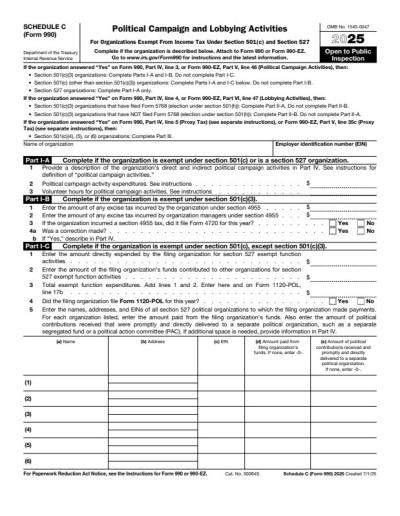
Schedule C (Form 990), Political Campaign and Lobbying Activities, is an IRS schedule used by certain tax-exempt organizations to report political campaign activity, lobbying activity, related expenditures, taxes, corrective actions, and section 501(h) election information. It is filed with Form 990 or Form 990-EZ when the organization answers the relevant political or lobbying questions in a way that requires the schedule.
The schedule separates several legal regimes. Part I addresses political campaign activities and section 527 exempt-function activity. Part II covers lobbying by section 501(c)(3) organizations, including organizations that elected the expenditure test under section 501(h) and those measured under the substantial-part test. Part III covers lobbying by other organizations. The correct part depends on the organization's exemption classification, elections, activities, and answers on the main return.
Prepare Schedule C from the finalized Form 990 or 990-EZ, general ledger, campaign and lobbying cost centers, payroll allocations, grants, payments to outside organizations, volunteer-hour records, Form 4720 information, prior Form 5768 elections, and written activity descriptions. PDFengine fills the official PDF but does not classify advocacy, determine tax-exempt status, calculate excise tax, or electronically file the return. Apply the instructions for the exact tax year being filed.
Who needs to fill this out?
- Form 990 or 990-EZ filers that participated or intervened in a political campaign for or against a candidate.
- Section 501(c)(3) organizations that engaged in lobbying, whether or not they made a section 501(h) election.
- Other tax-exempt organizations required to disclose direct or grassroots lobbying activities and expenditures.
- Tax professionals, finance teams, and nonprofit officers reconciling advocacy records to the organization's annual information return.
Where and how to submit
File Schedule C as an attachment to the organization's Form 990 or Form 990-EZ through the IRS-authorized electronic filing method used for that return. Do not submit it as a stand-alone schedule and do not send it to PDFengine. The deadline generally follows the organization's annual return deadline, including an approved extension, but an extension to file does not necessarily extend payment deadlines for excise taxes. Keep the completed schedule, allocation methods, invoices, payroll support, board records, communications, and filed return with the organization's tax records. Because filed Form 990 materials are generally subject to public inspection, review narrative text for accuracy and avoid unnecessary confidential personal information.
How to fill it out
- Step 1 — Name of organization and EIN: Enter the legal Name of organization and Employer identification number exactly as they appear on Form 990 or 990-EZ. Use the same tax period and return version throughout the schedule.
- Step 2 — Political campaign activity: Complete Political campaign activity expenditures and Volunteer hours for political campaign activities from contemporaneous records. Report section 4955 excise tax incurred by the organization or managers, indicate whether Form 4720 was filed, and answer whether a correction was made.
- Step 3 — Section 527 activity: Enter amounts directly expended for section 527 exempt-function activities and funds contributed to other organizations. Reconcile the Total exempt function expenditures and answer whether Form 1120-POL was filed when applicable.
- Step 4 — Recipient organization table: For each recipient, enter Name, Address, EIN, Amount paid from filing organization's funds, and Amount of political contributions received and promptly delivered to a separate political organization. Use continuation space exactly as the instructions require.
- Step 5 — Section 501(h) lobbying test: If the organization has a valid election, transfer exempt-purpose expenditures, lobbying nontaxable amounts, grassroots limits, lobbying expenditures, and taxable excess amounts from the supporting calculations. Do not mix direct and grassroots lobbying categories.
- Step 6 — Substantial-part or other lobbying disclosures: For organizations not using the 501(h) expenditure test, complete the applicable Yes or No questions and describe activities, volunteers, paid staff, compensation, and expenditures. Other exempt organizations should report direct contact and grassroots lobbying in the designated part.
- Step 7 — Reconcile and attach: Tie every amount to the main return, books, Form 4720, and any Form 1120-POL. Review narrative explanations for names, dates, issues, methods, and totals, then include Schedule C in the same filing package as Form 990 or 990-EZ.
Frequently asked questions
Is political campaign activity the same as lobbying?
No. Campaign intervention concerns candidates for public office, while lobbying generally concerns legislation. Different restrictions, calculations, and reporting parts apply.
Does every Form 990 filer complete Schedule C?
No. The filing requirement depends on the organization's answers on Form 990 or 990-EZ, its exemption classification, and its political or lobbying activities during the year.
What is a section 501(h) election?
Eligible section 501(c)(3) organizations may elect an expenditure-based lobbying test by filing Form 5768. Verify that the election is effective for the reporting year before using Part II-A.
How should shared employee costs be reported?
Use a reasonable, consistently applied allocation supported by time records or other contemporaneous evidence. Retain the method and source records with the return workpapers.
Do I need Form 4720 as well?
Possibly. If section 4955 or other excise-tax rules apply, consult the current Schedule C and Form 4720 instructions and file all required forms.
Can Schedule C be filed separately from Form 990?
No. Schedule C is an attachment to the applicable Form 990 or 990-EZ and should be transmitted as part of that complete return.
Can I create Schedule C (Form 990) in bulk?
Yes. PDFengine supports bulk generation of Schedule C (Form 990) via Excel or CSV upload — upload a spreadsheet with one row per form and PDFengine generates all PDFs at once. You can also automate bulk creation programmatically via the PDFengine API.
Ready to fill it in?
Fill in this form


