
Schedule D (Form 1040), filled in online.
Capital Gains and Losses
Type in the panel and watch each answer land on the page. Filling in and signing is free; downloading needs a free account, which includes 5 downloads a month.
Or fill it another way:
- Category
- Tax
- Fillable fields
- 55
- Pages
- 2
- Paper size
- US Letter, 8.5 × 11 in
Five ways to fill this form.
-
Fill it in here
Type in the panel and watch it land on the form. Sign it, then download.
Free to fill and sign Start filling -
Many at once, from a spreadsheet
One row per person, one finished PDF for each.
Paid plan · you can walk through it Start with a spreadsheet -
Send it to someone to fill in
Email a link. They fill it in without an account and you get the answers back.
Paid plan · you can walk through it Send a request -
From your own software
Fill it over the API. One request returns the finished PDF.
Paid plan -
Let an AI assistant do it
Connect ChatGPT or Claude once, then describe what goes on the form.
With a free account
What is this form?
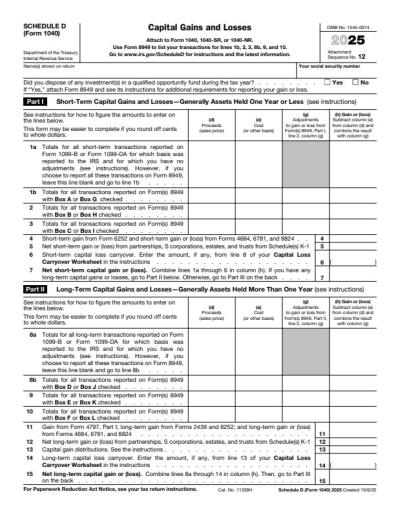
Schedule D (Form 1040) is the IRS schedule for reporting capital gains and losses. It summarizes short-term and long-term transactions from Forms 1099-B, Form 8949, partnership or trust K-1s, installment sale forms, casualty-related forms, and capital loss carryovers. The schedule determines the net capital result that feeds back into your individual tax return.
The form has several grouped lines for transactions with basis reported to the IRS, transactions requiring Form 8949 detail, and carryovers from prior years. PDFengine helps you complete the official fillable PDF so you can match proceeds, basis, adjustments, gains, losses, and worksheet-driven totals exactly to the structure the IRS expects.
Using PDFengine for Schedule D (Form 1040) also makes internal review easier when more than one person touches the filing process. Because the output follows the official IRS layout, a payroll manager, bookkeeper, broker operations specialist, or outside tax advisor can compare the draft line by line against source records without first translating a custom interface back into tax-form language. That is especially useful when the form later feeds another schedule, information return, withholding setup, or compliance archive.
Another practical advantage is consistency across repeated reviews. If the same payer, employer, or preparer needs to revisit the form later, the saved PDF shows exactly which line items, checkboxes, and reference amounts were used at the time of preparation. That reduces confusion when a recipient asks for clarification, when an auditor wants to trace a number back to source material, or when a correction has to be prepared without rebuilding the entire document from scratch.
Who needs to fill this out?
- Investors who sold stocks, ETFs, mutual funds, crypto-related property, or other capital assets
- Taxpayers receiving one or more Forms 1099-B and needing to summarize the results
- People with capital loss carryovers or gains flowing from K-1s, Form 4797, Form 6252, or Form 8949
- Preparers who want a reviewable draft of a 2026 capital gains schedule before filing
- Teams that want a standardized PDF draft for approval, reconciliation, recordkeeping, or secure client review
Where and how to submit
Schedule D is attached to Form 1040, 1040-SR, or 1040-NR and usually travels with Form 8949 or other supporting documents. Keep your broker statements and worksheets, because the schedule often summarizes transactions rather than listing every trade. If the return is prepared electronically, confirm that each required attachment is included.
After completion, keep both the finished PDF and the records that support every amount, checkbox, or identification field on the form. The PDF is useful for review and recipient delivery, but the supporting ledger, worksheet, payroll file, brokerage statement, or benefits record is what allows you to answer later questions from the recipient, an accountant, or the IRS. A saved copy also makes future corrections easier if you later need to issue an updated version.
Before you file, share, or archive the form, compare the completed PDF once more against the source records and any related forms mentioned in the instructions. Small mismatches in names, TINs, dates, line references, or payment amounts can create extra follow-up work later. A final review pass is usually faster than correcting a distributed or filed form after the fact.
How to fill it out
- Step 1 — Header and yes/no questions: Enter the taxpayer name and Social Security number, then review the initial yes/no questions before starting the transaction totals.
- Step 2 — Short-term transactions: Complete the Part I lines for short-term transactions, including totals reported directly from Form 1099-B or Form 1099-DA and totals coming from Form 8949 Box A, B, C, G, H, or I categories where applicable.
- Step 3 — Long-term transactions: Use Part II for long-term proceeds, basis, adjustments, and gain or loss totals, plus any long-term results from Forms 2439, 6252, 4684, 6781, 8824, or K-1 statements.
- Step 4 — Carryovers and worksheets: Add capital loss carryovers, capital gain distributions, and any worksheet-driven amounts such as 28% rate gain or unrecaptured section 1250 gain when the instructions require them.
- Step 5 — Net result and transfer: Combine the short-term and long-term sections, review line 16 and later decision points, and transfer the final result to the proper line on Form 1040.
Frequently asked questions
Do I always need Form 8949 with Schedule D?
Not always. Some transactions can be totaled directly on Schedule D, but many still require Form 8949 detail.
What is the difference between short-term and long-term on Schedule D?
Short-term generally covers assets held one year or less, while long-term covers assets held longer than one year.
Can Schedule D include capital loss carryovers?
Yes. The schedule has lines for prior-year capital loss carryover amounts.
Does Schedule D only apply to stock sales?
No. It can also apply to other capital assets and gains or losses from certain related IRS forms.
Why are there separate lines for different 1099-B categories?
Because reporting treatment depends on whether basis was reported and whether adjustments must be shown on Form 8949.
Should I keep a copy after sending it?
Yes. Keep the completed PDF together with the supporting records so you can verify what was reported if questions come up later.
Can I use PDFengine for review before filing or sharing?
Yes. Many teams use PDFengine to prepare and review the official layout first, then file or distribute the final version through their normal workflow.
What should I check before I finalize the PDF?
Review names, identification numbers, dates, line references, and every amount against the source records so the final version matches the underlying paperwork.
Can I create Schedule D (Form 1040) in bulk?
Yes. PDFengine supports bulk generation of Schedule D (Form 1040) via Excel or CSV upload — upload a spreadsheet with one row per form and PDFengine generates all PDFs at once. You can also automate bulk creation programmatically via the PDFengine API.
Ready to fill it in?
Fill in this form


