
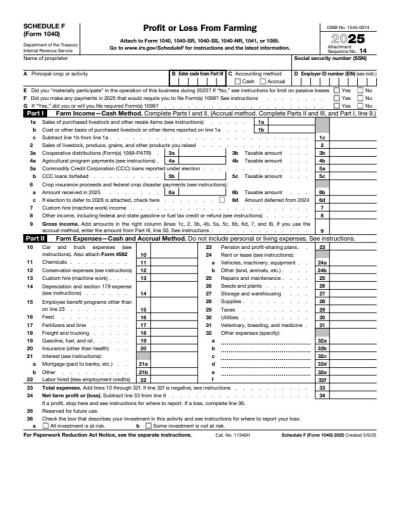
Schedule F (Form 1040), filled in online.
Profit or Loss From Farming
Type in the panel and watch each answer land on the page. Filling in and signing is free; downloading needs a free account, which includes 5 downloads a month.
Or fill it another way:
- Category
- Tax
- Fillable fields
- 89
- Pages
- 2
- Paper size
- US Letter, 8.5 × 11 in
Five ways to fill this form.
-
Fill it in here
Type in the panel and watch it land on the form. Sign it, then download.
Free to fill and sign Start filling -
Many at once, from a spreadsheet
One row per person, one finished PDF for each.
Paid plan · you can walk through it Start with a spreadsheet -
Send it to someone to fill in
Email a link. They fill it in without an account and you get the answers back.
Paid plan · you can walk through it Send a request -
From your own software
Fill it over the API. One request returns the finished PDF.
Paid plan -
Let an AI assistant do it
Connect ChatGPT or Claude once, then describe what goes on the form.
With a free account
What is this form?
Schedule F (Form 1040) is the IRS schedule used by farmers to report profit or loss from farming activity. The form pulls together gross farm income, cooperative distributions, agricultural program payments, car and truck expenses, feed, seed, labor, rent, depreciation, and other costs that determine the net result of the farming business for the tax year. On PDFengine, the template keeps the official PDF structure intact, so users can complete the real layout online and download a clean finished file instead of typing into a flat scan or rewriting the form from scratch.
That matters because Schedule F (Form 1040) is usually part of a wider compliance workflow. The data entered here often has to match other records exactly, including names, taxpayer identifiers, box values, addresses, signatures, withholding details, or transmittal totals. A structured PDF draft makes review easier for accountants, payroll staff, lenders, cooperative administrators, compliance teams, and taxpayers who need a reliable archive copy.
Who needs to fill this out?
- Farmers and agricultural sole proprietors reporting farm income and deductible farm expenses on their individual federal tax return
- Bookkeepers organizing livestock, crop, subsidy, insurance, and operating expense records for year-end tax reporting
- Tax preparers who want a readable PDF draft before transferring the numbers into a complete Form 1040 filing package
- Anyone reconciling farm revenue and expense categories to official IRS line items for a filing year
- Anyone who wants to complete the official Schedule F (Form 1040) (2026) layout online without manually editing the government PDF
Where and how to submit
Schedule F is attached to the taxpayer’s federal income tax return, usually Form 1040, when farm income and expenses must be reported. The finished PDF should be kept with ledgers, sales summaries, subsidy records, depreciation support, and receipts for major farm expenses so the filing can be defended later if needed.
For cross-border users, the practical point is simple: even when you prepare Schedule F (Form 1040) from outside the United States, it remains a U.S. federal form with U.S. filing rules, naming conventions, and recordkeeping expectations. Keep the finished PDF with the source documents that support every important field so the form can be reviewed, corrected, or reproduced later without guesswork.
How to fill it out
- Step 1 — Start with the top identity fields: Use Name of proprietor first and confirm that the filing is tied to the right person, business, payer, recipient, or reporting package before entering detailed numbers.
- Step 2 — Complete the matching identification details: Fill fields such as OMB No. 1545-0074 exactly as shown on payroll records, prior returns, onboarding documents, cooperative statements, or withholding files so the PDF matches the official records.
- Step 3 — Enter the core reportable amounts: Use entry lines like Line A: Principal crop or activity and Line B: Enter code from Part IV for the amounts or values that drive the purpose of Schedule F (Form 1040). It is better to copy directly from source records than to estimate or summarize from memory.
- Step 4 — Review status and supporting choices: Check whether fields like Line C: Accounting method — Cash or related boxes identify filing status, withholding treatment, recipient category, or another reporting choice that changes how the form is interpreted.
- Step 5 — Finish the remaining explanation or control fields: If the PDF includes a field such as Line C: Accounting method — Accrual, use it to complete the remaining narrative, account, certification, or cross-reference information needed for a clean review copy.
- Step 6 — Validate the finished PDF: Before filing or sharing the document, compare the final PDF with the related tax return, payroll export, cooperative ledger, lender package, retirement paperwork, or withholding statement so names, dates, and totals line up everywhere.
Frequently asked questions
Who usually files Schedule F?
Individual farmers and other eligible taxpayers who report farming activity on their federal return usually file it.
Does Schedule F replace Form 1040?
No. It is a schedule that supports Form 1040 rather than a separate return on its own.
Why do expense categories matter?
Because the IRS expects farming costs to be grouped and reported in the proper line items.
Should subsidy and insurance payments be reviewed carefully?
Yes. Farm-related payments often need to be matched to the right income lines.
Can the PDF be reviewed before the full return is assembled?
Yes. That is one of the practical reasons to complete the schedule digitally first.
Can I create Schedule F (Form 1040) in bulk?
Yes. PDFengine supports bulk generation of Schedule F (Form 1040) via Excel or CSV upload — upload a spreadsheet with one row per form and PDFengine generates all PDFs at once. You can also automate bulk creation programmatically via the PDFengine API.
Ready to fill it in?
Fill in this form


