
Schedule NEC (Form 1040-NR) — Tax on Income Not Effectively Connected, filled in online.
Schedule NEC (Form 1040-NR) — Tax on Income Not Effectively Connected — official fillable PDF form
Type in the panel and watch each answer land on the page. Filling in and signing is free; downloading needs a free account, which includes 5 downloads a month.
Or fill it another way:
- Category
- Tax
- Fillable fields
- 137
- Pages
- 1
- Paper size
- 792 × 612 pt
Five ways to fill this form.
-
Fill it in here
Type in the panel and watch it land on the form. Sign it, then download.
Free to fill and sign Start filling -
Many at once, from a spreadsheet
One row per person, one finished PDF for each.
Paid plan · you can walk through it Start with a spreadsheet -
Send it to someone to fill in
Email a link. They fill it in without an account and you get the answers back.
Paid plan · you can walk through it Send a request -
From your own software
Fill it over the API. One request returns the finished PDF.
Paid plan -
Let an AI assistant do it
Connect ChatGPT or Claude once, then describe what goes on the form.
With a free account
What is this form?
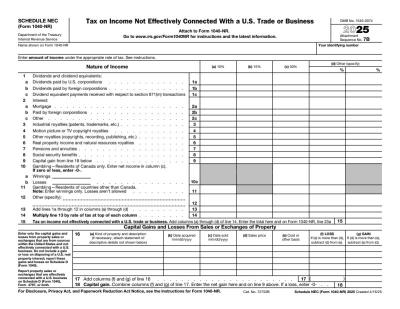
Schedule NEC calculates U.S. tax for a nonresident alien on certain U.S.-source income not effectively connected with a U.S. trade or business. It groups dividends, interest, royalties, rents, pensions, social security benefits, capital gains, and other fixed or determinable annual or periodical income by the applicable statutory or treaty rate, and its result is transferred to Form 1040-NR. This fillable version helps you prepare a legible working copy, but it does not replace the current instructions, eligibility rules, required evidence, or review by the receiving authority. Use the edition requested for the relevant transaction or reporting period and compare the completed PDF with the official source before submission.
Information should come from source records rather than memory or estimates. Names, identifiers, dates, amounts, addresses, and selections must agree with the supporting documents for the case. A technically complete PDF can still be rejected when an answer is inaccurate, a required attachment is missing, or a signature belongs to the wrong person. Save the original records and document any calculation used to produce an amount.
Who needs to fill this out?
- Nonresident aliens filing Form 1040-NR with qualifying not-effectively-connected U.S.-source income.
- Taxpayers claiming a treaty rate for an item reported in a Schedule NEC category.
- Nonresidents subject to the special capital-gain computation.
- Cross-border tax professionals reconciling income, withholding, sourcing, and treaty positions.
Before starting, confirm that Schedule NEC (Form 1040-NR) is the form requested by the issuing or receiving organization. Assign one person to reconcile the entries when several people provide information. Do not enter placeholder data simply to make a field look complete. If a question does not apply, follow the printed instructions for leaving it blank or marking it not applicable, because a blank field and a zero can have different meanings.
Where and how to submit
Attach Schedule NEC to the same-year Form 1040-NR and file the complete return electronically when eligible or at the IRS address in current instructions. Do not file Schedule NEC alone. The deadline varies with the taxpayer’s circumstances, and an extension generally does not extend the time to pay. Use only a submission channel accepted by the receiving organization, and verify the address, portal, email, or office against current official instructions. Keep a complete copy together with attachments and proof of delivery or electronic confirmation. If the recipient returns the form for correction, amend the inaccurate entry transparently and resubmit the complete package; do not discard the version that shows what was originally delivered.
Review the generated PDF at normal size and at high zoom. Confirm that long values are not clipped, checkboxes show the intended choice, dates use the requested format, and every signature and attachment is present. Protect the file because it may contain personal, financial, medical, or transaction information. Share it only with people and systems authorized to handle the submission.
How to fill it out
- Step 1 — Name shown on Form 1040-NR and identifying number: Enter the taxpayer name and SSN or ITIN exactly as on the accompanying return.
- Step 2 — Classify the income: Separate dividends, interest, royalties, rents, pensions, benefits, gains, and other amounts, keeping effectively connected income outside Schedule NEC.
- Step 3 — 10%, 15%, 30%, and Other rate columns: Place each gross amount under its applicable rate. Specify the exact other percentage and retain statutory or treaty support.
- Step 4 — Lines 1 through 11: Enter every category in its designated row and use the required taxable portion where the instructions do not call for the full payment.
- Step 5 — Capital gains section: Report applicable transactions, presence days, gains, losses, limitations, and rate under the special nonresident rules, retaining a supporting calculation.
- Step 6 — Tax by rate: Total each rate column, multiply accurately, and reconcile gross income and federal withholding to Forms 1042-S, 1099, and other source records.
- Step 7 — Transfer to Form 1040-NR: Add the calculated tax, carry it to the designated line, and attach Schedule NEC plus any required treaty statement or disclosure.
Frequently asked questions
Is every Schedule NEC item taxed at 30%?
No. A treaty or another rule may provide a lower or different rate, but the taxpayer must substantiate it.
Should I report gross income or cash after withholding?
Generally report the applicable gross income here and claim federal withholding separately on Form 1040-NR.
Where does effectively connected income go?
It is generally reported in the main Form 1040-NR computation and related schedules, not Schedule NEC.
Can a treaty reduce the rate to zero?
Some treaty provisions can do so when every eligibility requirement is met, and an additional disclosure may be required.
Can I use an electronic signature?
Use an electronic signature only when the recipient and the applicable instructions accept it. A typed name is not automatically equivalent to a valid signature, and some filings require an original, witnessed, notarized, or professional signature.
What should I check before submitting?
Reconcile identifiers, dates, amounts, selected options, attachments, and signatures against the source records. Then inspect the final PDF for clipped text, blank required fields, duplicate selections, and pages in the wrong order.
Should I keep a copy of the completed form?
Yes. Keep the exact submitted version, supporting records, and delivery confirmation for the retention period that applies. Store the files securely because the form may contain sensitive information.
Can I create Schedule NEC (Form 1040-NR) in bulk?
Yes. PDFengine supports bulk generation of Schedule NEC (Form 1040-NR) via Excel or CSV upload — upload a spreadsheet with one row per form and PDFengine generates all PDFs at once. You can also automate bulk creation programmatically via the PDFengine API. Each generated form must still be individually reviewed and, where required, signed.
Ready to fill it in?
Fill in this form


