
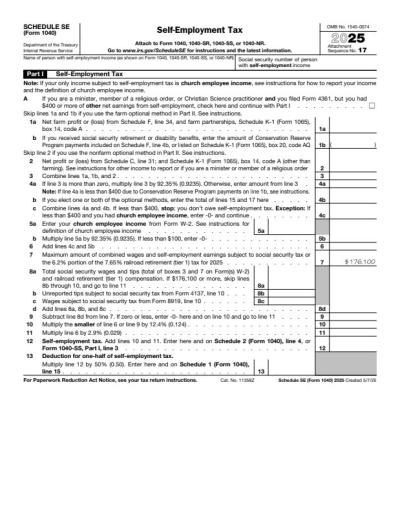
Schedule SE (Form 1040), filled in online.
Self-Employment Tax
Type in the panel and watch each answer land on the page. Filling in and signing is free; downloading needs a free account, which includes 5 downloads a month.
Or fill it another way:
- Category
- Tax
- Fillable fields
- 27
- Pages
- 2
- Paper size
- US Letter, 8.5 × 11 in
Five ways to fill this form.
-
Fill it in here
Type in the panel and watch it land on the form. Sign it, then download.
Free to fill and sign Start filling -
Many at once, from a spreadsheet
One row per person, one finished PDF for each.
Paid plan · you can walk through it Start with a spreadsheet -
Send it to someone to fill in
Email a link. They fill it in without an account and you get the answers back.
Paid plan · you can walk through it Send a request -
From your own software
Fill it over the API. One request returns the finished PDF.
Paid plan -
Let an AI assistant do it
Connect ChatGPT or Claude once, then describe what goes on the form.
With a free account
Key facts
| Property | Details |
|---|---|
| Form number | Schedule SE (Form 1040) |
| Official name | Self-Employment Tax |
| Issuing agency | Internal Revenue Service, Department of the Treasury |
| Current revision | 2025 revision |
| Number of pages | 2 pages |
| Filing frequency | Annual, attached to the individual federal income tax return |
| Related instructions | 2025 Instructions for Schedule SE (Form 1040) |
| Main carryovers | Line 12 to Schedule 2 (Form 1040), line 4; line 13 to Schedule 1 (Form 1040), line 15 |
What is this form?
Schedule SE (Form 1040), officially titled Self-Employment Tax, is the Internal Revenue Service schedule used to calculate Social Security and Medicare tax on net earnings from self-employment. It is issued by the Department of the Treasury, Internal Revenue Service and attached to an individual income tax return such as Form 1040, Form 1040-SR, Form 1040-NR, or Form 1040-SS when applicable. The current official IRS materials for this template are the 2025 revision. The Social Security Administration also relies on the amounts reported here to credit self-employment earnings for future benefit purposes.
The schedule is a 2-page form with two main parts. Part I calculates self-employment tax from farming income, nonfarm business income, partnership income, church employee income, and wage amounts already subject to Social Security tax. It walks through lines 1a through 13, including the 92.35% adjustment on line 4a, the Social Security wage base comparison on lines 7 through 10, the Medicare portion on line 11, total self-employment tax on line 12, and the deduction for one-half of self-employment tax on line 13. Part II, on page 2, covers the optional methods on lines 14 through 17 for certain farmers and nonfarm filers who want to preserve Social Security coverage or meet other eligibility rules even when actual net earnings are low.
Schedule SE does not report income by itself; it converts business profit or other self-employment earnings into the taxpayer's self-employment tax liability. The completed tax from line 12 carries to Schedule 2 (Form 1040), line 4, while the deduction from line 13 carries to Schedule 1 (Form 1040), line 15. The form also contains a special checkbox above Part I for ministers, members of religious orders, and Christian Science practitioners who filed Form 4361 but still have at least $400 of other net earnings subject to self-employment tax.
Who needs to fill this out?
- Sole proprietors and independent contractors generally must file Schedule SE if the amount on line 4c is $400 or more.
- Farmers with net farm profit reported from Schedule F, line 34 or farm partnership self-employment earnings reported on Schedule K-1 (Form 1065), box 14, code A may need the schedule.
- Partners who have self-employment earnings, including certain guaranteed payments and partnership amounts reported for self-employment tax purposes, generally use Schedule SE.
- Church employees with $108.28 or more of church employee income must generally file even if their other self-employment earnings are below $400.
- Ministers, members of religious orders, and Christian Science practitioners usually must complete the form for ministerial earnings unless they received IRS approval of an exemption through Form 4361. Even with Form 4361, they may still file if they have other nonexempt self-employment earnings of $400 or more.
- U.S. citizens or resident aliens living abroad may still owe self-employment tax on foreign self-employment income unless a totalization agreement applies.
- People who generally do not need Schedule SE include filers whose line 4c is less than $400 and who do not have church employee income of $108.28 or more, as well as individuals whose earnings are exempt because of approved Form 4029, approved Form 4361 for the exempt income, or a qualifying international social security agreement.
Where and how to submit
Schedule SE is filed with the taxpayer's federal income tax return, not by itself. Electronic filing is the normal method: the schedule is transmitted with Form 1040, 1040-SR, 1040-NR, or 1040-SS through IRS e-file, commercial tax software, or an authorized e-file provider. If filing on paper, the schedule goes in the same package as the return and any related schedules. The receiving agency is the Internal Revenue Service; the Social Security Administration later uses the earnings information for benefit records.
Paper mailing addresses depend on where the taxpayer lives and whether a payment is enclosed. For many states in the Southeast and Texas, paper returns without payment go to Department of the Treasury, Internal Revenue Service, Austin, TX 73301-0002. For many states in the Midwest and Northeast, the no-payment address is Department of the Treasury, Internal Revenue Service, Kansas City, MO 64999-0002. For many western states, the no-payment address is Department of Treasury, Internal Revenue Service, Ogden, UT 84201-0002.
Returns with payment commonly go to IRS lockbox addresses such as Internal Revenue Service, P.O. Box 1214, Charlotte, NC 28201-1214 or Internal Revenue Service, P.O. Box 931000, Louisville, KY 40293-1000, depending on the state listed in the IRS Where to File table. If you use a private delivery service, the IRS instructs filers to use only the street addresses 3651 S IH35, Austin, TX 78741, 333 W. Pershing, Kansas City, MO 64108, or 1973 Rulon White Blvd., Ogden, UT 84201, based on the return type.
For a 2025 Schedule SE filed with a calendar-year individual return, the normal filing deadline is April 15, 2026. An extension extends the filing date for the return package, but not the time to pay tax due.
How to fill it out
- Step 1 — Heading and taxpayer information: Enter the name of the person with self-employment income exactly as shown on Form 1040, 1040-SR, 1040-SS, or 1040-NR, and enter that person's Social Security number. If both spouses have self-employment income on a joint return, each spouse completes a separate Schedule SE.
- Step 2 — Part I, lines 1a through 3: Enter net farm profit or loss on line 1a, any qualifying Conservation Reserve Program payments on line 1b if the line instructions apply, and net profit or loss from Schedule C, line 31 plus applicable Schedule K-1 (Form 1065), box 14, code A nonfarm amounts on line 2. Add lines 1a, 1b, and 2 on line 3.
- Step 3 — Part I, lines 4a through 6: If line 3 is positive, multiply it by 92.35% (0.9235) on line 4a. If you qualify for the optional methods in Part II, enter the total from lines 15 and 17 on line 4b. Add lines 4a and 4b on line 4c. If line 4c is less than $400, you generally stop unless you have church employee income. Enter church employee income from Form W-2 on line 5a, multiply by 92.35% on line 5b, then add lines 4c and 5b on line 6.
- Step 4 — Part I, lines 7 through 10: Use line 7 for the year's maximum combined wages and self-employment earnings subject to Social Security tax. On line 8a, enter total Social Security wages and tips from boxes 3 and 7 of Form W-2; on line 8b, enter unreported tips from Form 4137, line 10; on line 8c, enter wages subject to Social Security tax from Form 8919, line 10. Add them on line 8d, subtract from line 7 on line 9, and multiply the smaller of line 6 or line 9 by 12.4% on line 10.
- Step 5 — Part I, lines 11 through 13: Multiply line 6 by 2.9% on line 11 for the Medicare portion. Add lines 10 and 11 on line 12 and transfer that amount to Schedule 2 (Form 1040), line 4 or the corresponding line on Form 1040-SS. Then multiply line 12 by 50% on line 13 and transfer that deduction to Schedule 1 (Form 1040), line 15.
- Step 6 — Part II, Optional Methods to Figure Net Earnings: Complete this page only if you are using an optional method. Enter the maximum income for optional methods on line 14. On line 15, farmers enter the smaller of two-thirds of gross farm income or the stated dollar cap. On line 16, subtract line 15 from line 14. On line 17, nonfarm filers enter the smaller of two-thirds of gross nonfarm income or the allowed amount. Add the optional-method amounts back on line 4b of Part I.
- Step 7 — Final review and attachments: Confirm that all cross-references match the main return, especially Schedule C, Schedule F, Schedule K-1, Schedule 1, and Schedule 2. If you are a minister reducing line 2 by allowable church-employee business expenses, attach the required explanation. Keep worksheets and supporting records for the Social Security wage base calculation and any exemption claimed through Form 4029, Form 4361, or an international coverage statement.
Important deadlines & penalties
- Annual filing deadline: For a 2025 calendar-year return, attach Schedule SE to Form 1040, 1040-SR, 1040-NR, or 1040-SS by April 15, 2026.
- Extension deadline: File Form 4868 by April 15, 2026 to request an automatic extension to October 15, 2026. This extends the time to file the return package, but not the time to pay self-employment tax.
- Estimated tax dates: Because self-employment tax is pay-as-you-go, estimated tax installments are generally due April 15, June 15, September 15, and January 15 of the following year. The IRS states underpayment penalties can apply even if a refund is due when the return is later filed.
- Late filing penalty: If the return is filed late, the IRS generally charges 5% of unpaid tax for each month or part of a month, up to 25%. For Forms 1040 due after December 31, 2025, a return filed more than 60 days late can trigger a minimum failure-to-file penalty of $525 or 100% of the unpaid tax, whichever is less.
- Late payment penalty: If the tax is not paid by the original due date, the IRS generally charges 0.5% of unpaid tax per month, up to 25%. If both late-filing and late-payment penalties apply in the same month, the failure-to-file penalty is reduced by the failure-to-pay amount.
- Penalty reductions and exceptions: The underpayment penalty may be reduced in certain casualty, disaster, retirement-after-age-62, or disability situations under Form 2210 rules. Federally declared disaster relief can also move the filing and payment dates.
Common mistakes to avoid
- Stopping after line 4c when church employee income exists: If line 4c is under $400, many filers incorrectly stop even though line 5a church employee income of $108.28 or more requires them to continue. That can understate tax and lead to IRS correction notices, penalties, and interest.
- Putting gross receipts on line 2 instead of net profit: Line 2 asks for net profit or loss from Schedule C, line 31, not total sales or gross income. Using gross receipts inflates self-employment tax and may also distort the deduction on line 13.
- Ignoring the 92.35% factor on lines 4a and 5b: Entering full net earnings instead of multiplying by 0.9235 causes both the Social Security and Medicare portions to be overstated.
- Using the wrong wage amount on lines 8a through 8d: The form requires Social Security wages and tips, not federal wages from Form W-2 box 1. Pulling the wrong box can misstate the remaining Social Security wage base on line 9.
- Forgetting to transfer line 12 and line 13: Schedule SE is incomplete unless line 12 goes to Schedule 2 (Form 1040), line 4 and line 13 goes to Schedule 1 (Form 1040), line 15. Missing either transfer can produce an incorrect total tax or deduction.
- Claiming an exemption without the required approval: Some filers omit Schedule SE because they believe ministerial or religious income is automatically exempt. Without an approved Form 4029, Form 4361, or qualifying international coverage statement, the IRS can assess the tax later.
- Using optional methods incorrectly on lines 14 through 17: Part II is not a free election for every filer. Applying the farm or nonfarm optional method without meeting the IRS conditions can create unsupported earnings and expose the return to adjustment.
Expert tips
- Check line 4c before doing the full wage-base math: If line 4c is below $400 and you do not have church employee income on line 5a, you generally do not owe self-employment tax.
- Reconcile line 2 to Schedule C, line 31 exactly: This is one of the fastest ways to catch a data-entry error before it flows through lines 4a, 10, 11, and 13.
- Use the optional methods strategically: Part II can help certain farmers and low-income self-employed filers preserve Social Security coverage credits even when actual net earnings are low. Review the official instructions carefully before electing it.
- Remember that foreign earned income exclusions do not usually reduce SE tax: U.S. citizens and resident aliens abroad may still owe Schedule SE tax unless a totalization agreement applies and they have the required foreign coverage statement.
- Ministers should read Pub. 517 before completing line 2: The IRS has special rules for housing allowances, retirement benefits, and unreimbursed employee business expenses tied to ministerial income.
- Schedule SE does not compute Additional Medicare Tax: If wages and self-employment income exceed the threshold, use Form 8959 for that separate tax.
- Use IRS payment tools if tax is due: Direct Pay, EFTPS, an IRS online account, or a payment plan can reduce the risk of compounding failure-to-pay penalties and interest after filing.
Related forms & next steps
- Form 1040 — main individual income tax return to which Schedule SE is attached. Official IRS page
- Schedule 1 (Form 1040) — receives the deduction for one-half of self-employment tax from Schedule SE line 13. Official IRS page
- Schedule 2 (Form 1040) — receives self-employment tax from Schedule SE line 12. Official IRS page
- Schedule C (Form 1040) — reports net profit or loss from a sole proprietorship, which flows to Schedule SE line 2. Official IRS page
- Schedule F (Form 1040) — reports farm profit or loss, which can flow to Schedule SE line 1a. Official IRS page
- Form 1040-ES — used to calculate and pay estimated tax, including self-employment tax during the year. Official IRS page
- Form 4868 — requests an automatic extension of time to file the Form 1040 return package. Official IRS page
- Form 8959 — calculates Additional Medicare Tax, which is separate from the Schedule SE computation. Official IRS page
Frequently asked questions
What is Schedule SE (Form 1040) used for?
It is used to calculate self-employment tax, which covers Social Security and Medicare tax on net earnings from self-employment.
Who has to file Schedule SE?
You generally must file if line 4c is $400 or more, or if you have church employee income of $108.28 or more. Partners, sole proprietors, many farmers, and some ministers commonly need it.
Do I file Schedule SE by itself?
No. Schedule SE is attached to Form 1040, 1040-SR, 1040-NR, or 1040-SS. It is not mailed or e-filed as a standalone form.
Why does Schedule SE multiply income by 92.35%?
The IRS uses the 92.35% factor on lines 4a and 5b to adjust net earnings before applying the Social Security and Medicare tax rates.
What if my self-employment income is less than $400?
If line 4c is under $400, you usually do not owe self-employment tax. The main exception is when you have church employee income of $108.28 or more, which can still require filing.
Can I use Schedule SE if I live outside the United States?
Yes. Many U.S. citizens and resident aliens abroad still owe self-employment tax. A foreign earned income exclusion does not usually remove that liability. An exception may apply under a social security totalization agreement if you have the proper coverage statement.
Can I create Schedule SE (Form 1040) in bulk?
Yes. PDFengine supports bulk generation of Schedule SE (Form 1040) via Excel or CSV upload — upload a spreadsheet with one row per entry and PDFengine generates all PDFs at once. You can also automate bulk creation programmatically via the PDFengine API.
Ready to fill it in?
Fill in this formOfficial sources
- About Schedule SE (Form 1040) — official IRS overview of the schedule and its purpose.
- 2025 Instructions for Schedule SE (Form 1040) — official line instructions, filing thresholds, special rules, and optional methods.
- Schedule SE (Form 1040) PDF — official IRS form showing the current line layout for Parts I and II.
- Where to file Form 1040 paper returns — official IRS mailing addresses by state and payment status.
- IRS Failure to File Penalty — official penalty rules for late-filed individual returns, including monthly rates and minimum penalties.



