
Form W-4R, filled in online.
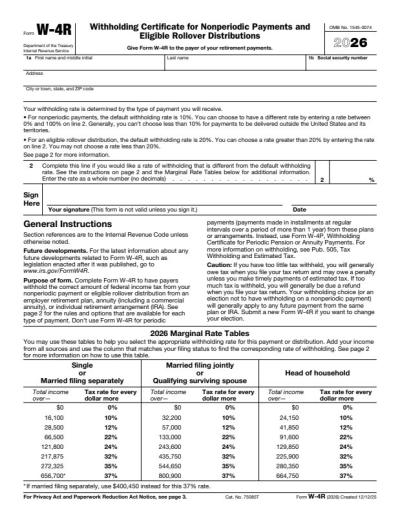
Withholding Certificate for Nonperiodic Payments and Eligible Rollover Distributions
Type in the panel and watch each answer land on the page. Filling in and signing is free; downloading needs a free account, which includes 5 downloads a month.
Or fill it another way:
- Category
- Tax
- Fillable fields
- 6
- Pages
- 3
- Paper size
- US Letter, 8.5 × 11 in
Five ways to fill this form.
-
Fill it in here
Type in the panel and watch it land on the form. Sign it, then download.
Free to fill and sign Start filling -
Many at once, from a spreadsheet
One row per person, one finished PDF for each.
Paid plan · you can walk through it Start with a spreadsheet -
Send it to someone to fill in
Email a link. They fill it in without an account and you get the answers back.
Paid plan · you can walk through it Send a request -
From your own software
Fill it over the API. One request returns the finished PDF.
Paid plan -
Let an AI assistant do it
Connect ChatGPT or Claude once, then describe what goes on the form.
With a free account
What is this form?
Form W-4R is the IRS withholding certificate used for nonperiodic payments and eligible rollover distributions. It gives the payer instructions about how much federal income tax to withhold from certain retirement-related payments when the recipient does not want to rely only on the default withholding treatment. On PDFengine, the template keeps the official PDF structure intact, so users can complete the real layout online and download a clean finished file instead of typing into a flat scan or rewriting the form from scratch.
That matters because Form W-4R is usually part of a wider compliance workflow. The data entered here often has to match other records exactly, including names, taxpayer identifiers, box values, addresses, signatures, withholding details, or transmittal totals. A structured PDF draft makes review easier for accountants, payroll staff, lenders, cooperative administrators, compliance teams, and taxpayers who need a reliable archive copy.
Who needs to fill this out?
- Individuals receiving nonperiodic retirement or deferred compensation payments who want to adjust federal withholding
- Plan administrators, retirement providers, and finance staff collecting withholding instructions before processing distributions
- Taxpayers reviewing whether they want more or less withholding on a lump-sum or other nonperiodic payment
- Advisers who need a tidy PDF before attaching it to a retirement, annuity, or rollover distribution file
- Anyone who wants to complete the official Form W-4R (2026) layout online without manually editing the government PDF
Where and how to submit
Form W-4R is generally given to the payer, plan administrator, retirement provider, or other distribution source that will apply withholding to the payment. It is not typically mailed to the IRS by the individual, but it should be preserved with the payment request, rollover papers, and tax planning notes used to choose the withholding instruction.
For cross-border users, the practical point is simple: even when you prepare Form W-4R from outside the United States, it remains a U.S. federal form with U.S. filing rules, naming conventions, and recordkeeping expectations. Keep the finished PDF with the source documents that support every important field so the form can be reviewed, corrected, or reproduced later without guesswork.
How to fill it out
- Step 1 — Start with the top identity fields: Use Line 1a: First name and middle initial first and confirm that the filing is tied to the right person, business, payer, recipient, or reporting package before entering detailed numbers.
- Step 2 — Complete the matching identification details: Fill fields such as Last name exactly as shown on payroll records, prior returns, onboarding documents, cooperative statements, or withholding files so the PDF matches the official records.
- Step 3 — Enter the core reportable amounts: Use entry lines like Address and City or town, state, and ZIP code for the amounts or values that drive the purpose of Form W-4R. It is better to copy directly from source records than to estimate or summarize from memory.
- Step 4 — Review status and supporting choices: Check whether fields like Line 1b: Social security number or related boxes identify filing status, withholding treatment, recipient category, or another reporting choice that changes how the form is interpreted.
- Step 5 — Finish the remaining explanation or control fields: If the PDF includes a field such as Line 2: Rate of withholding, use it to complete the remaining narrative, account, certification, or cross-reference information needed for a clean review copy.
- Step 6 — Validate the finished PDF: Before filing or sharing the document, compare the final PDF with the related tax return, payroll export, cooperative ledger, lender package, retirement paperwork, or withholding statement so names, dates, and totals line up everywhere.
Frequently asked questions
What types of payments use Form W-4R?
It is used for nonperiodic payments and eligible rollover distributions rather than for regular wage withholding.
Do I send Form W-4R to the IRS?
Usually no. You give it to the payer or plan administrator handling the payment.
Why should I review withholding before signing?
Because the withholding choice can affect whether you owe more tax later or receive a larger refund.
Is Form W-4R the same as Form W-4P?
No. The forms are related but cover different withholding situations for retirement-related payments.
Should I keep a signed copy?
Yes. It is useful to store it with the payment and tax planning records.
Can I create Form W-4R in bulk?
Yes. PDFengine supports bulk generation of Form W-4R via Excel or CSV upload — upload a spreadsheet with one row per form and PDFengine generates all PDFs at once. You can also automate bulk creation programmatically via the PDFengine API.
Ready to fill it in?
Fill in this form


