
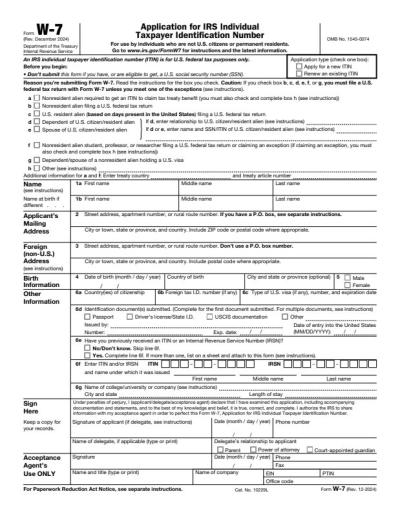
Form W-7, filled in online.
Application for IRS Individual Taxpayer Identification Number
Type in the panel and watch each answer land on the page. Filling in and signing is free; downloading needs a free account, which includes 5 downloads a month.
Or fill it another way:
- Category
- Tax
- Fillable fields
- 69
- Pages
- 1
- Paper size
- US Letter, 8.5 × 11 in
Five ways to fill this form.
-
Fill it in here
Type in the panel and watch it land on the form. Sign it, then download.
Free to fill and sign Start filling -
Many at once, from a spreadsheet
One row per person, one finished PDF for each.
Paid plan · you can walk through it Start with a spreadsheet -
Send it to someone to fill in
Email a link. They fill it in without an account and you get the answers back.
Paid plan · you can walk through it Send a request -
From your own software
Fill it over the API. One request returns the finished PDF.
Paid plan -
Let an AI assistant do it
Connect ChatGPT or Claude once, then describe what goes on the form.
With a free account
What is this form?
Form W-7 is the IRS application used to request an Individual Taxpayer Identification Number, or ITIN. It is meant for people who need a U.S. tax processing number but are not eligible for a Social Security Number, and it ties the applicant’s identity, foreign status, reason for applying, and supporting tax context into one official filing package. On PDFengine, the template keeps the official PDF structure intact, so users can complete the real layout online and download a clean finished file instead of typing into a flat scan or rewriting the form from scratch.
That matters because Form W-7 is usually part of a wider compliance workflow. The data entered here often has to match other records exactly, including names, taxpayer identifiers, box values, addresses, signatures, withholding details, or transmittal totals. A structured PDF draft makes review easier for accountants, payroll staff, lenders, cooperative administrators, compliance teams, and taxpayers who need a reliable archive copy.
Who needs to fill this out?
- Individuals who are not eligible for a Social Security Number but need a U.S. taxpayer identification number for federal tax reporting
- Nonresident or resident aliens, dependents, spouses, and other applicants preparing an ITIN request package
- Tax preparers and acceptance agents reviewing identity documents, foreign status, and tax return attachments before submission
- People who want a clean PDF draft before assembling the final W-7 mailing or in-person application package
- Anyone who wants to complete the official Form W-7 (2026) layout online without manually editing the government PDF
Where and how to submit
Form W-7 is usually submitted to the IRS with supporting identification documents and, in many cases, with an accompanying federal tax return or another qualifying exception package. Because the application depends on matching names, foreign status documents, and tax records, the final PDF should be stored with the full ITIN file before it is mailed or presented through an acceptance agent.
For cross-border users, the practical point is simple: even when you prepare Form W-7 from outside the United States, it remains a U.S. federal form with U.S. filing rules, naming conventions, and recordkeeping expectations. Keep the finished PDF with the source documents that support every important field so the form can be reviewed, corrected, or reproduced later without guesswork.
How to fill it out
- Step 1 — Start with the top identity fields: Use Application type: Apply for a new ITIN first and confirm that the filing is tied to the right person, business, payer, recipient, or reporting package before entering detailed numbers.
- Step 2 — Complete the matching identification details: Fill fields such as Application type: Renew an existing ITIN exactly as shown on payroll records, prior returns, onboarding documents, cooperative statements, or withholding files so the PDF matches the official records.
- Step 3 — Enter the core reportable amounts: Use entry lines like Reason for submitting Form W-7: Nonresident alien required to get an ITIN to claim tax treaty benefit and Reason for submitting Form W-7: Nonresident alien filing a U.S. federal tax return for the amounts or values that drive the purpose of Form W-7. It is better to copy directly from source records than to estimate or summarize from memory.
- Step 4 — Review status and supporting choices: Check whether fields like Reason for submitting Form W-7: U.S. resident alien (based on days present in the United States) filing a U.S. federal tax return or related boxes identify filing status, withholding treatment, recipient category, or another reporting choice that changes how the form is interpreted.
- Step 5 — Finish the remaining explanation or control fields: If the PDF includes a field such as Reason for submitting Form W-7: Dependent of U.S. citizen/resident alien, use it to complete the remaining narrative, account, certification, or cross-reference information needed for a clean review copy.
- Step 6 — Validate the finished PDF: Before filing or sharing the document, compare the final PDF with the related tax return, payroll export, cooperative ledger, lender package, retirement paperwork, or withholding statement so names, dates, and totals line up everywhere.
Frequently asked questions
What is an ITIN?
An ITIN is a U.S. tax processing number issued by the IRS to certain people who are not eligible for a Social Security Number.
Do I need documents with Form W-7?
Yes. The application normally requires identity and foreign-status documentation, and often a related tax filing package.
Can I use Form W-7 just to get work authorization?
No. An ITIN is for tax processing and does not itself create work authorization or immigration status.
Why does the reason-for-applying box matter?
Because it tells the IRS which category supports the ITIN request and what evidence should accompany it.
Should I keep a copy of the entire package?
Yes. That is important if the IRS asks follow-up questions or if you need to reference the filing later.
Can I create Form W-7 in bulk?
Yes. PDFengine supports bulk generation of Form W-7 via Excel or CSV upload — upload a spreadsheet with one row per form and PDFengine generates all PDFs at once. You can also automate bulk creation programmatically via the PDFengine API.
Ready to fill it in?
Fill in this form


