
W 9S Form, filled in online.
W 9S Form — official fillable PDF form
Type in the panel and watch each answer land on the page. Filling in and signing is free; downloading needs a free account, which includes 5 downloads a month.
Or fill it another way:
- Category
- Tax
- Fillable fields
- 13
- Pages
- 2
- Paper size
- US Letter, 8.5 × 11 in
Five ways to fill this form.
-
Fill it in here
Type in the panel and watch it land on the form. Sign it, then download.
Free to fill and sign Start filling -
Many at once, from a spreadsheet
One row per person, one finished PDF for each.
Paid plan · you can walk through it Start with a spreadsheet -
Send it to someone to fill in
Email a link. They fill it in without an account and you get the answers back.
Paid plan · you can walk through it Send a request -
From your own software
Fill it over the API. One request returns the finished PDF.
Paid plan -
Let an AI assistant do it
Connect ChatGPT or Claude once, then describe what goes on the form.
With a free account
What is this form?
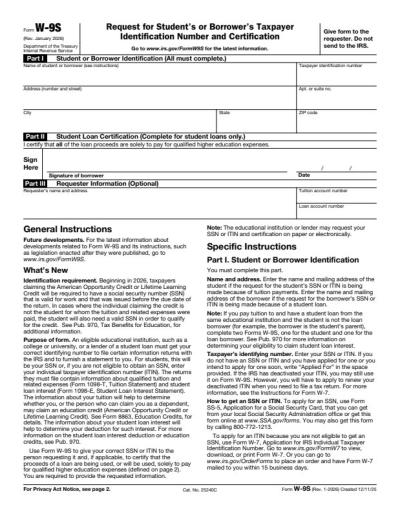
IRS Form W-9S, Request for Student's or Borrower's Taxpayer Identification Number and Certification, is used by eligible educational institutions and lenders to request a student's or borrower's correct taxpayer identification number. The information helps the requester prepare education-related information returns, including Form 1098-T for qualified tuition and related expenses or Form 1098-E for student loan interest.
The form has a student or borrower section and a requester section. The individual provides a legal name, taxpayer identification number, address, date, and any requested tuition or loan account number. Depending on the situation, the individual may certify that they are not required to obtain a TIN or that a loan is a qualified student loan. The school or lender identifies itself so the completed request can be matched to the correct account.
Form W-9S is generally given to the institution or lender that requested it; it is not ordinarily mailed to the IRS by the student or borrower. Because the form contains sensitive identity data, use a secure delivery method and verify the requester before sharing it. PDFengine prepares the official fillable PDF but does not validate the TIN, decide whether a loan qualifies, transmit the form, or file an information return.
Who needs to fill this out?
- Students asked by a college, university, vocational school, or other eligible educational institution to provide a correct TIN.
- Borrowers asked by a student-loan lender or servicer to provide identification and, when applicable, a qualified-loan certification.
- Educational institutions collecting data needed to prepare Form 1098-T.
- Lenders or servicers collecting data needed to prepare Form 1098-E and associate it with the correct loan account.
Where and how to submit
Return Form W-9S to the eligible educational institution, lender, loan servicer, or other requester named on the form. Follow the secure portal, in-person, or mailing instructions supplied by that organization; do not send it to PDFengine and generally do not send it directly to the IRS. Respond by the requester's stated deadline so it can prepare an accurate Form 1098-T or 1098-E. Keep a protected copy and proof of delivery. If the name or TIN changes, or if a previously supplied number was wrong, contact the requester and submit corrected information through its approved process.
How to fill it out
- Step 1 — Name of student or borrower: Enter the individual's legal name associated with the taxpayer identification number. Do not enter the educational institution, lender, parent, or payer unless that person is actually the student or borrower requested.
- Step 2 — Taxpayer identification number: Enter the Social Security number or other TIN requested by the form. Review every digit against the official record and avoid sending an unencrypted copy through an insecure channel.
- Step 3 — Address: Complete Address (number and street), Apt. or suite no., City, State, and ZIP code. Use an address where the requester can associate the person with its records and deliver any related tax statement.
- Step 4 — Account reference: Enter the Tuition account number when responding to an educational institution or the Loan account number when responding to a lender. Copy the number from the requester's notice or account statement rather than guessing.
- Step 5 — Certification: Read the applicable Part II certification before signing. Use the permitted certification only when its statements are true, including any statement about not having a TIN or about use of loan proceeds for qualified higher-education expenses.
- Step 6 — Date: Complete Date (month), Date (day), and Date (year) for the signature or certification. Use a complete current date and check whether the printed form also requires a handwritten or approved electronic signature.
- Step 7 — Requester details and secure delivery: Confirm the Requester's name and address shown on the form, retain a copy in a protected location, and return the completed document through the institution's or lender's approved secure method.
Frequently asked questions
Do I send Form W-9S to the IRS?
Generally no. Give it to the educational institution or lender that requested the information; that organization retains it and uses the data for reporting.
What taxpayer identification number should I enter?
Use the student's or borrower's correct TIN, commonly a Social Security number or individual taxpayer identification number, as permitted by the instructions.
Can a parent enter their TIN for a dependent student?
Not merely because the parent pays tuition or claims the student as a dependent. The form requests the TIN of the student or borrower identified on the account.
What if I do not have a TIN?
Read the certification and official instructions carefully and contact the requester. Do not invent a number; use the applicable statement only if its conditions are true.
Is Form W-9S the same as Form W-9?
No. W-9S is tailored to students, borrowers, tuition reporting, and student-loan interest reporting, while Form W-9 is a broader request for taxpayer identification and certification.
How should I protect the completed form?
Treat it as sensitive personal information. Use the requester's verified secure portal, approved mail process, or in-person delivery and store copies with restricted access.
Can I create Form W-9S in bulk?
Yes. PDFengine supports bulk generation of Form W-9S via Excel or CSV upload — upload a spreadsheet with one row per form and PDFengine generates all PDFs at once. You can also automate bulk creation programmatically via the PDFengine API.
Ready to fill it in?
Fill in this form


