
How to Convert an S/MIME Encrypted Email to PDF (Without Handing Over Your Keys)
Daan van Tongeren
PDFengine Team
You opened the email and read it just fine. Then you tried to convert it to PDF, and the tool refused, or you got a useless smime.p7m file. Here is the short answer: you cannot upload an encrypted email as-is, because the file still holds the locked envelope, not the text you saw on screen. You first create an unencrypted copy by forwarding the message to yourself with encryption switched off, then convert that copy. You never upload your private key to anyone.
That distinction matters for lawyers, notaries, and anyone archiving sensitive correspondence. The decryption has to happen on your machine, where your key already lives. This guide explains why, and walks through the safe method step by step.
Key Takeaways
An encrypted email file (
smime.p7m) holds a locked envelope. Your mail client decrypts it only for display, not for saving."Save As .msg" or dragging the email to your desktop saves that still-encrypted envelope, so any converter receives an unreadable file.
The reliable fix: open the email, forward it to your own address with encryption turned off, then convert the received copy.
Never upload a
.pfxor.p12private key to an online service. A.cercertificate is only the public key and cannot decrypt anything.Signed emails (
smime.p7s) are fully readable and convert without trouble. Only encrypted emails (smime.p7m) are blocked.
What does "S/MIME encrypted" actually mean?
S/MIME is the standard that secures email using a pair of cryptographic keys, defined in RFC 8551 (IETF, 2019). Every participant has a public key, which anyone can use to encrypt a message, and a private key, which only the owner holds. The two are mathematically linked but not interchangeable.
When someone sends you an encrypted email, they lock it using your public key. From that moment, only your private key can unlock it. The standard wraps the result in a PKCS#7 envelope, the smime.p7m part you sometimes see as an attachment.
This is why your own Outlook or Apple Mail shows the message plainly. Your private key already sits in that mail client, so it decrypts the envelope the instant you open the email. A separate service has no such key, and the math gives it no shortcut.
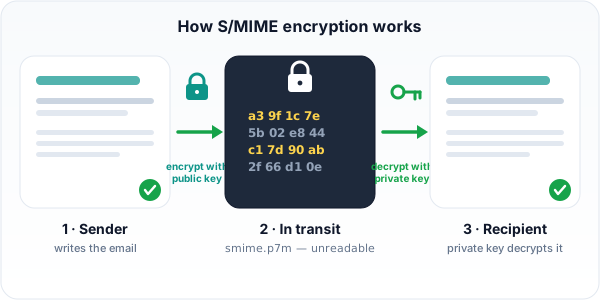 S/MIME locks an email with the recipient's public key. Only their private key, already sitting in their mail client, can unlock it.
Why can't PDFen (or any online tool) just open my encrypted email?
No online converter can read your encrypted email, because decryption requires your private key, and no responsible service will ever ask for it. PDFen deliberately detects S/MIME encrypted emails and skips them rather than requesting keys it has no business holding.
Here is the part that trips people up. The "certificate" you might share, a .cer or .crt file, is the public key only. It can encrypt, but it cannot decrypt. Sending it to a service does nothing to unlock your mail.
The private key is different. It lives in a .pfx or .p12 file, the PKCS#12 format described in RFC 7292 (IETF). That file is your digital identity. Whoever holds it can read every encrypted message you have ever received and sign correspondence as you.
For a law firm or notary, uploading that file to a web service is a serious liability risk, not a convenience. So PDFen takes the opposite approach. When it finds an encrypted email, it reports the reason and moves on. The current message reads: "This email is S/MIME encrypted and cannot be converted. Please decrypt the email first using your email client, then try again."
Why does "Save As" still give an unreadable file?
Saving an encrypted email saves the locked envelope, not the text on your screen, because your mail client decrypts only for display. This is the trap that catches most people, and almost no guide explains it.
Think about what Outlook actually does. When you open an encrypted message, it decrypts the content in memory so you can read it. But the message on disk is unchanged. "Save As .msg" or dragging the email to your desktop copies the original smime.p7m envelope, still locked.
So you upload that saved file expecting the readable email, and the converter receives ciphertext. According to Microsoft Support, encrypted and rights-protected mail can also block printing, so "Print to PDF" sometimes fails for the same reason. The decryption is for your eyes, not for export.
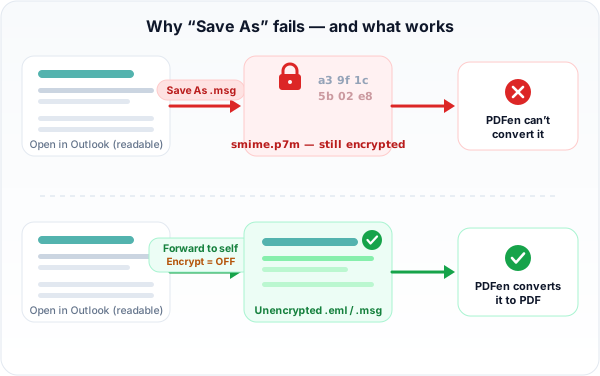 "Save As" keeps the locked envelope, so the converter gets ciphertext. Forwarding the email to yourself with encryption off produces a copy PDFen can read.
How do I convert an encrypted email to PDF the safe way?
Forward the email to yourself with encryption turned off, then convert the copy you receive. This works in any Outlook version, keeps your private key on your machine, and gives PDFen a clean file to process.
Follow these steps in Outlook:
Open the encrypted email. It decrypts on screen automatically, since your private key is already there.
Click Forward, not Save As. Forwarding rebuilds the message from the decrypted content.
On the Options tab, make sure Encrypt is turned OFF. Outlook sometimes carries the original encryption into the forward, which would defeat the purpose. Check this every time.
Send the message to your own email address.
Open the copy you receive. It is now unencrypted plain email.
**Save that copy as
.emlor.msg**, then upload it to PDFen's email-to-PDF tool.
Your private key never leaves your computer. The decryption happens exactly where it should, with the key owner, and only the clean result travels onward.
Apple Mail follows the same logic. Open the decrypted message, then forward or redirect it to yourself without S/MIME encryption. Export the received copy and upload that.
Why not just print to PDF yourself? You can, but you lose what PDFen adds: converted attachments, full headers and metadata for evidence, and clean PDF/A archival formatting. The forward-to-self route hands PDFen a complete, readable email it can fully process.
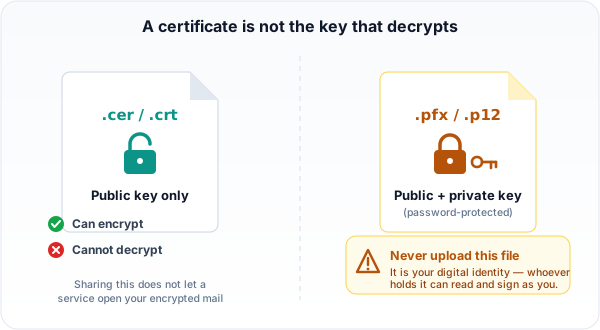 A .cer or .crt file is only the public key and cannot decrypt anything. The private key lives in a password-protected .pfx or .p12 file that should never leave your machine.
Signed vs encrypted: which emails convert fine?
Signed emails convert without any problem; only encrypted emails are blocked. This distinction matters because forum threads constantly confuse the two, and the fix is completely different.
A signed email carries an smime.p7s attachment or uses multipart/signed. The signature proves who sent the message and that it was not altered, but the body stays fully readable. PDFen converts these without complaint.
An encrypted email carries smime.p7m with enveloped-data, per RFC 8551 (IETF, 2019). The body is locked. Only this type triggers PDFen's skip.
You can see the confusion in real threads. One Microsoft Q&A user could open PDF attachments on their desktop but only saw smime.p7m on Outlook for Android. An EspoCRM forum report involved a signed, not encrypted, message where the workflow still broke. Same symptom, different cause.
What about legal evidence or forensic cases?
For evidence work, PDFen's email-to-evidence mode can still produce an authenticity report for an encrypted email, even though it does not decrypt the body. It records that the message was signed or encrypted, which is itself a fact worth preserving in a case file.
This matters for legal admins and notaries who need a defensible chain rather than just a readable copy. The report captures structural and authenticity details without ever touching your private key. If you need the actual content as well, use the forward-to-self method first, then run the unencrypted copy through the tool.
For everyday archiving, the standard email-to-PDF flow is enough once you have a clean, unencrypted file.
PDFen vs Adobe Acrobat for encrypted email
Both can produce a PDF, but they take different routes. Acrobat is powerful and desktop-based; PDFen is online and never wants your keys.
| Adobe Acrobat | PDFen |
Where it runs | Desktop application | Online, in the browser |
Pricing | Subscription-based (adobe.com/acrobat/pricing) | Free tier check, open upload |
Opens encrypted mail | Only if your S/MIME keys are installed locally | No, by design; needs an unencrypted copy |
Wants your private key | Keys must be present on your own machine | Never asks for keys |
Email features | General PDF tooling | Email and archive to PDF, attachments, headers, PDF/A |
If your keys are already configured on your own desktop, Acrobat can handle the message locally. PDFen takes the deliberate stance of staying out of your key store entirely, which suits teams who cannot put a private key near a web service.
Frequently asked questions
Why do I only see a smime.p7m file instead of the email content?
The smime.p7m file is the encrypted envelope. Your mail client could not decrypt it for display, often because the private key is missing on that device. The Microsoft Q&A thread shows this happening on Outlook for Android while the desktop opens it fine.
Why does my saved .msg file of an encrypted email still come out encrypted?
Because "Save As" copies the original locked envelope, not the text on screen. Your client decrypts only for viewing. Forward the email to yourself with encryption off instead, then save the received copy.
Can I just attach the encrypted emails to a new message and send it to myself?
No, and this is the same trap as "Save As". When you attach an email (drag it in, or use "Forward as Attachment"), you attach the stored message file, which for an encrypted email is still the locked smime.p7m envelope. The outer message you send is unencrypted, but every attached message stays locked, so PDFen extracts them and still hits encrypted files. Use inline Forward instead, with encryption off, so your client rebuilds the message from the decrypted content in the body.
Can I convert an encrypted Outlook email to PDF without uploading my private key?
Yes. Forward the email to your own address with the Encrypt option turned off, open the copy you receive, save it as .eml or .msg, and upload that. Your private key never leaves your computer.
What is the difference between a signed (smime.p7s) and an encrypted (smime.p7m) email?
A signed email proves origin and integrity but stays fully readable. An encrypted email locks the body so only the recipient's private key can open it, per RFC 8551. Only encrypted emails block conversion.
Do I need to send my .cer or .pfx certificate to an online service to read encrypted mail?
No, and you should not. A .cer file is only the public key and cannot decrypt anything. A .pfx or .p12 file holds your private key, your full digital identity, and uploading it anywhere is a security risk.
Why can I read the email on my desktop but not on my phone?
Your private key is installed on the desktop but usually not on the phone. Without that key, Outlook for Android or iOS shows the raw smime.p7m envelope instead of the decrypted message.
Convert your email once it's unencrypted
Once you have a clean, unencrypted copy, converting it is straightforward. Upload the .eml or .msg file to PDFen's email-to-PDF tool, and it handles the body, attachments, and headers, with PDF/A archival formatting.
For legal or forensic work, email-to-evidence adds an authenticity report. It records whether a message was signed or encrypted, even when it cannot read the locked body, which gives you a defensible record for the case file.
The principle stays the same throughout: decrypt where your key already is, then convert the clean copy. Your private key has no reason to travel anywhere.
Daan van Tongeren, founder of PDFen.
Related Articles
Compressing and repairing: How to optimize your PDFs
Professionalize your PDFs by using 5 essential PDF optimization tools. Learn when and how to repair,...

Can ChatGPT, Claude or Gemini Convert Email to PDF? What AI Can (and Can't) Do
No AI assistant can natively convert .eml or .msg to PDF. But Claude + MCP bridges the gap — here's...