
How to Convert OST to PDF: A Practical Guide for Archiving and Compliance
PDFengine Team
PDFengine

You usually need to convert OST to PDF when mailbox access is about to disappear, not when you have time for a calm archive project. An employee leaves, litigation starts, or an auditor asks for readable email records that still sit in an Outlook cache. An OST file works while Outlook and the linked account still work. It is a weak handover format.
PDF solves the handover problem. A converted archive is easier to review, share, and store outside the original Microsoft 365 or Exchange setup. The key is preserving sender, recipients, timestamps, folder order, and attachments.
Printing messages one by one creates gaps, drops attachments, and turns a mailbox into a pile of unlabeled files. A better OST-to-PDF workflow keeps the archive readable and organized from the start.
What does it mean to convert OST to PDF?
To convert OST to PDF, you extract the contents of an Outlook Offline Storage Table and render each message into a readable PDF. In a good workflow, the output keeps the message header, body, timestamps, and attachment context intact instead of flattening everything into plain text.
OST is not a neutral archive format. It is a synchronized local cache tied to a mailbox profile. PDF is portable, predictable, and easy to open on almost any device. That is why teams usually ask for PDFs rather than raw OST files.
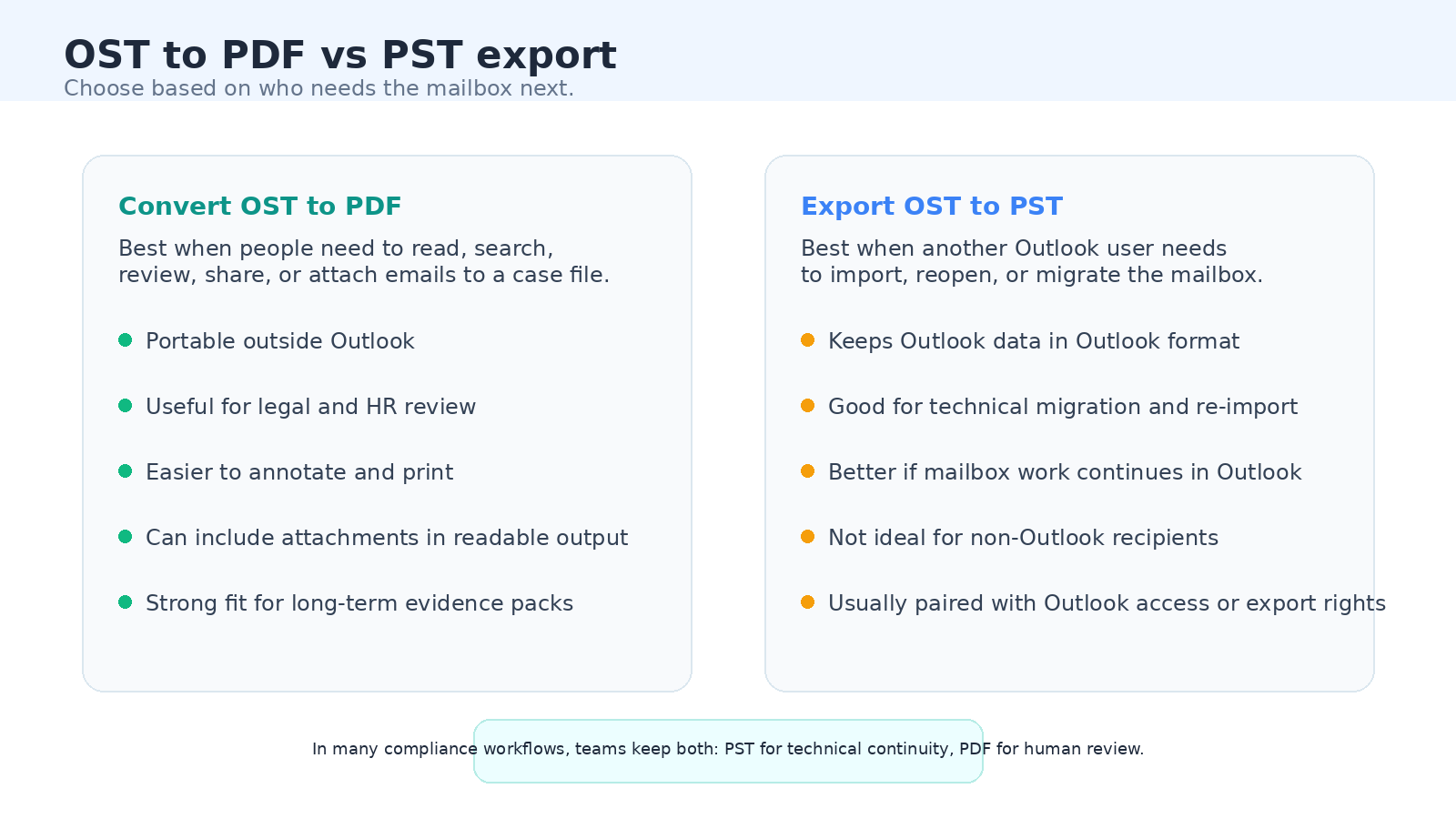
Why convert OST to PDF?
Most requests to convert OST to PDF come from operational pressure. These are the cases where PDF is the safer output:
Employee offboarding: When someone leaves, access rights change fast. PDF gives managers, HR, or legal reviewers a readable record without reopening Outlook.
Legal review: Law firms and internal counsel often need messages in a format they can search, annotate, print, and include in evidence bundles.
Compliance retention: A PDF archive is easier to hand to an auditor than an OST file tied to a profile that may no longer exist. If retention rules are strict, pair it with PDF/A.
Cross-team handover: Operations, finance, or project teams may need access to selected conversations, but not a full Outlook restore process.
Migration and tenant changes: During Microsoft 365 or Exchange changes, readable PDFs help preserve business context while the technical mailbox move happens separately.
Attachment visibility: A proper conversion flow can keep email attachments with the message, which is far more useful than saving a mailbox cache no one else can interpret quickly.
How to convert OST to PDF — step by step
First decide what kind of output you need. If the next person must keep working inside Outlook, PST may be the right technical export. If the goal is review, evidence, or long-term readability, go straight for PDF.
Locate the correct OST file. Confirm which mailbox, date range, and folder scope you actually need. On Windows, OST files are usually stored under AppData\Local\Microsoft\Outlook, but it is safer to confirm the path in Outlook account settings when the profile is still available.
Choose the output structure. Decide whether you want one PDF per email or one merged PDF for the whole archive. Separate PDFs are easier for indexing and quality control. A merged PDF suits case review.
Set attachment handling before you run the job. Decide whether you need the email body only, attachments only, or both together. For legal and compliance work, both is usually the right answer.
Preserve headers and folder context. The PDF should keep From, To, CC, BCC, Subject, and Date. Folder names matter too, because the same subject line means different things in Legal Hold than in Drafts.
Run the conversion and spot-check real samples. Do not trust the first success message. Open emails with long threads, HTML formatting, and attachments to make sure the output matches what reviewers expect.
Package the result for retention. Store the PDFs with a naming convention, keep the ZIP package intact if the tool outputs one, and decide whether the final archive also needs PDF/A.
PDFengine's OST conversion flow follows the pattern most teams want: extract the cached emails, convert each message to a readable PDF, keep attachment context, and package the result cleanly for download. If long-term retention matters, route that output into PDF/A.
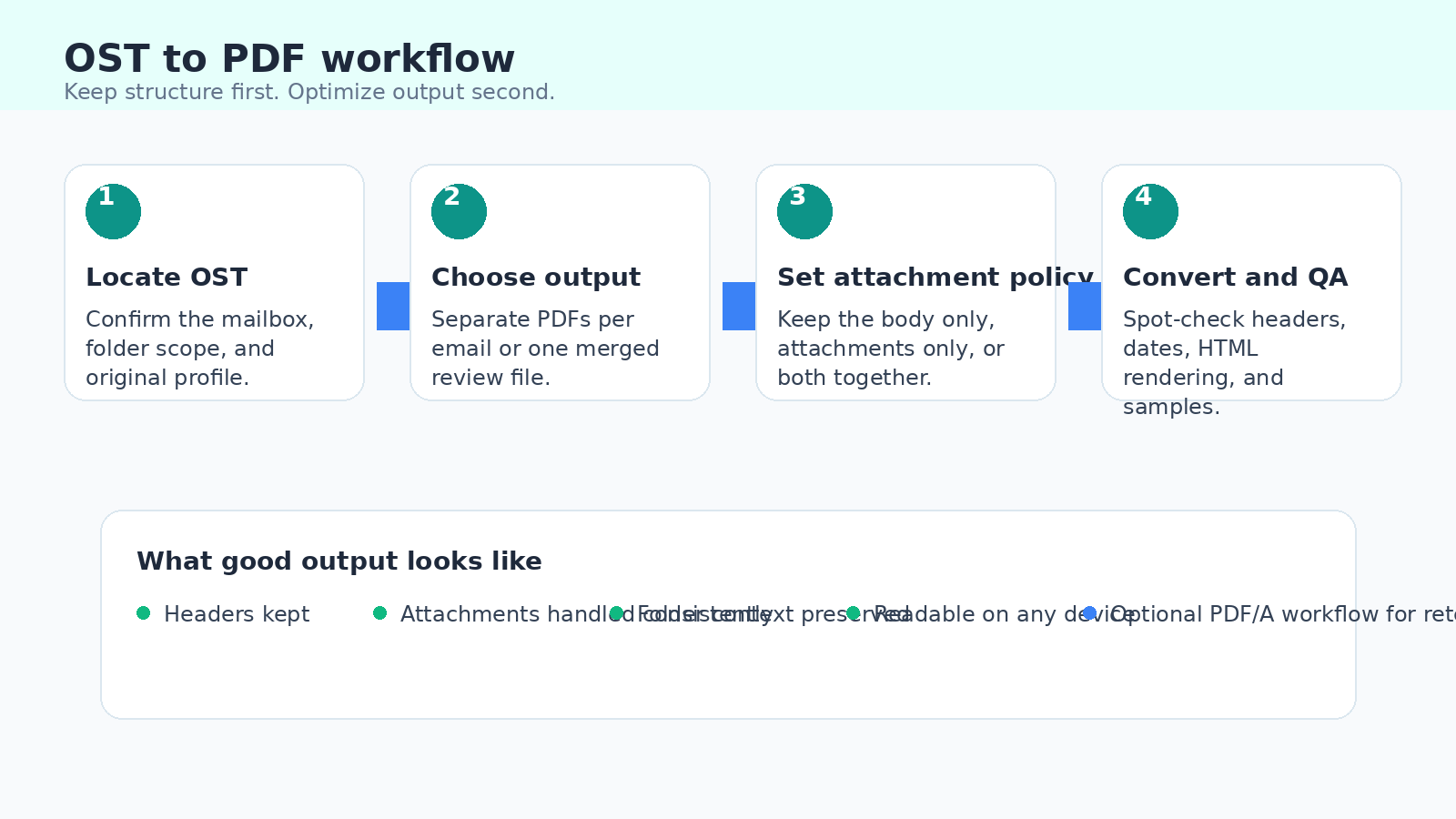
What to keep and what to check before you finish
Before you hand the files over, check these details:
Complete headers: Make sure the PDF shows sender, recipients, subject, and sent date. Those fields often matter more than the body text.
Original timestamps: Keep an eye on time zones and formatting. A one-hour mismatch creates unnecessary friction.
Folder breadcrumbs: If the output preserves folder grouping, keep it. Folder context helps reviewers understand what they are looking at.
Attachment treatment: Verify whether attachments are converted into pages, appended after the email, or excluded. Reviewers should not have to guess.
Searchability: If the archive includes scanned attachments, test whether the text is searchable. OCR may still be needed.
Consistent file naming: A naming pattern based on date, subject, or sender saves time later. Random filenames make correct archives hard to use.
Access control after download: PDF is portable, which is the point. It also means the archive should be stored in the right matter folder, document management system, or secure share as soon as it is generated.
Convert OST to PDF vs export OST to PST
OST and PST solve different problems. PST is better when another Outlook user needs to reopen or migrate the mailbox. PDF is better when the next step is human review.
If Outlook is still working and you need a technical mailbox handoff, PST is often the more native route. Microsoft guidance usually points users toward export workflows when the goal is to move data inside the Outlook ecosystem.
If the recipient is counsel, HR, management, or an external auditor, PDF is usually the cleaner choice. It opens anywhere and does not require another person to reconstruct the original Outlook profile.
In high-risk matters, many teams keep both. PST preserves technical continuity. PDF gives humans a stable review set.
Bulk and team use: converting multiple OST archives
A single mailbox conversion is rarely the real headache. The pain starts when HR offboards six employees or legal needs matter-specific mailboxes before Friday. At that point, repeatability matters more than the one-time conversion itself.
The best team workflows standardize naming, attachment handling, and output format. If every archive follows the same rules, review goes faster and follow-up questions drop.
This is where PDFengine's broader workflow angle is useful. Teams can convert the OST archive into readable PDFs first, then decide whether the output should be merged, compressed, or pushed through PDF/A for long-term storage.
For large mailboxes, also decide whether reviewers want separate PDFs in a ZIP or a single merged document. Separate files are better for indexing and selective disclosure. A merged file is better when one person needs a continuous review copy with attachments in place.
Common mistakes when converting OST to PDF
Converting only the email body: This saves time up front and creates missing context later. If attachments matter, define that before the job starts.
Flattening everything into one file too early: Merged output is useful, but it makes quality control harder if you have not first checked sample messages individually.
Ignoring timestamps and time zones: Reviewers notice date mismatches immediately. One incorrect assumption about locale settings can create unnecessary doubt about the whole archive.
Skipping quality checks on HTML emails: Complex signatures, embedded images, and forwarded chains are exactly where bad conversions reveal themselves.
Treating OST like a proper archive by itself: An OST file is still a cache tied to a mailbox profile. It is not a great final handover format when access or infrastructure changes.
Using vague file names: Final.zip, Archive2, and mailbox-copy-new are a pain six months later. Use a naming scheme that reflects date range, custodian, or matter name.
Frequently asked questions
What is an OST file?
OST stands for Offline Storage Table. It is Outlook's local mailbox cache in cached mode. It lets users work offline, but the file is tied to the Outlook profile that created it.
Can I convert an OST file without Outlook?
A direct OST-to-PDF workflow is usually handled by a dedicated conversion tool. If your goal is to keep working inside Outlook, exporting to PST while the mailbox still opens can be the safer native option. If the goal is readable handover, PDF is more practical.
Where are OST files usually stored?
On Windows, OST files are commonly stored under C:\Users\[username]\AppData\Local\Microsoft\Outlook. The exact path can differ by Outlook version and profile setup, so confirm the file location in account settings if the mailbox is still accessible.
What is the difference between OST and PST?
OST is a synchronized cache tied to a mailbox profile. PST is a portable Outlook data file designed for export and import inside Outlook. PDF is meant for readable, shareable output outside Outlook.
Are attachments preserved when you convert OST to PDF?
Yes, but only if the workflow is designed for it. Some processes convert the email body and ignore attachments. Better tools can include attachments as converted pages or preserve them in the review package.
Should I create one merged PDF or separate PDFs per email?
Separate PDFs are better for indexing and spot-checking. A merged PDF is better when one reviewer needs a single continuous file. Many teams generate separate PDFs first, then merge only if needed.
Can OST archives be used for long-term compliance retention?
Yes, but PDF or PDF/A is usually easier to hand over, inspect, and store. For retention, readable output plus a documented naming and storage policy is more useful than leaving everything in an Outlook cache.
If another Outlook admin needs to reopen the mailbox, keep a PST. If a human needs to review or preserve the record outside Outlook, convert OST to PDF while the mailbox context is still intact.
Convert OST to PDF with PDFengine
PDFengine lets you convert Outlook OST archives into readable PDF output for archiving, migration, and compliance review. The most relevant tool for this workflow is Convert OST to PDF.
If you need one continuous handover file instead of separate PDFs, use the merged variant. If retention rules apply, route the output into a PDF/A step after conversion.
Related tools and guides
Merge an entire Outlook cache into one file: Merge OST to PDF
Convert individual email formats like EML and MSG: Email to PDF
Create archival output for long-term retention: Convert to PDF/A
Related guide: Email archiving and email to PDF/A conversion
Related guide: Email Archive File Formats Explained: OLM, PST, OST & MBOX
Related Articles

How to deliver a newspaper ad PDF: the 240% ink limit, ISOnewspaper26v4 and GWG2015 explained
Your newspaper wants GWG2015, ISOnewspaper26v4 and max 240% ink. Here is what that means, why a prof...

Can ChatGPT, Claude or Gemini Convert Email to PDF? What AI Can (and Can't) Do
No AI assistant can natively convert .eml or .msg to PDF. But Claude + MCP bridges the gap — here's...