
How to deliver a newspaper ad PDF: the 240% ink limit, ISOnewspaper26v4 and GWG2015 explained
Founder, PDFengine

To deliver a newspaper ad PDF that passes, convert every colour in it, RGB and existing CMYK, to the ICC profile the paper names (usually ISOnewspaper26v4 or WAN-IFRAnewspaper26v5) and save it as PDF/X-4. That conversion is what brings total ink down to 240% or less. Attaching the newspaper profile as a label doesn't change a single number in your file.
Maybe you booked an ad in the regional paper for your estate agency, club or summer festival, and the specs say GWG2015_NewspaperAds_CMYK, ISOnewspaper26v4 and "max. 240% total ink". Your ad came from Canva, Word, Publisher or a designer who made it for glossy flyers. Here's what those terms mean and how to fix the file.
Key Takeaways
Newsprint is absorbent and printed coldset, so the ECI profile ISOnewspaper26v4 caps total ink at 240%.
Total ink is cyan + magenta + yellow + black at one spot. A rich black of 75/68/67/90 adds up to 300%.
An output intent is a label. Only a real colour conversion lowers the ink.
Use exactly the profile your paper names: v4 (240%), v5 (220%), or even ISO Coated v2 300 at some Belgian titles.
240% is a ceiling, not a target. Run the paper's own check last.
Why do newspapers limit ink to 240%?
Newspapers limit ink because the paper can't hold more. The European Color Initiative lists ISOnewspaper26v4 for coldset newspaper printing to ISO 12647-3:2005, with a dot gain of 26% and a maximum total ink of 240%. The ICC registry entry for IFRA26 records the same 26% tone value increase.
Newsprint is thin, uncoated and absorbent. On a coldset press the ink isn't dried with heat; it soaks into the paper, and halftone dots spread as it does. That spreading is the 26% dot gain. Pile too much ink on one spot and it stays wet: it smears, sets off onto the facing page as papers are folded and stacked, and dark areas clog into flat patches.
According to Prepressure, 53% of ads sent to Dutch newspaper printers in 2011 exceeded 240%. The page doesn't say where that analysis came from, so treat it as an indication, not a measurement.
Coated profiles allow more: 300% for PSO Coated v3 (ICC registry) and 330% for ISO Coated v2. A magazine or flyer ad is often too heavy for newsprint.
What is total ink coverage, and how do you calculate it?
Total ink coverage, often shortened to TAC, is the sum of the four process inks at one point: cyan + magenta + yellow + black. Each runs from 0 to 100%, so the theoretical maximum is 400%. Printers check the highest value anywhere on the page, not the average.
An illustrative calculation: many designers use a "rich black" for big headlines, say 75% cyan, 68% magenta, 67% yellow and 90% black. Add them up: 75 + 68 + 67 + 90 = 300%. Fine on coated paper with a 300% profile. On newsprint, 60 points over the limit.
Plain 100% K black, by contrast, adds up to just 100%. So set text and thin lines in pure black.
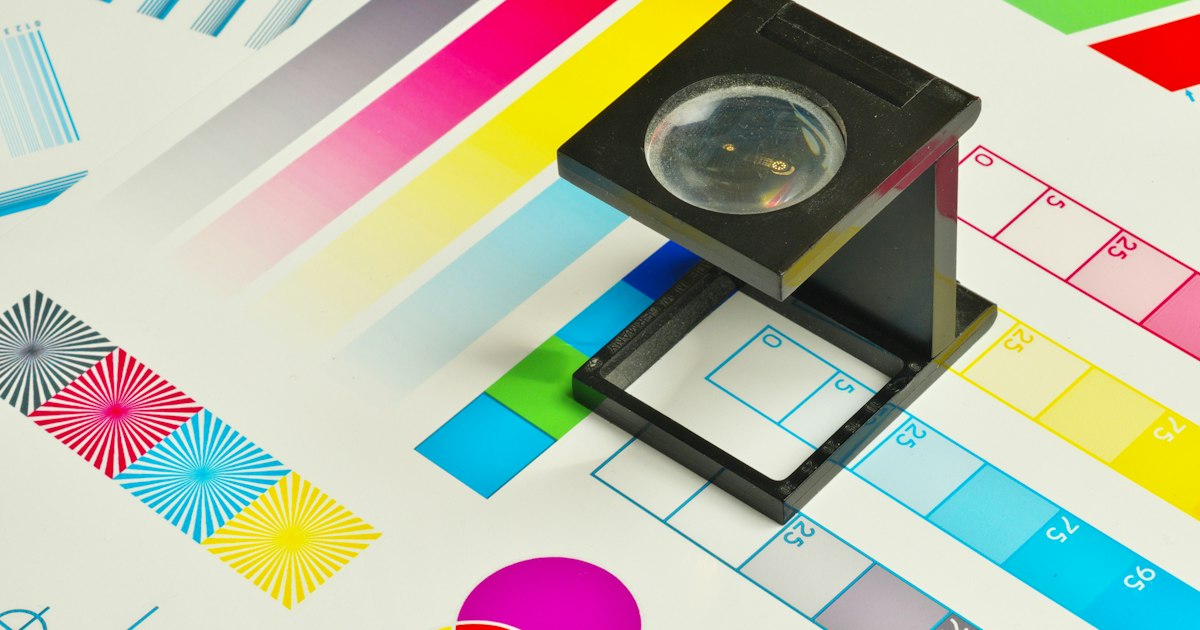 Total ink coverage is simply the four CMYK percentages at one spot added together.
Photos are harder. Shadows in an image prepared for coated paper tend to sit near that profile's ceiling, and you can't fix them pixel by pixel. The colour conversion has to do it.
What does GWG2015_NewspaperAds_CMYK ask for?
GWG2015 is a family of PDF delivery specifications from the Ghent Workgroup; NewspaperAds_CMYK is the variant for newspaper advertising. The GWG's overview of differences between 1v4 and 2015 sets out three points that matter here:
The file must be PDF/X-4:2010. The Dutch GWG2015 workflow guide is blunt: there is only one valid PDF/X-4 standard, and that's PDF/X-4:2010.
Ink is measured as effective coverage after rendering, including transparency and overprint. A shadow that's fine on its own can go over where a transparent shape overlaps it.
An output intent with a valid ICC profile is required.
The GWG documents don't state the 240% figure themselves. It comes from the profile: Mediahuis Netherlands names ISOnewspaper26v4 alongside the GWG2015_NewspaperAds_CMYK preset for its newspapers.
ISOnewspaper26v4 or WAN-IFRAnewspaper26v5: which do you need?
Use exactly the profile your newspaper or its printer names. ISOnewspaper26v4 allows 240% total ink (ECI), while its successor WAN-IFRAnewspaper26v5, based on ISO 12647-3:2013, allows 220% (pdf-aktuell). And some newspapers don't use a newsprint profile at all.
Publisher or printer | Profile asked for | Maximum ink |
|---|---|---|
Mediahuis NL (newspapers) | ISOnewspaper26v4 | 240% (set by the profile) |
Janssen/Pers Rotatiedruk | WAN-IFRAnewspaper26v5 | 240%, preferably 220% |
Mediahuis BE (newspapers) | ISO Coated v2 300 | 300% |
Mediahuis Belgium is the surprise. Its newspaper ad specifications ask for ISO Coated v2 300, a 300% maximum and a file name ending in _IC.pdf. Converting that ad to newsprint "to be safe" gives them a file they didn't ask for. For that spec, choose ISO Coated v2 300% rather than a newsprint profile; the online converter below offers it too.
Read the whole spec sheet, too. Janssen/Pers also lists PDF 1.3 and 6 mm bleed, so ask whether PDF/X-4 is accepted. US printers use GRACoL and SWOP instead. For other print jobs, see which colour profile does your printer want.
Why doesn't setting the newspaper profile lower the ink?
Because an output intent describes the file; it doesn't change it. In our own test, a file that was only labelled with the newspaper profile (output intent set, colours computed with a fixed formula) measured 289% total ink. The label said newsprint. The numbers were 49 points over the limit.
Adobe's Acrobat help on output intents confirms it: an output intent affects viewing and printing, but doesn't convert the colours in the PDF.
InDesign has a similar trap. For the export option Convert to Destination (Preserve Numbers), Adobe's InDesign PDF options documentation says: "Untagged color objects … and native objects (such as line art or type) are not converted." Your CMYK text, boxes and that 300% rich black keep their numbers under a newsprint label.
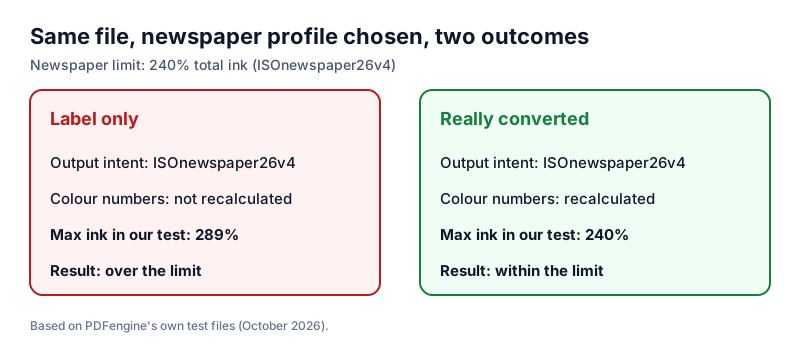 Swapping the output intent leaves the numbers untouched; only a real conversion recalculates them.
The fix is a real colour conversion: every RGB and CMYK value recalculated through the newspaper profile, keeping the appearance as far as newsprint allows. For the full mechanics, read output intent vs colour conversion.
Should your ad hit exactly 240%?
No. In an Adobe community thread, a designer converted RGB black to ISOnewspaper26v4 and got 217% with relative colorimetric rendering and 231% with perceptual. Neither reached 240%, and that's fine. The profile decides the ink mix; a preflight fails you for going over, never for staying under.
How do you convert a newspaper ad to the right profile?
Three practical routes, one end result: colours converted to the paper's profile, that profile embedded as output intent, fonts embedded, saved as PDF/X-4.
With InDesign
If you or your designer have the source file, this is the cleanest route. Download the GWG2015 export presets from gwg.org and export with the NewspaperAds preset. If your CMYK colours were made for coated paper, make sure the export converts them instead of preserving the numbers.
With Adobe Acrobat Pro
Only have the PDF? Open Convert Colors in Acrobat Pro and choose the newspaper profile as destination; Adobe describes this as the tool that actually changes colour values. Tick Preserve Black so 100% K text doesn't become a four-colour mix, then save as PDF/X-4. If the newspaper profile isn't listed, ask the paper for it: many include it in their delivery package, and you install it before converting.
Online, without Adobe software
The PDF/X-4 converter does the job in the browser. Choose ISOnewspaper26v4 (240%) or WAN-IFRAnewspaper26v5 (220%). The tool converts RGB and existing CMYK with ICC colour management, keeps 100% K black at 100% K, and embeds the same profile as output intent. Missing fonts are embedded; if that would mean swapping a font for a different one, the conversion stops with a clear message instead.
In our own test, a test page came out at 240.0% maximum ink with ISOnewspaper26v4 and 216.5% with WAN-IFRAnewspaper26v5. One honest caveat: in JPEG-compressed photos, compression noise can push isolated pixels slightly over the limit. A newspaper's preflight measures the rendered result, so when the limit is strict, run the paper's own check. The tool isn't GWG-certified; that check has the final word.
The converter costs 4 credits per document and needs a credit pack or subscription. The free print-ready check needs no account and reports colour space, fonts and PDF/X status, but doesn't measure ink coverage.
How does Acrobat Pro compare with an online converter?
Acrobat Pro gives you more control; an online converter asks for fewer decisions.
| Adobe Acrobat Pro | PDFengine PDF/X-4 tool |
|---|---|---|
Where it runs | Desktop app | In the browser |
Pricing | Subscription-based (Adobe pricing) | 4 credits per document |
Newsprint profiles | Any ICC profile you have installed | ISOnewspaper26v4 or WAN-IFRAnewspaper26v5 |
Converts RGB and existing CMYK | Yes, with Convert Colors | Yes, both re-separated |
Keeps 100% K black | With Preserve Black | Yes |
Output intent | Separate step when saving as PDF/X | Embedded automatically |
Control per object | Yes, by object and colour type | No, one setting per document |
What should you check before uploading your ad?
Ink is only one reason for rejection. Before you upload:
Find the exact profile and ink limit in the spec sheet.
Convert all colours to that profile, not just the label.
Keep text and thin lines in 100% K black.
Save as PDF/X-4 with fonts embedded, plus bleed if asked.
Upload through the paper's portal or run its preflight, and read the report.
For bleed, fonts and the rest, see the complete guide to print-ready PDFs.
Frequently asked questions
Why was my ad rejected for ink coverage?
Somewhere the four inks add up to more than the paper's limit. Common culprits: rich black headlines, shadows from a file made for coated paper, and overlapping transparent shapes. Convert the whole file to the paper's profile and check again.
Should I use ISOnewspaper26v4 or WAN-IFRAnewspaper26v5?
Whichever your paper or printer names. Mediahuis Netherlands asks for v4; Janssen/Pers asks for v5 with "240%, preferably 220%", and v5 tops out at 220%. The preflight checks against the profile in the spec, so don't swap it.
Will my colours look duller after conversion?
Somewhat, yes. Newsprint can't reproduce the saturated colours of coated paper, and the conversion shows you that before the press does. Designers in an Adobe community thread about 240% limits describe the same washed-out effect on book covers. Design for the paper: strong contrast, large type, pure black text.
Can I fix it without InDesign?
Yes. From Canva, Word or Publisher, export the best-quality PDF you can and convert it afterwards; users on Microsoft Q&A report that newer Publisher versions no longer offer CMYK output. Use Convert Colors in Acrobat Pro, or convert your ad to PDF/X-4 with a newsprint profile in the browser, then run the paper's own check.
Related Articles

Can ChatGPT, Claude or Gemini Convert Email to PDF? What AI Can (and Can't) Do
No AI assistant can natively convert .eml or .msg to PDF. But Claude + MCP bridges the gap — here's...
How to Convert Email to PDF With Headers (for Archiving & Records)
Convert email to PDF while keeping headers, attachments, and transport data intact, for single files...