
Which colour profile does your printer want? FOGRA39, FOGRA51, FOGRA52 and newsprint explained
Founder, PDFengine

Use exactly the colour profile your printer names. If they name none, FOGRA51 (PSO Coated v3) is the current standard for coated paper, FOGRA52 (PSO Uncoated v3) for uncoated paper, and a newspaper wants ISOnewspaper26v4 or WAN-IFRAnewspaper26v5, whichever its spec mentions. In practice, most Dutch and Belgian printers we checked still ask for the older FOGRA39, also sold as ISO Coated v2.
Below: what the names mean, why they change the ink on paper, what real printers ask for, and a short decision guide.
Key Takeaways
FOGRA39, FOGRA51 and FOGRA52 are measured print conditions; ISO Coated v2, PSO Coated v3 and PSO Uncoated v3 are the profiles built on them.
A different profile means different CMYK numbers for the same colour.
Maximum ink ranges from 330% (ISO Coated v2) to 220% (WAN-IFRAnewspaper26v5).
Most printers we checked in October 2026 still ask for FOGRA39.
If the printer names a profile, that name wins.
What is a colour profile for print, in plain words?
Think of it as a recipe. A specific paper, a specific set of inks and a specific press produce colour in a predictable way. Someone measures that combination carefully, and the result is a characterisation: a data set with a name like FOGRA39 or FOGRA51.
An ICC profile is the file built from that data. ISO Coated v2 is the profile based on FOGRA39. PSO Coated v3 is based on FOGRA51. Your design software and conversion tools use the profile to answer one question: which percentages of cyan, magenta, yellow and black give this colour on this paper?
Why does a different profile mean different ink amounts?
Because paper changes how ink behaves. A reply in an Adobe Community thread about choosing a CMYK profile puts it well: a profile is made for one particular mix of paper and ink.
On uncoated paper, ink soaks in and the printed dots spread. The ICC registry lists a tone value increase of 22% for PSO Uncoated v3, against 16% for PSO Coated v3. On newsprint it is 26%. The profile compensates for that spread, so the same red gets a different recipe on each paper.
How did FOGRA39 turn into FOGRA51 and FOGRA52?
FOGRA39 is the veteran. According to the ICC registry, it describes offset printing on coated paper of 115 g/m², based on ISO 12647-2:2004/Amd 1, and it dates from December 2006.
In 2013 the underlying standard, ISO 12647-2, was revised. Two new characterisations followed in May 2015: FOGRA51 for premium coated paper and FOGRA52 for wood-free uncoated paper. The ECI published the matching profiles, PSO Coated v3 and PSO Uncoated v3, on 30 September 2015.
What changed between the old and new coated profile?
The main difference is how the paper is measured. Many papers contain optical brighteners that make them look whiter in daylight. FOGRA51 and FOGRA52 use measurement condition M1, which takes those brighteners into account. FOGRA39 predates that condition, which is why the newer data is considered a better match for today's paper.
What about uncoated paper?
FOGRA52 covers wood-free uncoated paper: the matte, writable stock used for letterheads and many books. If your job goes on that paper and the printer gives no profile, FOGRA52 is the logical choice. Some printers still name older uncoated profiles, such as Pumbo's Uncoated FOGRA29.
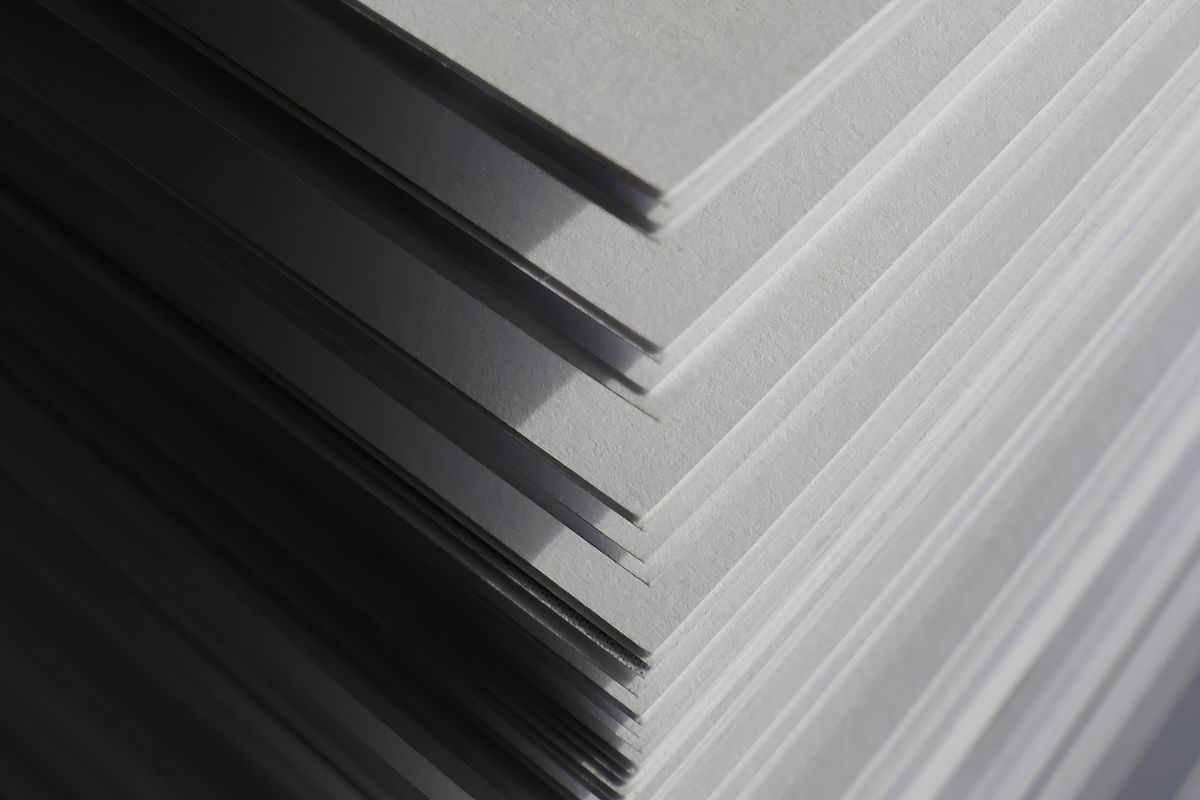 Uncoated paper absorbs more ink than coated paper, so it needs its own profile and its own CMYK recipe.
And newspapers?
Newsprint has its own standard, ISO 12647-3. The IFRA26 characterisation (June 2004) describes coldset printing with 26% dot gain. The ECI profile built on it, ISOnewspaper26v4, allows 240% total ink.
Its successor is WAN-IFRAnewspaper26v5, based on ISO 12647-3:2013, with a lower limit of 220% and heavier use of black to replace colour inks (pdf-aktuell). Our newspaper ad guide covers that 240% limit in detail.
How much ink does each profile allow?
Each profile caps the total ink coverage: the sum of cyan, magenta, yellow and black at the darkest point. Newsprint allows the least, coated paper the most. Go over the cap and a printer's preflight will flag the file.
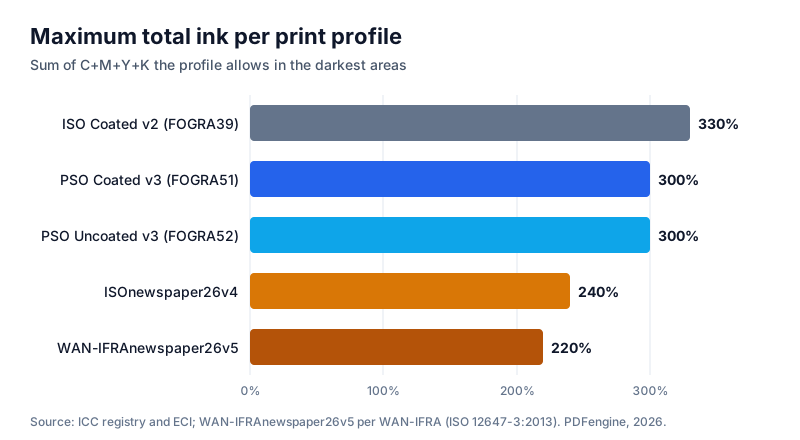 Maximum total ink per profile, from ECI and ICC registry data.
Watch the ISO Coated v2 name. The ECI publishes it at 330% and in a 300% variant, so "ISO Coated v2 300%" in a spec means the version with the lower cap.
In our own test, a page converted to ISOnewspaper26v4 came out at 240.0% maximum ink, and 216.5% with WAN-IFRAnewspaper26v5. One honest caveat: in JPEG-compressed photos, compression noise can push isolated pixels slightly over a limit. A printer's preflight measures the rendered result, so run it when the limit is strict.
There's also a trap here. Some tools only label a file with a profile without recalculating the colours. In our test, a file that was only labelled with the newspaper profile measured 289%, well over 240%. The difference between a label and a real conversion is the subject of output intent vs colour conversion.
Which profile do Dutch and Belgian printers actually ask for?
This is what we found on their delivery pages in October 2026. Specs change, so treat this as a snapshot and check the printer's current page before you deliver.
Printer | Profile asked | PDF/X | Max ink | Source |
|---|---|---|---|---|
Drukwerkdeal | FOGRA39 | X-4:2008 and X-1a (pages disagree) | 280% | |
Printdeal BE | FOGRA39 | X-4:2008 | not stated | |
Helloprint | FOGRA39 | PDF 1.4 or newer | 300% | |
Flyeralarm | ISO Coated v2 300% | X-3:2002 | 300% (260% express) | data sheet (older) |
Print.com | ISO Coated v2 or Uncoated | X-1a or X-4 | not stated | |
Pumbo | FOGRA39 or Uncoated FOGRA29 | no PDF/X required | 300% | |
Drukland | own profiles | not stated | 240% news, 280% offset, 300% digital | |
Saxoprint | FOGRA51 or FOGRA52 | not stated | not stated | proof.de list (2021) |
Mediahuis NL | ISOnewspaper26v4 (newspapers), ISO Coated v2 (magazines) | GWG2015 | not stated | |
Mediahuis BE | ISO Coated v2 300, also for newspapers | certified PDF | 300% | |
Janssen/Pers | WAN-IFRAnewspaper26v5 | PDF 1.3 | 240%, preferably 220% | |
Brave New Books | RGB advised for covers | X-3:2002 | not stated |
A few things stand out. Most printers still ask for FOGRA39, although FOGRA51 dates from 2015. Drukwerkdeal's own pages contradict each other on the PDF/X version, so ask them if in doubt.
Newspapers aren't uniform either. Mediahuis in the Netherlands asks for ISOnewspaper26v4, Mediahuis in Belgium asks for ISO Coated v2 300 even for newspaper ads, and Janssen/Pers wants the newer v5. Brave New Books goes the other way entirely and advises RGB for covers.
Which profile should you pick?
Here is the short version. Work down the list and stop at the first line that fits.
The printer names a profile: use exactly that one, including the variant (for example "ISO Coated v2 300%").
Coated paper, no spec: FOGRA51 (PSO Coated v3). If the printer's site mentions ISO Coated v2 anywhere, use FOGRA39 instead.
Uncoated paper, no spec: FOGRA52 (PSO Uncoated v3).
Newspaper: whatever the paper's spec names, ISOnewspaper26v4 or WAN-IFRAnewspaper26v5. Don't guess between them, because the ink limits differ.
Printing in the US: printers there typically use GRACoL or SWOP profiles, which are outside the scope of this article. PDFengine's converters offer GRACoL 2013 and SWOP 2013, but not the older GRACoL 2006 or SWOP v2, so use the exact name your printer gives.
Still unsure? A one-line email to the printer asking "which ICC profile do you want?" costs less than a reprint.
Can Acrobat convert to a specific profile, or is there an online option?
Adobe Acrobat Pro does this well. Its Convert Colors tool works with any ICC profile on your computer, and Adobe's colour conversion help says it "actually changes the color values". It's powerful, desktop-focused and subscription-based, and it assumes you know which settings to pick.
The PDF/X-4 converter on PDFengine is narrower by design. You choose a print profile (European FOGRA, North American GRACoL 2013 or SWOP 2013, or newspaper), and it converts both RGB and existing CMYK with ICC colour management. Pure black (100% K) stays 100% K, and the same profile is embedded as the output intent.
| Adobe Acrobat Pro | PDFengine PDF/X-4 tool |
|---|---|---|
Where it runs | Desktop | Browser |
Profiles | Any installed ICC profile | FOGRA51, FOGRA39, ISO Coated v2 300%, FOGRA52, GRACoL 2013, SWOP 2013, GRACoL 2013 Uncoated, ISOnewspaper26v4, WAN-IFRAnewspaper26v5 |
Converts existing CMYK | Yes | Yes |
Checking first | Built-in preflight | Free print-ready check (colour space, fonts, PDF/X status) |
Pricing model | Subscription | 4 credits per document (the check is free) |
Best for | Regular print work, full control | Occasional deliveries without desktop software |
Both ISO Coated v2 variants are there: the standard one with its 330% cap, and ISO Coated v2 300% for specs that name it explicitly, as Flyeralarm and Mediahuis Belgium do.
Missing fonts are embedded. If a font could only be embedded by swapping it for a different one, the conversion stops with a clear message rather than substituting silently. The tool isn't externally certified, so if your printer runs its own preflight or portal check, make that the final step.
Frequently asked questions
Is FOGRA39 outdated?
It's older, not broken. FOGRA39 dates from 2006 and was succeeded by FOGRA51 in 2015, yet most printers we checked still ask for it. If your printer wants FOGRA39 or ISO Coated v2, use it.
What's the difference between ISO Coated v2 and FOGRA39?
FOGRA39 is the measured print condition: the data. ISO Coated v2 is the ICC profile the ECI built from that data. In a printer's spec, both names point to the same thing. The same pairing applies to FOGRA51 and PSO Coated v3, and to FOGRA52 and PSO Uncoated v3.
Can I just use the default profile in my software?
Only if it matches what your printer asks for. A forum question about FOGRA27 vs FOGRA39 shows how easily two applications end up on different profiles. Check the setting rather than trusting it.
Does choosing a profile change my colours?
It changes the numbers, while aiming to keep the appearance. In our own test, converting existing CMYK to FOGRA51 turned 100% cyan into about 93% cyan. That is intended: the colour should look the same on the new paper, so the recipe changes. Very bright RGB colours may still look duller, because ink on paper can't reach them.
Which profile should I use for a newspaper ad?
Use the profile the newspaper names. Dutch Mediahuis titles ask for ISOnewspaper26v4 (240%), Janssen/Pers asks for WAN-IFRAnewspaper26v5 (preferably 220%), and Mediahuis Belgium asks for ISO Coated v2 300. And 240% is a ceiling, not a target: in an Adobe Community thread, RGB black converted to ISOnewspaper26v4 landed between 217% and 231%, depending on the rendering intent.
Ready to deliver your file?
Start with the free print-ready check. It needs no account and shows the colour space, fonts and PDF/X status of your PDF. When you know which profile your printer wants, convert to PDF/X-4 with that profile.
For bleed, page size and the rest of the checklist, see the complete guide to print-ready PDFs. Delivering to a newspaper? Read about the 240% ink limit next.
Related Articles

How to deliver a newspaper ad PDF: the 240% ink limit, ISOnewspaper26v4 and GWG2015 explained
Your newspaper wants GWG2015, ISOnewspaper26v4 and max 240% ink. Here is what that means, why a prof...

Can ChatGPT, Claude or Gemini Convert Email to PDF? What AI Can (and Can't) Do
No AI assistant can natively convert .eml or .msg to PDF. But Claude + MCP bridges the gap — here's...