
Output intent vs colour conversion: why a PDF/X label doesn't fix your colours
Founder, PDFengine

An output intent is a label. It tells the printer which press condition your PDF was prepared for, but it doesn't change a single colour value in the file. If a tool only attached the label, your colours and ink coverage are exactly what they were before, which is why a printer can still reject a file that says "PDF/X, newsprint".
Maybe you converted to PDF/X with FOGRA39 or a newspaper profile, using an online tool, an Acrobat fixup or an InDesign preset, and the printer still complains about ink. Here's what went wrong and how to check your file.
Key Takeaways
An output intent names the press condition, such as FOGRA51 or newsprint. Adobe's own documentation says it does not convert the colours.
Colour conversion rewrites the CMYK numbers, including existing CMYK made for a different profile.
In our own test, a label-only route measured 289% ink against a 240% newsprint limit. A real conversion measured 240.0%.
Printers check ink on the rendered result, so check the numbers, not the label.
A small test file shows within minutes whether a tool really converted.
What is the difference between colour values and an output intent?
Every object in a print PDF carries colour numbers. A logo might be 100% cyan, a deep background 80% cyan, 70% magenta, 60% yellow and 90% black. Those numbers are the recipe: they tell the press how much of each ink to put on the paper.
The output intent is a note attached to the file, with an ICC profile embedded, saying which press condition the recipe was written for. FOGRA51 describes premium coated paper, for example, while ISOnewspaper26v4 describes newsprint. The Library of Congress format description notes that every PDF/X variant requires one.
Think of a recipe written for a fan oven with a sticker saying "for a gas oven". Useful information, but the sticker doesn't change a single temperature.
What does the output intent actually do?
Viewers use it to simulate how the file will print, and a printer's preflight uses it to know which condition to check against. Adobe puts it plainly on its output intents help page: "Output intents override working spaces during viewing and printing, but they do not convert the colors in the PDF."
So the label changes what you see on screen. It doesn't change what the press receives.
Which tools convert colours and which only label them?
Adobe's own tools keep the two jobs apart. In Acrobat Pro, attaching an output intent is one step, and Adobe describes the Convert Colors tool as the one that actually changes the colour values. If you only did the first step, your numbers didn't move.
InDesign has a subtler catch. Adobe's documentation for the export option "Convert to Destination (Preserve Numbers)" says untagged colour objects and native objects, such as line art and type, are not converted. A file exported with a newsprint destination can still hold text and vectors with their original FOGRA39 numbers.
Online converters are harder to judge. When we compared online PDF/X tools in 2026, none of the others mentioned ink coverage, offered a newspaper profile or said what happens to existing CMYK. That doesn't prove they only label, but you can't tell from the description.
What happened when we tested a label-only conversion?
We ran the same test page through two routes, both targeting ISOnewspaper26v4, which has a 240% total ink limit according to the ECI. Both output files carried the same newsprint output intent. Only one was actually converted.
The first route set the output intent and calculated CMYK with a fixed formula, without using the profile. Its darkest areas measured 289%, well over the limit, despite the label. The second route converted the colours with ICC colour management. It came out at 240.0% with ISOnewspaper26v4 and 216.5% with WAN-IFRAnewspaper26v5, the newer newsprint profile with a 220% limit.
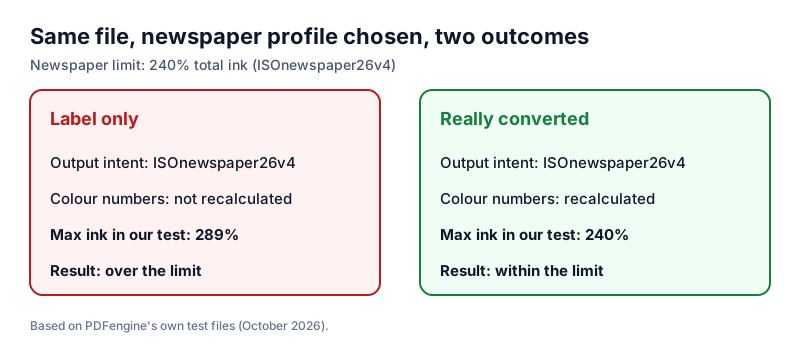 Same label, different numbers: only the converted file stays within the 240% newsprint limit.
A newspaper's preflight would flag the first file. Mediahuis NL, for example, asks for GWG2015 newspaper ads with ISOnewspaper26v4, delivered through its own portal.
One honest caveat: in JPEG-compressed photos, compression noise can push isolated pixels slightly above the profile's limit. A printer's preflight measures the rendered result, so check with it when the limit is strict.
Exact numbers also depend on the rendering intent. A designer on the Adobe forum converted to ISOnewspaper26v4 in InDesign and got 217% with relative colorimetric and 231% with perceptual. Different numbers, both under the limit, because both were real conversions.
Why does existing CMYK need converting too?
A file separated for FOGRA39 can use up to 330% ink, the limit of the ECI's ISO Coated v2 profile. PSO Coated v3 for FOGRA51 is built for 300% according to the ICC profile registry, and the newsprint profiles allow 240% and 220%. Relabelling a FOGRA39 file as FOGRA51 or newsprint keeps every 330% area exactly as it was.
"It's already CMYK" sounds like the job is done. It isn't: CMYK numbers only mean something for a specific press condition, and a recipe for coated paper is wrong for newsprint.
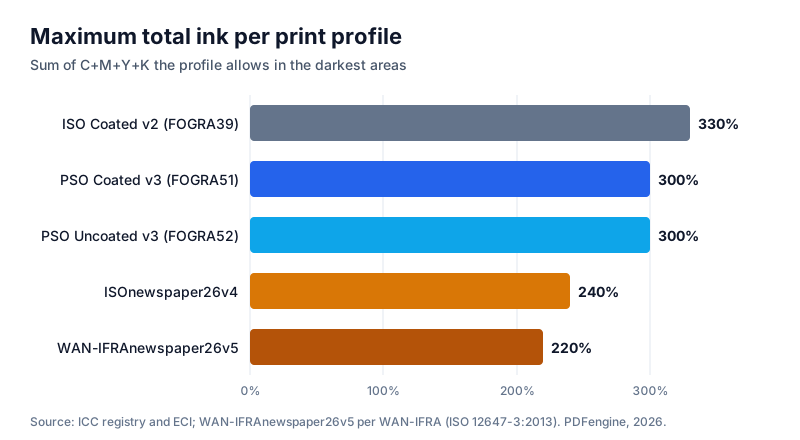 Each profile has its own ink ceiling, so CMYK made for one press can be too heavy for another.
What does re-separating do to the numbers?
A real conversion reads the existing numbers as FOGRA39 colours, works out what those colours look like, and calculates the recipe that gives the same appearance on the new paper. In our test, 100% cyan converted to FOGRA51 became about 93% cyan. That's intended: the appearance is preserved, the recipe changes.
Pure black is the exception. With black preservation, 100% K text stays 100% K and prints on the black plate alone. Without it, black text could turn into a four-ink mix, which printers in threads like this one ask designers to avoid.
US printers usually work with GRACoL or SWOP instead of the FOGRA profiles, but the principle is the same.
How can you check what your PDF really contains?
You need two answers: which output intent the file carries, and how much ink it actually uses. The GWG2015 differences document states that effective total ink is measured after rendering, including transparency and overprint. A label never enters that calculation.
Which output intent does the file carry?
Acrobat Pro's Preflight and Standards panel show whether a file claims PDF/X and which output intent it has. Without Acrobat, the free print-ready check reports PDF/X status, colour space and fonts, with no account needed. It does not measure ink coverage.
How much ink does it use?
Acrobat Pro's Output Preview can highlight areas above a total ink limit. Set it to your printer's number, such as 240% for many newspapers, and see what lights up. Because GWG2015 measures after rendering, an object that looks fine on its own can exceed the limit where it overlaps a transparent shadow. Why guess? Your printer's own preflight or portal check has the final word.
How do you tell whether a PDF/X tool really converted your colours?
You don't have to trust a product description. A test file and five minutes give you a clear answer.
Check whether the tool lets you pick a profile. A single "PDF/X" button can't know whether your printer uses coated paper or newsprint.
Check whether it mentions ink limits or existing CMYK. A tool that converts usually says so.
Make a test PDF with a 100% cyan patch, a line of 100% K text and an area with all four inks at 100% (400% total).
Convert it to FOGRA51 or a newsprint profile, then hover over each patch in Acrobat Pro's Output Preview and compare the values before and after.
Read the result. After a real conversion, the cyan moves (in our test to about 93% on FOGRA51), the black text stays 100% K and the heavy area drops to the profile's limit or below. If every number is identical, the tool only labelled the file.
How does Acrobat Pro compare?
Acrobat Pro can do everything described here, if you know which tools to combine. Here's how it compares with the PDF/X-4 conversion in PDFengine.
| Adobe Acrobat Pro | PDFengine PDF/X-4 tool |
|---|---|---|
Adds an output intent | Yes | Yes, the same profile you convert to |
Converts colour values | Yes, with Convert Colors or a preflight fixup | Yes, always, with ICC colour management |
Re-separates existing CMYK | Yes, if you set it up | Yes, automatically |
Profile choice | Destination profile you choose | FOGRA51, FOGRA39, ISO Coated v2 300%, FOGRA52, GRACoL 2013, SWOP 2013, GRACoL 2013 Uncoated, ISOnewspaper26v4, WAN-IFRAnewspaper26v5 |
Pure black | Depends on your settings | 100% K stays 100% K |
Ink coverage check | Output Preview can highlight areas above a limit | Not measured; the free check reports PDF/X status, colour space and fonts |
Formal validation | Full preflight profiles | Not externally certified; use your printer's preflight |
Where it runs | Desktop software | In the browser |
Pricing | 4 credits per document (credit pack or subscription) |
If you use Acrobat Pro daily and know Convert Colors and preflight, it's the more complete toolkit. For an occasional PDF/X-4, a focused tool saves the setup.
Frequently asked questions
Does adding an output intent make my file PDF/X?
No. Every PDF/X variant requires an output intent, according to the Library of Congress, but the standards set other rules too. PDF/X-1a allows only CMYK and spot colours, for instance, while PDF/X-4 allows live transparency. A label alone doesn't meet those rules, and it won't bring your ink within the printer's limit.
Why does my PDF look different in Acrobat after adding an output intent?
Acrobat uses the output intent to simulate the press when it displays the file, so a newsprint or uncoated profile looks flatter on screen than a coated one. Designers regularly report colours that turn dull after export. The numbers can be unchanged, so a duller preview doesn't prove the colours were converted.
Will converting CMYK to CMYK lose quality?
The numbers change, and that's the point. The conversion keeps the appearance as close as the new paper allows. Very saturated colours become flatter on newsprint, but that comes from the paper, not the conversion. Before converting, check which profile your printer asks for in our guide on which colour profile your printer wants.
Can I convert back to the original colours?
Not reliably. Each conversion recalculates the recipe, and going back and forth adds small shifts. Keep your original file and convert a fresh copy from it for each printer or paper.
Is a converted file guaranteed to pass my printer's preflight?
No tool can promise that without knowing your printer's exact check. Our PDF/X-4 conversion is not certified by an external validator. When your printer requires a preflight or portal check, run it as the final step.
Ready to convert instead of relabel?
If your printer keeps flagging colours or ink, the numbers are the problem, not the label. The PDF/X-4 converter recalculates RGB and existing CMYK for a European, North American or newspaper print profile, keeps pure black on the black plate and embeds that profile as the output intent. Want to see what your file contains first? Run the free print-ready check.
Working on a newspaper ad? Read the 240% ink limit explained. For bleed, fonts and everything else, see the complete guide to print-ready PDFs.
Related Articles

How to deliver a newspaper ad PDF: the 240% ink limit, ISOnewspaper26v4 and GWG2015 explained
Your newspaper wants GWG2015, ISOnewspaper26v4 and max 240% ink. Here is what that means, why a prof...

Can ChatGPT, Claude or Gemini Convert Email to PDF? What AI Can (and Can't) Do
No AI assistant can natively convert .eml or .msg to PDF. But Claude + MCP bridges the gap — here's...