
How to Prove Two PDFs Are Identical (or That One Wasn't Altered): Fingerprints and Hashes
Founder, PDFengine

Proving that two PDFs are identical, or that one wasn't altered, comes down to one thing: a cryptographic hash. A hash is a short PDF fingerprint computed from the file's contents. If two files produce the same hash, they are the same to the byte. If a single character changed, the hash changes completely. That gives you mathematical evidence, not a subjective "looks the same to me."
There's a catch that trips up even experienced lawyers and IT staff. Two PDFs that look identical and read identically can still return different hashes. That doesn't mean the document was tampered with. Below, I'll explain why that happens, which hash actually settles the question, and how to get a defensible result without ever opening a terminal.
Key Takeaways
A cryptographic hash proves two files are byte-for-byte identical; change one character and the fingerprint changes entirely.
Two visually identical PDFs often produce different SHA-256 hashes because PDF saves rewrite a hidden
/IDfield. That is normal, not tampering.SHA-256 is a federally standardized secure hash (NIST FIPS 180-4); older SHA-1 has demonstrated collisions and should not be trusted for evidence.
Four separate hashes (bytes, text, visual, metadata) can prove the content stayed identical even when the metadata changed. One byte hash cannot.
A hash proves sameness, not who changed a file or when. Pair it with a trusted timestamp or signature for that.
What does it actually mean to prove two PDFs are identical?
Identity between two files means their contents match exactly, and a cryptographic hash is how you demonstrate that. SHA-256 is a federally standardized secure hash function that produces a 256-bit fingerprint (NIST FIPS 180-4). Run it on a file and you get a 64-character string. Run it again on an identical copy and you get the same string, every time.
The value comes from sensitivity. Flip one bit, change one comma, edit one pixel, and the output scrambles beyond recognition. There's no partial match. This is why courts and regulators lean on hashing to show electronic evidence hasn't been altered since collection. The reasoning tracks the authentication framework in the US Federal Rules of Evidence, where a party must show an item is what it claims to be (American Bar Association, 2017).
In practical terms, a SHA-256 hash occupies a 2^256 address space, so a matching fingerprint is treated as effectively conclusive evidence that two files are byte-for-byte the same; regulators such as the SEC require records kept in non-rewriteable form precisely so integrity can later be shown (SEC Rule 17a-4).
Why do two identical PDFs have different hashes?
Because a PDF rewrites itself every time you save it, even when you change nothing visible. This is the single most misunderstood point in document forensics, and it sends people to the wrong conclusion constantly. Developers hit it, notaries hit it, and forum threads are full of the confusion. One iText knowledge base article is literally titled "Why are PDF files different even if the content is the same?".
The culprit lives in the PDF trailer: an /ID array. The specification asks writers to store a unique identifier there, and most PDF software regenerates it on every save. Export from Preview, duplicate the file, sometimes even print to PDF, and that hidden value shifts. The pages look the same. The text reads the same. But the raw bytes differ, so the PDF hash changes even though nothing visible does.
This is where naive "just compare the hash" advice becomes dangerous in a legal setting. A jurist compares two byte hashes, sees a mismatch, and wrongly concludes the document was manipulated. In reality a routine re-save changed the wrapper, not the substance. A developer documented this same trap while debugging PDF hashes (Phoenix Effect), and forensic examiners debate it under headings like "Same content different hash values".
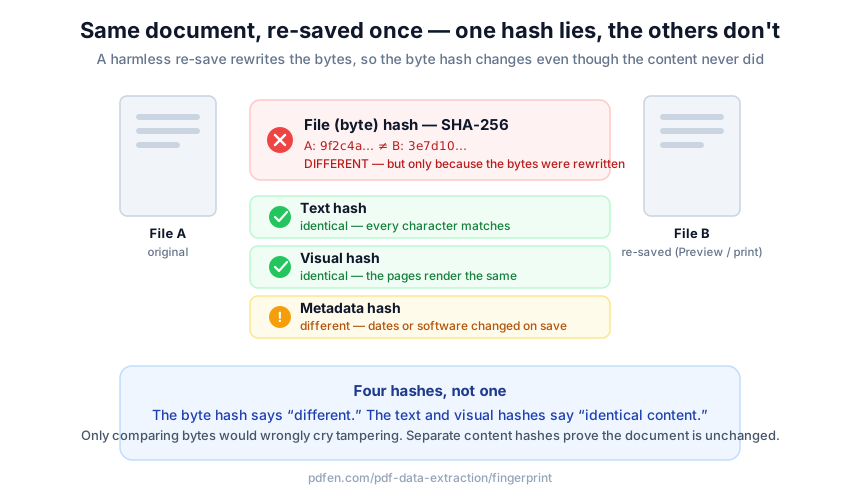 Left: an innocuous re-save changes the raw bytes, so the SHA-256 byte hash differs (red X). Right: the rendered page and text layer are unchanged, so the content and visual hash still match (green check).
So how do you separate a real edit from a cosmetic re-save? You stop relying on a single byte hash.
How do you check if two PDF files are the same without a false alarm?
You hash the layers separately, not just the raw bytes. A file hash answers "are these the exact same bytes?" A content hash answers the question you usually care about: "is this the same document?" When I built the fingerprint tool at pdfen, this layered approach came directly from watching people misread byte-only mismatches as fraud.
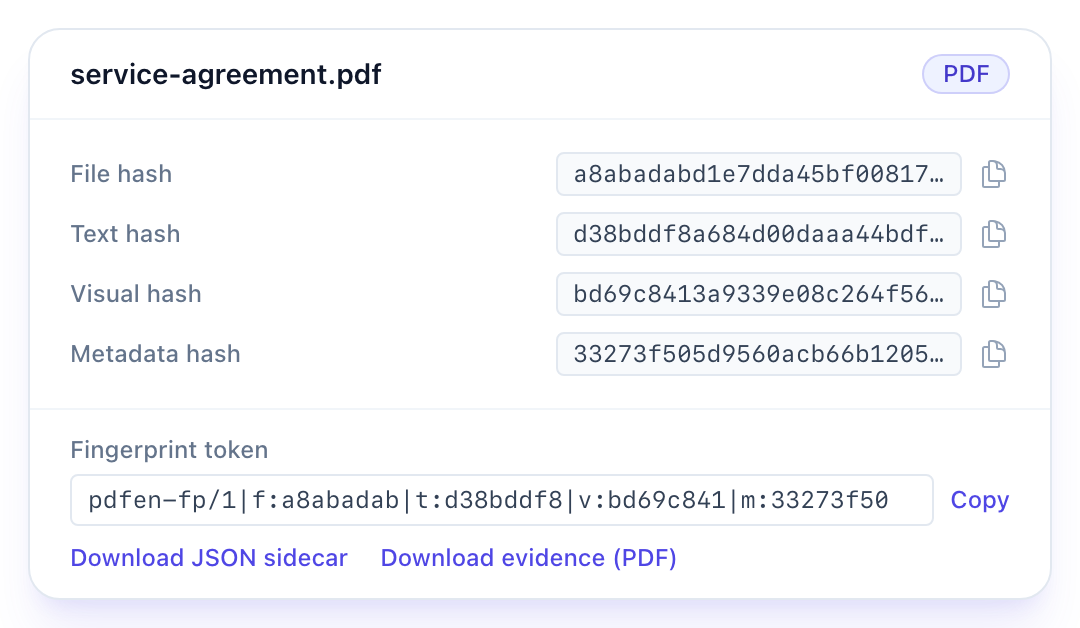
The pdfen fingerprint tool computes four separate hashes of one file:
File hash — SHA-256 of the raw bytes. Detects any change at all, including the
/IDrewrite.Text hash — the normalised text layer, with metadata stripped out. This is your content fingerprint.
Visual hash — the normalised rendered pages, so a scanned or image-based document is covered too.
Metadata hash — the normalised metadata bag, isolated on its own.
Because the layers are independent, you can prove something a plain checksum never could. Say you strip personal metadata from a contract before sharing it, using a tool like metadata removal. The file hash changes and the metadata hash changes, exactly as expected. But the text hash and visual hash stay identical. That combination is the proof: the content was untouched, only the metadata moved. A single byte hash would just say "different" and tell you nothing about what actually differed.
The upshot: pdfen computes four layered hashes per file, so its verdict can distinguish "same content, different metadata" from "the content differs," a distinction no single SHA-256 string can express.
How do you prove a PDF hasn't been altered, in practice?
You fingerprint the file at a known good moment, save that fingerprint, and re-check it later. The workflow is built for people who will never touch a command line, which is most lawyers, notaries, and compliance officers. Upload the PDF, Office file, image, or e-mail, and you get a fingerprint token plus a downloadable JSON sidecar. That token is your baseline.
Later, you paste the token or JSON back into "Compare with a saved fingerprint," and the tool tells you precisely what changed. The verdicts are plain-language, not a wall of hex:
Identical — bytes, content and metadata all match.
Same content and metadata; only the bytes differ — the benign re-save case.
Same content, different metadata — for example stripped or edited metadata.
The content differs — a real change to the document.
For e-mail, the tool fingerprints per node, meaning each attachment gets its own set of hashes. That matters when a dispute hinges on one PDF buried inside a forwarded message. If you need to check two files against each other directly rather than against a saved baseline, the file comparison tool shows the same equality matrix side by side.
One boundary worth stating clearly. Proving an e-mail was sent is a different question from proving a file is unaltered, and it relies on transmission signals like SPF and DKIM rather than file hashing. I cover that separately in how to prove an email was sent. This post stays on file and PDF identity.
Why SHA-256 and not MD5 or SHA-1?
Because the older algorithms are broken for evidence, and SHA-256 is the current federal standard (NIST hash-functions project). This isn't theoretical caution. SHA-1 collisions are demonstrated, not merely predicted. The open-source sha1collider project produces two different PDFs that share the same SHA-1 hash (nneonneo on GitHub).
Think about what that means in a courtroom. If your integrity proof runs on SHA-1, an opponent can argue that a matching hash no longer guarantees a matching file, because a collision is achievable. That argument doesn't work against SHA-256. Its output lives in a 2^256 space, and no practical collision has been produced. For anything you might need to defend, use SHA-256 and don't look back.
Isn't a modern algorithm overkill for an internal document check? Not really. The cost of computing SHA-256 is trivial, and standardizing on it now means you never have to re-hash an archive later when the weaker algorithm finally fails an audit.
Can't Adobe Acrobat just tell me if two PDFs are identical?
Not directly, and this surprises people. Acrobat has no plain "are these two files byte-identical" hash button. Its integrity mechanism is certificate-based digital signatures: it hashes the document, encrypts the digest with the signer's certificate, and re-hashes on open to detect changes made after signing (Adobe digital signature standards). That's genuinely strong, but only if the document was signed in advance. Acrobat's "Compare Files" is a visual and text diff, which answers "what changed," not "is this the cryptographically identical file."
Question you have | Adobe Acrobat | pdfen fingerprint |
|---|---|---|
Are these two files byte-for-byte identical? | No dedicated hash check | File hash (SHA-256) |
Did the content change, ignoring a re-save? | Compare Files diff (visual) | Text + visual hash |
Proof without signing the file in advance? | No; needs a prior digital signature | Yes; fingerprint any existing file |
Works on e-mail and attachments? | No | Yes, per node |
Usable without technical skills? | Partly | Yes, plain-language verdicts |
Acrobat and pdfen solve overlapping but different problems. If you signed the document beforehand, Acrobat's signature is excellent. If you're handed a file today and asked "is this the same one we filed last year," you need a fingerprint, not a signature. Adobe's own pricing page covers the subscription side if you want the signature workflow.
Frequently asked questions
Why do two PDFs with the same content have different hash values?
Because saving a PDF rewrites hidden bytes, chiefly the /ID value in the file trailer, even when nothing visible changes. Two content-identical PDFs then return different SHA-256 hashes (iText). It's normal behavior, not tampering. A text or visual hash ignores that wrapper and confirms the content is the same.
Is a hash proof that a document wasn't tampered with?
A matching hash proves two files are byte-for-byte identical, which is strong evidence of sameness and integrity. But a hash alone doesn't prove who changed a file or when. Under the US Federal Rules of Evidence framework, hashes support authentication (Duke Judicature), strongest when paired with a trusted timestamp or signature. It supports admissibility; it doesn't guarantee it.
How do I get the SHA-256 of a PDF without using the command line?
Upload the file to the pdfen fingerprint tool and you get the SHA-256 file hash plus three content-based hashes, no terminal required. This matters for non-technical users; Adobe forum threads show people wanting to verify a download is unmodified without any CLI (Adobe Community). You also get a saveable token and a downloadable evidence PDF.
Can I prove that stripping metadata didn't change the actual content?
Yes, and this is where separate hashes earn their keep. After removing metadata, the file hash and metadata hash change, but the text hash and visual hash stay identical. That combination proves the content was untouched. A single byte hash can only say "different," which would wrongly suggest the document itself was edited when only the metadata moved.
Should I use SHA-1 or MD5 if that's what our old system uses?
Not for anything you may need to defend. SHA-1 collisions are demonstrated: the sha1collider project builds two different PDFs with the same SHA-1 hash (GitHub). SHA-256 is the federal standard (NIST FIPS 180-4) and has no practical collision. Keep the old hash for legacy lookups if you must, but base evidence on SHA-256.
Getting a result you can defend
Proving a PDF is identical, or that it wasn't altered, is more nuanced than "compare the hash." The byte hash tells the truth but not the whole truth, because an ordinary save changes the bytes without touching the document. Separating the file, text, visual, and metadata hashes is what turns a confusing mismatch into a clear verdict.
If you need that clarity without a terminal, fingerprint your file with the pdfen fingerprint tool, save the token, and re-check it whenever a question comes up. To weigh two files against each other, use file comparison. And remember the honest limit: a hash proves sameness, not authorship or timing. For those, combine it with a trusted timestamp or signature. Used that way, a fingerprint gives you evidence you can stand behind.
By Daan van Tongeren, founder of PDFengine.
Related Articles

How to deliver a newspaper ad PDF: the 240% ink limit, ISOnewspaper26v4 and GWG2015 explained
Your newspaper wants GWG2015, ISOnewspaper26v4 and max 240% ink. Here is what that means, why a prof...

Can ChatGPT, Claude or Gemini Convert Email to PDF? What AI Can (and Can't) Do
No AI assistant can natively convert .eml or .msg to PDF. But Claude + MCP bridges the gap — here's...