
How to View Hidden Metadata in Emails and Their Attachments (.eml and .msg)
Founder, PDFengine

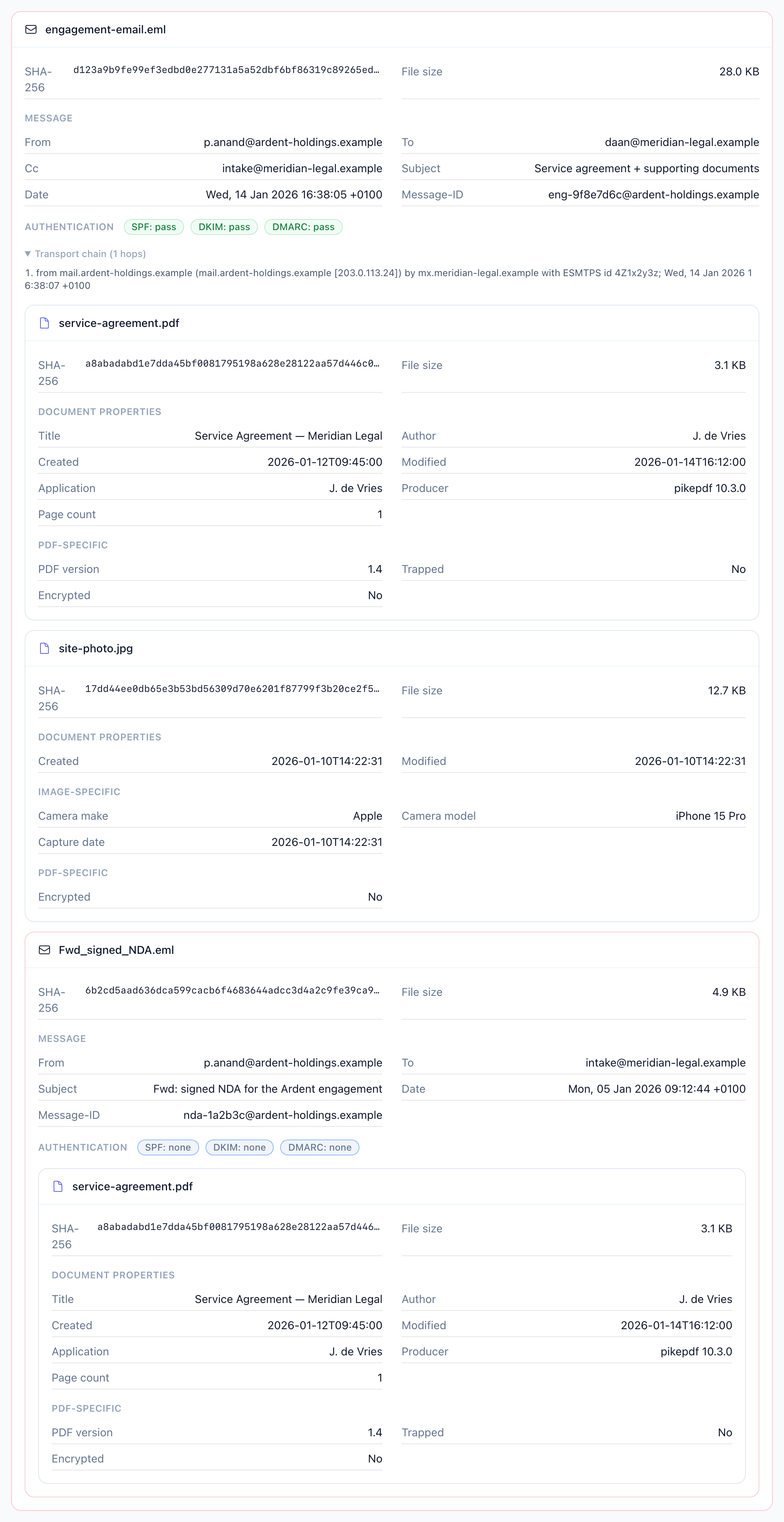
You can view the hidden metadata in an email and every file attached to it by uploading the .eml or .msg file to a metadata viewer that reads the message as a structured tree, not just as text. The free email metadata viewer on pdfen is built for this: it shows the full headers, then opens each attachment and reveals its embedded author, software, and creation dates, and it even expands one forwarded email hidden inside. No account, no install, and the file is deleted the moment the metadata is read.
According to DLA Piper, personal-data-breach notifications in Europe reached 443 per day by January 2026, a 22% jump year on year (DLA Piper, 2026). Much of what leaks from an organization never gets inspected, and attachments are the blind spot.
Key Takeaways
Upload a
.emlor.msgfile to read email headers, per-attachment file metadata, and one nested forwarded email in a single tree, with no Outlook required.The embedded creation date inside a PDF or Word attachment survives emailing, so you can check when a file was actually made, even after the visible download date changes.
Attachments carry author names, company, revision counts, edit time, prior filenames, and GPS EXIF data before you send them.
pdfen reports the receiving server's SPF, DKIM, and DMARC verdicts as stored, without re-running the cryptographic checks.
The Netherlands leads Europe with 39,773 breach notifications (DLA Piper, 2026), a reminder that data hygiene, including metadata, is under scrutiny.
What hidden metadata sits inside an email and its attachments?
Every email carries two layers of hidden data: the transport metadata in its headers, and the file metadata baked into each attachment. Forensic investigators have relied on this for two decades. The BTK serial killer was identified in 2005 after a recovered Word document's metadata listed the last author as "Dennis" and the organization as "Christ Lutheran Church" (Forensics Colleges).
The header layer is the envelope. It records From, To, subject, date, the Message-ID, and the complete transport chain: every Received hop the message passed through on its way to you. It also carries the SPF, DKIM, and DMARC verdicts that the receiving mail server wrote down.
The attachment layer is the contents. A PDF stores its author, the producing software, and its creation and modification dates in XMP. An image keeps EXIF data, sometimes including GPS coordinates. An Office document tracks author, company, revision count, and total editing time. Most email clients show you none of this.
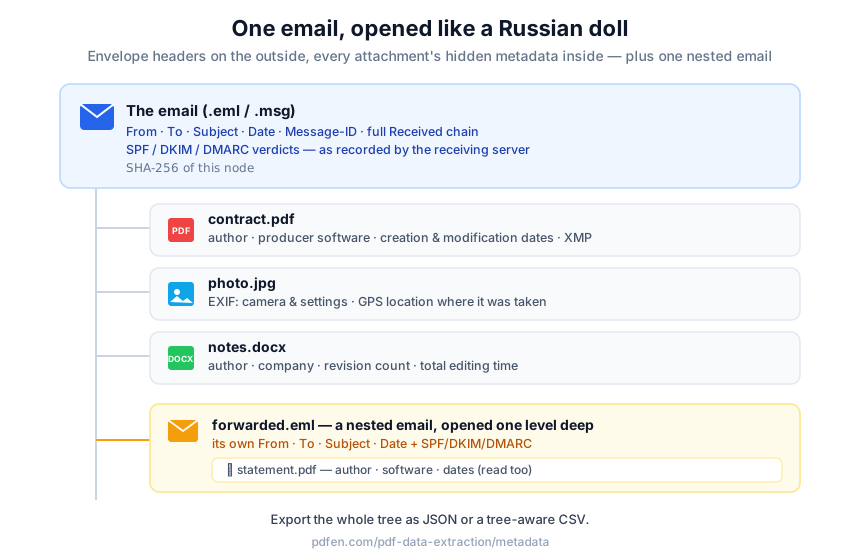 The recursive tree: the email node with its headers on the outside, each attachment carrying its own embedded metadata, and one forwarded email nested inside, like a Russian doll.
The pdfen viewer arranges all of it as a recursive tree. The email is the outer node. Each attachment becomes a child node with its full file metadata. If one attachment is itself a forwarded email (a message/rfc822 part), the viewer opens it one level deep. Every node also gets a SHA-256 fingerprint, which you can compare later using the per-node fingerprint tool.
How do you read email headers without Outlook or an email client?
You do not need Outlook to read email headers. In our testing, the fastest route is to export the message as a file and open it in a viewer that parses the structure for you. In Gmail you use "Show original" to save the raw message (Google); in Outlook you save the item as .msg. Then you upload that file.
Ask on the Linux Foundation forum how to read EML files including attachments, and the answer is always "you need a client" (Linux Foundation Forum). You don't. Header analyzers like MXToolbox parse routing and authentication verdicts well, but they stop at the envelope. They ignore what is inside the attachments entirely.
The pdfen viewer closes that gap. Upload a .eml or .msg file and you can read the headers and every attachment's metadata online, in one pass. You can also open .msg file metadata without Outlook installed, which helps anyone who receives Outlook exports but works in a different mail environment. Export the result as a JSON tree or a tree-aware CSV when you need a record.
How is viewing metadata different from converting an email to PDF?
Viewing metadata and converting an email are two separate jobs, and it helps to keep them apart. Our earlier guide, convert an email to PDF with headers, turns a message into a readable, archivable PDF document with the headers printed on the page. That is about producing a fixed record you can file or share.
The metadata viewer goes the opposite direction. It inspects the original file and never converts it. Nothing is rendered, nothing is flattened, and no new document is created. You are reading what the message already contains, not repackaging it.
Conversion answers "how do I keep a clean copy of this email for my dossier?" Inspection answers "what does this email and every file inside it actually reveal?" Legal teams often need both, in that order: inspect first, then convert the version you want to retain.
How can you check when a PDF attachment was actually created?
You can check a PDF attachment's real creation date by reading its embedded metadata rather than trusting the date your computer shows. When you save an attachment, your operating system overwrites the visible filesystem date with the moment you downloaded it. The embedded creation date, stored inside the file, survives the trip through email untouched (Meridian Discovery). The difference matters in disputes.
The surviving timestamp exposes backdating. If a contract PDF claims a creation date of January but the email that delivered it has Received hops and a Date header from March, the mismatch is visible in the tree. Forensic practitioners treat the embedded attachment metadata as more reliable than the file-system date precisely because emailing preserves it (ArcherHall).
To see who created a document, you compare the same way. The attachment's author field, its producing software, and its modification date sit next to the email's own timestamps in one view. No copying dates between windows, no guessing. You read the embedded values against the transport chain and the discrepancy, if there is one, stands out.
What are you leaking every time you send an attachment?
Before you hit send, it is worth seeing what your recipient can see. Documents routinely carry author names, the company, the last person to save them, revision counts, total editing time, prior filenames, and, for photos, GPS coordinates from EXIF (EDUCAUSE, 2017). None of it is visible when you open the file normally, yet all of it travels with the attachment.
Two cases show the cost. The UK government's 2003 "Dodgy Dossier" was traced back to its authors because the Word file's metadata exposed the chain of editors (North Carolina Bar, 2022). In 2004, metadata in an SCO Group filing revealed the suit had originally been drafted against Bank of America, according to the same North Carolina Bar analysis.
For a legal or compliance team, the lesson is direct. Inspect your own outgoing attachments the way an opposing party would. Run the file through the viewer, see the author, company, and revision trail, and if something should not leave the building, remove the metadata before it does. Seen what you leak? Strip it before you send.
Can email metadata prove who really sent a message?
Email metadata is strong evidence, but it is not cryptographic proof, and being honest about that line builds trust. Metadata is readable and often decisive, yet it is also forgeable. A determined sender can edit header fields and document properties. So the tree tells you what the file contains, not whether every value is genuine.
pdfen is explicit about the boundary: the viewer reports the SPF, DKIM, and DMARC verdicts as the receiving mail server recorded them in the Authentication-Results header, without re-running the cryptographic checks. If the server wrote "dkim=pass", the viewer shows "dkim=pass".
A missing field means the information is simply not in the file, not that the tool failed. Reading metadata gives you a clear, exportable picture and a defensible starting point. It does not, on its own, authenticate that an email is genuine.
How does the pdfen viewer compare to Adobe Acrobat?
Adobe Acrobat can read metadata, but only for a single PDF you have already extracted. Its File then Properties panel shows that one document's title, author, and creation date. It cannot open an .eml or .msg file, parse email headers, expand a nested email, read EXIF on an image attachment, read Office properties, or export a tree. Acrobat answers "who made this one PDF?" The email viewer answers "what is in this whole email and every file inside it?"
Capability | Adobe Acrobat (File > Properties) | pdfen email metadata viewer |
|---|---|---|
Reads a single PDF's document properties | Yes | Yes |
Opens | No | Yes |
Parses email headers and transport chain | No | Yes |
Reports SPF / DKIM / DMARC verdicts | No | Yes (as recorded by the receiving server) |
Reads EXIF/GPS on image attachments | No | Yes |
Reads Office author/company/revisions | No | Yes |
Expands one nested forwarded email | No | Yes |
Exports a JSON / CSV tree | No | Yes |
Price | Paid subscription (Adobe pricing) | Free |
For a single document you already hold, Acrobat is fine. For a whole email with attachments, you need a tool built for the tree.
Frequently asked questions
How do I see metadata from a file someone emailed me?
Save the email as a .eml or .msg file, then upload it to the free viewer. It reads the message as a tree and shows each attachment's embedded author, software, and creation dates. Plenty of people hit this wall when an .eml lands in a non-Outlook inbox. The file is deleted right after the metadata is read.
How do I open .msg file metadata without Outlook?
You do not need Outlook. Upload the .msg file to a viewer that parses Outlook's format directly, and it returns the headers plus each attachment's file metadata. Header analyzers stop at the envelope; a browser-based reader opens what is inside, without installing an email client.
Does metadata stay in email attachments after they are sent?
Yes. Embedded document metadata, including the internal creation date and author, travels with the attachment through email intact. Your operating system may overwrite the visible file date with the download time, but the embedded values survive (ArcherHall). Because it persists, you can check a PDF's true creation date even after downloading it.
Can I read a .eml file's headers and attachments online?
Yes. Upload the .eml file to a web-based viewer and read both the headers and every attachment in one pass, with nothing to install. Open-source projects like eml_analyzer show the demand for client-free reading (GitHub), and the pdfen viewer adds per-attachment file metadata and one level of nested-email expansion on top.
Where is the photo metadata on an image I received by email?
It sits in the image's EXIF block, which the viewer surfaces as a node under the email, sometimes including GPS coordinates. Note that some senders and platforms strip EXIF; a missing field means the data was not in the file you received.
If you handle email evidence, privacy reviews, or outgoing document checks, start with the free email metadata viewer, then strip metadata from anything before it leaves your office. For e-discovery volumes, bulk extraction and the API bill 1 credit per metadata node (the body, each attachment, and one nested email each count as a node), so a three-part email costs 3 credits; the free viewer covers one-off files.
By Daan van Tongeren, founder of PDFengine, where he builds email-archiving and metadata-forensics tooling.
Related Articles

How to deliver a newspaper ad PDF: the 240% ink limit, ISOnewspaper26v4 and GWG2015 explained
Your newspaper wants GWG2015, ISOnewspaper26v4 and max 240% ink. Here is what that means, why a prof...

Can ChatGPT, Claude or Gemini Convert Email to PDF? What AI Can (and Can't) Do
No AI assistant can natively convert .eml or .msg to PDF. But Claude + MCP bridges the gap — here's...