
Convert PDF text to outlines without Illustrator (and when you shouldn't)
Founder, PDFengine

You can convert the text in an existing PDF to outlines without Illustrator, either with the Preflight function in Acrobat Pro or with an online tool such as PDFengine's text-to-outlines tool. But first check whether your printer really needs it: most printers are happy with a PDF that has its fonts embedded, and outlines are a fallback with real downsides.
Key Takeaways
Outlines turn every letter into a vector shape, so the printer no longer needs your fonts.
Many printers accept embedded fonts. Outlines are mostly asked for by sign, sticker and foil printers, and when a font licence forbids embedding.
You cannot outline a font that is not stored in the PDF. Check that first.
After converting, the text is no longer text: you cannot select, search or read it aloud. Always keep your original.
The result is permanent. Send the outlined copy to the printer, not to your colleagues.
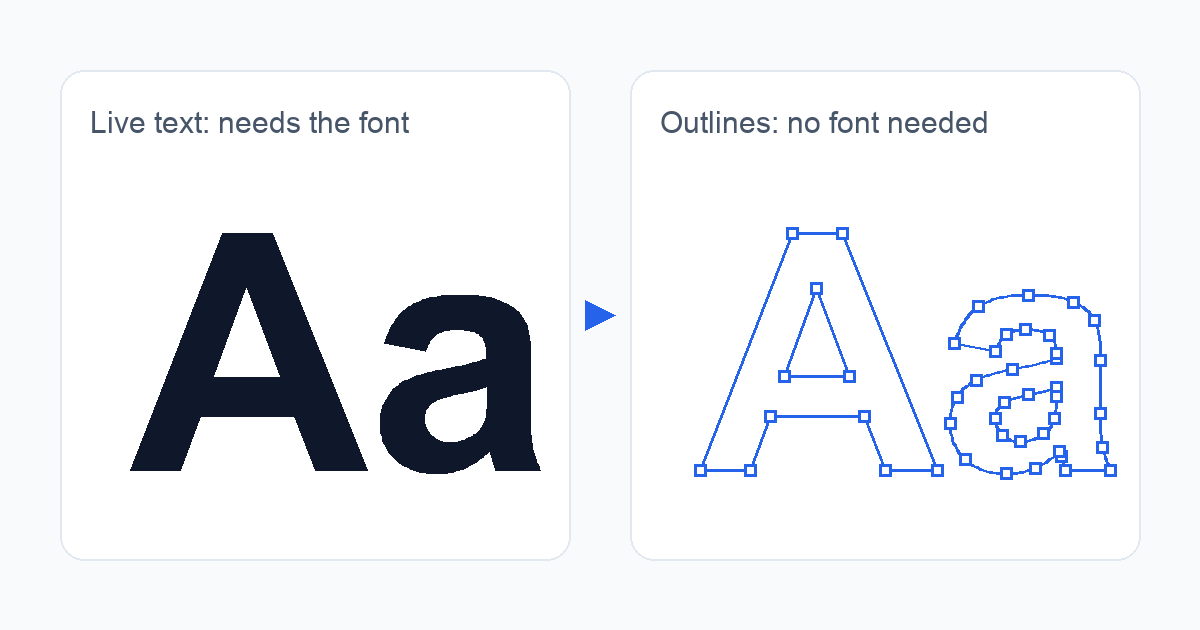 Left: live text that needs a font. Right: the same letters as vector outlines, which need no font.
Why does my printer ask for outlines when my PDF already contains the fonts?
A font is a small program that draws letters. If the PDF does not contain it, the printer's software swaps in another font and your layout changes. Embedding the font in the PDF solves that, and it is the normal route. Printers that ask for PDF/X, the exchange standard many of them prefer, generally expect the fonts to travel inside the file.
Still, some printers ask for outlines anyway. Sign, sticker and foil printers often do: Vispronet warns about artwork with un-outlined fonts, and myfolie asks you to vectorise paid fonts because of their licence. Other printers, such as Print&Bind and Onlineprinters, say the opposite: embed where you can and use outlines only as a last resort.
So the question is not "how do I outline?" but "what does my printer's own specification say?"
Do you really need to outline the text?
Work through this in order:
Read the printer's file specification. If it says "embed fonts" or asks for PDF/X, you probably do not need outlines.
Check that your fonts are embedded. The free print-ready check reports colour space, fonts and PDF/X status in plain language. If a font is missing, try embedding the fonts first.
Outline only if the printer asks for it, or if the font licence does not allow embedding.
For the bigger picture on fonts, colour and bleed, see the complete guide to print-ready PDFs.
How do I convert text to outlines in an existing PDF?
The fastest route when you only have the PDF and no design file:
Open the text-to-outlines tool and upload your PDF (or a ZIP of PDFs).
The tool checks every font before converting. If something cannot be converted, a message tells you which file and why, and nothing is charged for that file.
Download the result. It is saved next to your original as a new file whose name ends in
_contouren.pdf, and your original stays untouched.
One file gives you a PDF, several files give you a ZIP. The tool costs 1 credit per converted file, and new accounts start with free credits.
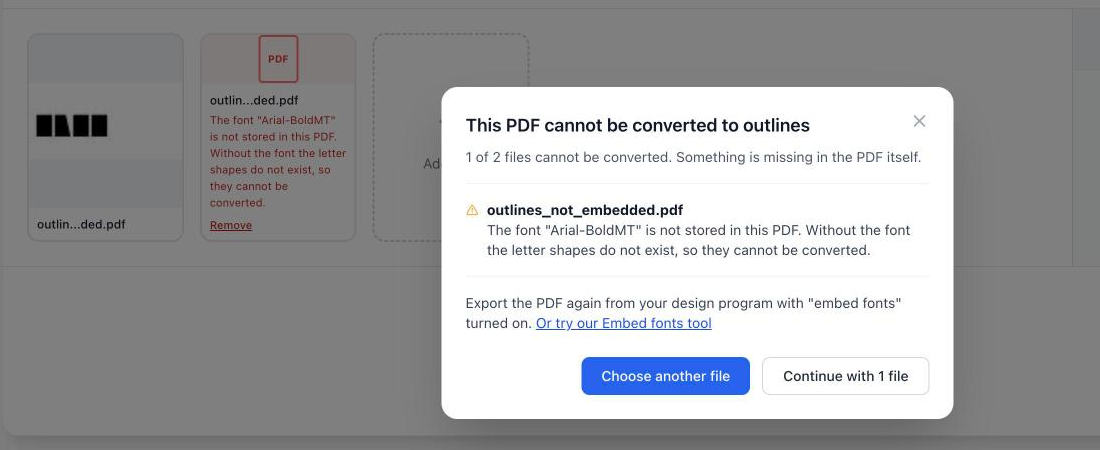 If a font is not stored in the PDF, you see which file it is and why before you spend any credits.
The Acrobat Pro route
If you already have Acrobat Pro, Preflight can do the same. An Adobe expert describes the path in the Adobe Community: open Print Production, then Preflight, pick the fixup "Convert fonts to outlines" and choose "Analyze and fix". The menu names differ per version, and users report that the option goes missing or that some fonts are skipped. Avoid the "Flattener Preview" trick you see in older tutorials: it is meant for transparency, not for fonts.
What do you lose when text becomes outlines?
Searching and selecting. The text is now shapes. You cannot copy it, search it or run it through a spell check.
Screen readers. A screen reader cannot read shapes, so the file is no longer accessible. This follows from how outlines work, so use the outlined copy for print only.
Hinting. Fonts carry hints that keep small text crisp at low resolution. Onlineprinters warns that outlined text can look heavier and lose quality at small sizes, and FlexiPDF's documentation says the same about hinting.
Reversibility. You cannot undo it in the outlined file. Keep the original.
File size. The file can grow, because every letter is now a drawing.
Because of that, do it as the very last step, and only for the copy that goes to the printer.
When does converting text to outlines not work?
Outlines are drawn from the font's letter shapes, so the shapes must exist.
The font is not embedded. The most common reason. Without the font in the PDF there are no shapes to convert, in any tool. Export the PDF again with "embed fonts", or try the embedding tool.
Special encodings. Fonts with unusual character encodings, mostly Asian fonts, are not supported yet.
Vertical text.
Text inside a pattern fill or a transparency mask.
In these cases PDFengine's tool refuses and tells you why, rather than delivering a file where the text only looks converted.
One more point: converting does not make a font licence irrelevant. Printers such as myfolie ask for outlines because of licensing, but whether your own licence allows it is something to check in the licence itself.
PDFengine or Acrobat Pro Preflight?
| PDFengine text to outlines | Acrobat Pro Preflight |
|---|---|---|
Where | Online, upload a PDF or ZIP | Desktop app, subscription-based (pricing) |
Best for | An occasional file, or a printer's request when you have no design file | Batch work with a droplet, or when you already use Acrobat Pro |
Checks fonts first | Yes, tells you which file and why | Convert and check afterwards |
Original kept | Yes, new file next to it | You choose a new name when saving |
Limits | Only embedded fonts, no vertical text, no Asian special encodings | Menu changes between versions, some fonts skipped |
Both are permanent in the result, both lose searchable text, and both leave the font licence question with you.
Frequently asked questions
Why is there still text left after "Convert fonts to outlines"?
Usually a font was not embedded or could not be read, so the fixup skipped it. Check with the free print-ready check which fonts the file really contains.
Can I outline text if I no longer have the source file?
Yes, that is exactly the case where converting an existing PDF helps. Keep the original PDF, because the outlined copy cannot be edited as text.
Can I still search or edit outlined text?
No. The letters are shapes, so there is nothing to search and no way back. If you may need to edit later, keep the original.
Does outlining text fix a font licence problem?
Not automatically. Some printers ask for outlines because a licence forbids embedding, but the licence itself decides what you may do. Check it.
Do I need outlines for PDF/X?
Usually not. In practice a PDF/X file is expected to carry its fonts, which embedding covers. Ask your printer, and read its file specification first.
Related guides
Related Articles

How to deliver a newspaper ad PDF: the 240% ink limit, ISOnewspaper26v4 and GWG2015 explained
Your newspaper wants GWG2015, ISOnewspaper26v4 and max 240% ink. Here is what that means, why a prof...

Can ChatGPT, Claude or Gemini Convert Email to PDF? What AI Can (and Can't) Do
No AI assistant can natively convert .eml or .msg to PDF. But Claude + MCP bridges the gap — here's...